
Ecommerce
Shopify vs WooCommerce vs Custom Ecommerce: Which Is Best for Your Business?
Written by Web6 Editorial Team · Published 12 August 2026 · 24 min read
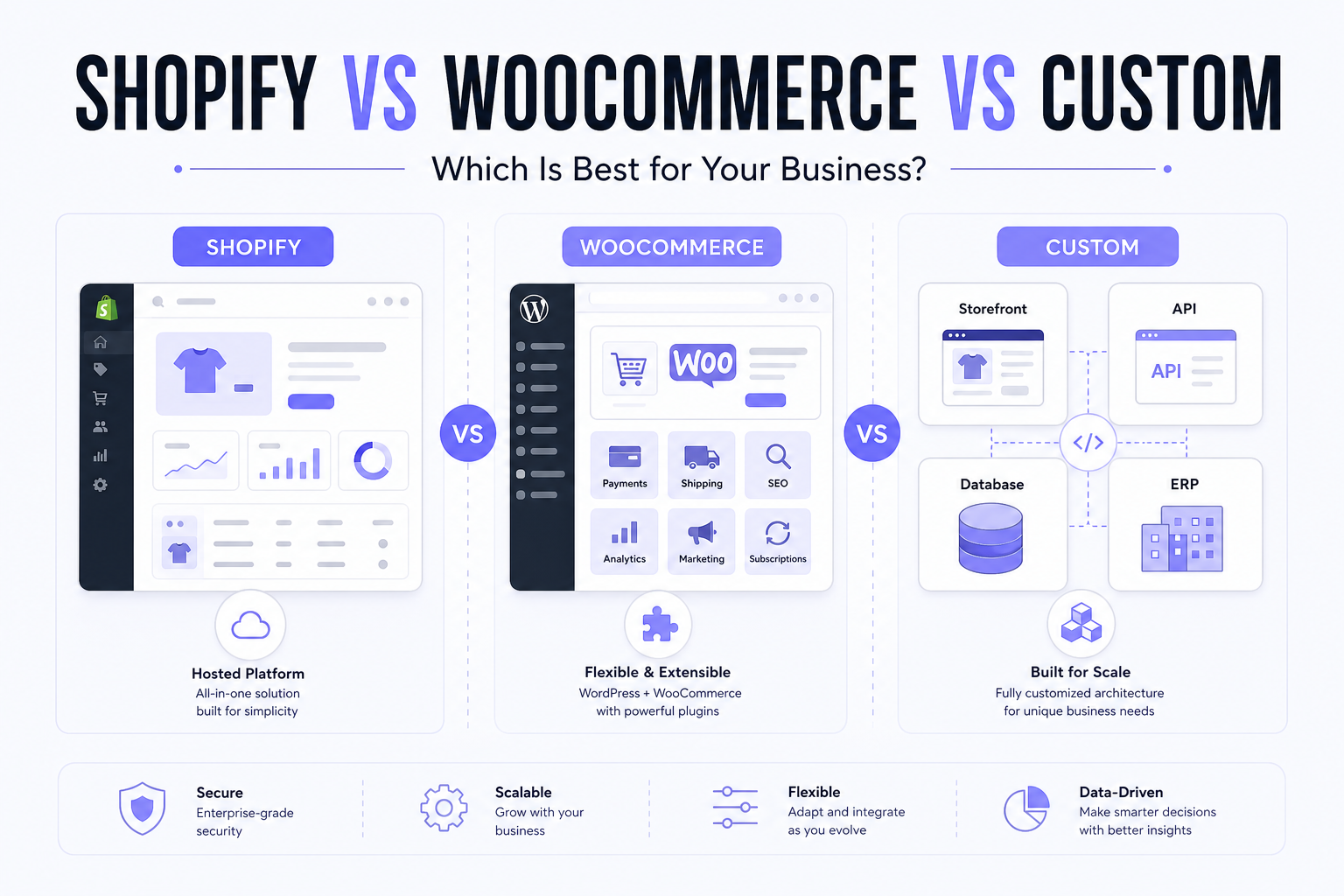
Choosing an ecommerce platform is not simply a question of which product has the longest feature list. Shopify, WooCommerce and custom ecommerce can all support successful online businesses, but they solve different problems.
Shopify emphasizes managed infrastructure and a mature commerce ecosystem. WooCommerce gives businesses deep control within the WordPress ecosystem. Custom ecommerce provides the greatest architectural freedom, and also creates more development and maintenance responsibility. The right choice depends on what your business actually needs — model, catalog, integrations, B2B, international selling, team skills, time to market and how much ongoing ownership you can fund.
If you are still deciding between a company website, WordPress CMS and Shopify as business platforms — not only ecommerce engines — start with custom website vs WordPress vs Shopify.
Which is better: Shopify, WooCommerce or custom ecommerce?
Shopify is usually the strongest starting point for businesses that want a hosted ecommerce platform, faster deployment and a broad app ecosystem. WooCommerce can be a strong choice for businesses already built around WordPress that want greater control over hosting and plugins. Custom ecommerce makes the most sense when the business requires workflows, integrations, pricing logic or architecture that standard platforms cannot support cleanly. There is no universal winner: compare total cost, maintenance responsibility, customization, scalability, integrations and time to market before choosing.
Quick decision
Choose Shopify if: you want a managed ecommerce platform and fast deployment.
Consider WooCommerce if: WordPress is central to your website and content strategy, and you can manage hosting and plugins.
Consider custom ecommerce if: your business processes cannot reasonably fit standard platform capabilities.
Executive comparison
| Factor | Shopify | WooCommerce | Custom ecommerce |
|---|---|---|---|
| Setup speed | Often fastest for standard stores | Fast if WordPress is already in place | Usually slower (discovery + build + QA) |
| Initial development | Theme/app-led, often lower for standard D2C | Theme/plugin-led; custom PHP can raise cost | Usually highest engineering |
| Hosting | Included in the platform model | You choose and pay for hosting | You design and pay for infrastructure |
| Maintenance | Platform ops centralized; you still maintain theme/apps/custom code | WordPress, plugins, theme, hosting, backups | Application, deps, infra, security, monitoring |
| Ease of management | Commerce-first admin for most merchants | Familiar if the team already lives in WordPress | Depends entirely on the admin you build |
| Customization | High within APIs, themes, apps and (on Plus) checkout extensibility | High via WordPress/PHP and extensions | Highest architectural freedom |
| App/plugin ecosystem | Shopify App Store | WooCommerce/WordPress extensions | Most features are built or integrated |
| SEO control | Strong when implemented well; some platform constraints | Strong WordPress content control; hosting/plugins matter | Full control — only if developers implement SEO correctly |
| Performance control | Theme, apps and scripts dominate | Hosting, theme, plugins, database | Architecture, frontend, backend, CDN |
| Security responsibility | More platform-level responsibility centralized | Shared across merchant, host and developers | Your team owns more of the surface |
| B2B | Native companies, catalogs, quantity/volume rules; Plus unlocks more catalogs and checkout UI depth | Extensions or custom code | Can match unusual dealer/credit/approval logic |
| ERP/CRM integration | Apps + Admin/Storefront APIs + custom apps | Plugins + REST/custom code | Designed around your systems — still needs mapping |
| International commerce | Shopify Markets (languages, currencies, domains, taxes/duties) | Plugins + hosting + tax/shipping setup | Whatever you design and maintain |
| Ownership/control | Less infra ownership, more platform constraints | More hosting/code control | Maximum architecture control and responsibility |
| Best fit | Managed commerce, D2C, faster launch | WordPress-centric, content-heavy teams | Proprietary workflows, marketplaces, deep ops software |
What is Shopify?
Shopify is a hosted ecommerce platform. Conceptually it includes the storefront, hosting/infrastructure, checkout, admin, APIs, themes, apps/extensions, and product/order management. Shopify operates much of the commerce infrastructure so merchants are not running their own checkout servers.
Merchant responsibility still begins at theme quality, app selection, catalog data, integrations, analytics, SEO implementation, and any custom apps or checkout extensions you add. Shopify is not “set and forget,” and it is not infinitely customizable outside its APIs and extension points. For implementation, see Shopify development when that path fits — this article is about whether it fits, not a sales pitch.
What is WooCommerce?
WooCommerce is an open-source ecommerce solution built around WordPress (official WooCommerce documentation describes it as a customizable commerce platform on WordPress). The merchant typically selects hosting, WordPress, themes, plugins, maintenance, backups and security setup.
That flexibility is the point: you can change a great deal of the stack. The trade-off is responsibility. WooCommerce core being open-source does not make professional ecommerce free. You still pay for hosting, development, extensions, updates and operational care.
What does custom ecommerce development mean?
A custom ecommerce system is designed around specific business requirements rather than relying entirely on an off-the-shelf commerce platform. Potential components include frontend, commerce backend, database, checkout and payment integrations, admin, ERP, CRM, warehouse systems and APIs.
“Custom ecommerce” is not one product. It can range from a custom frontend on existing commerce infrastructure (for example a headless storefront on Shopify or another engine) to a fully custom commerce backend. Treat quotes as architecture decisions, not a single SKU named “custom.” For the build / extend / buy decision itself — platform vs hybrid vs full custom — use custom ecommerce vs platform.
Architecture comparison
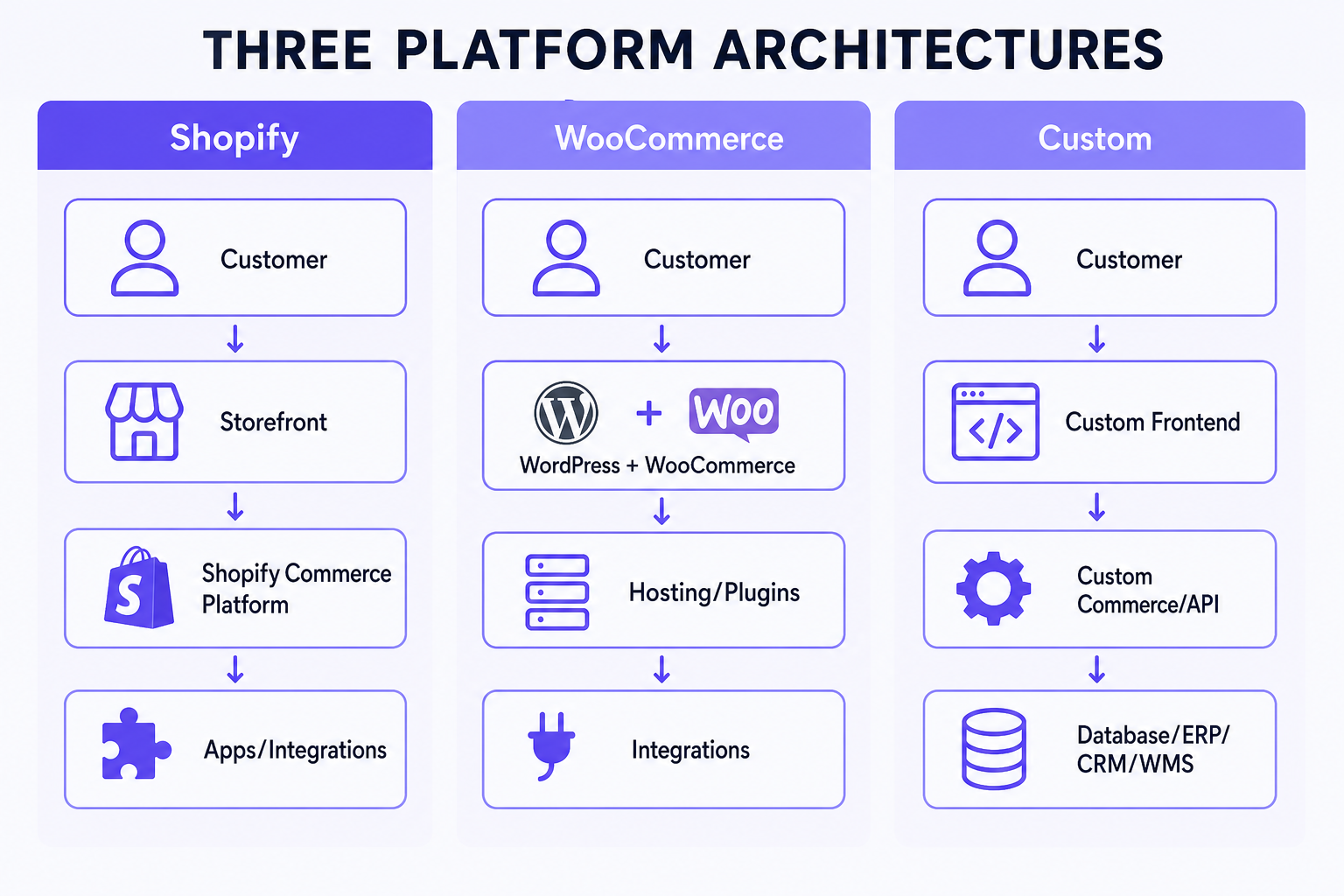
Shopify: Customer → Shopify storefront → Shopify commerce platform → apps / integrations.
WooCommerce: Customer → WordPress + WooCommerce → hosting / plugins → integrations.
Custom: Customer → custom frontend → custom commerce/API layer → database / ERP / CRM / WMS.
Operational implication: Shopify centralizes more commerce runtime. WooCommerce puts WordPress and hosting in the critical path. Custom puts your application and data model in the critical path. Failures, updates and scaling look different in each diagram.
Shopify vs WooCommerce vs custom ecommerce cost
Separate platform cost, development cost and ongoing cost. Do not compare a Shopify subscription to a custom engineering invoice.
Shopify India’s published plan prices (verified August 2026 on shopify.com/in/pricing) include approximately Basic ₹1,499/month billed yearly (₹1,994 monthly), Grow ₹5,599 yearly (₹7,447 monthly), Advanced ₹22,680 yearly (₹30,164 monthly), and Plus from about ₹1,75,000/month. GST commonly applies on subscriptions. Third-party payment provider fees also apply in India (2% / 1% / 0.6% / 0.2% by plan on Shopify’s pricing page), on top of gateway charges. Confirm current figures before budgeting.
WooCommerce has no Shopify-style commerce SaaS fee, but hosting, premium extensions, security and developer time are real. Custom stacks have no platform subscription named “custom,” but they have infrastructure and engineering forever.
For indicative India project bands, use the ecommerce website cost in India guide. For Shopify-only delivery ranges, use the Shopify website development cost guide. This comparison stays on structure, not another price list.
| Cost area | Shopify | WooCommerce | Custom |
|---|---|---|---|
| Platform / software | Plan subscription (+ GST) | Core open-source; paid extensions common | No commerce SaaS; licenses for libraries/services |
| Hosting | Included in platform model | Separate hosting bill | Separate infra bill |
| Theme / design | Free or paid theme + customization | Free or paid theme + customization | Custom UI cost |
| Apps / plugins | Recurring App Store fees possible | Recurring or one-time extensions | Usually built/integrated |
| Development | Theme, apps, custom apps, migration | Theme, plugins, custom PHP | Full product engineering |
| Maintenance | Theme/apps/custom code + plan | WP + plugins + hosting + backups | App + infra + security + monitoring |
| Infrastructure | Mostly Shopify-operated | Your host / CDN / cache | Your design (or cloud vendor) |
A lower upfront WooCommerce or DIY Shopify launch can produce higher recurring cost if plugins/apps and emergency fixes accumulate. A higher custom build can still be cheaper over three years only if it replaces expensive workarounds — not because “ownership is free.”
Compare total cost of ownership, not only launch price
Over two to three years, think:
TCO ≈ initial development + platform/hosting + apps/plugins + maintenance + support + enhancements + infrastructure.
Do not invent a single three-year rupee total. Build a spreadsheet with your actual app/plugin list, change volume and who answers 2 a.m. incidents.
Which platform is fastest to launch?
For standard ecommerce (catalog, payments, shipping, theme), Shopify is often fastest because hosting, checkout and admin already exist. WooCommerce can also launch quickly when WordPress hosting and a capable theme are already in place. Custom usually needs more discovery, development and testing.
Complexity changes the pattern. A dirty migration, ERP cutover or unusual B2B rules can make any platform slow. Do not treat week-counts as guarantees.
Ease of use
Shopify’s admin is commerce-first: products, orders, discounts, markets and apps in one place. WooCommerce feels natural if the team already publishes in WordPress; it feels heavier if they do not want plugin updates. Custom admin quality is whatever you budget — excellent or painful.
No platform is objectively easiest for everyone. Match the admin to who will run the store daily.
Hosted vs self-managed infrastructure
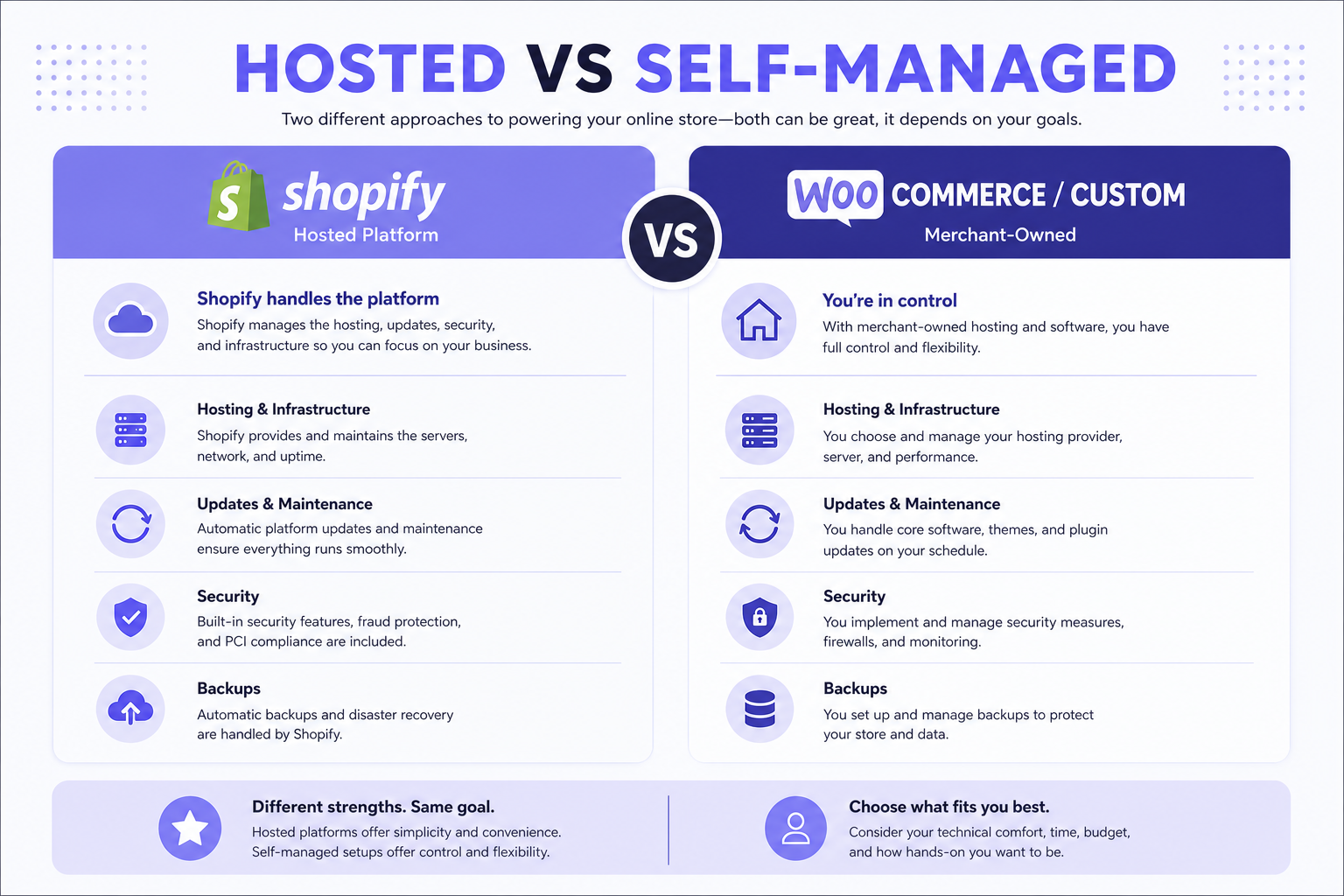
Shopify handles much of hosting and platform infrastructure. WooCommerce businesses choose hosting directly or via a provider. Custom hosting depends on the chosen stack.
Business implications: hosted models trade some control for less server work. Self-managed models trade more control for cost, maintenance and the need for technical expertise. Neither is automatically cheaper.
Which platform requires more maintenance?
Shopify may reduce server/platform maintenance. Merchants still maintain theme, apps, custom code and integrations.
WooCommerce typically needs attention to WordPress core, plugins, themes, hosting, backups, security and compatibility between updates.
Custom ecommerce requires application, dependencies, infrastructure, security, monitoring and upgrades — depending on architecture. “More custom” almost always means “more owned maintenance,” not zero recurring cost.
Shopify vs WooCommerce vs custom ecommerce security
None of the three is inherently secure or insecure. Security is mostly about who is responsible for what.
Shopify centralizes more platform-level responsibility (infrastructure, many checkout/payment scopes). You still control staff access, apps, custom code and operational hygiene.
WooCommerce shares responsibility across merchant, host and developers: updates, access, plugins, payments, infrastructure, logging and backups.
Custom gives the development team more control and more ownership: you design logging, backups, patching and payment PCI scope. That can be excellent with a mature team and dangerous without one. Do not rank platforms with fake 10/10 security scores.
Which platform gives you the most customization?
Shopify: significant customization within themes, metafields, apps, Admin/Storefront APIs, and checkout extensibility. Checkout UI extensions on the information, shipping and payment steps are documented as Shopify Plus; branding and other extension surfaces exist more broadly. You cannot freely rewrite checkout HTML like a forked template.
WooCommerce: strong customization through the WordPress/PHP ecosystem and, for modern stores, Cart/Checkout blocks (default for new stores since WooCommerce 8.3). Classic PHP checkout hooks do not automatically apply to block checkout — extensions must support the current model.
Custom: greatest freedom because architecture can be designed specifically. More freedom means more development responsibility. Nothing is unconstrained: payments, tax, privacy and fraud still apply.
Checkout customization
Shopify checkout is extensible within Shopify’s supported points, not an open HTML file. WooCommerce checkout can be customized via blocks, plugins or code, with compatibility caveats. Custom checkout can model unusual flows, but payment security and legal requirements remain. Do not imply anything can be changed without constraint.
Design flexibility
All three can look excellent. Template-based, custom theme and fully custom frontend are available on every path with enough budget. Do not choose a platform from screenshots alone.
Shopify apps vs WooCommerce plugins vs custom features
Shopify has the App Store. WooCommerce has WordPress/WooCommerce extensions. Custom features are usually developed or integrated.
Ready-made ecosystems speed common problems (reviews, subscriptions, search). Custom fit solves uncommon problems. Subscriptions and extensions accumulate cost; replacing them with custom software is not automatically cheaper once you count development, hosting, maintenance and upgrades.
Which is better for SEO: Shopify, WooCommerce or custom ecommerce?
All three can rank well when implemented properly. SEO depends on crawlability, indexability, architecture, content, internal linking, performance, structured data, authority and search intent — not on a platform slogan.
Platform differences affect how recommendations are implemented, not a guaranteed winner. Do not declare WooCommerce or custom automatically better. Do not say “Shopify has bad SEO.”
Shopify SEO
Watch collection/product architecture, theme quality, app bloat, structured data, performance and international/Markets setup. Implementation still decides outcomes. For ecommerce search architecture, use the ecommerce SEO playbook.
WooCommerce SEO
WordPress is strong for publishing workflows and site architecture if hosting and plugins are competent. An SEO plugin does not determine SEO quality. “Yoast is installed” is not a strategy.
Custom ecommerce SEO
Architectural freedom helps only if developers implement fundamentals: accessible content, canonical logic, sitemaps, metadata, URL architecture and, where relevant, JavaScript rendering. Custom freedom is not automatically an SEO advantage. For ongoing organic work, see SEO services.
Which platform can be faster?
Any of them can be fast or slow depending on implementation. A well-built WooCommerce store may outperform a poorly built Shopify or custom store, and the reverse is also true.
Shopify performance is dominated by theme, apps and third-party scripts. WooCommerce by hosting, plugins, theme and database. Custom by architecture, frontend, backend and CDN.
Core Web Vitals
Evaluate LCP, INP and CLS on your templates with real field or lab data. Do not choose a platform because a benchmark blog published an average score. Google’s current Core Web Vitals set is LCP, INP and CLS (INP replaced FID).
Which platform scales better?
Avoid “custom scales infinitely.” Scaling can mean traffic, catalog size, order volume, operational complexity, custom workflows or international markets.
Shopify can support significant scale, including Plus for higher limits and checkout/B2B depth. WooCommerce scaling depends heavily on infrastructure and implementation. Custom can be architected for a specific load profile, but only with engineering. Large catalogs should be judged by variants, filters, search, imports, PIM and inventory — not SKU count alone.
Best platform for D2C ecommerce
Shopify is often strong for rapidly launching branded D2C stores with managed checkout and apps. WooCommerce can fit content-driven WordPress brands. Custom may fit unusual business logic or high UX differentiation that is actually strategic. There is no absolute D2C winner.
Shopify vs WooCommerce vs custom for B2B ecommerce
B2B needs are operational: customer-specific pricing, dealer accounts, credit, quotations, bulk ordering, POs, approvals, ERP, sales reps and catalog restrictions.
Shopify B2B (Help Center, reviewed August 2026) includes companies, catalogs, quantity rules and volume pricing. On Basic, Grow and Advanced you can assign up to three active catalogs across B2B markets; Plus offers unlimited catalogs and direct assignment to companies/locations. Checkout UI on information/shipping/payment steps remains Plus-oriented. Complex credit, multi-step approvals or unusual dealer portals may still need apps or custom apps.
WooCommerce typically uses B2B/wholesale extensions or custom PHP. Custom ecommerce can encode proprietary dealer logic — at the cost of owning it. For commercial B2B delivery, see B2B ecommerce development.
| Requirement | Shopify | WooCommerce | Custom |
|---|---|---|---|
| Wholesale pricing | Catalogs / quantity & volume rules | Extensions or custom | Designed to spec |
| Account pricing | Company/location catalogs; plan limits apply | Extensions or custom | Designed to spec |
| Dealer portal | Logged-in B2B + apps/custom apps | Extensions or custom | Strong for unusual portals |
| ERP sync | Apps / custom apps / middleware | Plugins / custom | Built around ERP — still mapping-heavy |
| Quote workflow | Draft orders + apps/custom | Extensions or custom | Fully custom RFQ possible |
| Credit terms | Net terms / apps; complexity varies | Extensions or custom | Can match finance rules |
| Complex approvals | Often apps or custom apps | Often custom | Strongest when rules are proprietary |
Which platform is best for ERP integration?
It depends on ERP APIs, available connectors, data mapping, workflow complexity, sync direction, volume and custom business logic. Shopify and WooCommerce may use existing connectors. Custom integration may still be required on any storefront when the ERP is the system of record.
See ERP development and the Shopify ERP, CRM and API integration guide for architecture patterns — not as proof that one storefront “wins” ERP.
CRM integration
Shopify ↔ CRM, WooCommerce ↔ CRM and custom ↔ CRM are all possible. The difference is ready-made connectors versus custom workflow complexity. See custom CRM development when the CRM itself is part of operations.
Custom APIs
If commerce must fit a proprietary ERP, warehouse, manufacturing system, dealer system or pricing engine, evaluate API architecture early. A custom frontend/backend may be justified when the store must sit inside existing business systems rather than the other way around.
Which platform is better for Indian payment requirements?
All three can support UPI, cards, COD and Indian gateways via integrations. Shopify in India uses third-party gateways (Shopify Payments is not the India default model); platform third-party fees apply in addition to gateway fees. WooCommerce includes Cash on Delivery in core documentation and connects gateways via extensions. Custom integrates whatever the payment provider API allows.
Do not treat a 2024 gateway compatibility list as permanent. Confirm the gateway’s current Shopify app or WooCommerce extension before committing. This is not an endorsement of any provider.
COD in India
Shopify, WooCommerce and custom can all support COD. Advanced pincode, order-value, product, customer, fee and risk rules usually need apps, plugins or custom logic — not the platform logo alone.
Shipping / logistics
All three have shipping apps/plugins and courier APIs. Proprietary warehouse logic often matters more than the storefront brand. Custom integration may be required regardless of platform.
Which platform is better for international selling?
Shopify Markets (developer and Help Center docs, reviewed August 2026) supports multiple languages, international pricing, market-specific domains/subfolders, taxes/duties and buyer experiences grouped by market conditions — not geography alone. Plus adds capabilities such as automatic country detection in themes. Confirm plan-specific Markets features on Shopify before promising them to stakeholders.
WooCommerce international setups typically combine multilingual plugins, multi-currency extensions, tax plugins and hosting. Custom can model any market structure you can fund. “International” is rarely a toggle; it is catalog, tax, shipping, payments, content and support hours.
Which platform is better for content-heavy websites?
WooCommerce/WordPress often has an advantage when the business is already centered on WordPress publishing. Shopify and custom can also support blogs and content architectures. WordPress popularity is not automatic SEO superiority.
CMS flexibility
If you need a large editorial portal, documentation or a complex CMS, options include WordPress/WooCommerce, a headless CMS plus commerce, or a custom CMS. Do not overcomplicate a small catalog brand with a CMS programme it will not staff.
Do you need headless ecommerce?
Headless separates the frontend from the commerce backend. Potential advantages: frontend flexibility, multi-channel presentation, performance architecture and custom experiences. Trade-offs: complexity, development cost, integration and maintenance.
Do not choose headless because it is fashionable. Choose it when the storefront experience is a product in itself and you have the engineering capacity.
Which option gives you the most control?
Control has several dimensions: source code, infrastructure, data, frontend, checkout/business logic and deployment.
Shopify: more platform constraints, less infrastructure responsibility. WooCommerce: more hosting and code control. Custom: maximum architecture control and maximum responsibility. All three create switching cost. Custom does not mean “zero lock-in” — you lock into your own code and the people who understand it.
How hard is it to migrate later?
Migration can include products, customers, orders, content, URLs, images, SEO metadata and integrations. Future portability is a real selection criterion. Shopify → WooCommerce, WooCommerce → Shopify and custom → either are all done in the market; none are free of SEO and data risk. For a Shopify-bound example, see the Shopify fashion migration case study.
Which platform is best for a startup?
Do not build complex custom software before product-market validation unless ecommerce technology itself is the differentiator. Shopify or WooCommerce usually reduces initial engineering. Choose based on whether WordPress is already central, how unique the workflow is, and who will maintain the store. Small businesses should prioritize budget, ease of management, fast launch and standard functionality over overengineering.
Growing D2C brand
Priorities often shift to brand design, conversion, marketing integrations, performance, analytics and international expansion. Shopify frequently fits that mix well. WooCommerce remains viable for content-led brands with strong hosting. Custom remains a later conversation unless UX or ops truly cannot live on a platform.
Manufacturer / wholesaler
Manufacturers and wholesalers often prioritize ERP, inventory, dealer pricing, sales teams, quotations and purchase orders. The decision may move toward Shopify B2B, WooCommerce B2B extensions, or custom B2B architecture depending on complexity — not automatically to custom.
What should larger businesses evaluate?
Not only traffic. Consider integrations, SLAs, governance, security, international operations, deployment, B2B, custom workflow, support, team skills and total cost. Do not automatically recommend custom because the company is “enterprise.” Many large brands run successfully on Shopify Plus or well-operated WooCommerce with clear ownership.
Decision scorecard
This is a planning aid, not a formula.
Choose Shopify if most are true
- [ ] Standard ecommerce model
- [ ] Want managed infrastructure
- [ ] Fast launch matters
- [ ] Strong app ecosystem is useful
- [ ] Internal development resources are limited
Consider WooCommerce if most are true
- [ ] Website already depends heavily on WordPress
- [ ] Content publishing is central
- [ ] You want more direct hosting/plugin control
- [ ] Team understands WordPress maintenance
- [ ] Required workflows fit available extensions/customization
Consider custom ecommerce if most are true
- [ ] Business workflow is genuinely unique
- [ ] Proprietary systems are central
- [ ] Standard platforms require major compromises
- [ ] Custom logic is strategic
- [ ] Organization can fund ongoing engineering/maintenance
Business scenario starting points
| Business scenario | Likely best starting point | Why |
|---|---|---|
| New D2C fashion brand | Shopify | Managed commerce, themes, apps, faster launch |
| Content-heavy niche retailer | WooCommerce or Shopify, depending on WordPress dependence | Publishing workflow vs commerce-first admin |
| Manufacturer with dealer pricing + ERP | Evaluate Shopify B2B vs custom | Catalog/plan limits vs proprietary pricing/ERP depth |
| Proprietary marketplace | Custom | Vendors, commissions, settlements are a different product |
| Small local retailer | Shopify or WooCommerce | Standard store; avoid overengineering |
| International brand | Shopify or custom, depending on Markets vs unique localization | Markets covers many cases; unusual tax/entity rules may not |
| Complex B2B distributor | Shopify B2B or custom | Native B2B vs approvals/credit/ERP that exceed platform fit |
Feature requirement matrix
| Requirement | Shopify | WooCommerce | Custom |
|---|---|---|---|
| Standard storefront | Excellent | Excellent | Possible but often overkill |
| Fast launch | Strong | Strong (if WP ready) | Lower |
| Managed hosting | Strong | Depends | Depends |
| Content-heavy site | Good | Strong | Custom CMS possible |
| Unique workflows | Good within platform | Flexible | Strongest |
| ERP integration | Strong (apps/APIs) | Strong (plugins/code) | Strong (if staffed) |
| B2B | Strong with plan-appropriate B2B | Extensions / custom | Strong |
| Marketplace | Apps / custom | Plugins / custom | Strongest for proprietary model |
| Low maintenance | Stronger for most teams | Lower (more owner ops) | Usually higher |
| Full infrastructure control | Lower | Strong | Strongest |
When Shopify is the right choice
Standard ecommerce, managed infrastructure, app ecosystem, time to market, D2C, merchant-friendly admin, and scaling without running your own checkout servers.
When Shopify may not be ideal
When platform constraints conflict with a core proprietary workflow; when the organization requires infrastructure or checkout control that Shopify’s extension model cannot provide; or when commerce behaviour is highly unusual (true multi-vendor marketplace, exotic pricing engines, multi-tenant platforms). Verify actual limits — Shopify B2B and checkout extensibility cover more than older “Shopify cannot do B2B” claims.
When WooCommerce is the right choice
WordPress is already central, content is heavy, the team is comfortable with PHP/WordPress, you want hosting control, and required functionality is available via the ecosystem or maintainable custom code.
When WooCommerce may not be ideal
When the team does not want to manage hosting, plugins and updates; when plugin dependency becomes an operational burden; or when the business prefers a more managed commerce platform. That is a resourcing decision, not a scare story about insecurity.
When custom ecommerce is the right choice
Proprietary business logic, custom marketplace, deep ERP/manufacturing integration, complex B2B, unusual product configuration, custom multi-tenant commerce, or when commerce itself is strategic product/IP.
When custom ecommerce is not appropriate
Basic startup, standard D2C, limited budget, no internal technical support, or requirements already handled well by major platforms. Building custom “for ownership” alone is one of the expensive ways to delay launch.
You do not always have to choose fully hosted or fully custom
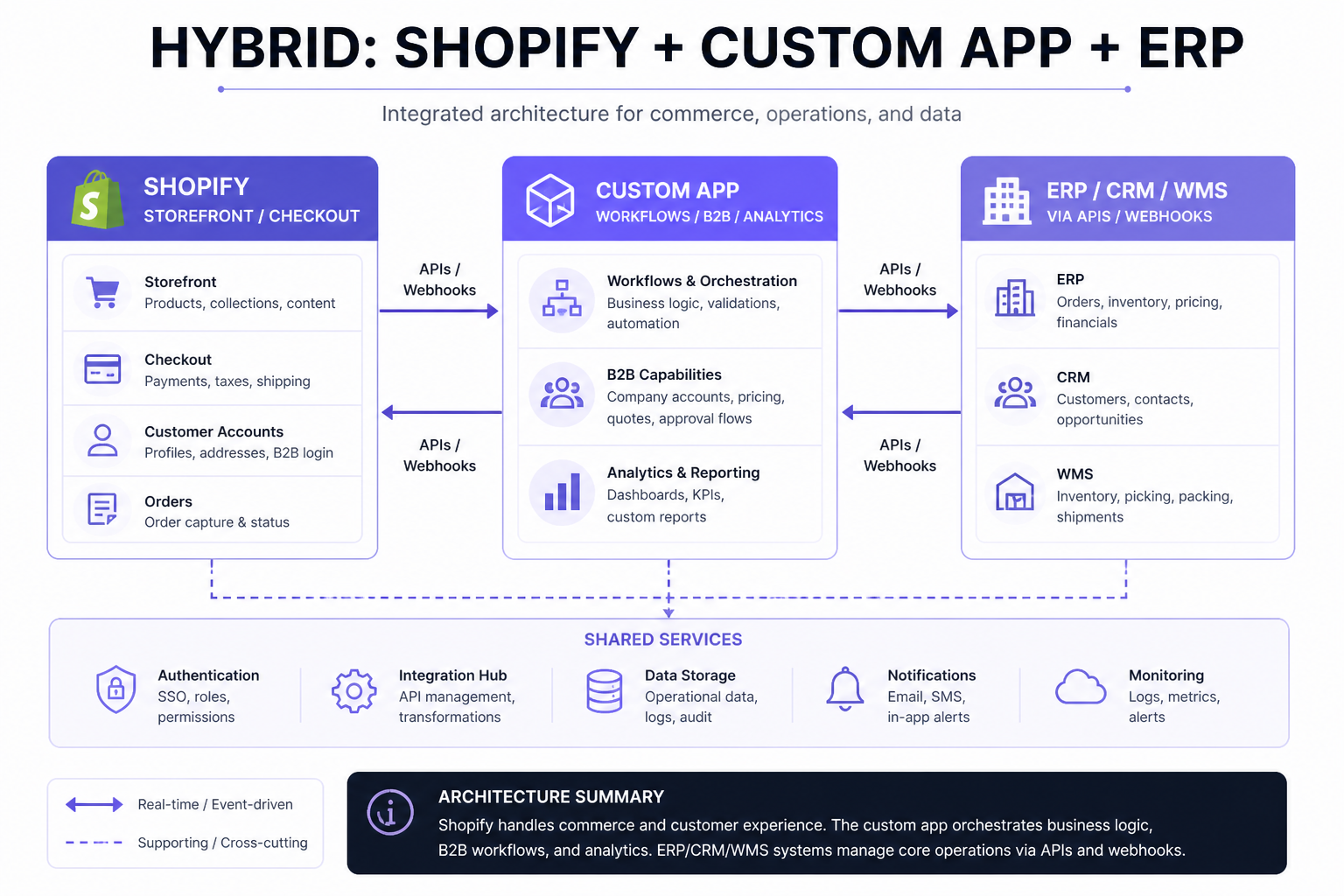
Hybrids are common: Shopify + custom app; WooCommerce + custom API; Shopify + ERP integration; commerce platform + headless/custom frontend.
Shopify + custom app
Keep Shopify as commerce infrastructure and build custom functionality for ERP, CRM, B2B, analytics or internal workflows. That is often preferable to rebuilding checkout, payments and catalog from scratch. See Shopify app development, public vs custom Shopify apps, and when a Shopify store needs a custom app.
Total decision framework
Business requirements → standard or unique? → managed or self-managed? → integrations? → B2B? → content? → time to market? → maintenance capacity? → total cost? → platform decision.
Fit beats feature count. Once you know which features your business actually needs, platform selection is easier — start with the ecommerce website feature checklist if requirements are still fuzzy.
10 questions before choosing
- What type of ecommerce business are we building?
- How unique are our workflows?
- What is the project budget?
- How quickly must we launch?
- Who will maintain the platform?
- Which ERP/CRM/WMS systems must connect?
- Do we need B2B features?
- Do we sell internationally?
- How important is WordPress/content publishing?
- What could change over the next three years?
What not to base the decision on
Lowest monthly fee alone, developer preference, one SEO plugin, one benchmark, “unlimited customization,” number of apps/plugins, one competitor’s stack, or social-media opinions. Choose from business requirements.
10 ecommerce platform selection mistakes
- Choosing based only on initial cost
- Ignoring recurring software costs
- Overengineering too early
- Ignoring maintenance responsibility
- Underestimating integrations
- Treating SEO as a platform checkbox
- Ignoring B2B requirements
- Ignoring future international expansion
- Choosing custom only for “ownership”
- Migrating without considering SEO and data complexity
Need help choosing an ecommerce architecture?
If you want a scoped recommendation based on catalog, integrations, B2B and launch constraints — not a feature bake-off — start with ecommerce website development. Web6 builds both Shopify and custom commerce; the useful answer is still the one that fits the business. When you are comparing providers, evaluating ecommerce developers covers briefs, proposals and red flags separately from platform choice.
Frequently asked questions
Which is better: Shopify, WooCommerce or custom ecommerce?
There is no universal winner. Shopify usually fits managed, faster D2C launches; WooCommerce fits WordPress-centric content businesses that will maintain hosting and plugins; custom fits workflows that standard platforms cannot support cleanly. Compare TCO, maintenance, integrations and time to market.
Is Shopify more expensive than WooCommerce?
Not automatically. Shopify has a clear subscription (plus apps and, in India, third-party payment provider fees). WooCommerce core is open-source but hosting, extensions, security and developer time still cost money. Compare first-year and three-year TCO, not the monthly plan line alone.
Is WooCommerce really free?
No. The core software is open-source, but professional ecommerce still involves hosting, development, plugins, maintenance and often other costs. Treat “free WooCommerce” as a myth.
Which platform is better for SEO?
All three can rank when crawlability, content, architecture, performance and authority are done well. WooCommerce is not automatically better because WordPress has SEO plugins. Custom is not automatically better because you own the code. Shopify is not automatically worse.
Which platform is better for a startup?
Usually Shopify or WooCommerce until the workflow itself is the product. Avoid heavy custom engineering before product-market fit unless technology is the differentiator. Pick based on WordPress dependence and who will maintain the store.
Which platform is best for B2B ecommerce?
Shopify B2B covers companies, catalogs and quantity/volume rules, with catalog limits on non-Plus plans. WooCommerce uses extensions or custom code. Custom fits unusual dealer, credit or approval logic. Evaluate ERP and pricing complexity before assuming custom.
Which platform is easier to maintain?
Shopify usually reduces server/platform work. WooCommerce needs WordPress, plugin and hosting care. Custom needs application and infrastructure ownership. “Easiest” depends on your team’s skills, not a universal ranking.
Can Shopify integrate with ERP and CRM?
Yes — via apps, Admin/Storefront APIs, webhooks and custom apps. Ready-made connectors help some ERPs; unusual mapping still needs middleware or custom work. The same is true on WooCommerce and custom stacks.
When should a business build custom ecommerce?
When workflows, integrations, marketplace mechanics or pricing logic cannot reasonably fit a major platform without constant workarounds — and when the organization can fund ongoing engineering. Not because ownership sounds appealing on a slide.
Is custom ecommerce more scalable?
It can be architected for a specific scale profile, but it does not scale “infinitely” by default. Shopify and well-hosted WooCommerce also scale. Engineering quality matters more than the label “custom.”
Can I migrate between ecommerce platforms later?
Yes, but products, customers, orders, URLs, metadata and integrations all move with risk. Plan redirects and data quality. Switching cost exists on every path, including custom code.
Which ecommerce platform is best for India?
The one that fits catalog, payments (UPI/cards/COD via gateways), GST operations, COD rules and who will maintain the store. Shopify, WooCommerce and custom all operate successfully in India. Confirm current gateway and plan fees; do not pick from a global meme.