
Web Development
Custom Website vs WordPress vs Shopify: What Should Surat Businesses Choose?
Written by Web6 Editorial Team · Published 3 September 2026 · 22 min read
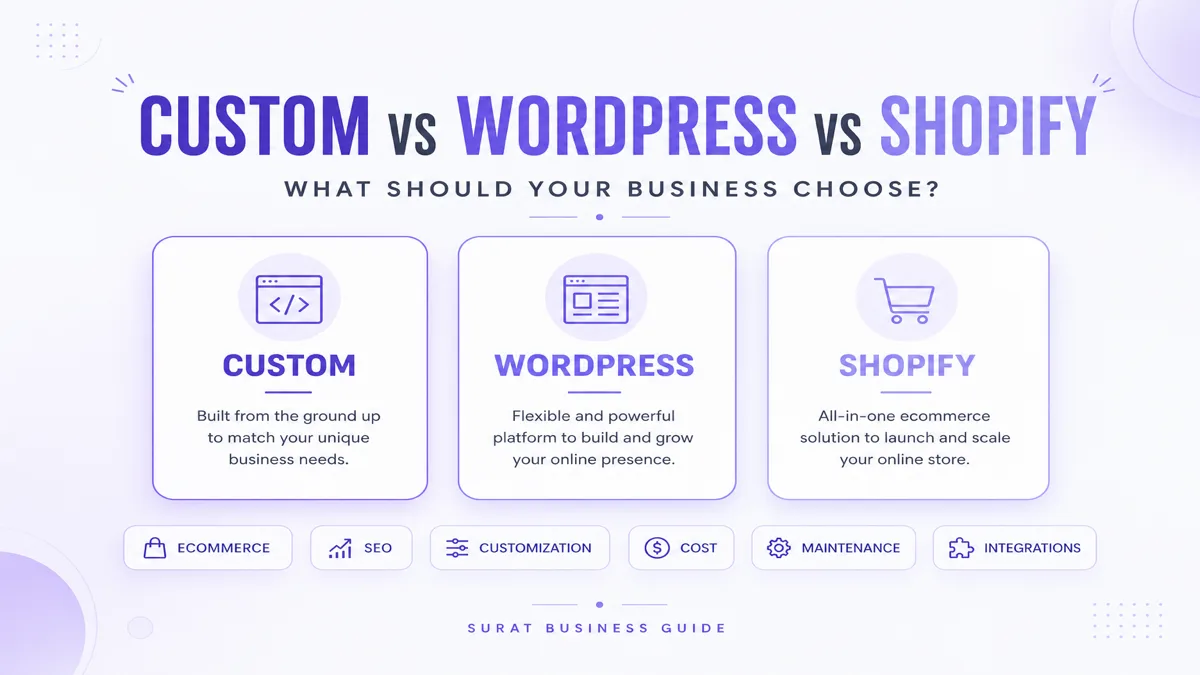
A manufacturer that needs a dealer portal, a fashion brand selling hundreds of products and a service company that mainly needs leads may all need websites — but they probably should not use the same technology.
Shopify, WordPress and custom development solve different problems. The useful question is not “which platform is best?” It is: which platform fits the requirements with the least unnecessary complexity?
This guide compares custom websites, WordPress and Shopify for business decision-making. It is intentionally platform-neutral. For budget planning in Surat, see website development cost in Surat. For a deeper ecommerce-only comparison of Shopify, WooCommerce and custom commerce, use Shopify vs WooCommerce vs custom ecommerce. For build vs buy ecommerce architecture, see custom ecommerce vs ready-made platforms. For vendor evaluation, use how to choose a website development company in Surat. If you need a web development company in Surat to implement the chosen approach, Web6 can evaluate multiple stacks against your requirements.
Should your business choose Shopify, WordPress or a custom website?
Choose Shopify when ecommerce is the primary requirement and the business benefits from a managed commerce platform — products, collections, checkout, orders and a mature app ecosystem. Choose WordPress when content publishing, service pages, blogs or relatively standard business websites are the main requirements and the selected stack can support the needed functionality. Choose custom development when workflows, integrations, portals, data models or business logic go substantially beyond what standard platforms handle efficiently. There is no universal winner. The right choice depends on requirements, budget, maintenance expectations and future growth — not on which label sounds more advanced.
Custom website vs WordPress vs Shopify: requirement comparison
| Requirement | Custom website | WordPress | Shopify |
|---|---|---|---|
| Business / company website | Strong | Strong | Limited use case |
| Blog / content site | Strong | Strong | Possible |
| Standard ecommerce | Strong (must be built or integrated) | Possible via commerce stack | Strong |
| Fast store launch | Depends | Depends | Strong |
| Custom workflows | Strong | Depends | Platform-dependent |
| Custom backend | Strong | Possible | Limited / platform-dependent |
| Built-in ecommerce | Must be developed | Plugin-based (e.g. WooCommerce) | Strong |
| Hosting management | Depends | Usually business / provider | Platform-managed |
| Maintenance | Depends | Ongoing | Lower platform maintenance |
| Full code flexibility | Strong | Strong within stack | Platform constraints |
| Complex integrations | Strong | Possible | APIs / apps / platform-dependent |
| Unique portal / business system | Strong | Possible depending on scope | Usually limited |
| Content management | Custom / headless CMS | Strong | Available |
| SEO control | Strong if implemented | Strong | Strong within platform architecture |
Treat “Strong / Possible / Depends / Platform-dependent” as evaluation language — not guarantees. Implementation quality still decides outcomes.
Who should choose what?
Choose Shopify if
- Your primary objective is ecommerce
- You want managed commerce infrastructure
- Standard store architecture fits the business
- You want access to an ecommerce app ecosystem
Choose WordPress if
- Content is important
- You need a corporate or service website
- You want flexible CMS functionality
- Your requirements fit the WordPress ecosystem
Choose custom development if
- You need proprietary workflows
- You need custom portals or dashboards
- Complex integrations are central
- Unusual product or business logic is required
- You need unique backend functionality or full architectural control
What is a custom website?
A custom website means the information architecture, data model and UI follow how your business sells, serves and operates — not how a generic theme imagined a “company site.” It may use modern frontend frameworks, a custom backend, a custom database, a headless CMS, APIs and custom business logic.
Custom does not mean every button is coded from scratch with no libraries. Professional custom work still uses frameworks, cloud services, payment providers and CMS tools. Custom means the application shape is designed around requirements. For delivery, see custom website development.
Advantages
- Architecture based on requirements
- Custom workflows and portals
- Greater implementation flexibility
- Custom API integration
- Specialized data structures
- Less dependence on plugin ecosystems when that matters
- Ability to build business-specific software experiences
Disadvantages
- Higher initial development requirement
- Longer discovery and build cycles
- Greater responsibility for maintenance
- More testing surface
- Infrastructure decisions to own
- Requires a capable development team
When custom development makes sense
Illustrative examples: B2B dealer portals, customer dashboards, quotation engines, product configurators, CRM-integrated lead systems, ERP-connected portals, complex pricing rules, internal business systems, marketplaces and custom SaaS functionality.
When custom development is overkill
If a business only needs five to ten company pages, a contact form, a blog and standard content editing, a complex custom backend is often unnecessary. Likewise, if the requirement is a conventional ecommerce store, Shopify may reduce development complexity compared with rebuilding commerce from scratch.
What is WordPress and when does it make sense?
WordPress is an open-source content management system. It is used for blogs, corporate sites, service businesses, publishers and many other website types. Themes and plugins extend it. Editorial teams often value the familiar publishing workflow.
Do not equate WordPress with “only blogs.” It can power serious business websites when the stack, hosting and development quality match the brief.
WordPress advantages
- Mature CMS and editorial tools
- Large ecosystem of themes, plugins and developers
- Strong content publishing and page management
- Flexibility for many website types
- WooCommerce option when ecommerce is needed on WordPress
WordPress disadvantages
- Plugin compatibility and update discipline
- Security depends on maintenance quality
- Hosting responsibility usually sits with the business or provider
- Theme and plugin quality varies widely
- Performance can degrade with poor architecture — a well-built WordPress site can perform well; poorly chosen themes, plugins and hosting can cause problems
WordPress security
WordPress is not “insecure by default.” Security depends on updates, plugins, themes, hosting, permissions, credentials, backups and development quality. Neglect those, and any CMS becomes risky.
What about WooCommerce?
WooCommerce adds ecommerce capabilities to the WordPress ecosystem. It can fit businesses already using WordPress, content-heavy commerce and teams that want WordPress-centric flexibility. Complexity often appears in hosting, plugins, updates, checkout/payment setup and ongoing maintenance. WooCommerce core being open-source does not make a professional store free.
What is Shopify and when does it make sense?
Shopify is a hosted commerce platform built around products, collections, checkout, orders, payments/integrations, themes and apps. Shopify operates much of the commerce infrastructure so merchants are not running their own checkout servers.
Merchant responsibility still includes theme quality, app selection, catalog data, integrations, analytics, SEO implementation and any custom apps or extensions. Shopify is not “set and forget,” and it is not infinitely customizable outside its APIs and extension points. For implementation when that path fits, see Shopify development services.
Shopify advantages
- Ecommerce-first architecture
- Managed hosting and commerce infrastructure
- Large app ecosystem
- Store administration for products and orders
- Reduced infrastructure responsibility for standard stores
Shopify disadvantages
- Subscription and potential app costs
- Platform architecture constraints
- Theme and platform limits for unusual workflows
- Dependency on the Shopify ecosystem
- Highly specialized processes may need apps, custom apps or a different architecture
Shopify custom development
Shopify is not a fixed template builder. Customization is possible through themes, Shopify APIs, apps, custom apps, extensions where supported, and metafields/metaobjects where appropriate. Evaluate whether the required logic fits those extension points before assuming you must leave the platform.
Shopify pricing note (verify before budgeting)
As of September 2026, Shopify’s published USD plans on shopify.com/pricing include Basic at $39/month ($29/month billed yearly), Grow at $105/month ($79 yearly), Advanced at $399/month ($299 yearly), and Plus from about $2,300/month. Payment processing rates, third-party gateway fees, apps, themes and local plan pricing can change — confirm current figures for your region before budgeting. Do not treat subscription price alone as total ownership cost.
Which platform is better for a company website?
Scenario: a service company needs Home, Services, About, Case Studies, Blog, Contact and lead forms — with little or no product checkout.
WordPress or custom development usually make more sense than Shopify when commerce is not important. WordPress often wins for editorial flexibility on a content-led brochure site. Custom development can win when brand performance, unusual UX or application features matter more than a standard CMS. Shopify can host pages and a blog, but using a commerce platform as a pure brochure site is often unnecessary complexity.
Which platform is better for ecommerce?
Compare Shopify, WordPress + WooCommerce and custom ecommerce across catalog size, checkout, payments, inventory, apps, integrations, custom pricing, B2B, workflows and maintenance. For deeper ecommerce architecture, use the dedicated ecommerce platform comparison and ecommerce website development service page.
| Ecommerce requirement | Shopify | WooCommerce | Custom |
|---|---|---|---|
| Standard D2C store | Strong | Strong | Possible |
| Fast launch | Strong | Depends | Usually slower |
| Built-in commerce infrastructure | Strong | Plugin-based | Must be built / integrated |
| Deep custom business logic | Depends | Possible | Strong |
| Custom ERP workflow | Possible | Possible | Strong |
| Unusual checkout / workflow | Platform-dependent | Flexible | Strong |
| Maintenance responsibility | Lower (platform) | Higher | Depends |
What should a Surat textile or fashion business choose?
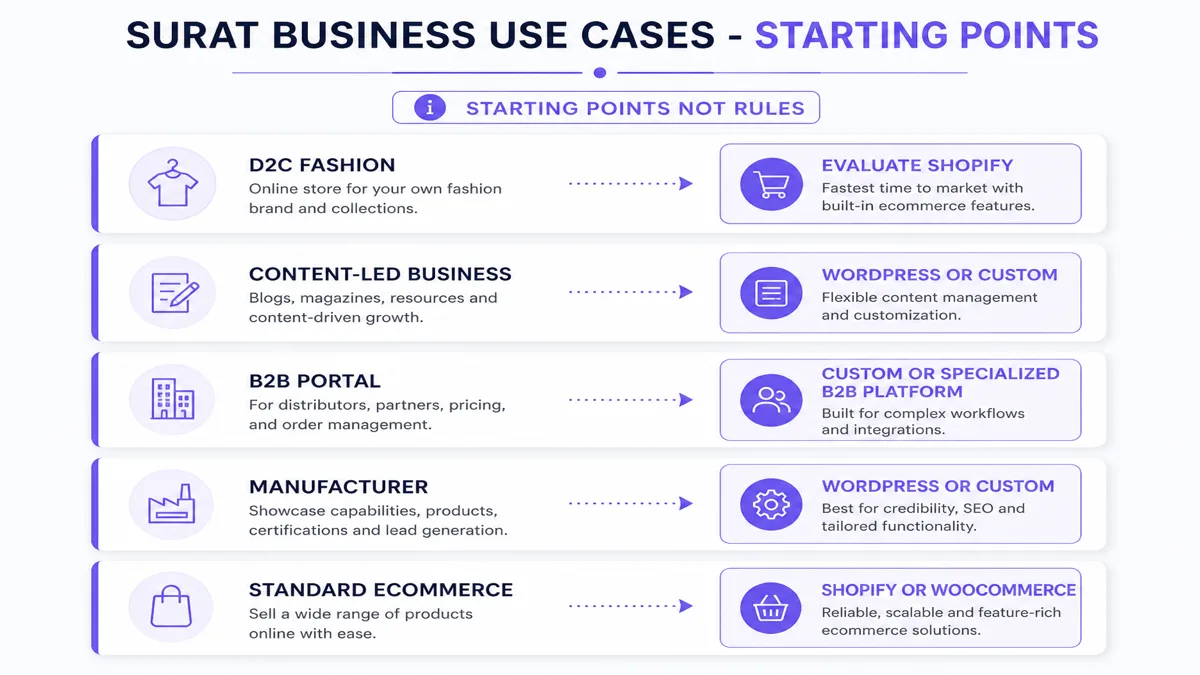
Scenario A — D2C fashion brand
Needs products, collections, variants, payments, orders, shipping and discounts. Shopify is often a strong first evaluation.
Scenario B — Textile manufacturer / exporter catalogue
Needs product catalogue, MOQ information, technical specifications, bulk enquiry, dealer enquiries and possibly CRM integration. WordPress or custom development may fit depending on content volume and workflow depth.
Scenario C — Complex B2B textile portal
Needs customer login, account-specific pricing, bulk ordering, MOQ rules, quotation, approvals and ERP synchronization. Custom development or specialized B2B commerce architecture is often more appropriate. See B2B ecommerce development.
What about jewellery businesses?
Jewellery projects split into at least three shapes: catalog/showcase sites, ecommerce stores and custom quotation or configuration systems. High-resolution imagery, performance, inventory trust, product variants and catalog structure matter more than the brand name of the platform. A showcase site may fit WordPress or lightweight custom. A standard retail store may fit Shopify. A memo/quote-heavy workflow may need custom logic or careful platform extension.
What should a manufacturing company choose?
Common needs include product catalogs, specifications, PDF downloads, RFQ forms, dealer networks, CRM integration, ERP integration, customer portals and international lead generation. WordPress can be suitable for content-driven manufacturer sites. Custom development becomes more relevant as workflows and integrations grow.
ERP integration considerations
A typical flow: Website / store → order or enquiry → integration → ERP → inventory / operations. Any of the three website approaches can feed an ERP if the integration is designed well. Unusual shop-floor or lot logic often pushes work into middleware or custom systems. See ERP development when the operational system itself needs ownership.
What should a local service business choose?
Typical needs: service pages, local SEO, lead forms, calls, WhatsApp contact, blogs, reviews and location information. WordPress or lightweight custom development is often appropriate. Shopify generally makes less sense unless products or bookings-as-commerce are important. For organic visibility work after the site is sound, see SEO services.
What should an exporter choose?
Exporters often need international landing pages, catalog content, RFQ forms, country targeting, multiple languages, CRM integration and downloadable specifications. Platform choice follows complexity: content-led sites may work on WordPress; commerce-led exporters may evaluate Shopify; portal/approval-heavy exporters may need custom architecture. This is not tax, legal or currency advice — validate international selling, payments and compliance with qualified advisors.
What should a startup choose?
Separate the marketing website from the software product. A startup marketing site can use WordPress, a custom static/headless approach or another suitable CMS. If the “website” is actually a dashboard, SaaS app, marketplace or customer portal, a normal CMS or store platform may not be appropriate — that is software product work.
Which is better for SEO: Shopify, WordPress or custom development?
Google ranks useful, accessible pages — not platform brands. All three can support SEO when implemented correctly. Practical factors include crawlability, indexation, page structure, internal links, metadata, structured data, performance, content quality, canonicalization and mobile usability.
Shopify: strong when implemented well; commerce URL and theme/app performance considerations apply. WordPress: high content control; SEO plugin ecosystem helps, but plugin/theme quality and hosting matter. Custom: maximum architectural flexibility — SEO still must be designed and implemented. Custom does not automatically rank better. For measurement and technical work, see technical SEO strategy.
Which platform is faster?
There is no universal winner. Performance depends on theme or code quality, images, third-party scripts, plugins/apps, hosting, rendering architecture and tracking scripts. Poor custom code can be slow. Poor WordPress plugins can be slow. Too many Shopify apps and scripts can affect storefront performance. Architecture matters more than labels.
If you track Core Web Vitals (LCP, INP, CLS), treat them as user-experience signals and part of page-experience considerations — passing them does not guarantee rankings. See current Google documentation for definitions.
Which platform scales better?
Break scalability into traffic, catalog size, content volume, business workflows, teams, integrations and development complexity. Shopify often handles commerce infrastructure scaling well for standard stores. WordPress scalability depends significantly on architecture and hosting. Custom systems can be designed around specific scaling requirements but require engineering ownership.
Which platform gives you the most customization?
Separate visual, functional, data, workflow, integration and backend customization.
| Type | Shopify | WordPress | Custom |
|---|---|---|---|
| Branding / UI | Strong | Strong | Very strong |
| Content structure | Strong / depends | Strong | Very strong |
| Ecommerce workflows | Strong within platform | Flexible | Very strong |
| Backend logic | Platform-dependent | Flexible | Very strong |
| Database architecture | Platform-controlled | Flexible within stack | Full control |
| Integrations | Strong APIs / ecosystem | Strong ecosystem / APIs | Full architectural control |
Which platform requires more maintenance?
Shopify: platform infrastructure is largely managed, but you still manage theme, apps, integrations, content and custom code. WordPress: the business or provider typically handles hosting, WordPress updates, plugin updates, theme updates, security and backups. Custom: responsibility depends on architecture and agreement — hosting, runtime updates, dependencies, database, application updates and monitoring may all be in scope.
Who owns the website?
Domain control should generally stay with the business. Content ownership depends on agreements and platform terms. Source code ownership varies. Shopify is a hosted proprietary platform. WordPress core is open source, but themes, plugins and custom development have their own licensing. Custom code ownership should be defined in the development agreement. This is practical guidance, not legal advice.
No software is dependency-free: Shopify means operating on Shopify; WordPress depends on hosting, plugins and themes; custom still depends on frameworks and providers.
Which costs more: Shopify, WordPress or custom development?
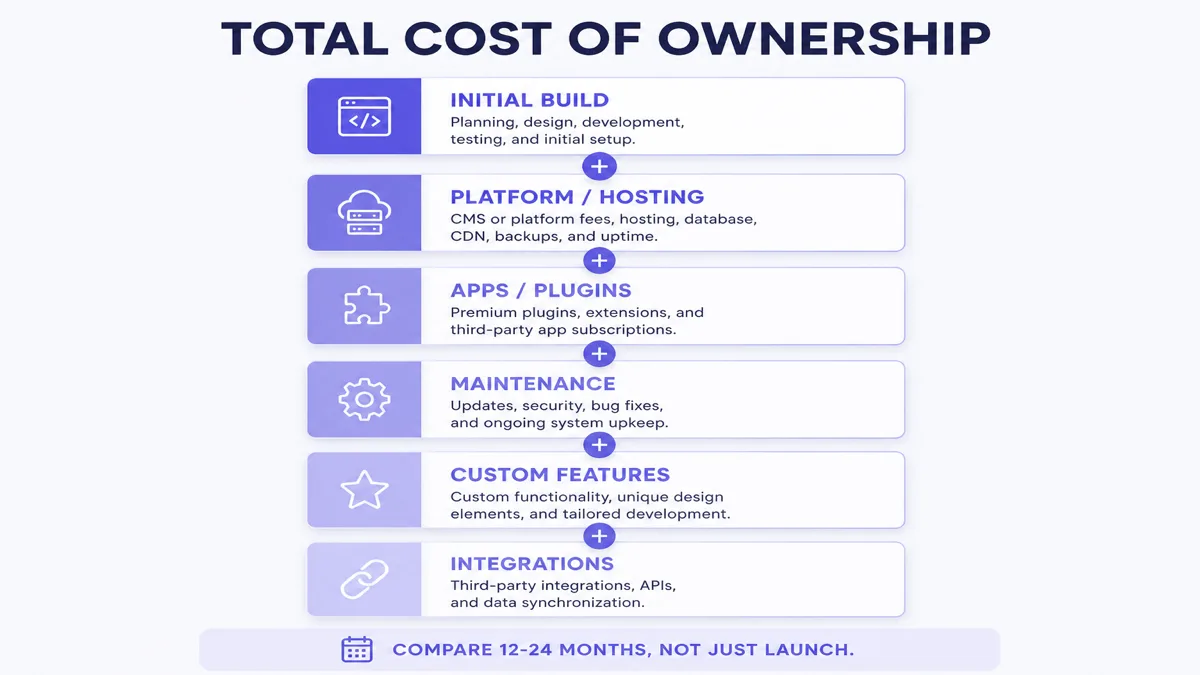
Do not invent a single “best price.” Compare three categories: initial development, recurring platform/infrastructure and ongoing maintenance/development. Do not compare only a development invoice to a monthly subscription.
Evaluate total cost of ownership across development, hosting, subscriptions, apps/plugins, maintenance, security, updates, support, custom features, integrations and future changes — ideally over 12–24 months, not launch week alone.
| Cost type | Shopify | WordPress | Custom |
|---|---|---|---|
| Platform subscription | Yes | Core CMS: no | Usually no commerce SaaS fee |
| Hosting | Included in platform | Required | Required / depends |
| Themes | Optional paid themes | Optional | Design / development |
| Apps / plugins | Often | Often | Custom / integrations |
| Maintenance | Moderate / depends | Ongoing | Ongoing |
| Custom development | Depends | Depends | Usually significant |
| Future features | Apps / custom dev | Plugins / custom dev | Custom development |
Web6 does not publish fixed package prices here because scope drives cost. For ecommerce project bands, see ecommerce website cost in India and Shopify website development cost.
Which platform is faster to launch?
Shopify can often launch standard ecommerce requirements faster because commerce infrastructure already exists. WordPress can be relatively quick for standard content and business websites. Custom development typically needs more discovery and engineering when functionality is unique. Scope still decides timeline — do not treat any platform as a guaranteed launch date.
How does security differ?
No platform is “100% secure.” Shopify handles significant infrastructure and platform security responsibilities. WordPress security is shared across the business, host and developers through updates, access control and hosting hygiene. Custom security depends on architecture, development quality and hosting setup. Payment handling should use reputable providers and platform-supported flows rather than reinvented card storage.
Payments, inventory and B2B
Payment availability depends on business location, provider coverage and platform integrations — verify official documentation for your market rather than assuming a gateway list. Inventory ranges from simple stock to multi-warehouse and ERP-managed manufacturing inventory; complex inventory often needs integration, not just a platform checkbox.
What if you sell B2B?
B2B needs may include company accounts, MOQ, bulk ordering, account-specific pricing, quote requests, purchase orders, credit workflows, sales approvals and ERP sync. Shopify offers B2B capabilities that vary by plan (verify current catalogs and features on Shopify’s pricing and B2B docs). WooCommerce and WordPress can support B2B with extensions or custom code. Highly unusual dealer workflows often justify custom or specialized B2B architecture — see B2B ecommerce development.
Multiple languages and international selling
WordPress has mature multilingual plugin approaches; Shopify supports storefront translation and international selling tools such as Markets (verify current capabilities). Custom systems require multilingual architecture by design. SEO considerations include URL strategy, hreflang where appropriate and translation quality — machine-translated pages are not “localized SEO.” Exporters should also plan currency, markets, shipping and tax at a high level with qualified advisors.
Content management, apps and integrations
WordPress has a strong CMS heritage. Shopify supports pages and blogging but is commerce-first. Custom sites can integrate a headless CMS or custom editor. Apps and plugins reduce custom development but introduce cost, dependencies, updates, performance considerations and compatibility risk — they are tools, not automatically good or bad.
CRM, ERP and API integrations
Fit depends on requirements. Shopify offers APIs and apps; WordPress offers REST APIs, plugins and custom code; custom applications can expose and consume APIs with full architectural control. Proprietary workflows may need custom middleware — but not every ERP sync requires abandoning a platform.
Lead example: Website lead → CRM → sales team — possible on any platform with the right integration. Commerce example: Store → order → integration → ERP → inventory/fulfillment → store status — architecture matters more than the frontend label alone.
Which website platform should your business choose?
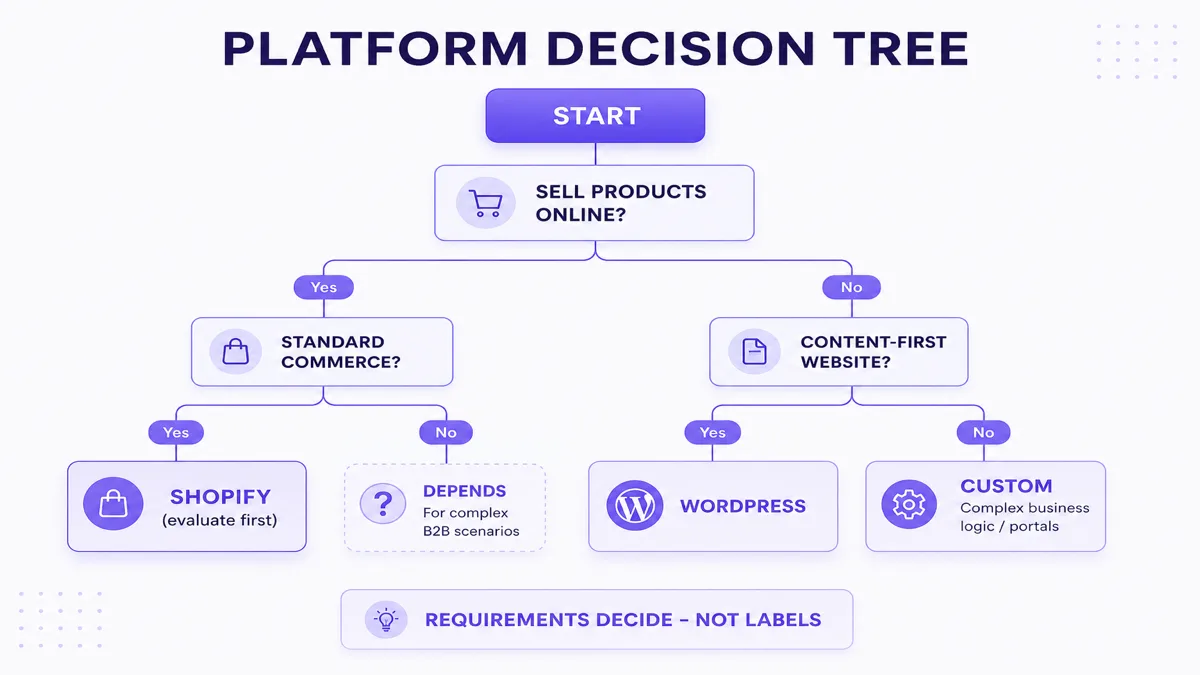
- Standard online store → evaluate Shopify first
- Content-heavy company website → evaluate WordPress
- Highly specialized business logic → evaluate custom development
- B2B portal → compare specialized platform capabilities against custom architecture
- Simple brochure site → avoid unnecessary complexity
- SaaS / software product → a normal CMS or store platform may not be appropriate
10 questions to ask before choosing a platform
- Are you primarily selling products online?
- Do you need customer accounts?
- Do you need custom pricing?
- Do you need ERP/CRM integration?
- Will non-technical users manage content?
- Do you require unusual workflows?
- Is blogging/content central to growth?
- How much ongoing maintenance can you handle?
- Do you expect significant custom functionality?
- Do you need complete backend control?
Mostly “yes” to ecommerce and standard checkout → lean Shopify. Mostly “yes” to content and editorial control → lean WordPress. Mostly “yes” to unusual workflows, portals and backend control → lean custom. Mixed answers → hybrid evaluation (platform + targeted custom work).
Recommendation starting points by business type
| Business type | Start by evaluating |
|---|---|
| D2C fashion brand | Shopify |
| Corporate / service website | WordPress or custom |
| Textile catalogue / exporter | WordPress or custom |
| Complex B2B textile portal | Custom or specialized B2B platform |
| Standard ecommerce store | Shopify / WooCommerce |
| Manufacturer website | WordPress or custom |
| SaaS product | Custom |
| Customer / dealer portal | Custom |
| Content publication | WordPress |
| Simple local business website | WordPress or lightweight custom |
These are starting points — not “always choose” rules.
Shopify vs WordPress: which is better?
Shopify is generally easier to evaluate first for ecommerce-first businesses that want a managed commerce platform. WordPress is generally stronger as a flexible content management system and can support ecommerce through WooCommerce. Neither is universally better. Requirements determine the answer.
Custom website vs WordPress: which should you choose?
Choose WordPress when its CMS and ecosystem handle the requirements effectively. Consider custom when data architecture, backend workflows, performance architecture, integrations or application functionality require something significantly different from a CMS-plus-plugins model.
Custom website vs Shopify: which should you choose?
Evaluate Shopify first for standard ecommerce. Evaluate custom when commerce is only one part of a much more specialized business application or workflow — or when you are building a non-commerce system entirely. Custom is not automatically superior; it is a different ownership model.
10 mistakes businesses make when choosing a website platform
- Choosing based only on development price
- Choosing technology before requirements
- Overbuilding a simple site
- Underestimating integrations
- Ignoring maintenance
- Ignoring recurring costs
- Selecting plugins/apps without evaluating dependencies
- Ignoring SEO architecture
- Ignoring ownership and access
- Planning only for launch and not future changes
Do not choose based only on agency preference
A developer may naturally recommend the stack they know. Ask why the platform is recommended for your requirements — functionality, cost, maintenance, scalability, integration and business goals — not comfort with a familiar toolchain.
Can you change platforms later?
Yes, but migration has cost and SEO implications. Typical migration items include products, customers, orders, pages, blogs, images, URLs, metadata, redirects, analytics and integrations. Preserve important URLs where practical, map redirects, review canonicals, verify internal links, submit a sitemap, monitor Search Console and test analytics. Migration does not guarantee unchanged rankings.
Website platform checklist
Before choosing:
- Define website goal
- List required pages
- List ecommerce needs
- Define custom workflows
- Define integrations
- Define CMS requirements
- Define SEO requirements
- Define content plan
- Define expected traffic
- Define user roles
- Define maintenance responsibility
- Calculate recurring costs
- Understand platform limitations
- Clarify ownership
- Plan future features
Need help choosing the right website platform?
Web6 builds across custom website development, Shopify development, ecommerce development, B2B ecommerce, SEO and CRM/ERP integrations. That mix lets the recommendation follow project requirements rather than forcing every brief into one stack. The appropriate approach should still be based on the project — not on a single preferred tool.
Not sure which platform fits your business?
Share your website goals, required features, ecommerce needs and integrations. The platform decision should follow the requirements — not the other way around.
Discuss your website requirements · Explore Shopify development
Frequently asked questions
Which website platform is best for a business?
There is no universal best platform. Choose based on business model, ecommerce needs, content needs, custom workflows, integrations, budget and maintenance capacity.
Is Shopify better than WordPress?
Shopify is usually stronger for ecommerce-first businesses that want managed commerce. WordPress is usually stronger as a flexible CMS for content and company websites. Requirements decide the winner.
Is WordPress better than a custom website?
WordPress is often better when CMS and ecosystem fit the brief. Custom is better when proprietary workflows, portals or backend architecture go beyond a CMS-plus-plugins model.
Is Shopify better than a custom ecommerce website?
For standard D2C commerce, Shopify is often the better starting point. Custom ecommerce fits proprietary commerce models and deep operational software needs. See the ecommerce platform comparison for detail.
Which platform is best for SEO?
None ranks automatically. Google ranks useful pages. Shopify, WordPress and custom sites can all perform well when crawlability, content, structure and performance are implemented correctly.
Which platform is best for a Surat textile business?
D2C fashion often starts with Shopify. Catalogue/exporter sites often evaluate WordPress or custom. Complex B2B portals often need custom or specialized B2B architecture.
Is Shopify suitable for B2B businesses?
Shopify has B2B capabilities that vary by plan and complexity. Simple B2B catalogs may fit; unusual dealer, credit or approval workflows may need Plus features, custom apps or a different architecture. Verify current Shopify B2B docs.
Is WordPress suitable for ecommerce?
Yes, typically via WooCommerce or related commerce stacks. It can work well, especially for content-heavy commerce, but hosting, plugins and maintenance responsibility are higher than on a hosted commerce platform.
Which platform requires the least maintenance?
Shopify usually reduces infrastructure maintenance for standard stores, but theme, apps and integrations still need care. WordPress and custom usually require more ongoing operational ownership.
Which option costs the most?
It depends on scope and total cost of ownership. Custom engineering often costs more upfront. Shopify and WordPress can become expensive through apps, plugins, maintenance and future changes. Compare 12–24 month TCO, not launch invoices alone.
Can I migrate from WordPress to Shopify later?
Yes, with planning. Expect work on products, content, URLs, redirects, apps and integrations. SEO can be protected with careful redirects — not guaranteed unchanged rankings.
When should a business choose custom website development?
When proprietary workflows, portals, unusual data models, deep integrations or application functionality are central — and the team can fund ongoing ownership. Do not choose custom only because it sounds more premium.