
Shopify Apps
How to Integrate Shopify with ERP, CRM or Custom APIs
Written by Web6 Editorial Team · Published 12 August 2026 · 33 min read
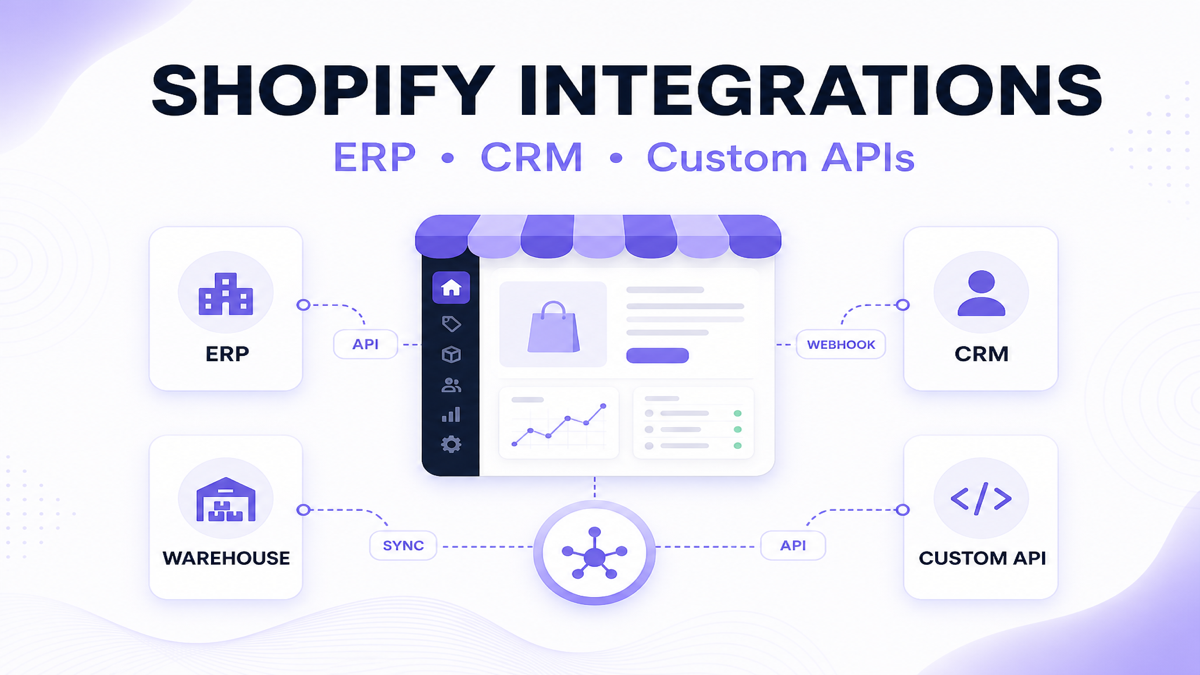
A Shopify store often stops operating as an isolated ecommerce platform once the business grows. Orders may need to reach an ERP, inventory may come from a warehouse system, customer activity may need to update a CRM, and internal tools may require Shopify data. The challenge is not just moving data — it is deciding who owns each piece of information and keeping every system synchronized when something changes.
How do you integrate Shopify with ERP, CRM or another API?
Shopify can integrate with ERP, CRM, and external systems using its APIs, webhooks, Shopify apps, middleware/iPaaS, or a custom integration service. A typical integration listens for events (for example, order or customer changes), transforms the Shopify payload into the format required by the external system, sends it via an API, and records whether synchronization succeeded. The “right” approach depends on data volume, workflow complexity, how quickly you need updates, and how much custom business logic is involved.
Key takeaways
- Define the system of record before building.
- Use webhooks for event-driven updates where it fits your workflow.
- Use APIs for reads/writes and for scheduled reconciliation/backfills.
- Build retries and idempotency from the start.
- Existing connectors/middleware are often enough for standard workflows.
- Custom app/integration work is best when business logic and data mapping are unique.
What can Shopify integrate with?
Shopify integration patterns are common across B2B and D2C operations. The exact data exchanged depends on your architecture and system-of-record choices.
| System | Typical data exchanged | Why connect it |
|---|---|---|
| ERP | Orders, customers, invoices, payments/status, product master, stock | Run finance, purchasing, fulfillment and accounting from a single operational backbone |
| CRM | Customer profiles, leads, opportunities, account notes, sales stages | Keep sales and support context aligned with what happened on Shopify |
| Warehouse / WMS | On-hand stock, reserved stock, allocations, fulfillment status | Avoid overselling and improve picking/packing accuracy |
| Accounting | Invoice references, taxes, refunds/credits, payment settlement | Reduce manual reconciliation work and keep reports consistent |
| Shipping / Courier | Labels, tracking, shipment events | Improve delivery visibility and customer communication |
| POS | Orders/orders events, inventory adjustments | Unify store and in-store sales operations |
| Marketing automation | Segments, purchase events, lifecycle signals | Trigger campaigns based on real customer behavior |
| Custom internal software | Custom workflows, internal dashboards, approvals, data exports | Enable business-specific processes that standard apps can’t model |
Four ways to integrate Shopify with external systems
Most integrations fall into one of these patterns. Choose based on data ownership, workflow fit, and how much custom logic you need.
1) Native Shopify or partner integrations
Best for: standard workflows where the connector already matches your data model. Advantage: faster setup. Trade-off: limited customization when your business rules differ.
2) Middleware / iPaaS
Best for: mapping and routing between systems without building a full integration service. Advantage: reusable flows across many apps. Trade-off: complex transformations can become hard to maintain as volume grows.
3) Custom Shopify app
Best for: business-logic-heavy workflows and admin tools. Advantage: you can build a UI, enforce rules, and own transformation logic. Trade-off: more build and maintenance responsibility.
4) Direct API integration
Best for: custom integration services where you control scheduling, queues, and reconciliation. Advantage: full control over reliability patterns. Trade-off: you must implement event handling, retries, and monitoring correctly.
Comparison table: middleware vs custom app vs direct API
| Approach | Best for | Setup speed | Flexibility | Maintenance | Custom logic |
|---|---|---|---|---|---|
| Native connector | Standard connectors and common workflows | Fast | Medium | Lower | Low to medium |
| Middleware | Routing + transformation between multiple systems | Medium | Medium to high | Medium | Low to high |
| Custom app | Unique rules + merchant-facing admin workflow | Slower | High | Shared (you + dev team) | High |
| Direct API integration | Full control: reliability, queues, and reconciliation | Slower | High | Higher | High |
How Shopify ERP integration works
In most ERP integrations, Shopify and ERP share a boundary of responsibility. Exact ownership depends on your system of record.
Shopify → ERP
- Orders
- Customers
- Discount information
- Tax information (where your workflow captures it)
- Payments/status
- Returns/refunds
- Fulfillment requests
ERP → Shopify
- Inventory
- Product data (where required)
- Pricing (especially for account-based models)
- Fulfillment status and delivery updates
- Order status back to Shopify (when needed)
- Availability signals
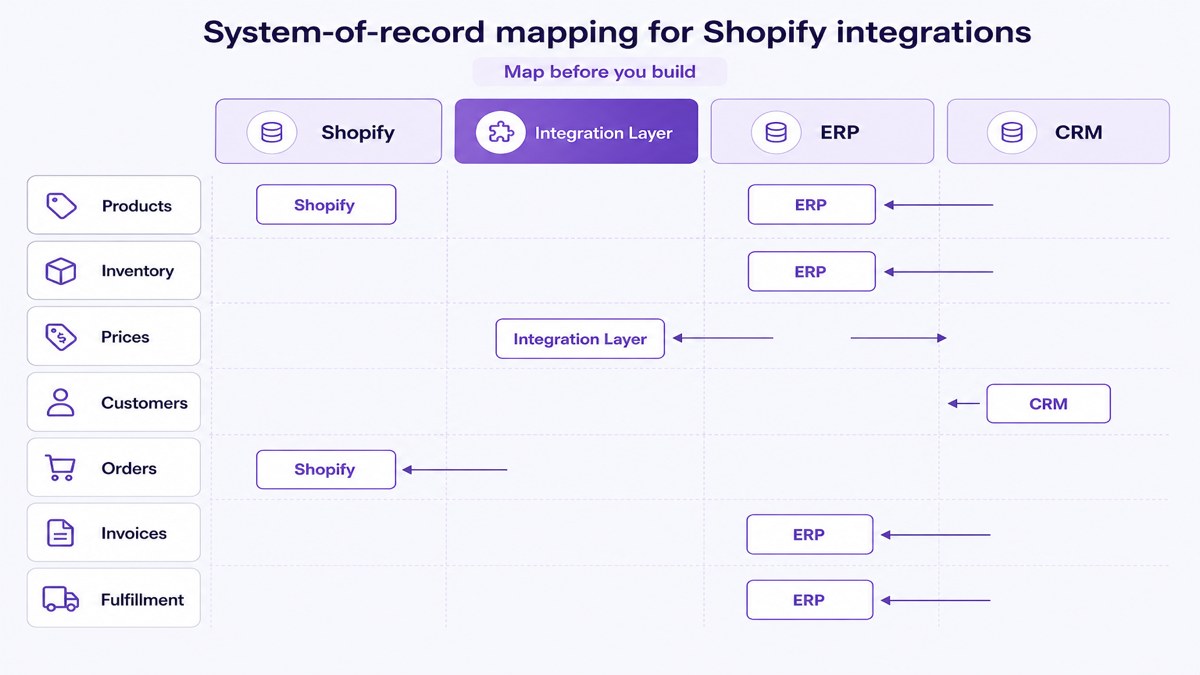
Decide the system of record before writing integration code
A reliable integration begins with clarity. For each data type, decide which system is the source of truth.
| Data type | Common ownership options | What can go wrong if unclear |
|---|---|---|
| Products / SKUs | ERP or Shopify | Catalog drift and mapping errors |
| Inventory | ERP/WMS or Shopify | Overselling and wrong availability |
| Prices | ERP/CRM or Shopify | Wrong wholesale or promo pricing displayed |
| Customers | CRM or Shopify | Duplicate customer records and mismatched identity |
| Orders | ERP or Shopify | Duplicate fulfillment requests or missed cancellations |
| Invoices / accounting events | ERP/accounting | Reconciliation effort and reporting inconsistencies |
| Returns / refunds | ERP/accounting or Shopify | Refund loops and inconsistent return states |
| Fulfillment | WMS/ERP or Shopify | Picking/packing mismatch and shipping confusion |
How Shopify CRM integration works
A CRM integration is not only about “sync customers.” It often supports sales processes that happen off the storefront.
- Customer creation/update
- Customer segments and account grouping
- Order history context for customer support and sales
- Inputs for lifetime value or engagement scoring
- B2B leads and enquiry capture
- Sales rep ownership and assignment rules
- Quote/referral workflows where appropriate
- Support context (order/customer notes) where permitted
Important nuance: not every Shopify customer should automatically become a live CRM sales opportunity. Your CRM team may need rules such as order thresholds, customer intent signals, or account eligibility.
Zoho CRM example (illustrative)
Many teams use Zoho as a central sales/relationship platform. A common pattern is:
- Shopify customer/order event → integration service → Zoho Contact / Account / Deal (as appropriate)
- Zoho account update (for example stage, notes, owner) → integration service → Shopify tags/metafields (only when it matches your workflow)
Link to related build work: Zoho CRM development.
How to connect Shopify with a custom API
When you connect Shopify to a proprietary warehouse platform, custom pricing engine, or internal middleware, you’re building (or configuring) an integration layer.
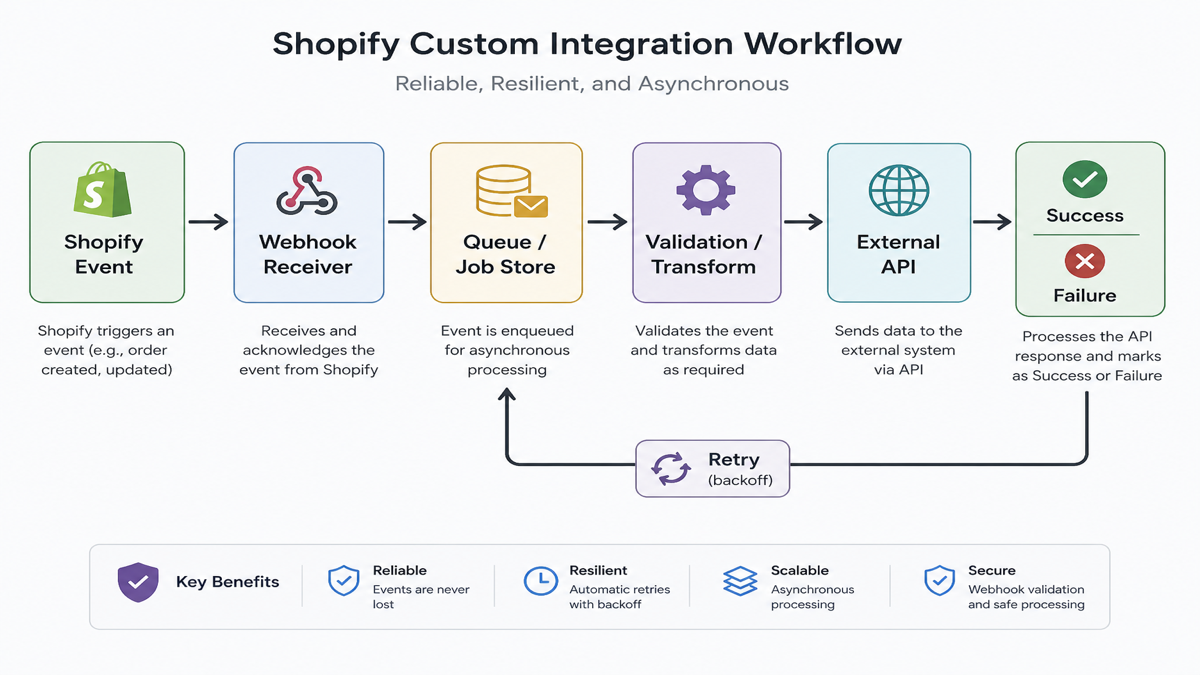
Generic architecture:
- Shopify event
- Webhook receiver
- Integration service / custom app
- Validation + transformation
- External API call
- Result + logging
- Retry or reconciliation when needed
You can also do scheduled synchronization. The key is to keep the workflow reliable by design: queueing, idempotency, and backfills.
When to use Shopify webhooks
Webhooks are useful when you want the integration to be notified that something changed — for example, an order was created/updated, a customer record changed, product information changed, or fulfillment-related events happened (where supported by Shopify).
Webhooks are not a full synchronization system by themselves. If an event is missed, or an external API is temporarily down, you still need retries and reconciliation.
When to use Shopify APIs
APIs are useful for querying data, creating/updating resources, and reconciling differences between systems. Typical reasons to use APIs include:
- Backfills after missed webhook events
- Scheduled sync jobs for inventory/product catalog updates
- Recovering from partial failures (for example, retrying only failed records)
- Building admin views (what was sent, what failed, and what is still pending)
Why modern Shopify integrations use GraphQL
Many modern integrations use GraphQL because it helps you request exactly the fields you need, reduce unnecessary payload, and stay resilient as Shopify’s API evolves. GraphQL can also support patterns like “query the minimal set of fields required for processing,” which simplifies transformation logic and reduces the chance of mapping mistakes.
Map data before integrating systems
Mapping prevents inconsistent records and avoids “mystery differences” during reconciliation.
| Shopify field | ERP/CRM field | Transformation | Owner |
|---|---|---|---|
| SKU | Item code | Normalize format and verify variant mapping | Integration layer |
| Customer email | Contact email | Lowercase/trim; handle missing emails | System of record decision |
| Order ID | External order reference | Store immutable reference for idempotency | ERP/Integration |
| Variant ID | ERP line item key | Maintain ID mapping table | Integration layer |
| Inventory quantity | On-hand / available stock | Apply reserved/safety stock rules | Inventory owner |
| Price | Accounting price and customer pricing | Tax/discount split if required | Pricing owner |
| Shipping method | Carrier/service code | Map to internal carrier list | Fulfillment owner |
Use stable identifiers, not names
Names change. Titles get updated. Emails can be missing or edited. Integrations should rely on stable identifiers and maintain mapping tables.
Bad identifier: Product title
Better identifiers: SKU, Shopify resource ID, external ERP ID, CRM record ID
Mapping tables let you connect entities even when display fields evolve.
How to synchronize Shopify inventory safely
Inventory sync is where overselling risk becomes real. Treat inventory like a controlled system:
- Single source of truth: define which system owns stock numbers
- Multiple locations: map Shopify inventory levels to warehouse/store locations
- Reserved stock: decide whether “available” includes reservations
- Safety stock: apply buffers so fulfillment doesn’t run out
- Update direction depends on architecture (ERP/WMS → Shopify is common)
- Sync delays and eventual consistency: design for short lags
If your warehouse processes orders with reservations, your integration needs to represent that state so Shopify availability reflects what can actually be fulfilled.
How to send Shopify orders to ERP or other systems
Order sync requires more than “order created.” Your integration needs to understand what the external system expects at each lifecycle step.
- Order creation + line items
- Discounts, tax, and shipping details
- Customer and account references
- Payment status and confirmation requirements
- Fulfillment status and shipping updates
- Cancellations and refund/credit events
Some workflows require payment verification or manual approval before you request fulfillment. Your integration should encode those business states.
Prevent duplicate orders with idempotent integration design
Webhooks can be delivered more than once, and API calls can be retried after uncertain outcomes. If your integration processes the same event twice, you can create duplicate ERP orders or multiple fulfillment requests.
Idempotency means “process the same event again, but end up with the same final result.” A common processing key is the Shopify order ID plus the event type.
What happens when ERP or CRM APIs are unavailable?
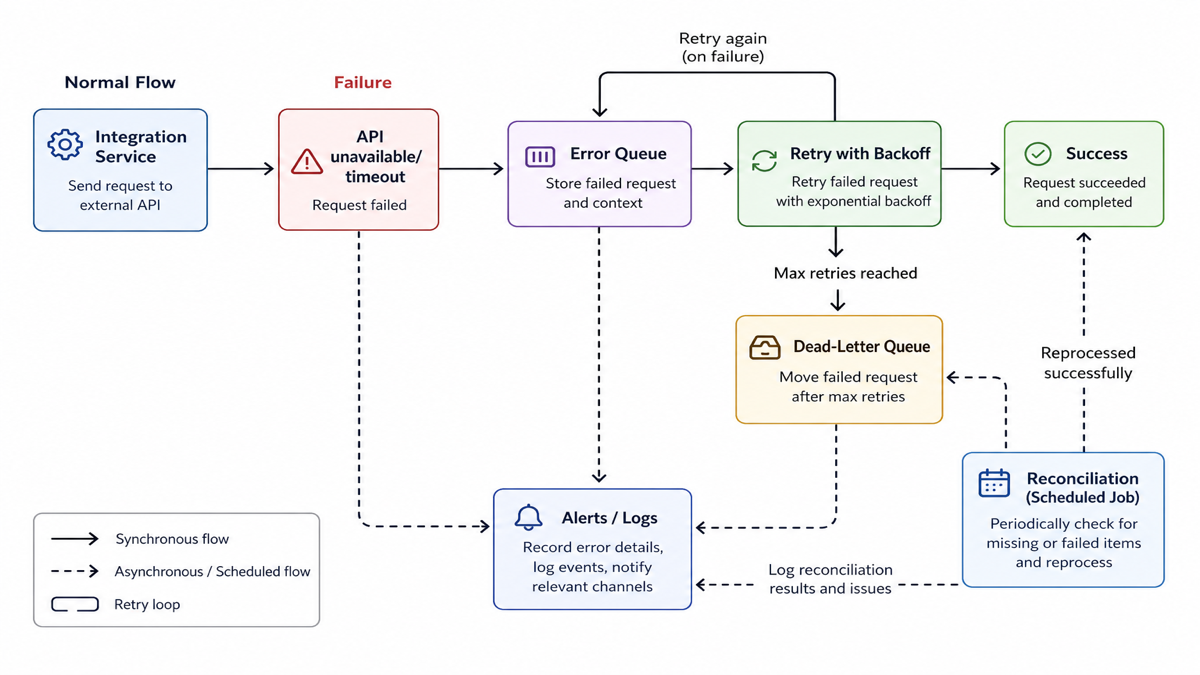
External systems fail sometimes. Your integration should assume failure and handle it with:
- a queue for pending work
- retry attempts with backoff
- clear error states for manual recovery
- optional dead-letter handling for records that consistently fail
- alerts for persistent issues
Webhooks are not enough — add reconciliation
Reconciliation is a scheduled comparison between systems. It helps you catch:
- missing webhook events
- records that failed during an API call
- out-of-sync states caused by data mapping changes
Example: every few hours, compare recent Shopify orders against ERP sync records, then reprocess anything missing or failed.
Rate limits: design for batching and efficient syncing
Shopify APIs and external APIs usually enforce rate limits. Integrations should reduce unnecessary polling, batch work where possible, cache safely, and avoid requesting data repeatedly when it can be stored and reused.
Real-time vs scheduled sync: use the right pattern for each data type
| Data | Recommended pattern | Why |
|---|---|---|
| Orders | Near real-time | Fulfillment deadlines and operational processing require freshness |
| Inventory | Near real-time / event-driven depending on source | Avoid overselling by reflecting warehouse changes quickly |
| Product catalog | Scheduled or event-driven | Catalog changes are not usually “urgent second-by-second” |
| Analytics | Batch | Aggregations are expensive; run on schedules |
| CRM enrichment | Near real-time or batch | Update sales context quickly, but do not overload every event |
“Real-time everything” is often unnecessary and expensive. Reliability patterns (idempotency, retries, reconciliation) usually matter more than raw speed.
One-way vs two-way synchronization (and why it matters)
Two-way sync can create loops: Shopify changes price, ERP changes price, and systems fight for “what is correct.” If you truly need two-way sync, you need precedence rules, timestamps, and a conflict strategy.
In many cases, a pragmatic approach is one-way ownership per data type, with Shopify/ERP/CRM states reconciled periodically.
Should you use middleware or a custom Shopify app?
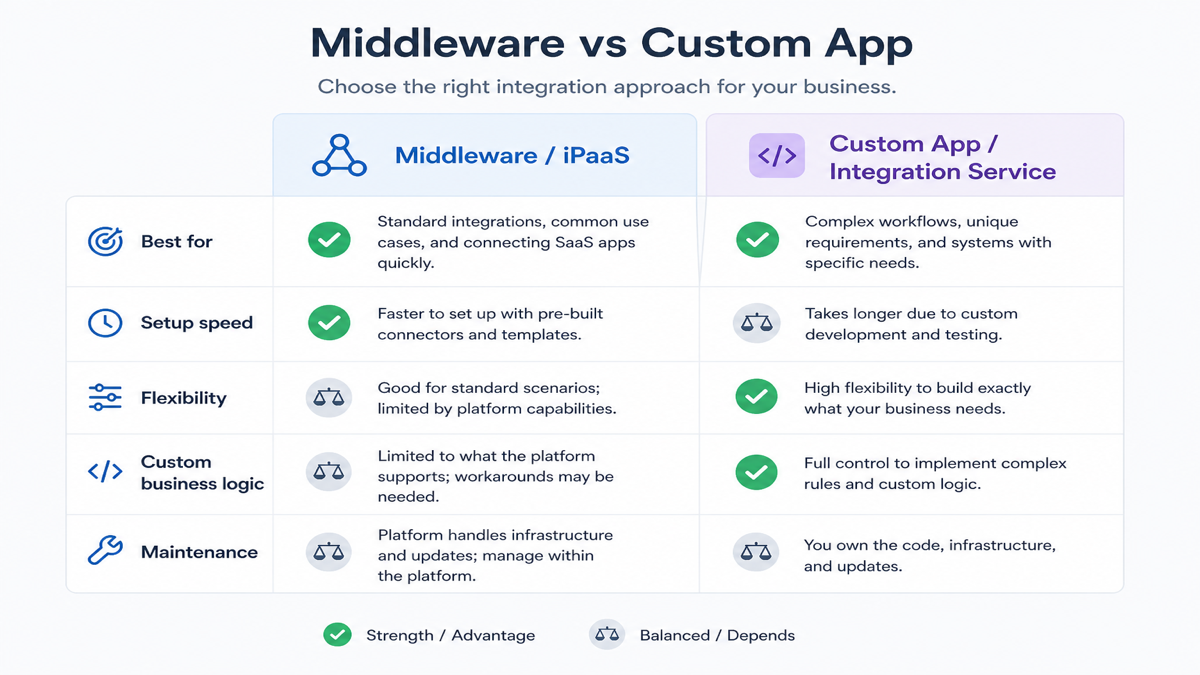
Middleware works well when:
- you have standard connectors
- transformations are relatively simple
- workflows are common and predictable
- speed requirements are moderate
Custom app/integration work becomes more useful when:
- business logic is unique
- you need custom admin UI for operators
- volume is high
- you require complex mapping and failure recovery
- you need merchant-specific sync rules and monitoring
For broader app capability context, see Shopify app development.
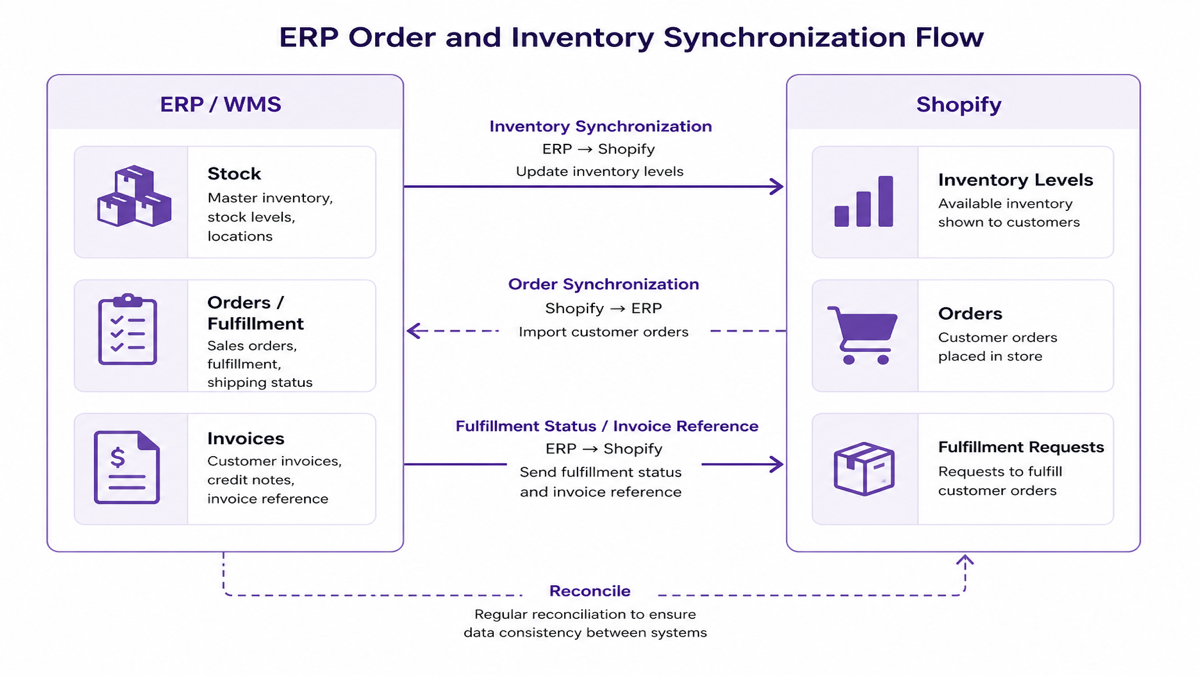
Example: ERP order/inventory responsibilities (illustrative)
In one common pattern, a manufacturer keeps:
- ERP/WMS owns: SKU master, stock, and invoices
- Shopify owns: storefront merchandising, cart/checkout, and customer-facing order tracking
Integration flow:
- ERP/WMS stock → integration → Shopify inventory levels
- Shopify order → integration → ERP order request
- ERP fulfillment status/invoice reference → integration → Shopify fulfillment visibility
Exact responsibilities depend on your system-of-record decision and operational state model.
Example: CRM customer context for B2B (illustrative)
In a B2B store, Shopify captures account and order events. The CRM may manage:
- sales rep assignment
- lead stage and follow-up schedules
- account notes and quotation context
A reliable integration passes the right context to CRM, but it should not blindly create CRM deals for every customer. Use rules tied to account eligibility or order thresholds.
Example: custom warehouse API integration (illustrative)
Suppose a Shopify store needs to send orders to a proprietary warehouse platform. The flow might look like:
- Order event → webhook → integration service
- Validate and transform payload
- Send to warehouse API
- Store warehouse order/reference
- Fulfillment callback/status → Shopify
Monitoring and retry handling are critical because warehouse APIs can temporarily time out or reject requests.
B2B integration considerations
B2B integrations often require more than “order to ERP.” Typical needs include:
- customer-specific pricing and account eligibility
- credit terms and payment/account rules
- account approvals and sales rep ownership
- purchase order references
- ERP customer accounts and wholesale inventory availability
Related: B2B ecommerce development.
India-focused note: order-risk workflows (COD)
Some stores use order-risk rules to decide what can ship on COD vs prepaid. In those cases, order sync to ERP/warehouse may need business-state checks (for example, confirmation conditions) before fulfillment. This is an integration design choice, not only a storefront setting.
Security requirements for Shopify integrations
- Minimum permissions: grant only the scopes required for your workflow
- Secure authentication: use OAuth/auth flows where applicable
- Webhook verification: validate requests so you don’t accept forged events
- HTTPS everywhere and secret storage for credentials
- PII minimization: sync only the data required for each workflow
- Audit logging: keep traceability for sync actions and failures
Data privacy basics
Do not sync customer data simply because an API allows it. Sync only the data needed for the workflow, define retention rules, and ensure access is controlled for the team who manages the integration.
Monitor integrations after launch
Without observability, integration support becomes slow and expensive. At minimum, track:
- successful syncs
- failed syncs
- retry counts and queue depth
- sync delays and end-to-end processing time
- API error categories
- record mismatches for reconciliation
When is a custom admin dashboard useful?
A merchant-facing integration dashboard can be valuable when operators need to understand what happened and fix issues quickly. Typical features include last sync status, failed record list, mapping health indicators, retry buttons, and clear documentation for “who owns this failure.”
Common Shopify integration mistakes
- Starting integration development before defining system-of-record ownership
- Using product names instead of stable identifiers and mapping tables
- No duplicate protection (idempotency)
- Treating webhooks as guaranteed one-time events
- No retry strategy for external API failures
- Polling too frequently and creating unnecessary load
- Building two-way sync without precedence and conflict handling
- Not handling cancellations/deletions/refunds consistently
- No reconciliation/backfill plan
- No monitoring or alerting
- Hardcoding mappings that break when catalogs change
- No API version upgrade plan
Shopify integration implementation checklist
- [ ] Define systems involved
- [ ] Define system of record per data type
- [ ] Define sync direction
- [ ] Map stable identifiers and store ID mapping tables
- [ ] Define triggers (webhooks/events and/or scheduled sync)
- [ ] Define transformation rules
- [ ] Plan authentication and permissions
- [ ] Verify API limits and avoid unnecessary polling
- [ ] Add idempotency keys
- [ ] Add retries with backoff
- [ ] Add reconciliation and backfill
- [ ] Add logs and alerts
- [ ] Define failure ownership and escalation path
- [ ] Test duplicates, partial failures, and missed events in staging
- [ ] Document API versions and maintenance responsibility
Integration architecture (business-friendly)
Failure handling: retries and reconciliation work together
Frequently asked questions
Can Shopify integrate with an ERP?
Yes. Shopify ERP integration is usually implemented by sending orders and customer/account data to ERP, and syncing inventory and fulfillment status back to Shopify. Reliable integrations decide which system owns each data type, then use webhooks/events for changes and APIs for reconciliation/backfills.
Can Shopify integrate with a CRM?
Yes. Shopify CRM integration typically syncs customers, orders context, and sales workflow signals to CRM. A good design avoids flooding CRM with deals for every customer and instead uses rules (for example, B2B account eligibility or order thresholds) aligned with how your sales team works.
Can Shopify connect to a custom API?
Yes. A Shopify integration layer can receive webhooks for events, transform data into your custom API format, call your API, and log results. Because external APIs can fail, you also need idempotency, retry handling, and scheduled reconciliation so duplicates and gaps don’t build up.
What data can Shopify send to an ERP?
Common categories include orders, customer references, discounts, taxes, payment/status information, return/refund events, and fulfillment requests. The exact fields depend on your integration mapping and what ERP expects at each lifecycle step.
How are Shopify webhooks used in integrations?
Webhooks notify your integration that a specific event happened (for example, an order or customer changed). They are event-driven signals — they are not a complete sync mechanism on their own. For reliability, pair webhooks with retries and reconciliation so missed events don’t leave systems out of sync.
Should I use middleware or build a custom Shopify app?
Use middleware when your workflow is standard and transformations are manageable. Choose a custom app/integration when you need unique business logic, complex mapping, custom admin workflows, or advanced failure recovery. In both cases, reliability patterns like idempotency and reconciliation still matter.
How do I keep Shopify inventory synchronized?
Start by defining the system of record for inventory and mapping Shopify inventory levels to ERP/WMS locations. Then sync stock updates using event-driven updates or scheduled jobs, and apply reserved/safety stock rules to prevent overselling. Regular reconciliation helps correct drift.
How do I prevent duplicate orders during integration?
Implement idempotency. Use a stable processing key such as Shopify order ID plus event type, store the result, and make repeated webhook deliveries or retries resolve to the same final ERP outcome. This prevents duplicate fulfillment requests and double accounting events.
What happens when an external API is unavailable?
Your integration should queue the work, retry with backoff, and record failures for manual recovery when needed. For repeated failures, you can use a “dead-letter” style flow and trigger alerts. Scheduled reconciliation ensures anything that failed earlier still gets corrected.
How much does a custom Shopify integration cost?
Integration cost depends on complexity: how many systems are involved, how unique your data mapping and approval workflows are, the volume of events, and the reliability features you need (queues, idempotency, retries, reconciliation). Many stores start with existing connectors/middleware and only move to custom integration when integration gaps cause operational pain.
Next steps
A Shopify integration is not just “connect API A to API B.” It is a reliability system built on clear ownership, correct mapping, and failure recovery. If you’re planning a multi-system workflow, start by defining system-of-record per data type, then design webhooks/events plus APIs for backfills and reconciliation.
If you need to build or modernize integration software, review ERP development, custom CRM development, and Shopify app development.
Related example: manufacturing CRM development and custom Shopify app development.