
Ecommerce
25 Must-Have Features for a Successful Ecommerce Website
Written by Web6 Editorial Team · Published 21 August 2026 · 24 min read
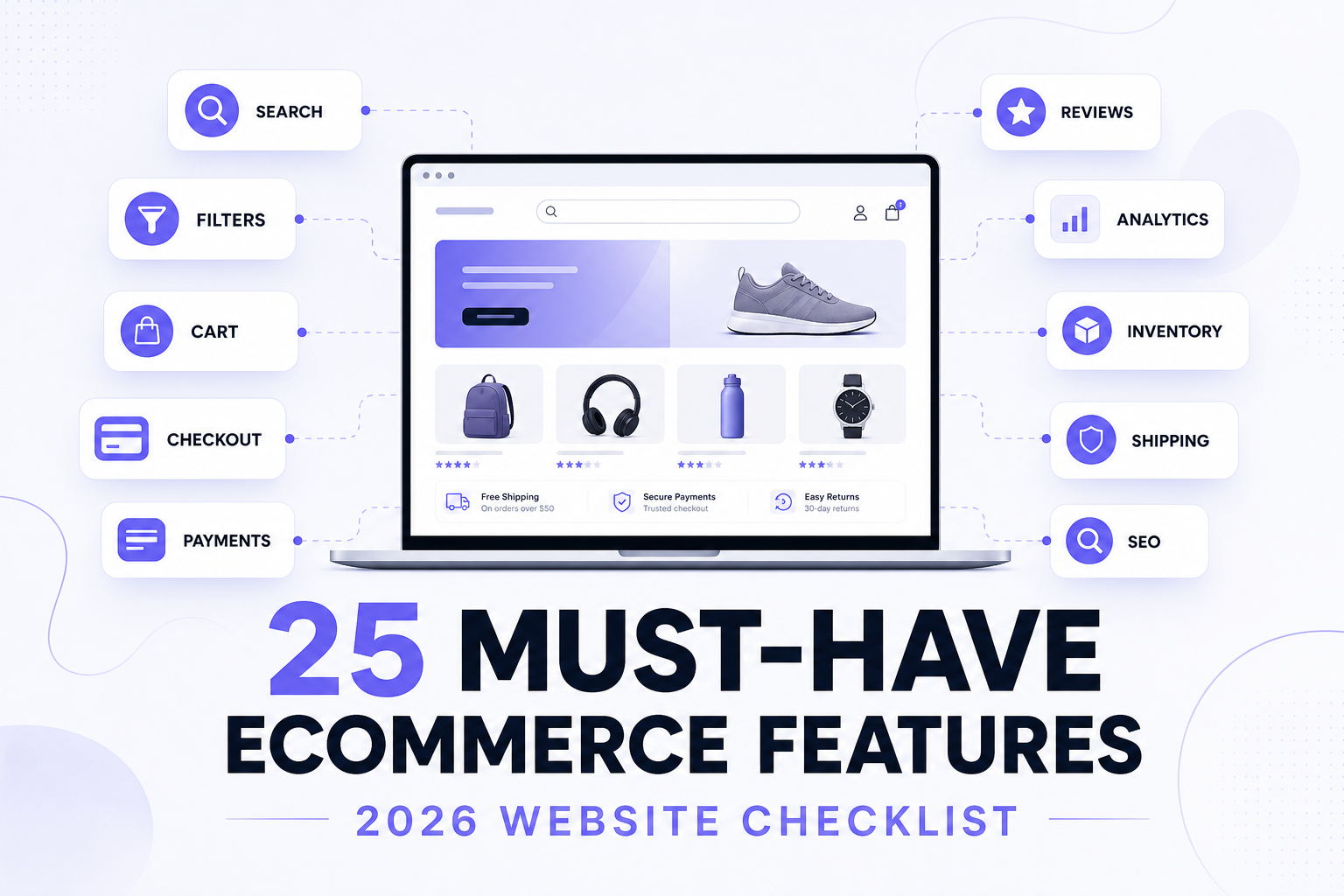
A successful ecommerce website needs more than attractive product pages and a payment gateway. Customers must be able to discover the right product, evaluate it confidently, complete checkout with minimal friction and receive clear information throughout the buying journey.
At the same time, the business needs reliable inventory, analytics, SEO, integrations, security and an architecture that can grow. This guide breaks those requirements into 25 practical ecommerce features — with priority labels, MVP versus phase-two thinking, and a checklist you can hand to a developer.
What features should an ecommerce website have?
Most successful online stores share a core feature set: mobile-responsive design, clear navigation, site search, product filters, strong product pages, variants where needed, inventory visibility, cart, checkout, payments, shipping information, customer accounts or guest checkout, reviews, wishlist, promotions, order tracking, SEO foundation, structured data, performance, security, analytics, marketing integrations, and — when operations require it — ERP/CRM connections plus an architecture that can scale. Not every business needs every advanced feature at launch. The right ecommerce feature set depends on business model, products, catalog size, customers, fulfillment, integrations and whether you sell B2C, D2C or B2B.
How to read feature priority
Essential — required for most ecommerce stores. Growth — useful as traffic, catalog or repeat purchase grows. Advanced — required only for certain business models or operational requirements (B2B, multi-warehouse, deep ERP). Do not treat all 25 as day-one must-haves.
Quick feature checklist
| # | Ecommerce feature | Priority | Primary purpose |
|---|---|---|---|
| 1 | Mobile-responsive design | Essential | UX |
| 2 | Clear navigation | Essential | Discovery |
| 3 | Site search | Essential (small catalogs: depends) | Discovery |
| 4 | Product filtering | Essential / Growth | Discovery |
| 5 | Strong product pages | Essential | Conversion |
| 6 | Product variants | Depends on catalog | Catalog |
| 7 | Inventory visibility | Essential | Operations |
| 8 | Shopping cart | Essential | Conversion |
| 9 | Streamlined checkout | Essential | Conversion |
| 10 | Multiple payment options | Essential | Checkout |
| 11 | Shipping & delivery information | Essential | Checkout |
| 12 | Customer accounts | Growth | Retention |
| 13 | Guest checkout | Essential where supported | Conversion |
| 14 | Reviews & ratings | Growth | Trust |
| 15 | Wishlist / save for later | Growth | Retention |
| 16 | Promotions & discounts | Growth | Marketing |
| 17 | Order tracking | Essential / Growth | Post-purchase |
| 18 | SEO foundation | Essential | Discovery |
| 19 | Structured data | Essential | Search |
| 20 | Performance optimization | Essential | UX |
| 21 | Security & privacy | Essential | Trust |
| 22 | Analytics & conversion tracking | Essential | Measurement |
| 23 | Marketing integrations | Growth | Acquisition |
| 24 | ERP / CRM / operations integration | Advanced | Operations |
| 25 | Scalable architecture | Essential (keep simple) | Growth |
1. Mobile-responsive ecommerce design Essential
What: Layouts and interactions that work on phones, tablets and desktops. Why: Customers browse, search, filter, view products, pick variants, add to cart and check out on small screens. How: Responsive grids, readable type, adequate touch targets, usable mobile menus, correctly sized images, and a checkout that does not require pinch-zoom. Sticky add-to-cart can help on long PDPs if it does not hide content. When: Every store. Mistakes: Desktop-only mega menus dumped into a tiny drawer; tap targets too small; checkout fields that trigger zoom.
2. Clear product and category navigation Essential
What: A shop hierarchy customers understand — typically Home → Category → Subcategory → Product, plus breadcrumbs. Why: Navigation is how most shoppers discover without using search. How: Organize by how people shop, not internal SKU codes. Use mega menus only when the catalog justifies them. Keep mobile nav shallow. When: Every store with more than a handful of products. Mistakes: Extremely deep trees, duplicate categories, or hiding bestsellers behind “Shop.”
3. Fast and accurate ecommerce site search Essential for larger catalogs; depends for tiny stores
What: On-site search that finds products by name, brand, SKU, synonym or typo. Why: Intentional shoppers in larger catalogs often search first. How: Autocomplete, typo tolerance, SKU/brand matching and product/category suggestions. Semantic or AI search only if it measurably improves findability — not because it is fashionable. When: Medium and large catalogs; optional for a 20-SKU boutique with excellent nav. Mistakes: Search that ignores SKUs, returns empty results for common misspellings, or indexes junk pages.
4. Useful product filters and sorting Essential / Growth
What: Facets such as price, size, color, brand, availability, material, rating and product-specific attributes, plus sort by price, newest, popularity or relevance. Why: Filters turn a large collection into a shortlist. How: Show only facets that exist in the current result set. Decide crawl/index/canonical strategy for filter URLs deliberately — uncontrolled combinations can create index bloat. There is no one universal SEO rule for every catalog. When: Fashion, electronics and any multi-attribute catalog. A tiny uniform catalog may wait. Mistakes: Empty filter options, indexing every parameter combo, or filters that reset on every click.
5. Product pages that answer buying questions Essential
What: A PDP with title, price, images (and video where useful), variants, availability, description, specifications, size/shipping/return information, reviews, add to cart and related products. Why: Product pages reduce uncertainty; pretty layouts alone do not. How: Answer “what is it, will it fit, when will it arrive, can I return it?” Multiple angles, zoom, high-resolution images, variant-specific media and compressed/responsive images (see Web6’s image compressor and image converter for asset prep). When: Every SKU that can sell. Mistakes: Manufacturer copy pasted across SKUs, missing size/return info, huge unoptimized heroes that wreck LCP.
6. Flexible product variant management Depends on catalog
What: Size, color, material, pack size, style and similar options as variants, not duplicate products. Why: Inventory, images, URLs, pricing and SKUs must stay consistent. How: One parent with variants; variant-level stock and images; clear sold-out states. Complex configurators may need custom architecture. When: Any multi-option product. Mistakes: Separate URLs for every color with no canonical plan, or stock that does not follow the selected variant.
7. Accurate inventory and stock status Essential
What: Customer-facing states such as in stock, low stock, out of stock, pre-order or backorder — only if true. Why: Selling unavailable items creates cancellations and distrust. How: Sync stock from the system of record; multi-location inventory when warehouses matter. Never fake “Only 1 left!” scarcity. When: Every store that can sell out. Mistakes: Over-selling, hiding out-of-stock without alternatives, or inventory that ignores location.
8. A clear and persistent shopping cart Essential
What: A cart that shows items, variants, quantities, subtotal, discounts, and a checkout CTA, with edit/remove. Optional: drawer, notes, saved cart. Why: The cart is the last review before payment. How: Keep shipping/tax messaging honest (“calculated at checkout” if you cannot quote yet). Do not overload with upsells that hide the CTA. When: Every store. Mistakes: Lost cart on refresh, wrong variant shown, or a drawer that cannot open the full cart.
9. Fast, low-friction checkout Essential
What: Clear steps, minimal unnecessary fields, address handling, validation, shipping, payment and order review — usable on mobile. Why: Friction here loses committed buyers. How: Ask only what operations and law require. Do not remove GST, address or KYC fields you actually need. When: Every store. Mistakes: Forced account creation, unclear errors, or a desktop-only layout. For conversion diagnosis after launch, see the Shopify conversion rate optimization guide — this article stays on requirements, not CRO experiments.
10. Payment options suitable for your customers Essential
What: Methods your buyers actually use. In India that typically includes UPI, cards, net banking, wallets where relevant, COD and sometimes accelerated wallets/checkouts — via current gateway and platform support. Why: Missing a preferred method can abandon an otherwise ready order. How: Integrate a gateway that supports your mix; confirm live provider/platform docs before promising a method. Do not publish stale fee percentages here. When: Launch. Mistakes: One card-only option for an India D2C audience, or COD with no eligibility rules.
COD in India
COD may need pincode eligibility, order-value limits, fees, product exclusions, customer rules, prepaid incentives and RTO/fraud controls. Apps or custom logic often implement advanced rules. See reducing COD RTO on Shopify in India and, where pincode rules fit, COD Risk Guard — as tools, not as a required purchase.
11. Transparent shipping and delivery information Essential
What: Cost, estimated delivery, serviceability, free-shipping threshold and restrictions — visible before or during checkout. Why: Surprise shipping cost is a common drop-off reason. How: Pincode check, rate tables or courier APIs; advanced stores add multi-warehouse, weight and location rules. When: Launch. Mistakes: “Free shipping” that is not free, or no serviceability check until after payment.
12. Useful customer accounts Growth
What: Profile, saved addresses, order history, reorder, returns, wishlist, loyalty or subscriptions as needed. Why: Accounts help repeat purchase and support — they are not a vanity login wall. How: Do not force account creation unless B2B, subscriptions or policy require it. When: Repeat-purchase and B2B models sooner; simple one-off D2C can wait. Mistakes: Account required to view prices, or an account area with no order history.
13. Guest checkout Essential where supported
What: Purchase without creating an account. Offer optional account creation after payment. Why: Forced registration adds friction for first-time buyers. How: Enable guest checkout where the platform and checkout configuration allow it (confirm current Shopify/Woo/custom checkout settings — some B2B or market setups restrict it). When: Most D2C/B2C stores. Mistakes: Hiding guest checkout behind a tiny link, or assuming every platform allows it in every market.
14. Product reviews and ratings Growth
What: Ratings, written reviews, optional photos/video, verified-purchase flags where supported. Why: Reviews add context and trust — they are not a substitute for product facts. How: Moderate spam; show rating distribution; never fabricate reviews. Only mark up reviews in structured data when genuine visible reviews exist (Google Search Central review/product snippet guidance). When: Growth for most D2C; optional for some B2B. Mistakes: Fake testimonials, or AggregateRating schema with no on-page reviews.
15. Wishlist and save-for-later Growth
What: Save products without buying now; optional account sync or shareable lists. Why: Useful for considered purchases (fashion, jewellery, furniture, gifting). How: Guest wishlist can work via local storage; logged-in sync is better for multi-device. When: Not required for a very small/simple store. Mistakes: Wishlist that vanishes, or requiring an account just to save one item.
16. Flexible discounts and promotions Growth
What: Percentage/fixed discounts, free shipping, bundles, automatic discounts, coupons, customer-specific or quantity offers. Why: Promotions are marketing operations, not decoration. How: Keep rules understandable at cart and checkout. When: When you actually run campaigns. Mistakes: Stacking logic nobody can explain, or discounts that ignore variant/collection exclusions.
17. Order status and shipment tracking Essential / Growth
What: Statuses such as confirmed, processing, packed, shipped, out for delivery, delivered — plus carrier tracking where you have it. Confirmation, invoice, updates, returns/exchanges and support sit in the same post-purchase journey. Why: Visibility can reduce “where is my order?” tickets. Ecommerce UX does not end at payment. How: Email/SMS/WhatsApp updates with consent; account order history. When: Basic confirmation at launch; carrier tracking as fulfillment matures. Mistakes: Status that never updates, or tracking links that 404.
18. Ecommerce SEO foundation Essential
What: Crawlable navigation, indexable product/category pages, unique metadata, canonicals, XML sitemap, robots directives, redirects and internal links. Why: Organic discovery depends on architecture, not a plugin badge. How: Category pages can target commercial queries with useful context — not forced 800-word SEO dumps. Product pages need unique titles, useful descriptions, attributes, alt text and internal links — not duplicated manufacturer copy. Faceted navigation needs an explicit crawl/index/canonical plan. When: Build time, not “after launch.” Mistakes: noindex on collections, thin duplicate PDPs, or indexing every filter URL. Depth: ecommerce SEO playbook and SEO services.
19. Product structured data Essential
What: Valid markup where it matches visible content — typically Product with Offer, and Review/AggregateRating only when real reviews exist; BreadcrumbList for hierarchy. Google’s product snippet documentation requires a product name plus at least one of offers, review or aggregateRating; merchant listings have additional offer/image requirements. Why: Eligible rich results and clearer product understanding — not a ranking guarantee. How: JSON-LD that matches the page; validate with Google’s tools. Web6’s schema generator can help draft markup. When: Launch for indexable products. Mistakes: Review schema without visible reviews, or prices in markup that disagree with the page.
20. Fast ecommerce performance Essential
What: Optimized/responsive images, disciplined JavaScript, careful apps/plugins, caching/CDN, sensible fonts and server response. Measure, do not guess. Why: Slow PDPs and checkout hurt users; Core Web Vitals are also page-experience signals Search systems may use — they do not alone determine rankings. How: Current Core Web Vitals (web.dev, updated Oct 2024; still the 2026 set) are LCP (good ≤ 2.5s), INP (good ≤ 200ms) and CLS (good ≤ 0.1), typically judged at the 75th percentile. When: Launch budgets, then monitor. Mistakes: Five chat widgets, uncompressed heroes, or choosing a platform solely because a benchmark blog published an average score.
21. Security, privacy and customer trust Essential
What: HTTPS, secure payment handling, access control, updates, backups, fraud controls, careful integrations and clear privacy practices. Trust pages: contact, shipping, returns/refunds, privacy, terms, support. Why: Customers and payment partners expect a trustworthy checkout. How: HTTPS is baseline, not “the site is secure.” Do not use fake trust badges. This is not legal advice. When: Day one. Mistakes: Admin accounts shared widely, outdated plugins, or claiming SSL equals full security.
22. Ecommerce analytics and conversion tracking Essential
What: Product views, add to cart, checkout, purchases, revenue, funnels, sources, device and product performance — via GA4, Search Console, ad pixels and/or platform analytics. Why: You cannot improve what you do not measure. How: Implement current ecommerce events; server-side or advanced tracking only when requirements justify it — not every small store needs it. When: Launch with a baseline. Mistakes: Duplicate pixels, missing purchase events, or tracking that breaks after a theme update.
23. Marketing and customer communication integrations Growth
What: Email, SMS, WhatsApp, ads, remarketing, CRM and loyalty — with consent. Abandoned checkout/cart recovery via email/SMS/WhatsApp where appropriate, not spam. Why: Acquisition and retention live outside the PDP. How: Connect tools you will actually operate. Optional Shopify recovery apps such as EZ WhatsApp Abandoned Order only if WhatsApp recovery is in scope. When: After the store can take orders reliably. Mistakes: Ten pixels, zero consent, or recovery messages with no unsubscribe/opt-out path.
24. ERP, CRM and business-system integrations Advanced
What: Sync of products, inventory, orders, customers, pricing, invoices and/or fulfillment with ERP, CRM, WMS, PIM, accounting or shipping. Clear system-of-record ownership. Why: Growing operations cannot live in spreadsheet exports. How: Ecommerce → API/middleware → ERP, with webhooks, queues, retries, logging and reconciliation. CRM may receive customers, orders, B2B accounts and sales activity. When: When ERP/CRM already owns truth, or volume makes double entry unsafe. Mistakes: Bidirectional sync with no conflict rules. See ERP development, Shopify ERP/CRM/API integration and custom CRM development.
25. Architecture that can grow with the business Essential — keep it simple
What: Room to grow products, orders, customers, integrations, markets, warehouses, content, team, B2B and automation — without unnecessary complexity on day one. Why: Scalability is not only traffic. How: Choose platform and data model for realistic next 12–24 months, not a fantasy IPO. When: Architecture decisions at project start. Mistakes: Overbuilding a marketplace/headless stack for a 40-SKU launch, or painting yourself into a theme that cannot add B2B later.
Accessibility (cross-cutting)
Keyboard access, labels, contrast, image alternatives, understandable form errors and semantic HTML should influence the whole interface. Follow current WCAG guidance (W3C) rather than treating accessibility as a plugin. It is not a 26th marketing feature; it is how the other 25 are built.
Customer support (cross-cutting)
Contact page, email, phone, WhatsApp, live chat, help center or FAQ — pick channels you will staff. Do not add every widget. Support quality is an operations choice, not a theme setting.
What additional features does a B2B ecommerce website need?
Normal D2C stores do not need these. B2B often does: company accounts, multiple buyers, customer-specific pricing, quantity pricing, MOQs, quotes, purchase orders, credit terms, approval workflows, restricted catalogs, reordering, sales-rep access and ERP integration. These are operational workflows. See B2B ecommerce development when that is the product, not a theme toggle.
Which features matter most for D2C ecommerce?
Prioritize mobile UX, product media, reviews, fast checkout, payments, promotions, tracking, marketing integrations, analytics and retention. A native mobile app is not required for every D2C brand — a strong responsive site usually comes first.
Fashion
Size selector and guide, color variants, variant images, filters, wishlist, reviews, clear returns.
Jewellery
High-quality imagery, zoom, video, material/specs, trust and shipping/return copy, wishlist.
Electronics
Specifications, comparison, search, filters, warranty, reviews, availability, related accessories.
B2B manufacturer
Dealer login, account pricing, bulk/MOQ, quotes, ERP, inventory, sales-rep workflows — “must-have” follows the model.
Feature priority by business type
| Feature | Small D2C | Growing D2C | B2B | Large / complex |
|---|---|---|---|---|
| Mobile UX | Essential | Essential | Essential | Essential |
| Search | Depends | Essential | Essential | Essential |
| Filters | Depends | Essential | Essential | Essential |
| Wishlist | Optional | Growth | Optional | Depends |
| Reviews | Growth | Essential | Depends | Depends |
| ERP | Optional | Growth | Often important | Often important |
| CRM | Optional | Growth | Important | Important |
| B2B pricing | No | No | Essential | Depends |
| Multi-warehouse | No / depends | Growth | Growth | Often important |
Which ecommerce features should you launch first?
Launch: catalog, navigation, search where needed, product pages, cart, checkout, payment, shipping, basic SEO, analytics, security.
Phase 2 (only if needed): wishlist, loyalty, advanced recommendations/personalization, heavy automation, mobile app, advanced B2B, custom reporting.
More features do not automatically create a better ecommerce website
Every extra feature can add development cost, UI complexity, testing, maintenance, third-party scripts and operational work. Build features that solve actual customer or business problems.
Should a feature be native, app-based or custom-built?
| Approach | Best when | Main trade-off |
|---|---|---|
| Native | The platform already solves the requirement | Platform limits |
| App / plugin | A proven third-party solution exists | Recurring cost and dependency |
| Custom | The requirement is unique or strategic | Development + maintenance |
How these features work on Shopify
Many capabilities are native Shopify, theme features, App Store apps, Shopify Functions/checkout extensions, custom apps or external integrations. Checkout extensibility depth depends on plan (information/shipping/payment UI extensions are documented as Plus). For implementation, see Shopify development and, when native/apps are not enough, Shopify app development.
How these features work on WooCommerce
Capabilities may come from WooCommerce core, WordPress, extensions, the theme, custom PHP or external integrations. That flexibility includes maintenance: WordPress, plugins, hosting, backups and compatibility updates remain the merchant’s (or agency’s) job.
How these features work on custom ecommerce
Custom stacks require explicit decisions for catalog, search, cart, checkout, admin, security, APIs, analytics, SEO and operations — things hosted platforms often ship by default. That is why custom development should start from a requirements specification, not a moodboard.
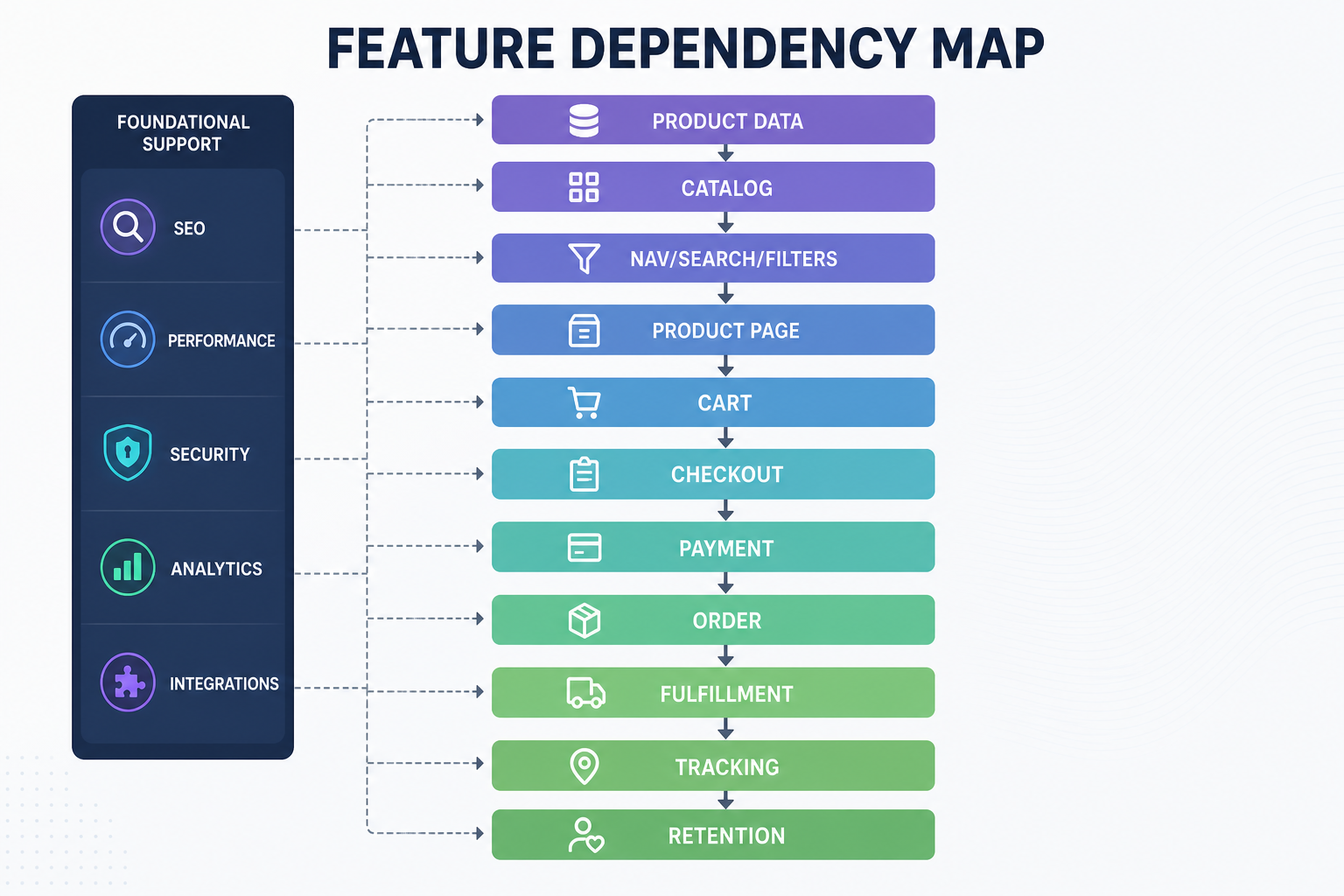
How features connect
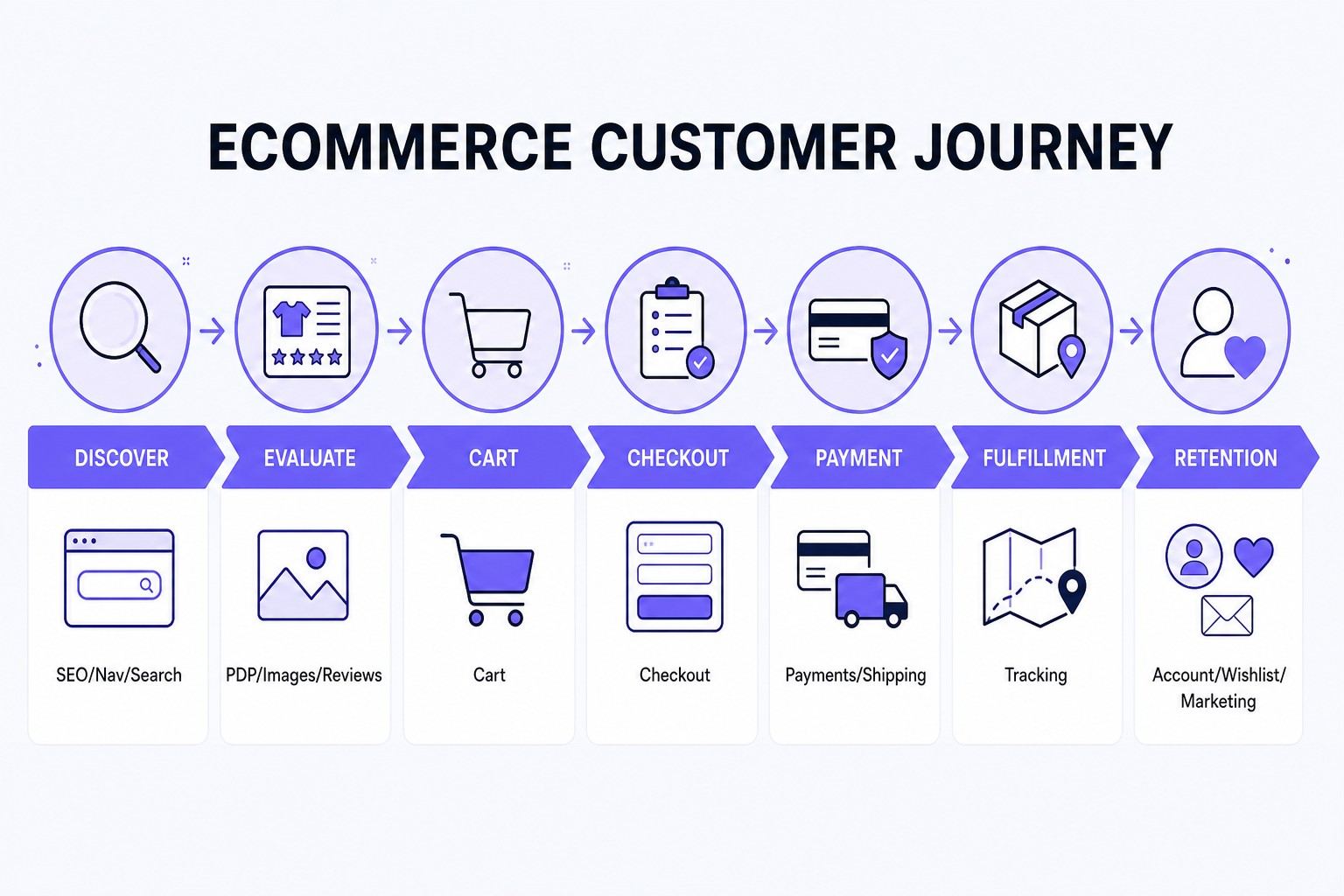
Discover: SEO, navigation, search. Evaluate: PDP, images, reviews, specs. Buy: cart, checkout, payment, shipping. Receive: tracking, notifications. Return: account, wishlist, marketing, loyalty.
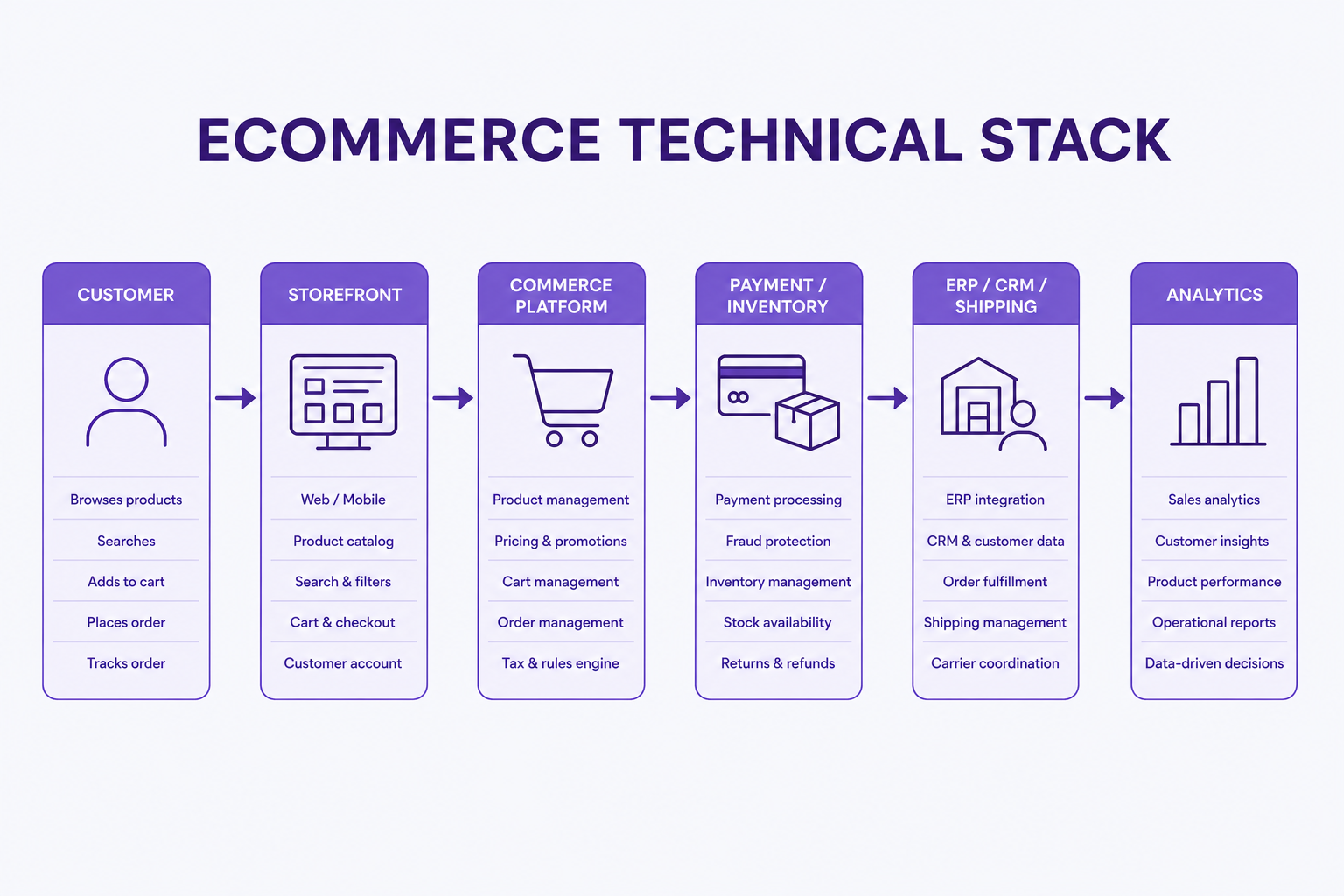
Customer order → ecommerce platform → payment → inventory → ERP/WMS → courier → fulfillment. CRM and analytics receive relevant customer and order data.
Ecommerce website feature checklist
Storefront
- [ ] Responsive design
- [ ] Navigation
- [ ] Search
- [ ] Filters
- [ ] Product pages
- [ ] Product media
- [ ] Variants
Conversion
- [ ] Cart
- [ ] Checkout
- [ ] Guest checkout
- [ ] Payments
- [ ] Shipping
- [ ] Promotions
- [ ] Reviews
Post-purchase
- [ ] Order confirmation
- [ ] Tracking
- [ ] Returns information
- [ ] Support
Marketing
- [ ] Analytics
- [ ] CRM
- [ ] Abandoned cart
Technical
- [ ] SEO
- [ ] Structured data
- [ ] Performance
- [ ] Security
- [ ] Accessibility
- [ ] Integrations
- [ ] Scalability
Requirements template
Copy into a spreadsheet before you request quotes.
| Requirement | Needed? | Priority | Native / app / custom | Notes |
|---|---|---|---|---|
| Product search | ||||
| Filters | ||||
| Reviews | ||||
| Wishlist | ||||
| COD | ||||
| ERP | ||||
| CRM | ||||
| B2B | ||||
| International |
What should you tell an ecommerce developer before requesting a quote?
- Business model
- Platform preference (if any)
- Number of products/SKUs
- Product variants
- Customer type
- Payments
- Shipping
- COD
- ERP/CRM
- B2B
- International markets
- Migration
- Design requirements
- SEO requirements
- Analytics
- Post-launch support
Feature complexity changes cost: basic filters ≠ advanced faceted search; standard payment ≠ custom payment workflow; basic account ≠ B2B company hierarchy; simple stock ≠ multi-warehouse ERP sync. Use the ecommerce website cost in India guide for budget structure.
Once you know which features your business actually needs, platform selection becomes much easier. Read Shopify vs WooCommerce vs custom ecommerce. If the question is whether to stay on a platform or go custom, use custom ecommerce vs platform. When you are ready to shortlist vendors, use the guide on how to choose an ecommerce development company.
Planning an ecommerce website around your actual business requirements?
A good ecommerce development scope starts by identifying which features are essential, which can use existing platform functionality and which genuinely require custom development.
Explore Ecommerce Website Development — or, if the open question is still platform fit, stay with the comparison guide above.
Frequently asked questions
What are the most important features of an ecommerce website?
Mobile-usable browsing, clear navigation, product pages that answer buying questions, cart, checkout, suitable payments, shipping information, inventory accuracy, SEO/performance/security basics and analytics. Search, filters, reviews and accounts depend on catalog and model.
What should every ecommerce product page include?
Title, price, media, variants, availability, useful description/specs, shipping and return context, add to cart, and reviews when you have genuine ones. Related products help when they are relevant.
Does every ecommerce website need site search?
No. Tiny catalogs with excellent navigation can launch without sophisticated search. Larger or attribute-heavy catalogs usually need accurate search, including SKU and typo tolerance.
Are product filters necessary for a small ecommerce store?
Not always. They become important when shoppers compare size, color, brand, price or technical attributes across many SKUs.
Should an ecommerce website allow guest checkout?
Usually yes for D2C/B2C, where the platform supports it. Forced accounts add friction. B2B or subscription models may require login. Offer account creation after purchase if useful.
Which payment options should an Indian ecommerce website support?
Typically UPI, cards, net banking, wallets where relevant and COD if that is part of your model — via current gateway and platform support. Confirm live provider docs; do not copy stale fee tables.
Does an ecommerce website need a wishlist?
It is a growth feature, especially for considered purchases. Very small or impulse catalogs can skip it at launch.
What SEO features should be built into an ecommerce website?
Crawlable IA, indexable templates, unique metadata, canonicals, sitemap, robots, redirects, internal links, performance and valid structured data that matches visible content. Faceted navigation needs an explicit index plan.
What features are required for B2B ecommerce?
Often company accounts, account-specific pricing, MOQs, quotes or POs, credit/approvals, restricted catalogs and ERP sync. These are not required for a standard D2C store.
When should an ecommerce store integrate with ERP or CRM?
When those systems already own products, stock, orders or customer relationships, or when volume makes double entry unsafe. Simple stores can wait.
Which features should an ecommerce startup build first?
Catalog, navigation, PDPs, cart, checkout, payments, shipping, basic SEO, analytics and security. Add search/filters if the catalog needs them. Defer wishlist, loyalty, apps and custom B2B unless they are required to take the first order.
How do ecommerce features affect development cost?
Complexity drives cost more than page count. Advanced search, custom checkout, multi-warehouse inventory, B2B pricing and ERP sync expand scope versus theme-led standard commerce. See the ecommerce cost guide for budgeting structure.