
Shopify Apps
When Does a Shopify Store Need a Custom App? 12 Real Use Cases
Written by Web6 Editorial Team · Published 11 August 2026 · 30 min read
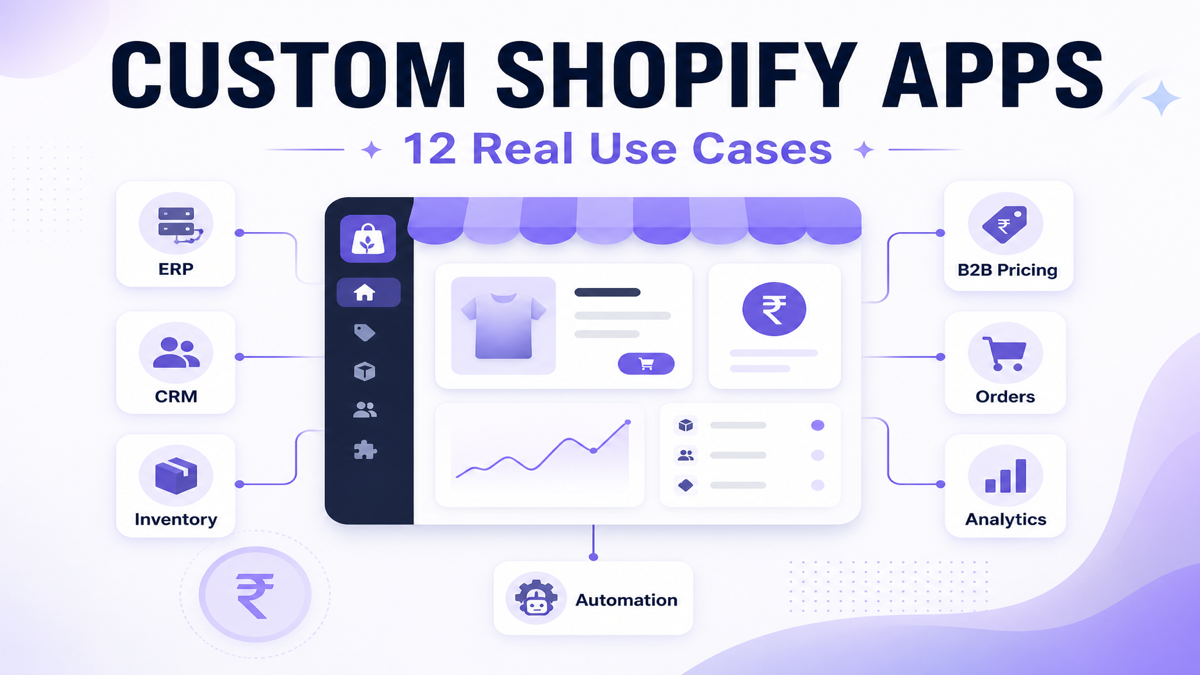
Most Shopify stores start with existing apps. Reviews, subscriptions, upsells, support chat widgets, live cart tracking, COD rule apps, and many operational automations are already covered by public apps or by built-in Shopify tools.
A custom Shopify app becomes useful when your workflow no longer fits standard settings — especially when pricing, inventory, orders, integrations, or internal approval processes depend on rules unique to your business. At that point, “installing another app” can create compromises, duplicate data, and manual work that your team still has to do. A custom app is usually hybrid architecture — not a reason to abandon Shopify. For the broader build vs buy ecommerce decision, separate custom apps from full custom commerce.
When does a Shopify store need a custom app?
A Shopify store usually needs a custom app when existing apps cannot support a business-specific workflow without excessive manual work, duplicate data, or operational compromises. Common triggers include connecting Shopify to ERP/CRM/WMS, implementing account-specific pricing and approval steps, synchronizing inventory with warehouse systems, automating order/fulfillment logic that standard apps can’t express safely, and building internal dashboards that your team uses daily.
Key takeaways
- Start with existing apps. Custom development is justified by operational complexity, not novelty.
- Choose custom when you need precise workflow fit: pricing, inventory, orders, integrations, and approvals.
- If multiple apps overlap and your team still works around them, consolidation into custom can reduce friction.
- Plan for maintenance: APIs, app permissions, webhook handling, and release cycles become part of the solution.
What is a custom Shopify app?
A custom Shopify app is built to solve a specific merchant workflow — often the workflow that gives you a competitive advantage — rather than fitting into the generic model of an existing App Store app.
Custom apps can run in Shopify surfaces (including embedded admin interfaces) and use Shopify APIs and webhooks to read/write store data. They can also connect external systems (like ERP, CRM, and warehouse tools) and automate operational steps that are hard to maintain across many separate tools.
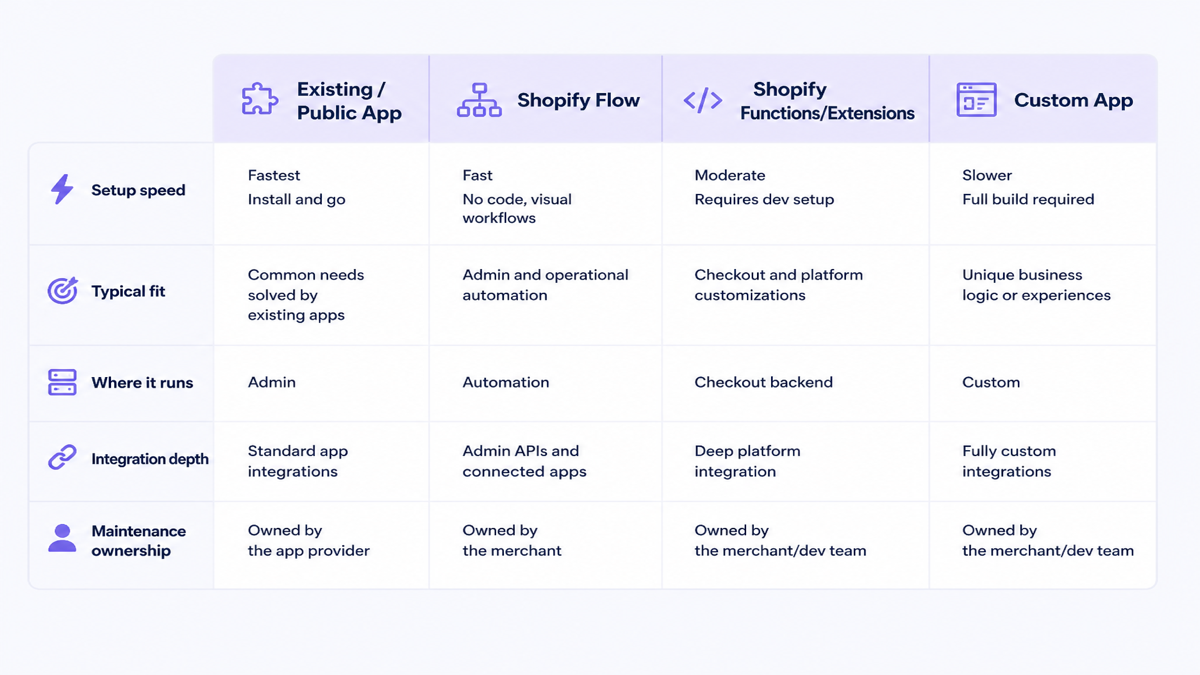
Important: not every “custom need” requires a custom app. Sometimes the workflow can be configured with an existing app, automated with Shopify Flow, or implemented with Shopify Functions/approved extension types.
Custom app vs public app
| Comparison | Existing / public app | Custom app |
|---|---|---|
| Purpose | Solves common merchant needs | Solves your workflow and rules |
| Setup speed | Usually faster to install and configure | Requires discovery, architecture, build, and testing |
| Cost model | Often subscription + configuration | One-time or phased build + ongoing maintenance |
| Flexibility | Bound by the app’s product decisions and settings | Full control over logic, data mapping, and UX |
| Maintenance ownership | Mostly app provider responsibility | Shared with your dev partner (API versions, permissions, webhooks) |
| Best fit | Standard workflows, repeatable requirements | Unique rules, cross-system integrations, approval steps, internal dashboards |
How to know if you actually need a custom Shopify app
- Existing apps cover < 70–80% of the workflow without manual exceptions.
- Staff rely on spreadsheets or copy/paste work between Shopify and internal tools.
- Pricing rules are account-specific and depend on tiers, MOQ, or approvals that the public app can’t model.
- Data must sync between Shopify and ERP/CRM/WMS with your own mapping rules.
- Orders require business-state governance (review, hold, release, finance checks, or shipping constraints).
- Multiple apps conflict: duplicated settings, overlapping data, and confusing operator screens.
- Operational errors affect outcomes (wrong prices, wrong allocations, fulfillment mistakes, delayed order updates).
- The workflow is core to how you sell, fulfill, or service customers.
If you can’t name the exact “pain” you’ll remove—or the operational KPI you’ll improve—custom app work will feel like a guess.
12 real use cases where custom app work is often justified
Each scenario below includes the problem pattern, what to inspect, and what a custom app (or a “non-custom” alternative) typically changes.
1. Custom B2B and wholesale pricing
When wholesale buyers require account-specific pricing tiers, minimum order values, credit/terms logic, or approval steps, “standard pricing” quickly becomes a workflow problem rather than a storefront styling issue.
What to inspect: how your team applies price lists today, how quickly pricing mistakes show up, and whether the logic depends on account identity (company), catalog membership, or negotiated rules.
Why custom can be useful: an embedded admin workflow can generate consistent quote/draft-order outputs from your internal pricing model, while the storefront and buyer accounts see correct prices.
Where this fits: B2B ecommerce development.
Practical KPI: reduce manual pricing errors and quote turnaround time; measure “pricing exceptions per week” and “time from quote request to approved draft order.”
2. ERP integration (inventory, orders, purchasing)
Many merchants can get part of ERP connectivity through general apps. Custom development becomes justified when you need a specific mapping, scheduling logic, or allocation model that doesn’t match what public connectors implement out of the box.
What to inspect: which objects are truly coupled (products, variants, inventory levels, reserved stock, orders, customer records, and invoices), the data quality level, and what happens when a sync fails (retries, reconciliation, and alerting).
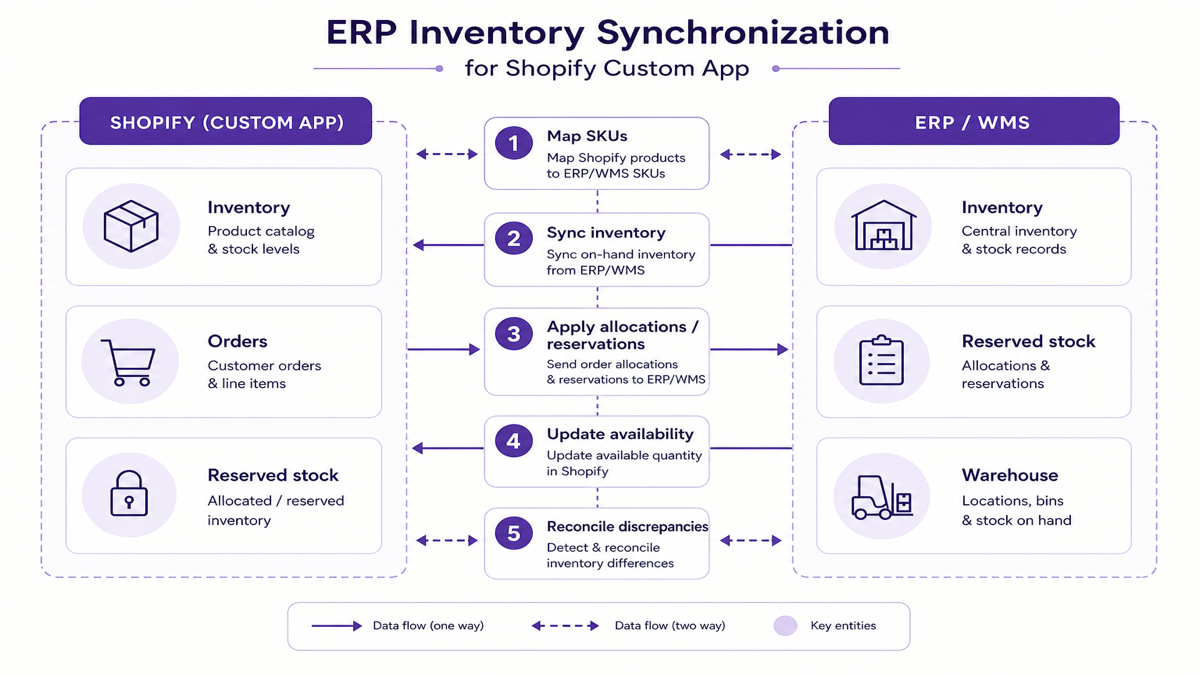
Where this fits: ERP development.
Practical KPI: reduce stock mismatches, improve fulfillment accuracy, and cut the “reconcile inventory” work your ops team does weekly.
3. CRM and sales workflow integration
Custom can help when your sales process requires more than storing leads. You may need sales pipeline governance, segmentation rules, sales rep ownership, quotation workflows, and tight alignment between customer records in CRM and buyer behavior in Shopify.
What to inspect: how often sales reps ask “did this lead become a real buyer,” whether B2B inquiries are handled consistently, and whether your CRM stages match how your team actually works.
Where this fits: custom CRM development.
Practical KPI: improve lead-to-quote conversion rate, reduce “lost context” tickets, and measure quote cycle time from lead capture to approval.
4. Custom inventory and warehouse synchronization
If your catalog depends on multiple warehouses, store locations, reserved inventory, and safety stock logic, you often end up with edge-case allocations that generic connectors implement incorrectly or incompletely.
What to inspect: how inventory is reserved (by order state), whether “availability” should show real-time or conservative numbers, and where your current process breaks under concurrency (multiple orders near the same time).
Practical KPI: fewer wrong-fulfillment incidents and fewer customer support escalations tied to inventory visibility.
5. Advanced COD rules and order-risk workflows
Some stores need “risk-aware checkout” that is conditional by cart value, products/collections, discount codes, and delivery serviceability. This is where custom can help — but sometimes an existing functions-based app already closes the gap.
Example (existing app): COD Risk Guard – Pincode Rules is designed to add a Cash on Delivery fee, restrict COD by cart value and by products/collections/discounts/pincodes, and hide COD for risky checkouts — built with Shopify Functions payment and delivery customizations.
When custom is still needed: if your rules require data types or decision dimensions not represented in the app’s configuration model, or if you need a broader “risk ops” workflow (review queues, custom dashboards, or ERP-backed risk signals).
Related reading: reduce COD RTO on Shopify in India.
Practical KPI: improve COD acceptance quality by tracking rule trigger rates and the downstream refusal/RTO distribution in your operations reporting.
6. Custom order approval or internal workflow
Stores sometimes need staff review before fulfillment: high-value order holds, B2B approval steps, fraud/manual review, or finance confirmation. Some teams can manage this with Shopify tags and workflow tooling; others need a custom admin workflow for consistent routing.
When custom is justified: approvals require a structured internal state machine, multiple user roles, and integration with internal review systems or CRMs.
When custom may not be required: if your workflow can be modeled with Shopify Flow automations, simple tags, and a clear ops checklist, you can avoid building software too early.
Practical KPI: fewer missed holds and faster processing for approved orders; measure “review queue time” and “approval throughput.”
7. Custom product configuration (made-to-order, bundles, personalization)
Public apps often handle simple option sets (size, color, add-ons). Custom becomes useful when configuration depends on complex rules: made-to-order constraints, dependency logic between fields, bundle pricing calculations, or special compatibility requirements.
What to inspect: the complexity of your product rules and whether “variant options” alone can represent your real configuration decisions.
Practical KPI: reduce “configuration errors” and cut customer clarification tickets triggered by mismatched expectations.
8. Dealer, distributor, or sales-rep portals
B2B businesses frequently need rep-friendly screens: order history, account-specific pricing/terms, quote creation, reorder workflows, and visibility into customer credit or outstanding balances.
What to inspect: whether your current portal is spreadsheets, email threads, or scattered tools — and how often reps duplicate effort.
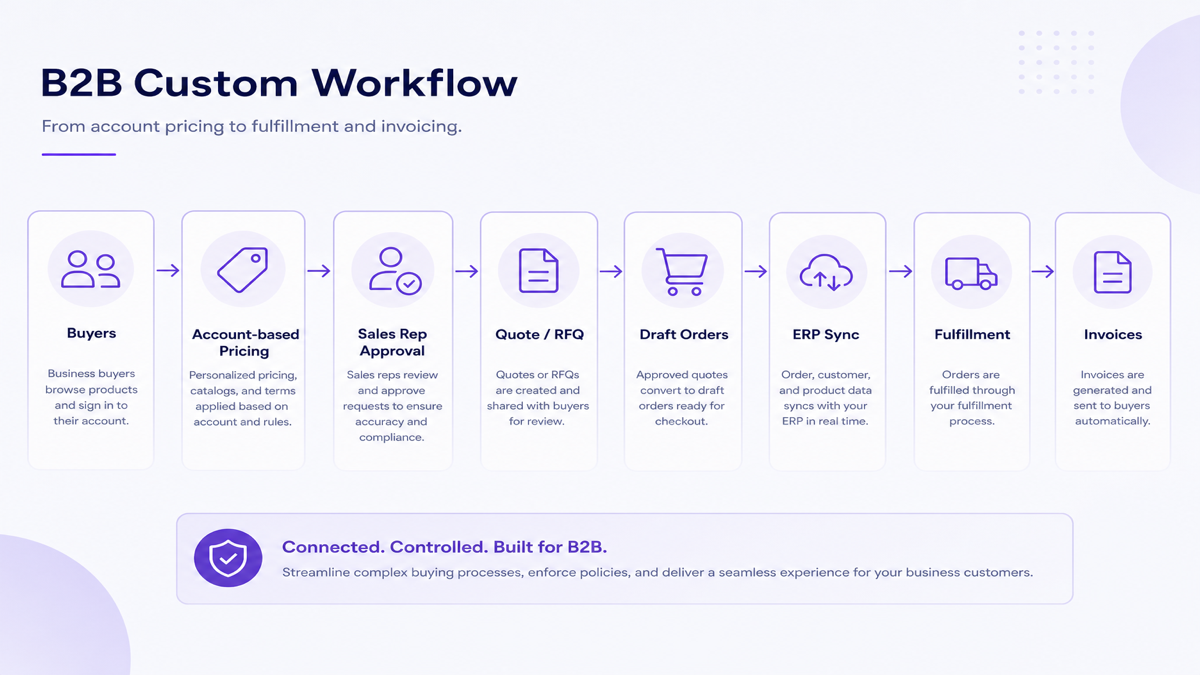
Where this fits: B2B ecommerce development.
Practical KPI: reduce “rep admin time” and increase reorder speed and quote completion rate.
9. Custom shipping and fulfillment logic
Some catalogs need different fulfillment paths based on region, warehouse assignment, delivery constraints, special handling requirements, or vendor routing. The key is to connect this logic safely to order states without breaking Shopify’s checkout and fulfillment lifecycle.
What to inspect: where the routing decision needs to happen (before checkout, during checkout, or after an order is created) and what data you need at that moment.
Practical KPI: fewer incorrect shipment assignments and improved on-time fulfillment by lane.
10. Custom analytics and operational dashboards
When dashboards must answer “what happened” in operational terms — not just generic marketing metrics — you may need a custom view over cart activity, product interest, and funnel drop-off stages.
Example (existing app): CartPulse – Track Live Cart is an analytics app built for live cart visibility. It focuses on cart additions/removals/changes, shopper journeys toward checkout, traffic sources and UTM campaigns tied to carts, and top cart products — including exportable CSV/Excel reports.
When custom is justified: if you need the dashboard to blend multiple internal sources (ERP, support tickets, WhatsApp conversations, warehouse outcomes) and present KPIs aligned to your daily ops.
Practical KPI: reduce time-to-insight (how fast teams can spot problems) and reduce “manual reporting hours” from weekly dashboards.
11. Customer-service and communication workflows
Communication is often where stores lose sales after customers hesitate. Some operations can run with existing chat and messaging apps. Custom development becomes useful when you need unique routing, internal approval before messaging, or cross-channel workflows tied to order state.
Example apps:
- Ezychat: Whatsapp Chat Button adds a floating WhatsApp chat button so shoppers can message your business in one tap, with optional greeting UX and measurement (Pro plans mention Analytics and Meta Pixel click tracking).
- ChatPop: Multi Chat Widget provides a floating all-in-one launcher for WhatsApp, Facebook Messenger, Telegram, Instagram, phone, SMS, email, TikTok, and custom links — aimed at reducing “where can I contact you?” friction.
- EZ WhatsApp Abandoned Order supports a manual recovery workflow: open one-click WhatsApp chats with pre-filled message templates for cart recovery, pending orders, and order updates (it explicitly positions itself as manual, not automated API broadcast).
When custom is still needed: if you want the messaging workflow to depend on complex business rules (account tier, fraud checks, special product policies) or integrate with internal CRM/ops systems for approvals and logging.
Practical KPI: faster response time, fewer unresolved support escalations, and better conversion from “needs help” shoppers.
12. Replacing several apps with one business-specific workflow
A common real-world pattern: merchants install 4–5 apps that each solve part of a workflow. Over time, the settings overlap, staff learn multiple admin interfaces, exports don’t match your internal data model, and operators still handle edge cases manually.
When consolidation into custom makes sense: the combined workflow is core to operations, your team repeatedly performs the same manual steps, and you’re paying app subscriptions while still losing time to integration gaps.
When you should not build custom yet: if existing apps cover most of the workflow reliably, the app stack is stable and inexpensive, and the missing 10–20% can be handled with a checklist or a simpler automation tool.
Practical KPI: reduce cumulative app subscription cost + manual operational time for the same outcomes.
When you probably do not need a custom Shopify app
- An existing app already supports your workflow with minimal manual exceptions.
- The workflow is temporary (a single campaign or short pilot) and you can revisit later.
- Theme settings and clear UX can solve the core problem — the app doesn’t actually need custom logic.
- Shopify Flow can handle the automation (triggers, conditions, and actions) without custom software.
- Shopify Functions/extensions can solve backend logic needs via approved extension types and existing app capabilities.
- Your business is too early-stage to justify build + maintenance risk.
- The expected savings (time, error reduction, subscription replacement) do not justify the build cost.
Custom app vs Shopify Flow vs Shopify Functions vs existing app
| Requirement | Existing App | Shopify Flow | Shopify Functions / extensions | Custom app |
|---|---|---|---|---|
| Common support widget or WhatsApp entry point | Usually best (configure and install) | Optional for internal notifications | Not required | Only if you need unique routing beyond app settings |
| Simple automation: tag customers, update statuses, notify teams | Sometimes | Often best starting point | Only for checkout/backend logic needs | When you must integrate unique internal systems and data mapping |
| Checkout decision logic (payment/delivery availability rules) | Often possible via functions-based apps | Not the core tool | Direct match when supported | When existing options can’t express your rules or you need deeper integration |
| ERP/CRM/WMS integration with your own mapping | May be partial | Limited unless logic fits connectors | Usually not the best fit | Most likely when sync is core and rules are unique |
Is a custom Shopify app worth the cost?
Custom app ROI is rarely “marketing math.” It usually comes from operational value: time saved, manual steps removed, errors avoided, app subscriptions consolidated, and faster throughput for the workflow your team already runs every week.
Conceptual value model: Annual value = time saved + avoided software cost + operational improvement + revenue enabled. Use it to compare against build and ongoing maintenance. Exact ROI depends on your scope and how often the workflow happens.
Build vs buy decision table
| Situation | Better starting point |
|---|---|
| Common ecommerce requirement | Existing app |
| Simple automation | Shopify Flow |
| Checkout/business logic (when supported) | Shopify Functions / extensions via a relevant app |
| Unique multi-system workflow | Custom app |
| Short-term campaign | Existing app or theme/UX solution |
| Strategic internal process | Consider custom app |
What a proper custom Shopify app development process looks like
- Define the business problem in workflow terms (who does what, when, and what breaks).
- Audit existing apps and Shopify capabilities (settings, Flow/automation, functions-based apps).
- Map entities and data (products, customers, orders, inventory, and internal records).
- Decide where logic runs (admin UI, backend, checkout decision points, or automation workflows).
- Design UX and ownership so staff can operate the workflow reliably after launch.
- Build, test, and deploy with QA across devices, permissions, and failure cases.
- Monitor and maintain with API upgrades, webhook reliability, and documentation.
If you need a partner for scoping, development, or integration, review Shopify app development services.
For an example of how custom app logic can support B2B pricing and operational workflows, see the custom Shopify app case study.
Lightweight technical architecture (merchant-friendly)
A typical custom app architecture often includes:
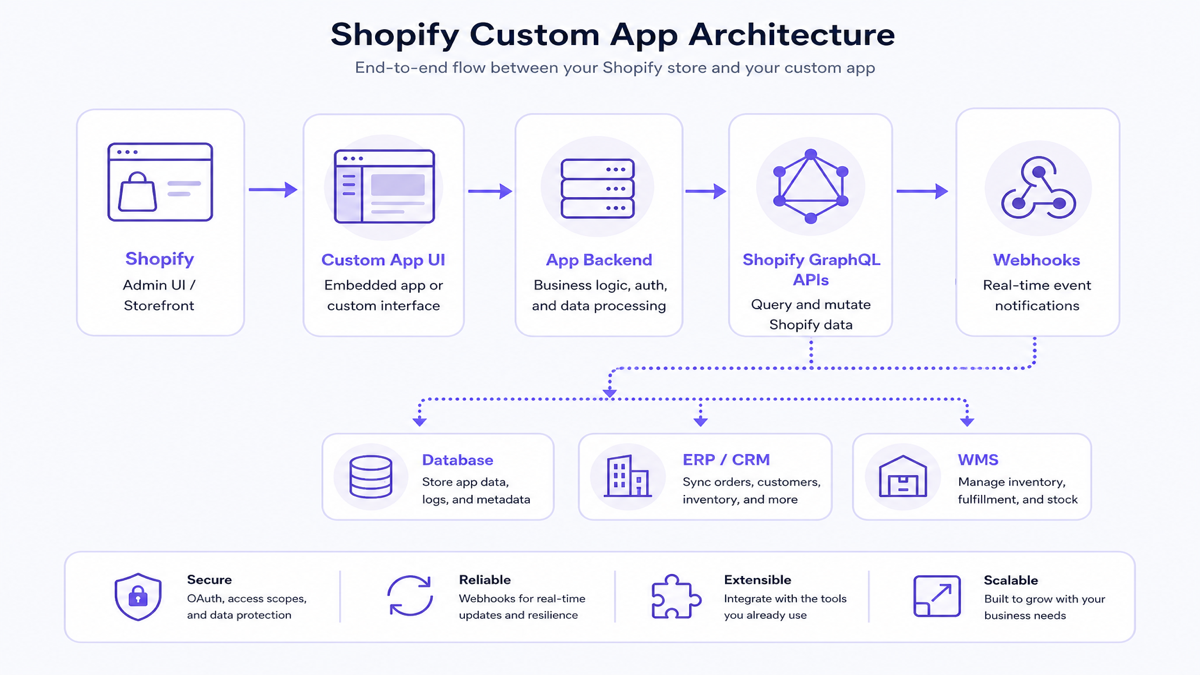
- Shopify surfaces (Admin UI, storefront touchpoints, or both)
- Embedded app UI (for merchant operators) and navigation via approved interfaces
- An app backend that holds logic and processes data
- Shopify GraphQL APIs for structured reads/writes
- Webhooks for event-driven updates
- A database and any external systems (ERP, CRM, WMS)
The key point for buyers: custom app work is integration and reliability work — not just adding UI screens.
Security and maintenance you should expect
Custom apps require secure access patterns and ongoing upkeep. Your project should plan for:
- API permissions and access scope control
- OAuth/authentication flow design (as required by the app type)
- Webhook verification and resilient event handling
- Logging, monitoring, and error visibility
- API version upgrades and dependency updates
- Clear documentation for the team that maintains the workflow
Questions to ask before you build
- What exact workflow problem are we fixing (and what does “better” mean)?
- Can an existing app solve the workflow with configuration?
- Can Shopify Flow handle the automation?
- Do we actually need checkout/backend logic via Functions/approved extensions?
- Which users need the workflow, and what roles must see what?
- What systems must sync (ERP/CRM/WMS), and how is failure handled?
- How often do we sync, and what’s the acceptable freshness window?
- Who owns maintenance after launch?
- How will ROI be measured (manual hours, errors, turnaround time, conversion/throughput)?
- What happens if Shopify changes an API or behavior in the future?
Frequently asked questions
What is a custom Shopify app?
A custom Shopify app is built for a specific merchant workflow and rules. It can provide embedded admin UI, connect to Shopify APIs, automate operations, and synchronize data with external systems. It is chosen when existing apps cannot support your workflow reliably without compromises.
When does a Shopify store need a custom app?
When the workflow is unique or cross-system (ERP/CRM/WMS), depends on business-specific pricing and approvals, requires deterministic order/inventory logic, or needs internal dashboards and routing your team uses daily. If an existing app covers most of the process, custom development may be unnecessary.
Should I use an existing Shopify app or build a custom one?
Use existing apps when the workflow is common and configuration covers your needs. Build custom when you need precise fit that reduces manual work, prevents data mismatch, and removes recurring operational errors. The decision should be based on measurable workflow value, not feature novelty.
Can a custom Shopify app connect to ERP or CRM?
Yes. Custom apps can integrate with ERP/CRM tools by mapping entities (products, orders, customers, inventory) and handling sync reliability with webhooks and reconciliation. If your integration needs are simple, existing connectors or middleware may be sufficient.
Can custom apps handle B2B pricing?
They can, especially when pricing rules depend on customer account identity, dealer tiers, MOQ thresholds, and approval steps. Many B2B workflows can also be implemented with a mix of Shopify features and apps, so the decision depends on how much manual exception work you need to avoid.
Is Shopify Flow enough for automation?
Often, yes for automation that fits Flow’s triggers, conditions, and actions. Flow can connect Shopify events to operational outcomes without building custom software. If you need deep integration or unique business logic that doesn’t fit the model, a custom app can be the right layer.
How much does a custom Shopify app cost?
Cost depends on how many workflows you need, how complex the integrations are, and the amount of QA and maintenance required. Many merchants start with existing apps or Flow and only build custom when the workflow pain justifies it. Compare quotes based on scope and ongoing ownership, not headline numbers.
How long does custom Shopify app development take?
Timelines vary based on discovery, UI complexity, integration depth, data migration requirements, and the amount of testing required. Faster delivery is usually possible when the workflow scope is small and data mapping is clean. Discuss QA and rollout steps early to avoid deadline-driven risk.
Who maintains a custom Shopify app?
Maintenance is usually a shared responsibility between your internal team (who owns the workflow and checks results) and the dev partner (who handles API upgrades, webhook reliability, and fixes). Good projects include documentation, monitoring, and a plan for future Shopify API changes.
Can one custom Shopify app replace multiple apps?
Sometimes. Consolidation makes sense when several apps overlap settings and your staff still does manual work. But if the existing app stack is stable and inexpensive, replacing it with custom can add maintenance burden. Evaluate whether custom can reduce both subscription cost and operational time.