
Shopify Apps
Public vs Custom Shopify Apps: Which One Should Your Store Use?
Written by Web6 Editorial Team · Published 13 August 2026 · 22 min read
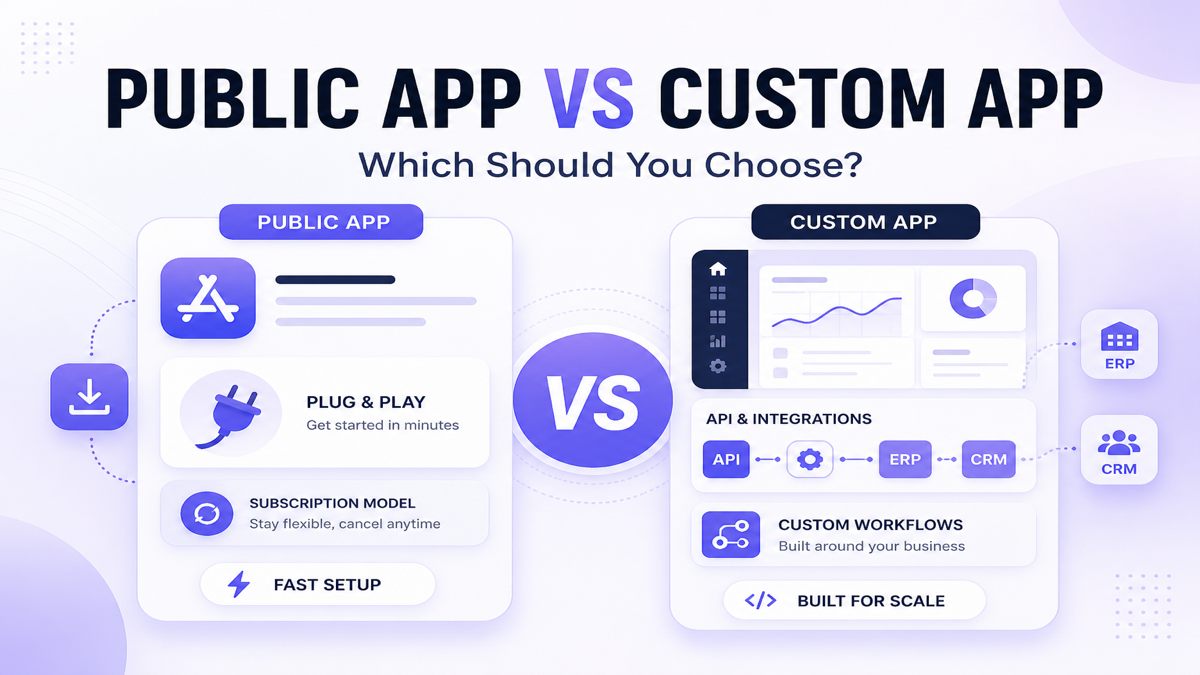
The Shopify App Store already covers thousands of common ecommerce requirements, so most merchants should not build custom software first. A custom app becomes useful when the business process is too specific for off-the-shelf apps — especially when pricing, inventory, approvals, integrations, analytics or internal workflows follow rules unique to that business.
This guide compares public and custom Shopify apps on cost, flexibility, maintenance, integrations and real scenarios so you can choose the lowest-complexity option that still solves the problem.
Should you use a public or custom Shopify app?
Use a public Shopify app when your requirement is common, the app already solves most of the problem, and you want faster setup with lower maintenance responsibility. Consider a custom Shopify app when the workflow depends on unique business rules, requires integration with ERP/CRM/internal systems, or existing apps create operational compromises. The best choice depends on fit, cost, flexibility, data requirements, maintenance and long-term strategic value.
Key takeaways
- Public apps are usually faster and cheaper to start with.
- Custom apps offer more workflow flexibility.
- Custom development creates ongoing maintenance responsibility.
- Existing apps should be evaluated before building.
- Integration complexity is one of the strongest reasons to go custom.
- Shopify Flow, Functions and extensions may solve some needs without a full custom app.
What is a public Shopify app?
A public Shopify app is built to serve many merchants and is typically distributed through the Shopify App Store (public distribution). Merchants install it, configure settings, and use a standardized feature set that the vendor maintains across stores.
Public apps often include:
- App Store listing and install flow
- Configurable settings for common workflows
- Subscription or usage-based pricing
- Vendor-managed updates, infrastructure and support
- Theme app extensions, admin embeds, or Functions-backed checkout logic where the product requires them
They are usually the right starting point for commodity needs: reviews, chat widgets, email, loyalty, upsells and many standard operational tools.
What is a custom Shopify app?
A custom Shopify app is built for a specific merchant or business workflow. In Shopify’s current distribution model, custom distribution can install an app on one store, or on multiple stores in the same Shopify Plus organization via an install link. Merchants can also create custom apps in Shopify Admin for single-store access patterns.
Custom apps can:
- Connect Shopify APIs and webhooks to ERP, CRM, WMS or proprietary systems
- Include merchant-specific admin UI and operator tools
- Automate approvals, pricing, inventory or order logic unique to the business
- Own mapping, retries, monitoring and failure recovery for that workflow
Maintenance is typically shared between the merchant and a development partner (or an in-house team). Older “private apps” were replaced by the custom-app model and should not be treated as current guidance.
Public vs custom Shopify apps — comparison
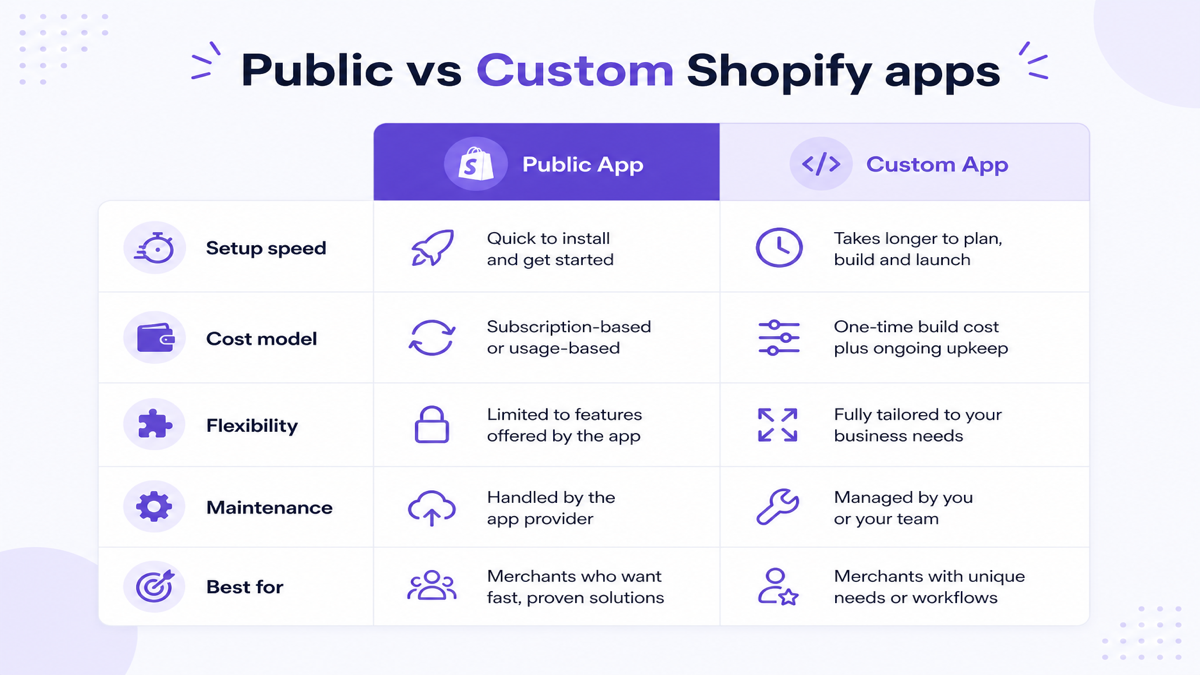
| Factor | Public Shopify app | Custom Shopify app |
|---|---|---|
| Initial setup | Install and configure | Discovery, design, build, QA |
| Time to launch | Usually hours to days | Usually weeks depending on scope |
| Upfront cost | Often low / subscription-led | Higher project investment |
| Ongoing cost | Subscription + usage + plan tiers | Hosting, maintenance, API upgrades |
| Flexibility | Within vendor product boundaries | Built around merchant rules (within Shopify platform limits) |
| Customization | Settings and available extensions | UI, logic, integrations, workflows |
| Maintenance | Mostly vendor responsibility | Merchant / partner responsibility |
| API integrations | Standard connectors where offered | Proprietary mapping and error handling |
| B2B workflows | Good for common patterns | Better for account-specific logic and portals |
| Internal dashboards | Product-defined reporting | Merchant-specific KPIs and ops screens |
| Data ownership / control | Vendor product + permissions | Higher control over data paths and storage choices |
| App conflicts | Possible when many apps overlap | Can consolidate workflows (or introduce new complexity if poorly scoped) |
| Support | Vendor support for many merchants | Contracted / dedicated support if arranged |
| Upgrade responsibility | Vendor | Your team / partner |
| Best suited for | Common, well-solved requirements | Unique, strategic, multi-system workflows |
Public vs custom Shopify app cost
Public apps may involve monthly subscriptions, usage charges, higher plans and add-ons. Custom apps may involve discovery, design, development, testing, hosting, monitoring, ongoing maintenance and API-version upgrades.
Do not compare only “monthly app fee vs build price.” Staff workarounds, failed syncs and operational friction are part of the real cost.
Compare total cost of ownership, not only initial price
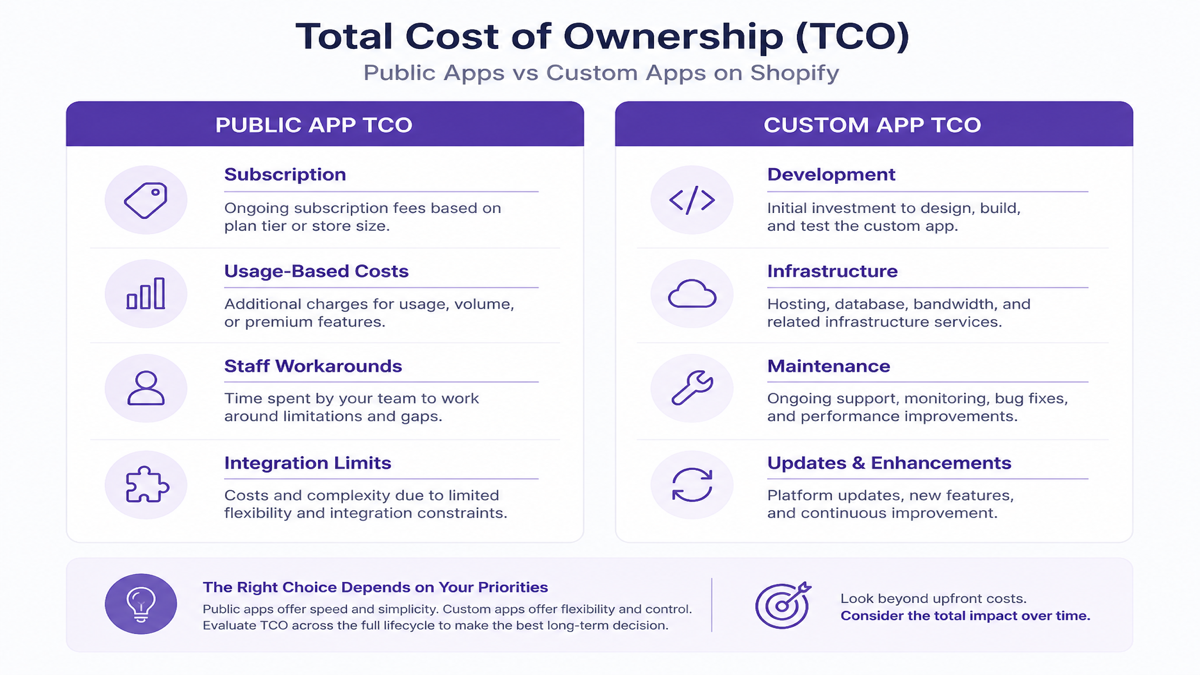
A practical TCO framing:
- Public app TCO = subscription + usage + staff workarounds + integration limitations
- Custom app TCO = development + infrastructure + maintenance + updates
If a ₹2,000/month app still forces two hours of spreadsheet work daily, the “cheap” option may be expensive. If a custom build saves little staff time and replaces stable apps, maintenance can outweigh the benefit.
Which option launches faster?
Public apps usually launch faster because the software already exists. Custom apps require discovery, architecture, development, QA and deployment. Faster does not always mean better — but unnecessary custom development creates avoidable complexity and delay.
Which option offers more flexibility?
Public apps are flexible within the vendor’s product model. Custom apps can encode merchant-specific rules, UIs and integrations — subject to Shopify platform and API capabilities. Custom apps cannot bypass Shopify checkout or API restrictions simply because they are custom.
Who maintains the app?
For public apps, the vendor generally maintains compatibility, infrastructure and product updates. For custom apps, your partner or internal team must handle dependencies, API changes, security patches, hosting, bug fixes and monitoring. Merchants often underestimate this ongoing ownership.
Support and roadmap influence
Public app vendors support many merchants, so response times and custom fixes depend on their support model. Custom maintenance can be tailored — but only if support hours and SLAs are contracted. Roadmap influence is usually higher with custom software and lower with App Store products.
Which is better for ERP, CRM and custom API integrations?
Public connectors and middleware are often enough for standard ERP/CRM sync patterns. Custom becomes useful for unusual data mapping, proprietary systems, multi-system orchestration, custom approval gates, and dedicated retry/reconciliation logic.
For architecture detail, see how to integrate Shopify with ERP, CRM or custom APIs.
Public vs custom apps for B2B Shopify
B2B needs often include customer-specific pricing, catalogs, dealer workflows, purchase orders, approvals, sales reps and account rules. Evaluate Shopify’s native B2B capabilities and public apps first. Custom work is more justified when account pricing, portals or ERP-linked wholesale rules cannot be configured reliably without manual exceptions.
Related: B2B ecommerce development.
Custom pricing: when public apps are enough
Many public apps handle quantity discounts, bundles and volume pricing. Custom development is more likely when pricing is ERP-driven, contract-based, dealer-specific, or spans multiple systems with approval steps.
Which option is better for inventory workflows?
Public inventory apps and connectors cover many common multi-location and sync needs. Custom integration may make sense for proprietary warehouse systems, safety-stock rules, complex allocations, ERP-owned inventory and unusual reservation models.
Public vs custom apps for analytics
Use an existing analytics app when standard reports answer the question. Build custom only for merchant-specific KPIs, internal data joins, proprietary operational reporting or dashboards that blend Shopify with ERP/CRM outcomes.
Example of a purpose-built public analytics option: CartPulse – Track Live Cart focuses on live carts, add/remove activity, journeys toward checkout, traffic/UTM context and exportable cart reports — useful when you need cart visibility without building a custom analytics stack.
COD rules: public app first, custom only when needed
Cash on Delivery policy is a practical build-vs-buy example. If you need configurable COD fees, pincode/product/collection/discount rules and hide-COD behavior, a public Functions-based app may be enough. COD Risk Guard – Pincode Rules is designed for those common COD controls.
Custom work is more justified when COD decisions must connect to an internal risk system, proprietary scoring, ERP holds or unusual multi-step approval flows that no public app models.
Chat and WhatsApp: usually public apps
Common support and notification entry points are often better handled by existing apps than custom builds:
- Ezychat: Whatsapp Chat Button — floating WhatsApp storefront chat entry
- ChatPop: Multi Chat Widget — multi-channel floating launcher (WhatsApp, Messenger, Telegram, Instagram, phone, SMS, email and more)
- EZ WhatsApp Abandoned Order — manual WhatsApp recovery with templates (not automated API broadcasts)
Do not build custom software for a solved commodity workflow without a clear reason.
Should you replace several Shopify apps with one custom app?
Consolidation can make sense when apps overlap, conflict, duplicate data, create manual handoffs or stack subscriptions without removing operational work. Keep public apps when they are stable, reasonably priced, independent and cheaper than owning custom maintenance.
App conflicts and operational complexity
Multiple apps can add storefront scripts, theme/app blocks, overlapping features and operator confusion. App count alone does not make a store slow — impact depends on what loads, when it loads and how well each app is implemented.
Are custom Shopify apps faster?
Not necessarily. Performance depends on storefront assets, network requests, extensions, script loading, backend latency and implementation quality. A poorly built custom app can be worse than a good public app. Judge quality and architecture, not the “custom” label.
Security responsibilities
With public apps, you trust the vendor’s application security practices and review requested permissions carefully. With custom apps, your team must handle authentication, scopes, secrets, webhook verification, infrastructure hardening, updates and monitoring. Neither category is inherently insecure — ownership differs.
Data privacy for both options
Review permissions, data collected, retention, third-party sharing and whether the app needs every requested scope. Sync and store only what the workflow requires — for public and custom apps alike.
Do you need an app, or can Shopify Flow solve it?
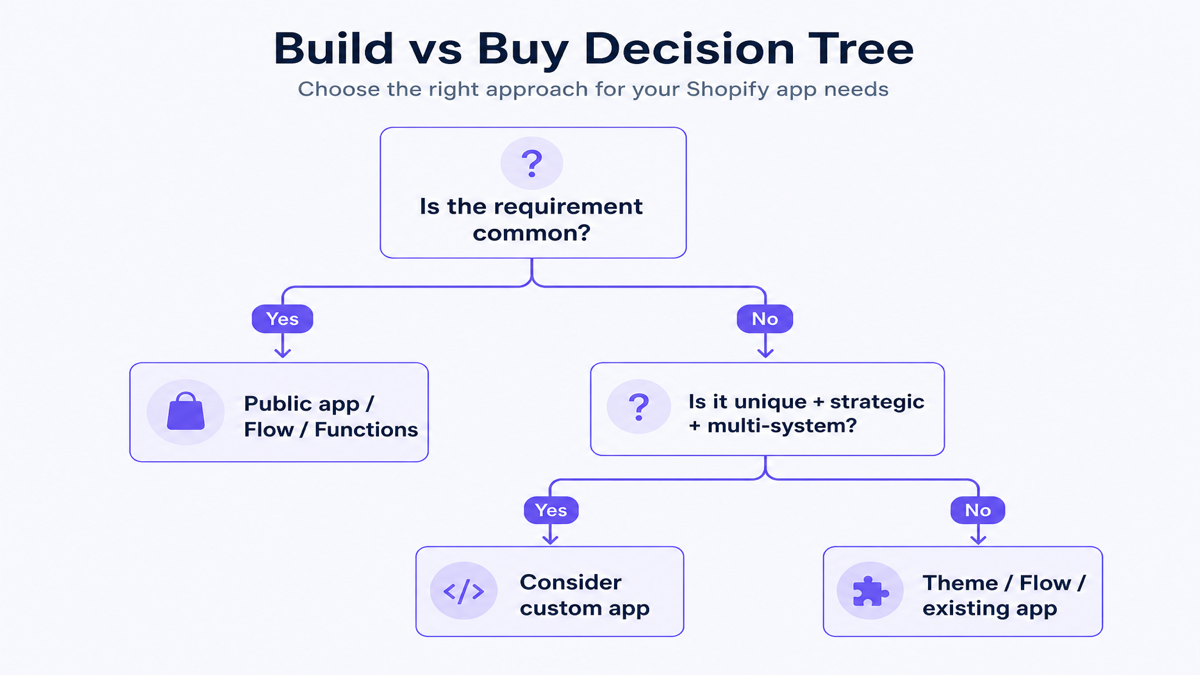
Shopify Flow can automate many operational workflows using triggers, conditions and actions — for example tagging, notifications and internal process automation — without building a custom app. If Flow (or an existing Flow connector) covers the need, prefer it over custom development.
Shopify Functions and extensions
Some checkout and commerce logic can be handled with Shopify Functions and app extensions (for example payment/delivery customization, discounts or validation) without a large standalone application. Public apps often package these capabilities. Custom Functions make sense when the rule set is unique and cannot be configured in an existing product — and, for custom Function apps, Shopify Plus may be required depending on the Function APIs involved.
Decision matrix: best starting point
| Requirement | Best starting point |
|---|---|
| Standard review system | Public app |
| Standard chat / support widget | Public app |
| Basic automation (tags, alerts) | Shopify Flow |
| Supported checkout/commerce logic | Shopify Functions / extensions (often via public app) |
| Standard ERP connector | Public connector / middleware |
| Unique ERP workflow | Custom app / integration |
| Dealer-specific portal | Custom app |
| Proprietary warehouse system | Custom integration |
| Temporary campaign | Theme / public app |
| Strategic proprietary workflow | Consider custom app |
Build vs buy checklist
Choose a public app first when
- [ ] The requirement is common
- [ ] An app already handles most requirements
- [ ] You need a fast launch
- [ ] Budget is limited
- [ ] You do not want maintenance responsibility
Consider custom when
- [ ] The workflow is unique
- [ ] Existing apps require manual workarounds
- [ ] Multiple systems must sync
- [ ] The workflow is central to operations
- [ ] Custom UI is required
- [ ] Data mapping is complex
- [ ] App subscriptions + staff workarounds have become costly
- [ ] Long-term operational value justifies maintenance
When public apps are better
Typical strong fits for public apps include reviews, basic chat, simple upsells, email marketing, standard subscriptions, common shipping tools and many loyalty use cases. Apps within a category still differ — evaluate feature coverage, support and permissions carefully.
When custom apps are better
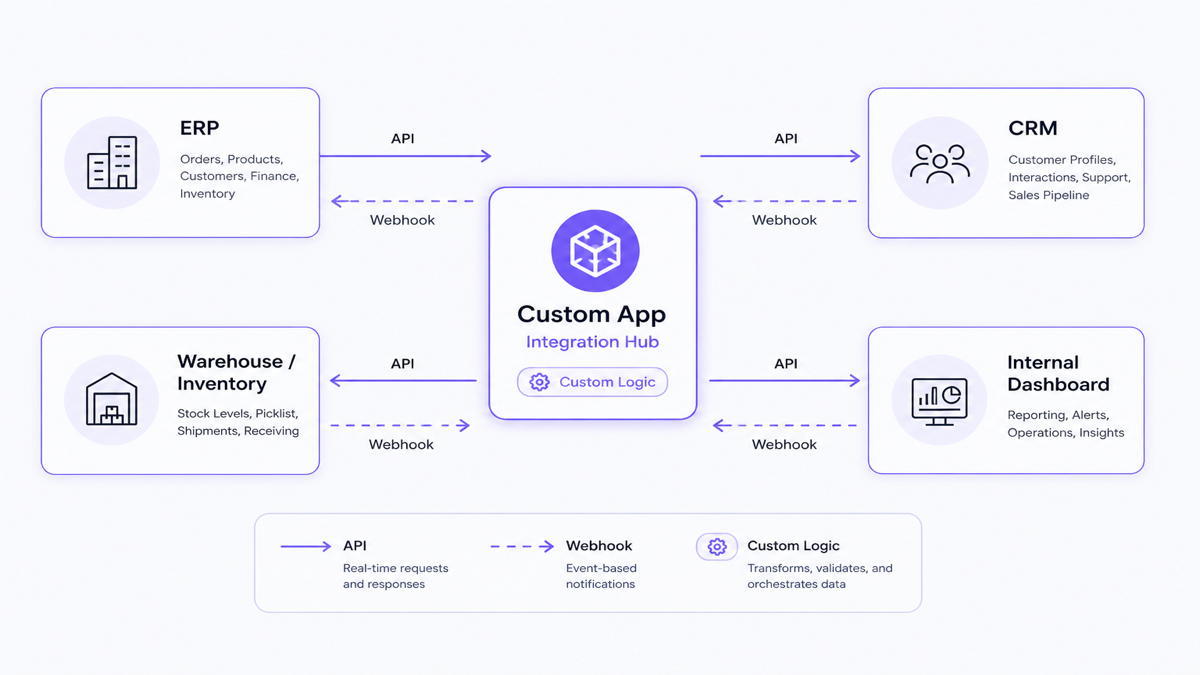
Stronger custom candidates include ERP synchronization, proprietary CRM workflows, B2B dealer portals, custom approvals, complex inventory, custom order routing, business-specific analytics, internal ops dashboards, proprietary APIs and special pricing logic.
For scenario-level detail, see when a Shopify store needs a custom app.
Sometimes the best answer is public apps + one custom integration
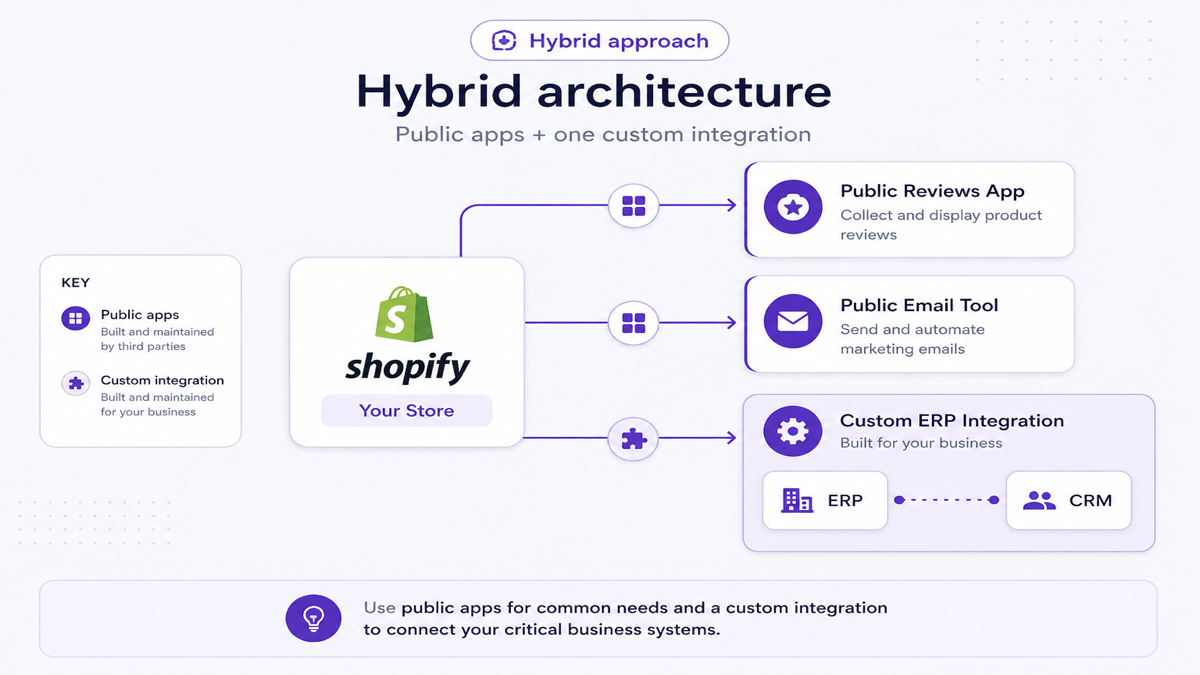
You do not have to choose all-public or all-custom. A common hybrid is a public reviews app + a public email tool + a custom ERP integration. Keep commodity features as products; build only the strategic connector.
Public app evaluation checklist
- Feature coverage vs your actual workflow
- Support quality and response expectations
- Pricing and usage limits
- Update history and vendor reliability
- Permissions requested
- Theme / checkout compatibility
- Integration or export options
- Likely performance impact
- Data export and exit options
Do not rely on star ratings alone.
Custom app evaluation checklist
- What exact problem does it solve?
- What is the business value?
- Can Shopify native features solve it?
- Can an existing app solve it?
- Which systems and data are involved?
- Who maintains it after launch?
- What happens when APIs change or sync fails?
- How will ROI be measured?
When does custom development become financially sensible?
Custom work becomes more sensible when operational savings, avoided subscriptions, fewer errors, faster processes or new revenue capability outweigh build and maintenance cost.
Conceptual framing: Net annual value = operational savings + avoided subscriptions + additional capability value − maintenance cost. Do not assume positive ROI without measuring the workflow.
Examples of when a purpose-built public app is enough
- COD Risk Guard — configurable COD fees and risk rules without custom Functions code
- CartPulse — live cart and product-activity analytics without a custom dashboard project
- Ezychat / ChatPop — support chat entry points without building a widget
- EZ WhatsApp Abandoned Order — manual WhatsApp recovery templates without an API messaging stack
If a purpose-built product already solves the problem well, custom development may be unnecessary.
Illustrative custom scenario (example, not a client claim)
A manufacturer sells on Shopify while ERP controls stock, customer pricing, invoices and fulfillment. Public apps may cover pieces of the workflow, but a custom integration can coordinate order handoff, inventory ownership and fulfillment status end-to-end. Build only after confirming connectors cannot cover the mapping and failure cases.
If you do build custom: process outline
- Requirement discovery
- Existing app / native-feature audit
- Workflow mapping
- Architecture
- UX/UI
- Development
- Testing
- Deployment
- Monitoring
- Maintenance
When scoping is needed, review Shopify app development services.
Frequently asked questions
What is a public Shopify app?
A public Shopify app is built for many merchants and is typically distributed through the Shopify App Store. You install it, configure settings, and the vendor maintains the product across stores.
What is a custom Shopify app?
A custom Shopify app is built for a specific merchant workflow. It can include custom admin UI, integrations and business rules, and is distributed for that store (or Plus organization) rather than as a general App Store product.
What is the difference between public and custom Shopify apps?
Public apps optimize for speed, shared features and vendor maintenance. Custom apps optimize for unique workflow fit and control, with higher build and maintenance ownership for the merchant or partner.
Is a custom Shopify app more expensive?
Usually yes upfront, because you fund discovery, development and QA. Over time, compare total cost of ownership: custom maintenance versus public subscriptions plus staff workarounds.
When should I build a custom Shopify app?
When existing apps and native tools leave large gaps — unique rules, multi-system sync, custom admin workflows, or strategic processes where operational value justifies maintenance.
Can a custom app replace several public apps?
Sometimes, if apps overlap and staff still do manual work. If public apps are stable and inexpensive, consolidating into custom software can increase maintenance burden without enough benefit.
Who maintains a custom Shopify app?
Usually the merchant’s development partner or internal team. Plan for API upgrades, hosting, security, monitoring and bug fixes — not only the initial build.
Can Shopify Flow replace an app?
For many operational automations (tagging, notifications, internal triggers), Flow can replace the need for a custom app. Complex UIs, proprietary integrations and unique commerce logic may still need an app or Functions-based solution.
Can custom Shopify apps connect to ERP or CRM?
Yes. Custom apps and integration services commonly sync orders, inventory, customers and status updates with ERP/CRM systems when public connectors are not enough.
Are custom apps better for B2B stores?
Not always. Start with native B2B features and public apps. Custom is more useful for dealer portals, account-specific pricing tied to ERP, or approval workflows that standard tools cannot express.
Choose the simplest reliable option
Start with public apps, Shopify Flow and platform extensions when they fit. Build custom when the workflow is unique, strategic and still broken after evaluating existing tools. The goal is not more software — it is a reliable process with the least unnecessary ownership.
Related reading: Shopify app development guide, custom app use cases, and Shopify ERP/CRM API integration.