
Shopify
How to Choose a Shopify Development Company in India: 8 Checks and 15 Questions
Written by Web6 Editorial Team · Published 4 November 2026 · 10 min read
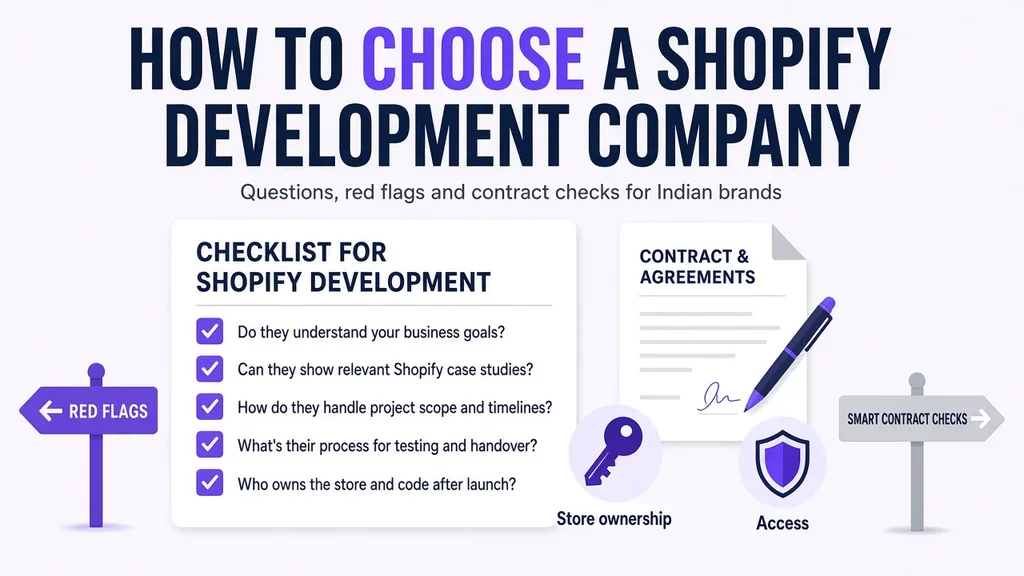
Most advice on hiring an agency is generic: check the portfolio, read reviews, compare quotes. That still applies, and our guide to choosing an ecommerce development company covers it. This guide is about the checks that only matter on Shopify: who owns the store, how access works, what a theme and app plan should look like, what your plan can do at checkout, and how Indian payments, COD and GST are handled.
The short answer
Choose a Shopify development company in India by first naming the job (theme setup, custom theme, migration, Plus or custom app), then shortlisting three to five agencies with live Shopify stores like yours. Before comparing prices, confirm that the store will be owned by you, that they will use collaborator access, that their theme and app plan is written down, that they have handled Indian gateways, COD and GST invoices, and that support terms are in the contract.
- Never let an agency upgrade a store to Shopify Plus before it is transferred to you. The organisation owner cannot be changed later through the admin.
- Never share your owner login. Collaborator access exists for this.
- Ask for the monthly app bill before you sign, not after launch.
In this guide
- Step 1: Name the Shopify job
- Step 2: Settle store ownership
- Step 3: Check how they get access
- Step 4: Ask for the theme and app plan
- Step 5: Test their checkout knowledge
- Step 6: Check India payments, COD and GST
- Step 7: Test their stores on a real phone
- Step 8: Read the partner tier correctly
- 15 questions to ask
- Red flags and green flags
- What the contract should say
- FAQs
Step 1: Name the Shopify job
Agencies that are excellent at one of these can be average at another. Decide which one you are hiring for.
| Job | What good looks like | Who tends to fit |
|---|---|---|
| Theme setup | Clean catalog, correct settings, fast launch | Freelancers, small agencies |
| Custom theme | Design system built as reusable sections, fast on mobile | Agencies with in-house designers and Liquid developers |
| Migration | Full URL map, redirects, data checks, calm launch day | Agencies with migration case studies |
| Shopify Plus | Checkout extensions, Functions, B2B, expansion stores | Agencies with live Plus stores |
| Custom app or integration | Stable API work, webhooks, error handling, monitoring | Agencies that publish or maintain apps |
If you are not sure the job is Shopify at all, our Shopify vs WooCommerce vs custom comparison helps.
Step 2: Settle store ownership
Shopify gives agencies two ways to work, and both keep you in control if used properly:
- Client transfer store. The agency creates the store in its Partner account, builds it, and transfers ownership to you when it is ready. After transfer, the agency keeps collaborator access and loses access to financial information. The transfer cannot be reversed.
- Your own store with collaborator access. You create the store, choose a plan, and the agency requests access. You own it from day one.
One trap catches brands every year: if an agency switches a client transfer store to Shopify Plus before transferring it, the agency becomes the organisation owner, and that cannot be changed through the Shopify admin. Ask how they will handle the transfer, and get it in writing.
Also confirm that the domain, the paid theme licence and every app subscription are in your name and on your card.
Step 3: Check how they get access
A professional Shopify partner asks for a four-digit collaborator request code (found in your admin under Settings, then Users, then Security) and requests only the permissions they need. Collaborator accounts do not use up your staff limit, cannot be made owner, and expire if unused for 90 days.
If an agency asks for your owner email and password "to save time", that is a red flag about how they handle security in general.
Step 4: Ask for the theme and app plan
Two decisions shape your store's speed, monthly cost and future flexibility. A good agency writes both down before quoting.
Theme
- Which theme, and why: a free Shopify theme, a paid theme from the Theme Store, or a custom Online Store 2.0 theme.
- How changes are made: on a duplicate theme or a development theme, never on the live theme.
- Where custom code lives: in a Git repository you can access, so the next developer can pick it up.
- Whether your team can edit sections and blocks without a developer.
Apps
- A list of every app they plan to install, what each does, and its monthly cost.
- Which features they will build into the theme instead of adding an app, and why.
- For custom apps: who owns the app, where it is hosted, and who pays for hosting.
Every app that loads on the storefront adds weight to the page. Agencies that build apps themselves tend to be more careful here. Our guide to public vs custom Shopify apps explains the trade-off, and Shopify app development company India covers when we build private apps.
Step 5: Test their checkout knowledge
Checkout is where agencies overpromise most. Ask a specific question such as "Can we add a GSTIN field to checkout?" or "Can we hide COD above ₹5,000?" and listen for an answer that mentions your plan.
- Checkout UI extensions on the information, shipping and payment steps are available on Shopify Plus only.
- Custom apps built with Shopify Functions (your own discount, shipping or payment rules) are Plus only. On other plans you use public apps that offer Functions.
- Old
checkout.liquidedits are no longer the way to customise checkout.
An agency that answers "yes, we can do anything" without asking your plan either does not know, or plans to tell you later. See Shopify Plus development in India for what Plus adds.
Step 6: Check India payments, COD and GST
Ask them to explain, without notes:
- Gateways. Shopify Payments is not available in India, so you will use Razorpay, PayU, Cashfree or similar. Shopify then charges its own fee on prepaid orders: 2% on Basic, 1% on Grow, 0.6% on Advanced, 0.2% on Plus. They should factor this into plan advice.
- COD. How they would limit COD by pincode or order value, confirm COD orders on WhatsApp, and reduce RTO. Our COD RTO guide lists the options.
- GST. How they set CGST, SGST and IGST, where HSN codes go, and which invoicing app they recommend, since Shopify does not issue GST invoices.
- Shipping. Which courier or aggregator integrations they have set up before, and how tracking and COD remittance work.
Our Shopify store launch checklist for India is a good reference to compare their answers against.
Step 7: Test their stores on a real phone
Ask for three live stores they built. Open each on a mid-range Android phone on mobile data, not office Wi-Fi. Open a collection, a product page, add to cart, and go to checkout. Then run each through PageSpeed Insights. You are not looking for perfect scores; you are looking for stores that feel fast and pages that do not jump around as they load.
Ask what they changed on each store and what the client's team can now edit themselves.
Step 8: Read the partner tier correctly
Shopify's Partner Program tiers are Registered, Select, Plus, Premier and Platinum. They are earned mainly from the revenue of stores a partner works with and the merchants they bring to Shopify. A high tier means scale and direct access to Shopify teams. It does not mean the agency is the best fit for a smaller or specialised project.
"Shopify Experts" and "Shopify Plus Partner" are retired labels. Treat them as marketing. For a method to build a shortlist from directory data, see best Shopify development companies in India.
15 questions to ask a Shopify development company
- Will the store be created in our name, or as a client transfer store? When will you transfer it?
- What collaborator permissions do you need, and why?
- Which three live Shopify stores you built are most like ours?
- Can we speak to one of those clients?
- Which theme do you recommend, and what will you customise?
- Where will custom code be stored, and will we get access?
- Which apps will you install, and what is the total monthly app cost?
- Which of our requirements need Shopify Plus, a public app or custom code?
- Which gateway do you recommend for us, and which Shopify plan, given our COD share?
- How will you set up COD limits and confirmation?
- How will GST and invoices work?
- Who will work on our project, and how senior are they?
- How do you test before launch? Can we see your QA checklist?
- What happens in the first 30 days after launch, and what is included?
- What are your support response times after that, and what do they cost?
Red flags and green flags
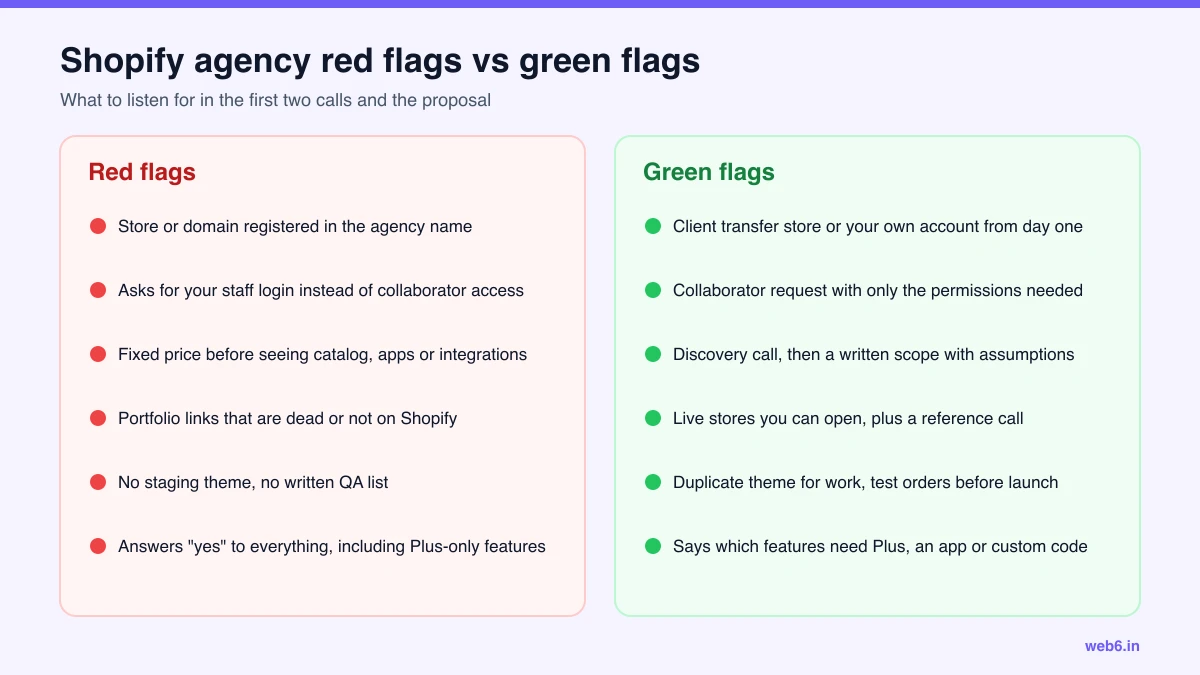
One more to add: an agency that gives you a fixed price in the first call, before seeing your catalog, apps or integrations, is pricing a template, not your store.
What the contract should say
- Scope with assumptions and exclusions, and a change-request process.
- Milestones tied to deliverables you can review, not to dates alone.
- Ownership of the store, domain, theme licence and apps, all in your name.
- Code: custom theme and app code assigned to you on payment.
- Apps: the list of paid apps and who pays for them.
- Warranty: a period after launch where bugs in delivered work are fixed at no cost.
- Support: response times and rates after the warranty.
- Tax: GST shown on invoices, and any TDS you deduct agreed upfront with your accountant.
- Exit: what the agency hands over if either side ends the engagement.
For budgets, use our Shopify website development cost in India guide to sense-check quotes. For how Web6 handles all of the above, see Shopify development company in India.
Frequently asked questions
How do I choose a Shopify development company in India?
Define the Shopify job first (theme setup, custom theme, migration, Plus or app). Shortlist three to five agencies with live stores like yours. Then check store ownership, collaborator access, theme and app approach, India payments and GST experience, speed on mobile, and written support terms before you compare price.
Should the agency create my Shopify store or should I?
Either works if ownership ends with you. You can create the store yourself and give the agency collaborator access, or the agency can build on a client transfer store and transfer it to you. Do not let anyone upgrade the store to Shopify Plus before ownership is transferred to you.
Should I give my Shopify login to a developer?
No. Shopify partners request collaborator access using a four-digit code from your admin, and you choose their permissions. Collaborators cannot become store owners, and you can remove them at any time. Unused collaborator access expires after 90 days.
What questions should I ask a Shopify developer?
Ask who will own the store and code, which live Shopify stores they built that you can open, how they handle Razorpay or other gateways, COD rules and GST invoices, how many apps they expect to install and what they will cost each month, how they test before launch, and what support response times they commit to.
Is a freelancer or an agency better for Shopify development?
A good freelancer is often fine for theme setup and small changes. An agency is safer for custom themes, migrations, integrations and Plus, where you need design, development and QA together, plus cover when someone is on leave.
What should a Shopify development contract in India include?
Scope with assumptions and exclusions, milestones tied to deliverables, store and domain ownership, assignment of custom theme and app code to you, the list of paid apps and who pays for them, a post-launch warranty period, support terms, GST on invoices, and an exit clause covering handover.
How long should Shopify agency selection take?
Two to four weeks is typical: one week to brief and shortlist, one to two weeks for discovery calls and proposals, and a few days for references and contract.