
CRM
Zoho CRM Implementation Guide: Process, Cost & Timeline
Written by Web6 Editorial Team · Published 27 August 2026 · 28 min read
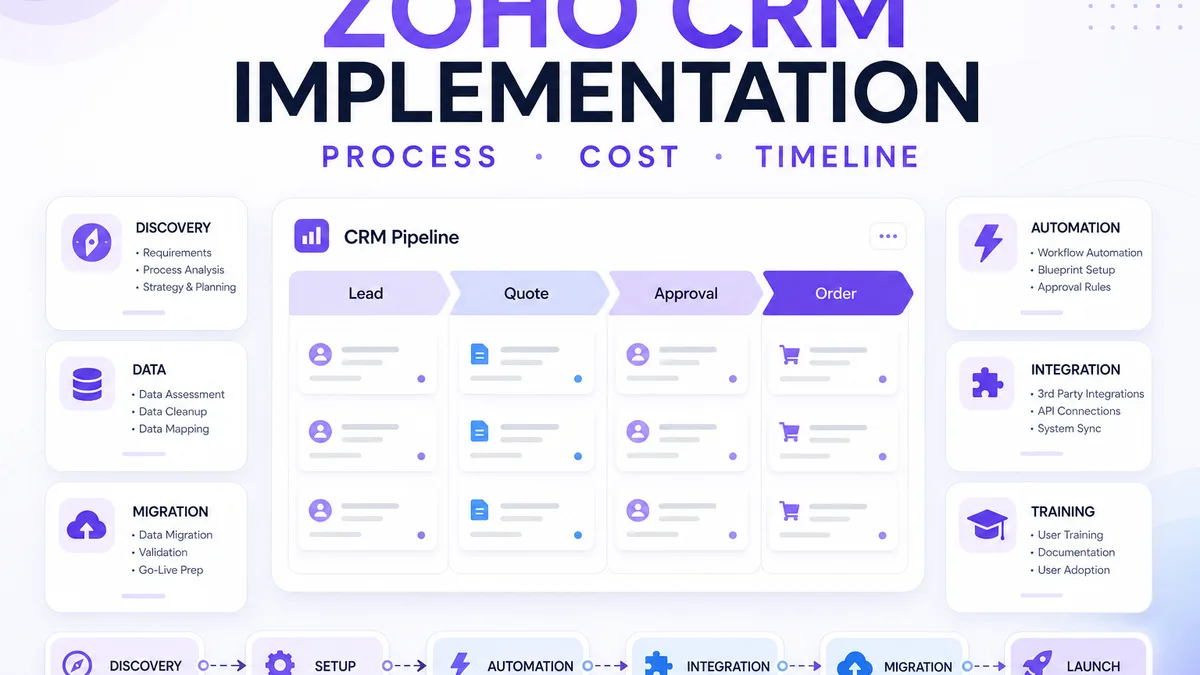
Zoho CRM can be configured quickly at a basic level, but a reliable business implementation is more than enabling modules and importing contacts. The CRM needs to reflect how leads enter the business, how sales teams qualify opportunities, how quotations and approvals work, who owns each stage, and which systems must exchange data.
This guide covers planning, process mapping, CRM architecture, customization, automation, migration, integrations, testing, training, cost and timeline drivers, and post-launch improvement — so you can judge whether a project is a simple setup or a full Zoho CRM implementation programme. If you are still choosing between Zoho and a purpose-built system, start with Zoho CRM vs custom CRM.
What does Zoho CRM implementation involve?
A professional Zoho CRM implementation typically starts with business-process discovery, followed by CRM architecture, module and field configuration, pipeline design, roles and permissions, workflow automation, data migration and integrations. After configuration, the system should be tested with real business scenarios, users should be trained, and post-launch issues should be monitored. Implementation cost and timeline depend on factors such as number of users, customization, migration volume, automation, Deluge development and integrations. Small straightforward implementations may move quickly, while complex multi-system projects require significantly more planning and testing.
Implementation stages
- DISCOVERY
- CONFIGURATION
- CUSTOMIZATION
- INTEGRATION
- MIGRATION
- TESTING
- TRAINING
- LAUNCH
- OPTIMIZATION
What is Zoho CRM implementation?
Implementation means adapting Zoho CRM to an actual business process — not merely creating an account. Work often includes leads, contacts, accounts, deals, pipelines, custom modules, fields, layouts, roles, profiles, permissions, automation, Blueprint (process management), reports, integrations, migration and training.
Treating implementation as “install CRM” usually produces a clean empty shell that sales abandons for WhatsApp and spreadsheets within weeks.
Zoho CRM setup vs implementation: what is the difference?
| Basic setup | Professional implementation |
|---|---|
| Create users | Map user roles and reporting hierarchy |
| Add fields | Design a data model for selling and reporting |
| Import contacts | Clean, map and validate migration data |
| Add stages | Model the actual sales process and exit criteria |
| Create a workflow | Design automation that removes real friction |
| Connect email | Integrate systems with ownership and failure handling |
| Start using CRM | Test, train, launch and optimize |
Basic setup can be enough for a small team with a simple pipeline. Professional implementation becomes more important as departments, approvals, migrations and integrations grow. For scoped delivery of that broader work, see Web6’s Zoho CRM development services.
Step 1: Understand the business process before configuring Zoho CRM
Map how leads arrive, how they are assigned, how qualification works, how quotations are created, how follow-ups happen, when management approval is required, how deals become customers, and how post-sales teams are involved. Do not start by configuring fields before this flow is clear.
Interview founders and floor reps. Managers reveal policy; reps reveal WhatsApp overrides, verbal discounts and dual ownership — the edges CRM must absorb if it is to become the system of record.
Illustrative sales flow (example, not universal)
Website lead → sales assignment → qualification → meeting → proposal → negotiation → won → customer handoff. Different businesses need different stages; copying a generic pipeline is a common failure mode.
Step 2: Design the CRM data structure
Standard building blocks include leads, contacts, accounts, deals and products. Relationships usually look like: account → contacts → deals → activities. Custom modules can hold business-specific entities — but only when standard modules cannot represent the work without awkward workarounds. For a deeper look at what can be configured versus what needs Deluge or APIs, see the Zoho CRM customization guide.
Custom fields
Fields should capture data needed for selling, reporting, automation and handoffs. Avoid dozens of unused fields. Typical types include text, number, date, picklist, lookup and formula fields. Every field should have an owner who cares if it is empty.
Step 3: Configure sales pipelines and deal stages
Pipeline stages should represent actual sales milestones. Prefer meaningful names such as Qualified, Demo, Proposal, Negotiation and Won where they match reality — not Stage 1 / Stage 2 / Stage 3. Zoho CRM supports multiple sales pipelines so different teams can track different operations without cluttering a single board.
Define exit criteria for each stage. If “Proposal” does not require a quotation record, forecasts become fiction.
Step 4: Configure roles, profiles and data access
Typical personas include sales executive, sales manager, operations, finance and admin. Decide who can view, edit, delete, export and approve. Sensitive fields (margins, personal data, partner pricing) need planned field-level and sharing rules — not “everyone is admin” for convenience.
Step 5: Automate repetitive CRM work
Useful automation includes lead assignment, follow-up tasks, email notifications, deal-stage actions, field updates, approval notifications and customer handoffs. Do not automate every possible action. Automation should remove friction, not create alert fatigue.
Workflow example (illustrative)
New lead → assign sales rep → create follow-up task → send internal notification → if no response → reminder. Label every automation with the business outcome it protects (response time, quote SLA, stuck deals).
When should you use Zoho Blueprint?
Blueprint (process management) helps standardize how deals move through stages. Transitions can require mandatory fields or actions — for example quotation attached, approval completed, meeting logged or document uploaded — before a record advances.
Use Blueprint where process integrity matters. Avoid forcing a click on every minor update; over-mandating fields is a common adoption killer. Blueprint availability depends on your Zoho CRM edition — confirm on Zoho’s current edition comparison before you design around it.
When is Deluge development needed?
Deluge is Zoho’s scripting language used for custom functions and related logic. It can support calculations, cross-module updates, API calls, record create/update rules and validations that workflow configuration cannot express cleanly.
Not every implementation needs Deluge. Prefer configuration first. Use Deluge when rules are genuinely insufficient — and keep functions small, named and tested. Endless nested scripts are a maintenance liability.
Step 6: Connect Zoho CRM with the systems your business already uses
Integration scope is often one of the largest implementation variables. Common connections include website forms, email, WhatsApp Business API partners, ERP, accounting, ecommerce, inventory, helpdesk and custom APIs. For architecture patterns — source of truth, APIs, webhooks and sync direction — see the Zoho CRM integration guide.
Website forms
Typical flow: website form → Zoho CRM lead → assignment → follow-up. Plan field mapping, spam/validation, source tracking and consent where relevant.
Zoho Books
Some teams connect deals to estimates or invoices and payment status. Not every business needs Books — keep finance as system of record when that is the operating model.
Zoho Inventory
Where stock and fulfilment matter, products, stock levels and sales orders may connect to CRM quoting and deal workflows. Do not force inventory data into CRM fields as a substitute for Inventory or ERP.
Zoho Desk
When post-sale service matters, customer context can flow into support tickets so agents do not restart discovery. Useful for service-heavy and B2B accounts.
Zoho Flow
Flow can connect applications and trigger workflows without custom code for many cases. It is not a universal replacement for all custom integrations — especially when you need retries, complex mapping or high-volume APIs.
Can Zoho CRM integrate with ERP software?
Yes. Teams commonly sync or hand off customers, products, inventory, orders, invoices and pricing between Zoho CRM and an ERP — often via API or middleware:
Zoho CRM ↔ API / middleware ↔ ERP
Define system of record for each entity and test failure handling. For ERP-side architecture and handoffs, see ERP development. Storefront and account workflows may also relate to ecommerce website development or B2B ecommerce development.
Custom API integration
When connectors are insufficient — legacy software, proprietary ERP, custom portals, internal apps — custom API work may need mapping, authentication, retry logic, error handling and monitoring. Treat integration ownership as a named workstream, not a go-live afterthought.
Step 7: Migrate existing CRM data carefully
Sources often include Excel, Google Sheets, an old CRM, ERP extracts or CSV exports. A safe sequence is: export → clean → deduplicate → map → import → validate.
Migration risks
- Duplicate contacts and accounts
- Incorrect field mapping
- Missing account relationships
- Invalid dates and inconsistent phone numbers
- Old or inactive data crowding the pipeline
- Missing record owners
Do not import everything blindly. Test a subset first, validate records, then run final migration. For critical systems, prepare backup and rollback options where applicable.
Step 8: Build reports that answer actual management questions
Useful views include lead sources, pipeline value, deal conversion, salesperson activity, aging deals, forecast and follow-up performance. Do not create dashboards merely because charts look impressive — every report should answer a decision someone already asks in meetings.
Step 9: Test Zoho CRM using real business scenarios
Test lead creation, assignment, permissions, automation, Blueprint transitions, email, API integrations, migration results, reports and mobile workflows where relevant. Do not rely only on developer testing.
User acceptance testing (UAT)
Have actual business users exercise their real workflows before full rollout. Capture defects as process issues or configuration issues — not vague “CRM feels wrong” feedback.
Step 10: Train users before expecting CRM adoption
Train sales representatives, managers, administrators and operations separately when workflows differ. Cover daily workflow, data entry, follow-ups, reports and exceptions. A single generic demo for every role is usually insufficient.
CRM adoption
A technically correct CRM can still fail if users do not understand why and how to use it. Poor adoption may indicate too many fields, poor workflows, insufficient training or unnecessary complexity — not only “user resistance.”
Step 11: Launch Zoho CRM in a controlled way
Strategies include a pilot group, phased rollout or full rollout depending on organization size. Monitor errors, automation noise, data quality, support tickets and user feedback in the first weeks.
Step 12: Improve the CRM after real usage
Implementation is not always finished on launch day. Expect pipeline refinement, new automation, reports, integrations, field cleanup, workflow adjustments and refresher training as the business learns what the CRM can support.
Zoho CRM implementation process at a glance
| Phase | Main work | Typical output |
|---|---|---|
| Discovery | Understand process | Process map |
| Architecture | Data and modules | CRM design |
| Configuration | CRM setup | Working structure |
| Automation | Workflows and Blueprint | Fewer manual steps |
| Integration | Connect systems | Defined data flow |
| Migration | Move data | Clean CRM data |
| Testing | Validate workflows | UAT approval |
| Training | User onboarding | Adoption readiness |
| Launch | Go live | Production CRM |
| Optimization | Improve | Better process fit |
How long does Zoho CRM implementation take?
There is no universal timeline. Duration depends on users, modules, customization, automation, migration volume, integrations, testing depth, decision speed and training. The following categories are illustrative — not guarantees:
| Implementation type | Typical complexity | Timeline character |
|---|---|---|
| Basic setup | Low | Short |
| Standard sales CRM | Medium | Several phased weeks |
| Integrated CRM | High | Longer, discovery-led |
| Complex multi-system | Very high | Multi-phase programme |
Ask partners for a phased plan tied to your process map — not a calendar promise made before discovery.
How much does Zoho CRM implementation cost?
Separate two cost layers:
- Zoho software / licence cost — paid to Zoho based on edition and users.
- Implementation / development cost — paid to the partner for discovery, configuration, automation, migration, integrations, training and support.
Zoho currently publishes Free (limited users), Standard, Professional, Enterprise and Ultimate editions, with annual and monthly billing and local taxes where applicable. Exact per-user rates change by currency and promotion — verify current figures on Zoho’s official CRM pricing page before budgeting. Do not treat third-party summaries as authoritative.
Implementation fees rise with users and teams, modules and custom fields, workflow and Blueprint depth, Deluge scope, migration cleanliness, API integrations, reports, training breadth and ongoing support. This article does not publish Web6 package prices.
Cost drivers
| Cost driver | Lower complexity | Higher complexity |
|---|---|---|
| Users | Small team | Large or multiple teams |
| Modules | Standard | Multiple custom modules |
| Automation | Basic | Complex / Blueprint-heavy |
| Migration | Clean spreadsheet | Multiple legacy systems |
| Integrations | Standard connector | Custom API |
| Reports | Basic | Management dashboards |
| Training | Single team | Multiple departments |
| Support | Basic handoff | Ongoing managed support |
Zoho CRM implementation considerations for Indian businesses
Many Indian teams sell with WhatsApp-led follow-ups, multi-branch ownership and GST-aware quoting alongside Zoho Books or other accounting tools. Manufacturers and distributors often need CRM stages that respect credit and dispatch readiness without turning CRM into an ERP. Export businesses care about multi-currency quotes; real estate teams about site visits and broker visibility; B2B networks about territories and price lists.
None of this requires stuffing geography into every field — but ignoring it produces templates reps reject. This is operational design, not tax or legal advice.
What changes for international Zoho CRM implementations?
Cross-border programmes often add multiple sales teams, time zones, currencies, regions, languages, territories, integrations and data/privacy requirements. Design permissions and reporting hierarchy early. Do not treat this as legal compliance advice, and do not force country-specific doorway content into a global process guide.
Industry workflow examples (illustrative)
Manufacturing
Lead → technical requirement → quote → approval → order → ERP. CRM owns pipeline and quote status; inventory and tax typically live in Books, Inventory or ERP with a clear sync contract.
Real estate
Lead → assignment → site visit → follow-up → booking. Automation can schedule visits and reminders; permissions matter for brokers vs in-house sales.
B2B distribution
Account → contact → opportunity → quote → negotiation → order, often with an ERP handoff after order confirmation.
Ecommerce (where relevant)
Customer → order → CRM segment → follow-up or sales activity. Not all ecommerce order data belongs in CRM — keep commerce systems authoritative for cart and fulfilment when that is the operating model.
12 common Zoho CRM implementation mistakes
- Configuring before process discovery
- Copying generic pipelines
- Creating too many unused fields
- Automating broken processes
- Ignoring permissions design
- Migrating dirty data
- No clear integration ownership
- Skipping UAT
- Skipping role-based training
- Over-customizing too early
- No documentation of fields and workflows
- Treating launch as the end of implementation
When Zoho CRM is a good fit
Zoho CRM often fits teams with a structured sales process, a need for automation, interest in the Zoho ecosystem (Books, Inventory, Desk, Flow), configurable CRM requirements and integration needs that fit Zoho’s architecture — especially SME and mid-market sales orgs. These are fit signals, not universal rules.
When Zoho CRM may not be enough
Consider alternatives when workflows are highly proprietary, the data model is unusual, the CRM itself is strategic product IP, or platform constraints force constant workarounds. In those cases, custom CRM development — or a hybrid architecture — may be cleaner than endless Deluge patches.
Zoho CRM vs custom CRM
| Factor | Zoho CRM | Custom CRM |
|---|---|---|
| Launch speed | Often faster | Usually longer |
| Built-in features | Strong | Must be developed |
| Customization | Strong within platform | Maximum flexibility |
| Maintenance | Lower platform responsibility | Higher ownership cost |
| Unique workflows | Depends on complexity | Strong fit |
| Ecosystem | Zoho suite | Custom integrations |
Do you need a Zoho CRM implementation partner?
Not always. Small teams with simple processes may configure Zoho CRM themselves. Professional implementation becomes more useful when migration, automation, Blueprint, custom modules, multiple departments, ERP integration, custom APIs or complex permissions are involved.
If you are evaluating vendors, use the companion guide: how to choose a Zoho CRM development company in India — covering discovery, customization, automation, migration, testing and support checks. For a step-by-step delivery model, see the Zoho CRM implementation guide on process, cost and timeline.
Zoho CRM implementation checklist
Before implementation
- ☐ Map sales process
- ☐ Define stages
- ☐ Identify users
- ☐ Define roles
- ☐ Audit existing data
- ☐ Identify integrations
- ☐ Define reporting needs
During implementation
- ☐ Configure modules
- ☐ Create fields and layouts
- ☐ Set permissions
- ☐ Configure automation
- ☐ Build integrations
- ☐ Prepare migration
- ☐ Test workflows
Before launch
- ☐ UAT complete
- ☐ Migration validated
- ☐ Integrations tested
- ☐ Reports validated
- ☐ Users trained
- ☐ Support process defined
After launch
- ☐ Monitor data quality
- ☐ Review automation noise
- ☐ Collect user feedback
- ☐ Improve reports
- ☐ Refine processes
Planning a Zoho CRM implementation?
A reliable programme starts by mapping the sales process, data model, automation and integrations before configuring the CRM. If you want help turning that map into a working system — customization, migration and integrations included — discuss your requirements via Web6’s Zoho CRM implementation and customization page, or the UAE Zoho CRM development page if your team operates in the United Arab Emirates.