
CRM
Zoho CRM Customization: What Can Be Customized for Your Business?
Written by Web6 Editorial Team · Published 27 August 2026 · 24 min read
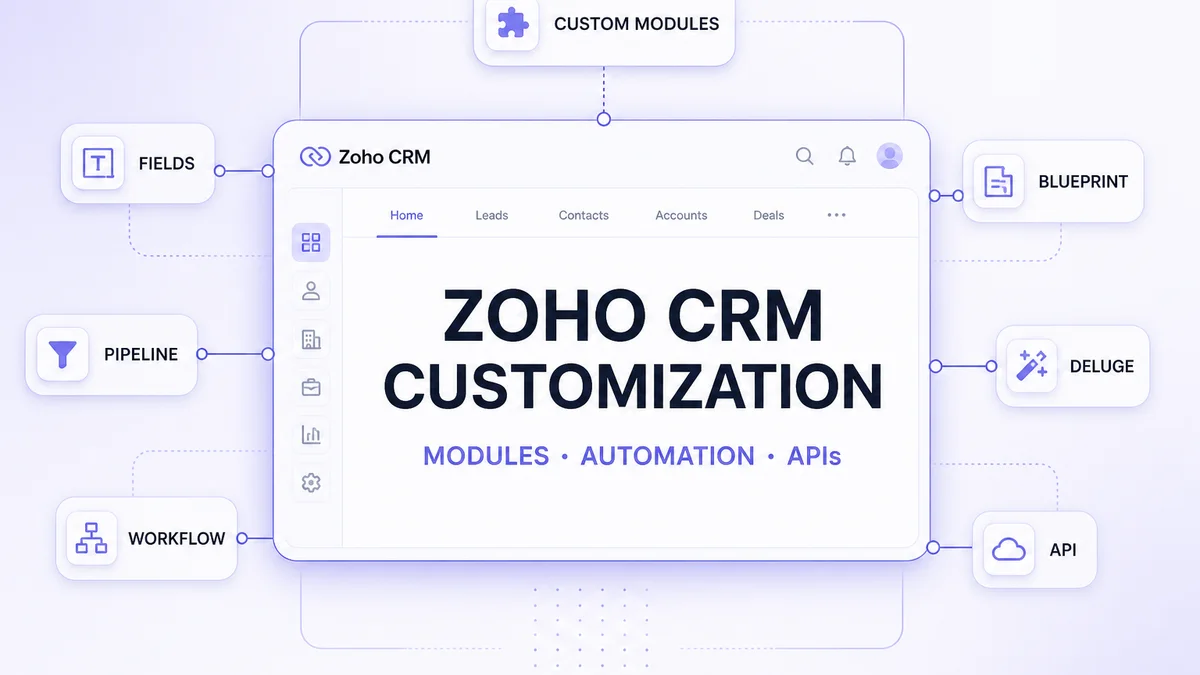
Zoho CRM provides a standard structure for managing leads, contacts, accounts and deals, but most businesses eventually need the system to reflect their own sales process. That may involve custom fields, modules, pipelines, automation, approval processes, integrations or custom functions.
There are different levels of customization. Some changes are pure configuration. Others require Deluge, APIs or extensions. And some requirements may exceed what should reasonably be built inside a configurable CRM — at which point custom CRM development is the cleaner architecture. For a full Zoho vs custom comparison, see Zoho CRM vs custom CRM.
What can be customized in Zoho CRM?
Businesses can typically customize modules and custom modules, fields, page layouts, pipelines, roles and permissions, workflow automation, assignment and approval processes, Blueprint process controls, validation rules, reports and dashboards, custom functions (often via Deluge), and integrations through connectors or APIs. Interface options such as Canvas, widgets or extensions may also apply depending on edition and architecture. Exact capabilities vary by Zoho CRM edition. Highly specialized operational systems may still be better suited to a purpose-built CRM than to endless platform stretching.
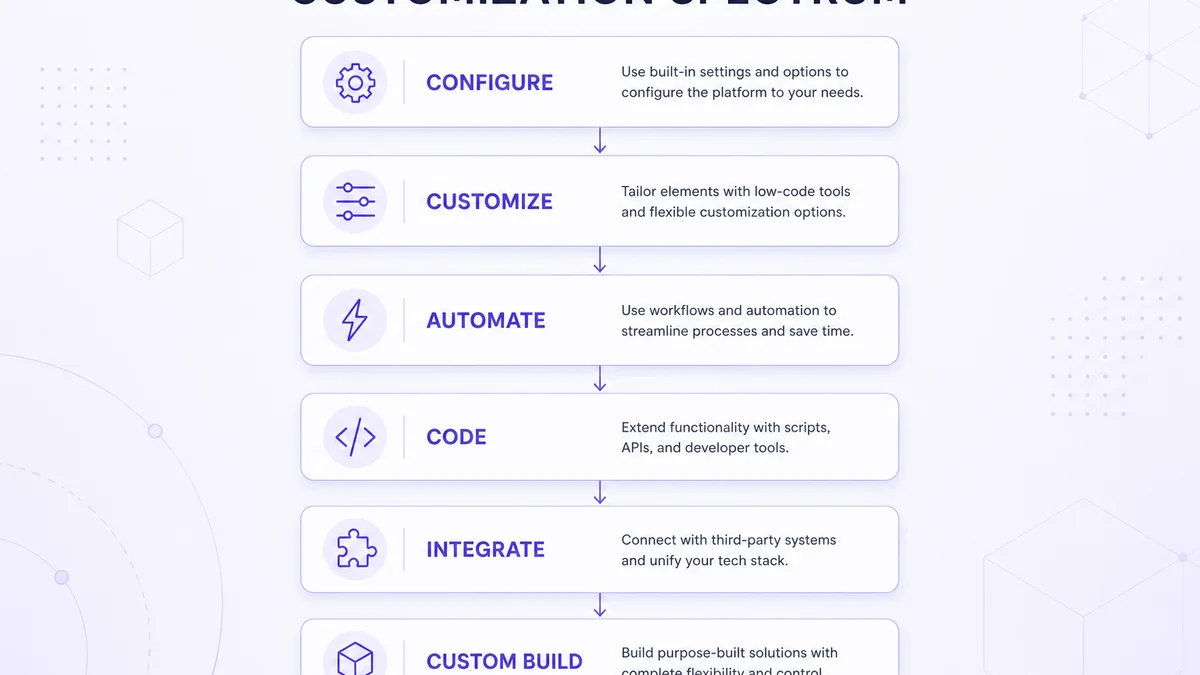
The Zoho CRM customization spectrum
| Level | Example | Typical approach |
|---|---|---|
| Basic | Rename fields, adjust layouts | Configuration |
| Structural | Custom modules, relationships | CRM customization |
| Process | Pipelines, approvals, Blueprint | Process configuration |
| Automation | Workflows and actions | Automation |
| Logic | Business-specific calculations/actions | Deluge / custom functions |
| Integration | ERP, website, apps | APIs / connectors |
| Advanced | Specialized interfaces / extensions | Custom development |
| Beyond platform | Proprietary operational system | Custom CRM |
Moving down the spectrum increases flexibility — and maintenance cost. Prefer the simplest level that correctly supports the process. For end-to-end delivery of configuration through integrations, see Zoho CRM development services.
1. Can you customize standard Zoho CRM modules?
Yes, within platform limits. Standard entities such as Leads, Contacts, Accounts and Deals can usually be extended with fields, layouts, views, related lists, automation and process controls. You are adapting how those modules behave for your business — not rewriting Zoho’s core product as if it were open-source software.
2. Custom fields: capturing business-specific information
Custom fields store data your process needs that defaults do not. Illustrative examples: Customer Type, Product Interest, Lead Source Detail, Expected Purchase Date, Dealer Category, Industry Segment.
Field types
Depending on edition and module settings, Zoho CRM commonly supports types such as text, number, currency, date, picklist, multi-select, lookup and formula fields. Confirm available types in your org’s setup — they can differ by plan and module.
Field design best practices
Do not create a field merely because someone might need it later. Prefer fields that support process, reporting, automation, segmentation or integration. Duplicate fields, unclear names, unused columns and uncontrolled picklists erode data quality and make dashboards unreliable.
3. Can you customize Zoho CRM layouts?
Yes. Different teams often need different page layouts — for example B2B sales vs channel sales vs enterprise sales may capture different information. Layouts control which fields and sections appear for which profiles.
Layout rules
Where supported, layout rules can show or hide sections and fields based on values — for example, if Customer Type = Distributor, show distributor-specific fields. Use them to reduce clutter, not to hide critical required data from the people who need it.
4. Can you create custom modules in Zoho CRM?
Yes (availability and limits depend on edition). A custom module holds a business-specific entity with its own records, fields, relationships, workflow and reporting. Illustrative entities: Properties, Sites, Machines, Dealers, Projects, Subscriptions, Installations, Vendors.
When to create a custom module
Create one when the entity needs its own lifecycle — not when a field or related list would suffice. Unnecessary modules multiply screens, permissions and automation surface area.
Relationships
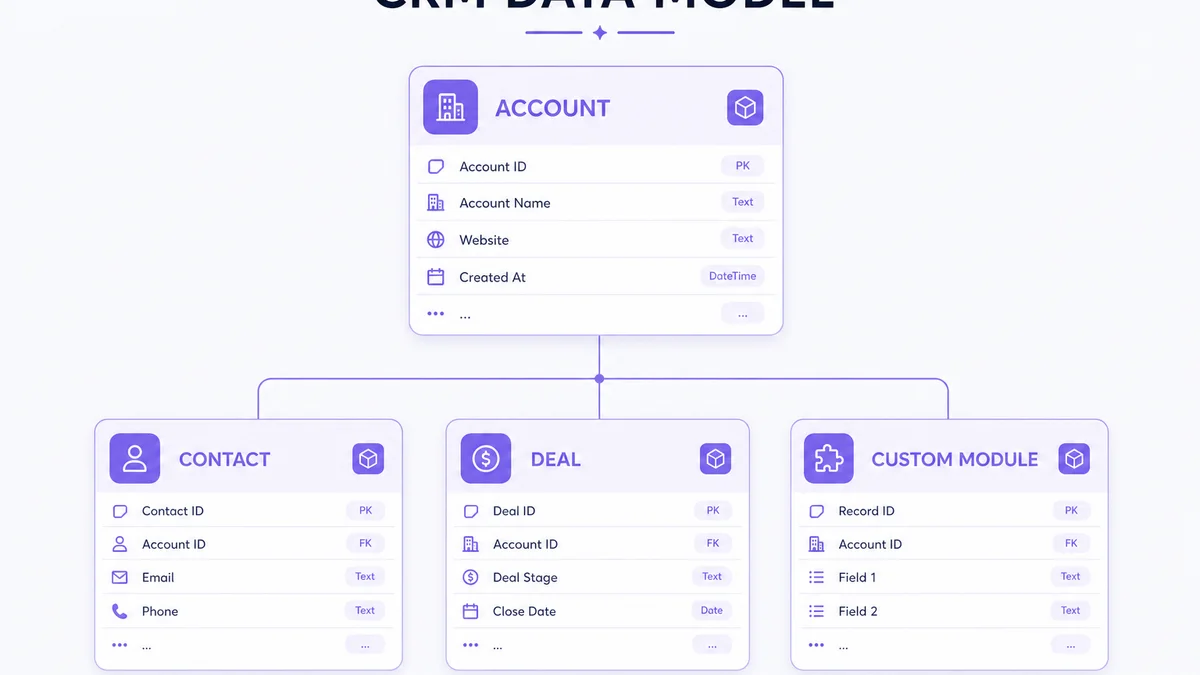
Design relationships before flooding the org with modules. A common pattern: Account → Contacts, Deals and (optional) custom entities such as Installations. Bad relationships produce orphan records and broken reports.
5. Can you customize sales pipelines in Zoho CRM?
Yes. Stages should mirror real milestones — for example Qualified → Demo → Proposal → Negotiation → Won — not Stage 1 / Stage 2 / Stage 3. Zoho CRM supports multiple pipelines so organizations can separate processes such as new sales, renewals, channel and enterprise motions when needed.
Define exit criteria per stage. If “Proposal” does not require a quotation, forecasts become fiction.
6. Roles, profiles and permissions
Roles typically describe reporting hierarchy (for example Sales Head → Regional Manager → Sales Executive). Profiles and permissions control what users can do. Conceptually: executives may see own records; managers team records; finance relevant commercial fields; admins system configuration.
Plan view, create, edit, delete, export and administration rights deliberately. “Everyone is admin” is not a permissions strategy.
7. What can be automated in Zoho CRM?
Common automations include lead assignment, follow-up creation, internal alerts, field updates, email actions, stage-based actions, customer handoffs and escalations — usually via workflow rules and related automation tools.
Automation example (illustrative)
New website lead → create CRM record → assign sales rep → create follow-up task → send internal alert → track response. Automate to remove useful repetitive work, not to maximize the number of triggers.
Don’t automate a broken process
If the underlying sales process is unclear, automation amplifies the confusion. Map the process first; automate second.
Assignment rules
Leads can often be routed by criteria such as region or product interest to the right team or specialist. Keep rules transparent so reps trust ownership.
8. Can Zoho CRM handle approvals?
Yes, through approval processes (edition-dependent). Typical uses: discount approval, quotation approval, high-value deal approval, special commercial terms. Flow conceptually: request → manager review → approve / reject. Pair approvals with clear SLAs so deals do not stall silently.
9. What is Zoho Blueprint and what can it customize?
Blueprint is process control — not visual skinning. It guides users through stages and can require actions or fields before a transition (for example Proposal → Approval required → Negotiation → Won). Availability is edition-dependent; confirm on Zoho’s current plans.
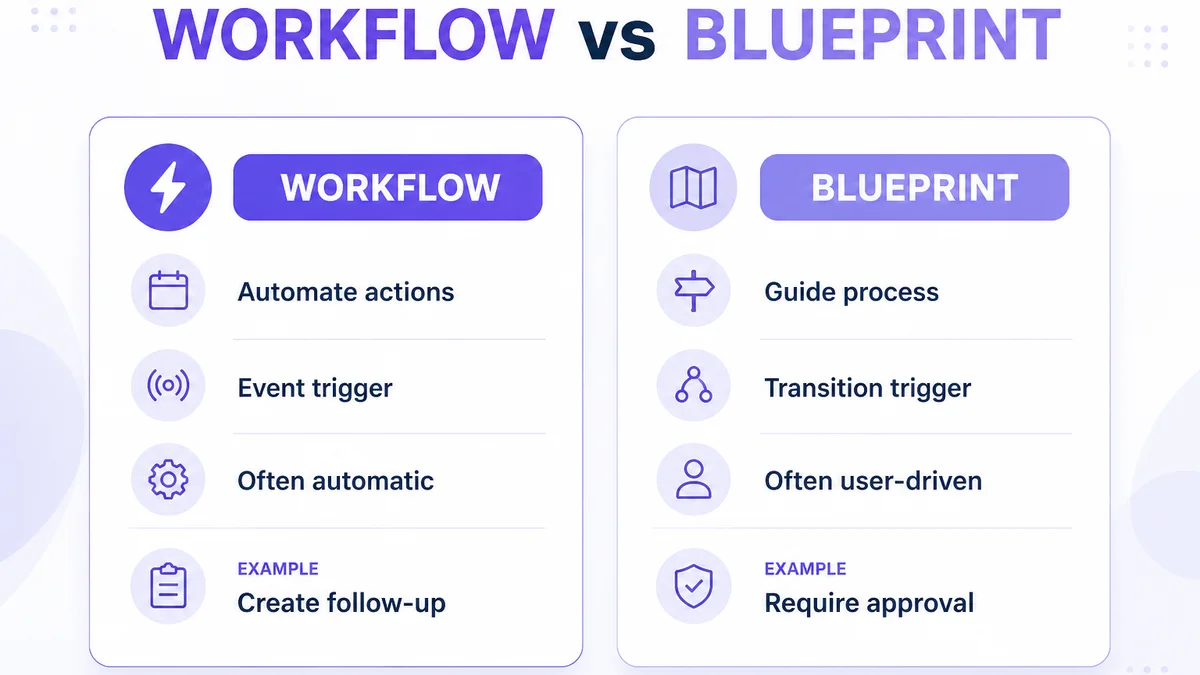
Blueprint vs workflow
| Feature | Workflow | Blueprint |
|---|---|---|
| Purpose | Automate actions | Guide / control process |
| Trigger | Event / condition | Process transition |
| User interaction | Often automatic | Often user-driven |
| Example | Create follow-up task | Require approval before next stage |
Use workflows for side effects; use Blueprint for rails. Avoid duplicating the same side effect in both places.
10. Can Zoho CRM enforce data-quality rules?
Validation rules (where available) can block saves or progress when required information is missing. Cleaner data improves reporting — but excessive validation makes CRM frustrating. Require only what the next decision truly needs.
11. What are custom functions in Zoho CRM?
Custom functions execute logic beyond standard configuration — for example calculating business-specific values, creating or updating related records, calling another system, transforming data or triggering advanced actions. They are often written in Deluge and tied to workflows, buttons or other triggers.
12. What is Deluge and when is it needed?
Deluge (Data Enriched Language for the Universal Grid Environment) is Zoho’s scripting language used across parts of the Zoho ecosystem for custom logic. Typical uses: calculations, conditional logic, cross-module actions, API calls and data transformation.
Deluge is not required for every customization. Prefer configuration first.
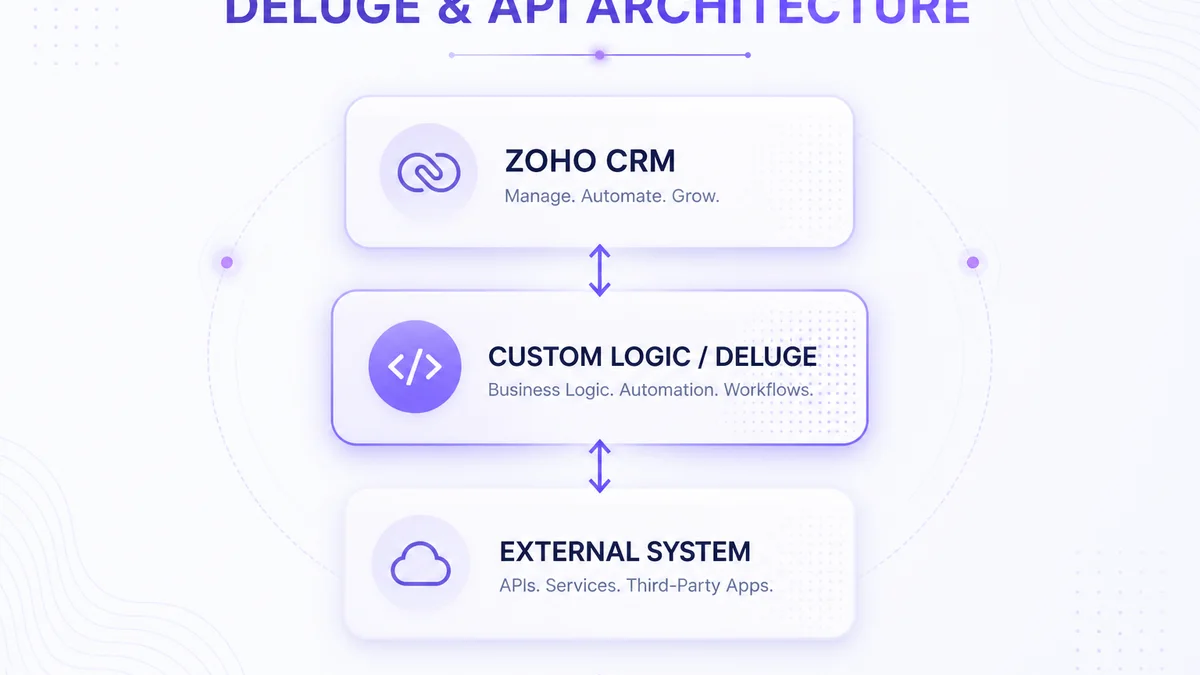
Configuration vs Deluge
| Requirement | Configuration | Deluge |
|---|---|---|
| Add field | Usually enough | Usually unnecessary |
| Change layout | Usually enough | Usually unnecessary |
| Simple workflow | Often enough | Often unnecessary |
| Complex calculation | Maybe | Often useful |
| External API logic | Limited / depends | Often useful |
| Complex cross-module logic | Depends | Often useful |
13. Can Zoho CRM connect to custom APIs?
Yes. APIs allow Zoho CRM to exchange data with ERP, websites, ecommerce platforms, internal software, logistics, billing and proprietary applications.
Typical architecture: Zoho CRM ↔ API / middleware ↔ business system. Plan authentication, field mapping, error handling, retries and monitoring — not only the happy-path sync. For a full treatment of sync direction, webhooks and ERP handoffs, see the Zoho CRM integration guide.
Webhooks
Where supported, event-style notifications can push changes (for example deal updated → external system). Confirm current webhook/notification options for your edition before designing around them.
14. Can a website be integrated with customized Zoho CRM workflows?
Yes. A common pattern: contact form → Zoho CRM → lead source capture → assignment → follow-up. Useful context includes UTM source, landing page, campaign and product interest. Not every website integration requires custom development — built-in forms and connectors may suffice for simpler cases.
15. Zoho CRM + ERP customization
Keep responsibilities clear. CRM typically owns leads, opportunities and relationships; ERP owns orders, inventory, finance and operations. Architecture: CRM ↔ integration ↔ ERP. For ERP-side design, see ERP development. Storefront and account workflows may also relate to ecommerce website development or B2B ecommerce development.
Zoho Books, Inventory, Desk and Flow
- Books — estimates, invoices and payments beside CRM customers/deals where that is the finance stack.
- Inventory — products, stock, orders and fulfilment when inventory is not forced into CRM fields.
- Desk — shared customer context from sale into support.
- Flow — no/low-code connections across apps; not always a substitute for robust custom APIs.
16. Can reports and dashboards be customized?
Yes. Build views that answer real questions: lead sources, aging opportunities, pipeline value, product interest, time-in-stage. Dashboards should drive decisions — not display vanity charts.
17. How much can the Zoho CRM interface be customized?
Layouts, views and related lists cover most day-to-day needs. Zoho also offers Canvas (a design studio for record screens) on eligible editions, plus widgets and extensions for embedded functionality. Canvas changes how a record looks and is arranged; it does not replace process enforcement (Blueprint) or business logic (workflows/Deluge). Always test critical customizations on mobile if field teams live in the mobile app.
Zoho CRM customization examples by industry
Examples below are illustrative, not client claims.
Manufacturing
Account → Contact → Inquiry → Technical requirement → Quote → Order, with optional custom entities such as Machine, Dealer, Installation or Project, and ERP handoff after order.
Real estate
Lead → Property interest → Site visit → Follow-up → Booking, sometimes with a Property or Project module.
B2B distribution
Account → Dealer → Inquiry → Quote → Order, with territory, dealer type, product interest and credit-related workflow where appropriate (not financial advice).
Professional services
Lead → Consultation → Proposal → Project → Renewal. Know where CRM should stop and project tools begin.
Ecommerce
Customer → Purchase/segment → Sales activity → Follow-up. CRM should not automatically become the source of truth for all ecommerce operational data.
What should you NOT customize in Zoho CRM?
- Customization for its own sake
- Duplicating built-in features
- Too many custom fields or modules
- Overly complicated workflows
- Huge Deluge scripts where simpler architecture exists
- Using CRM as ERP or as every business system
- Excessive automation and temporary-exception logic
Can you over-customize Zoho CRM?
Yes. Consequences can include harder onboarding, confusing UI, more maintenance, automation conflicts, data-quality problems, integration complexity and difficulty changing processes later. Prefer reversible, documented changes.
Configure Zoho CRM, customize it, or build a custom CRM?
| Requirement | Configure Zoho | Customize Zoho | Custom CRM |
|---|---|---|---|
| Standard sales pipeline | Strong fit | Usually unnecessary | Usually unnecessary |
| Custom fields | Strong fit | Light | Unnecessary |
| Business-specific modules | Possible | Strong fit | Depends |
| Complex automation | Possible | Strong fit | Depends |
| Custom API integration | Possible | Strong fit | Strong |
| Highly proprietary workflows | Limited / depends | Depends | Strong |
| Complete UI control | Limited | Limited / depends | Strong |
| Platform independence | No | No | Yes |
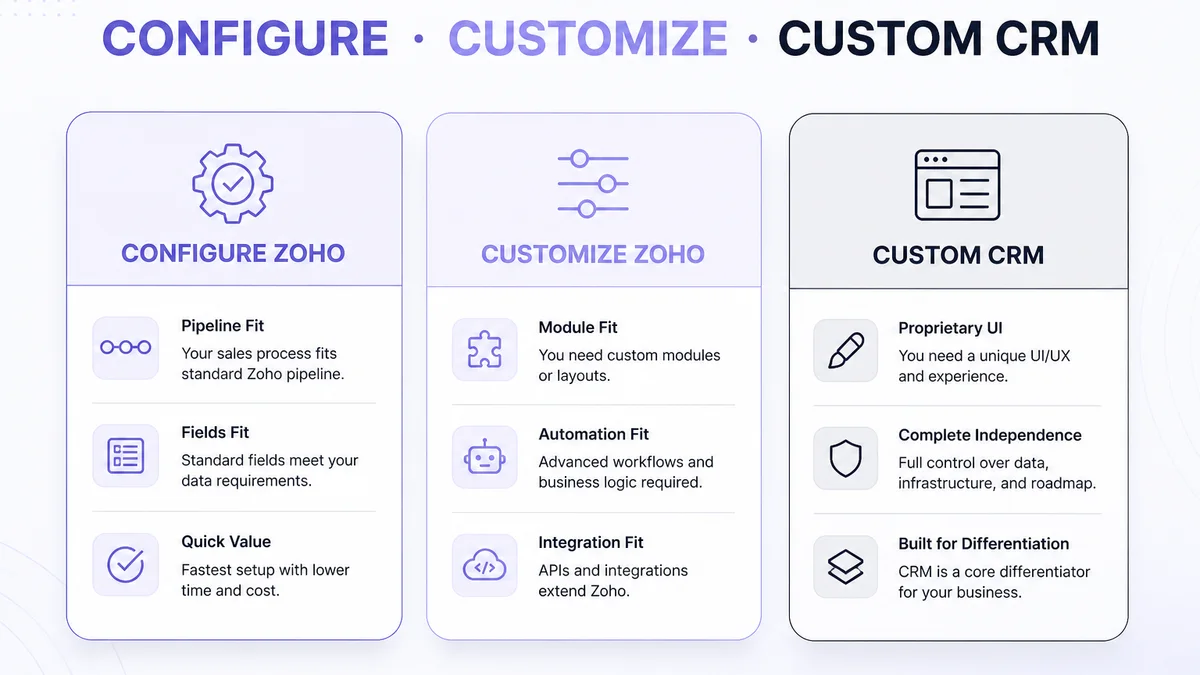
When does customization stop making sense?
Consider a purpose-built system when CRM must behave like proprietary operational software, workflows are highly specialized, full UI control or platform independence is required, CRM is core company IP, or cross-system architecture dominates the CRM. Continuously extending SaaS CRM can become more expensive than designing intentionally. That is when purpose-built CRM development deserves a serious comparison.
What does a good Zoho CRM customization process look like?
- Understand the business process
- Audit current CRM
- Identify pain points
- Separate configuration from custom development
- Design data model
- Configure modules and layouts
- Build automation
- Add custom logic
- Build integrations
- Test
- Train users
- Monitor and improve
For the broader discovery-to-launch programme, see the complete Zoho CRM implementation guide.
Requirements mini-template
- BUSINESS PROBLEM:
- CURRENT PROCESS:
- DESIRED PROCESS:
- USERS:
- DATA REQUIRED:
- AUTOMATION:
- INTEGRATIONS:
- REPORTING:
- PERMISSIONS:
- SUCCESS CRITERIA:
How should Zoho CRM customizations be tested?
Test permissions, field behavior, layouts, automation, Blueprint, custom functions, API integrations, migration effects, reports, mobile usage and edge cases. Change management matters: communicate and train when fields, pipelines or automation change.
What affects the cost of Zoho CRM customization?
Cost depends on scope — modules, fields/layouts, workflow complexity, Blueprint, Deluge, API integrations, migration, reporting, testing, documentation, training, support and edition/licensing — not a single fixed market price. This article does not publish Web6 rates.
| Customization | Relative complexity (illustrative) |
|---|---|
| Fields / layout changes | Lower |
| Pipeline configuration | Lower–Medium |
| Custom modules | Medium |
| Workflow automation | Medium |
| Blueprint | Medium |
| Deluge functions | Medium–High |
| API integrations | Medium–High |
| Multi-system architecture | High |
How long does Zoho CRM customization take?
There is no universal timeline. Duration depends on requirements clarity, existing CRM quality, number of modules, automation, Deluge, integration complexity, testing, stakeholder approvals, migration and training. Ask for phased estimates after discovery — not calendar guarantees before the process map exists.
Can you customize Zoho CRM yourself?
Many basic changes — fields, views, simple layouts, basic workflow — can be handled by an internal administrator. Professional help becomes more useful for architecture, complex automation, Blueprint, Deluge, APIs, ERP integration, migration, multi-team permissions and advanced business logic. If you are selecting a partner, use how to choose a Zoho CRM development company.
How do you keep a customized Zoho CRM maintainable?
Document custom fields, modules, workflows, Blueprints, Deluge functions, API integrations, permissions and reports — including why each exists and who owns it. Name automation clearly, avoid duplicate logic, remove unused customization, test major changes and follow least-privilege access. Do not treat this as a legal or security certification.
Need Zoho CRM to match your business process?
If standard configuration does not fully match how you sell, Web6 can help evaluate where configuration, automation, Deluge or custom integrations are appropriate — and when a custom CRM is the better fit. Explore Zoho CRM customization and development, or Zoho CRM development for UAE businesses when your market is the United Arab Emirates.