
CRM
How to Choose a Zoho CRM Development Company in India: 12 Things to Check
Written by Web6 Editorial Team · Published 27 August 2026 · 22 min read
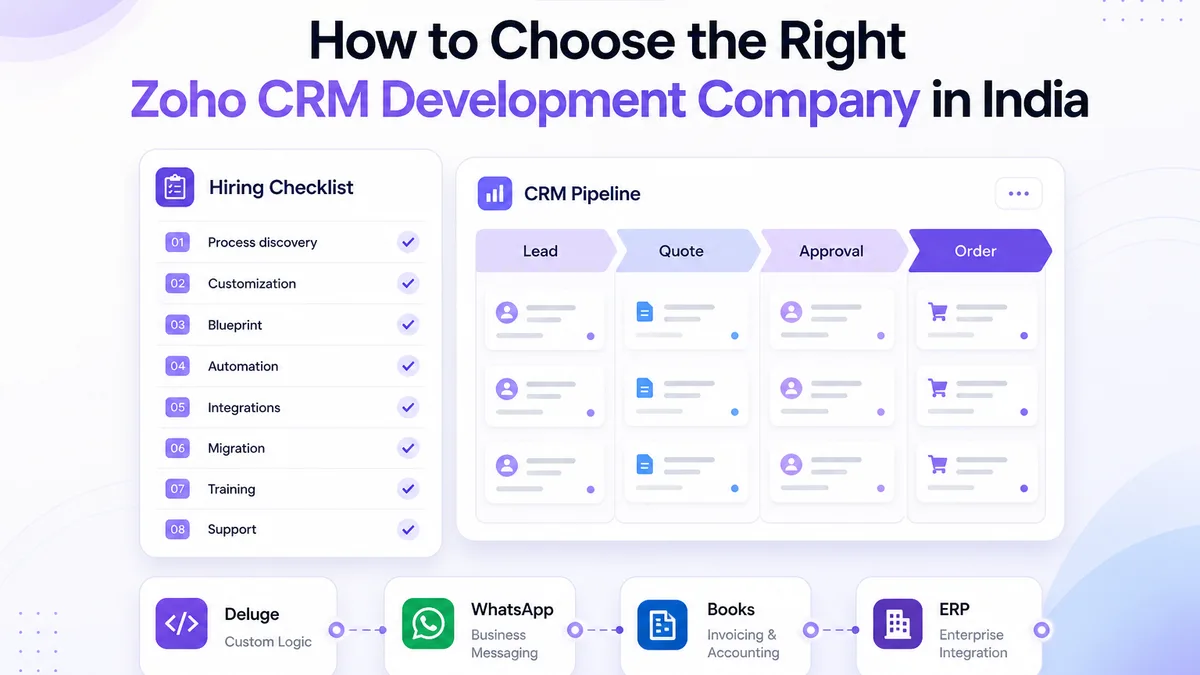
Many Indian businesses shortlist a Zoho CRM development company on price, a demo recording, or “we have done Zoho before.” That is how teams end up with generic pipelines, duplicate accounts, unread automation noise, and a CRM that sales quietly abandons for WhatsApp and spreadsheets.
CRM implementation is not only licence activation. It is process design, data architecture, roles, Blueprint and workflow decisions, Deluge where rules are not enough, integrations, migration, testing, training, and support after go-live. This guide explains what a competent Zoho CRM partner should actually do — and twelve checks you can run before you hire one. For the delivery model itself — phases, cost drivers and timeline factors — read the Zoho CRM implementation guide. Still deciding Zoho versus custom CRM? See Zoho CRM vs custom CRM.
How do you choose a Zoho CRM development company?
Evaluate whether the company discovers your sales process before configuring modules, customizes fields and layouts for how you sell, designs automation and Blueprint transitions with purpose, integrates Zoho CRM with the systems you already run, migrates data carefully, tests with real scenarios, trains users, and supports the CRM after launch. Prefer partners who will also say when Zoho CRM is a poor fit and when custom CRM development is the cleaner path.
What does a Zoho CRM development company actually do?
A serious engagement goes beyond turning on Leads and Deals. Expect work across discovery, configuration, customization, automation, integration, migration, reporting, training, and support.
- Business process discovery — how leads arrive, who owns follow-ups, how quotes are approved, how orders hand off to ops.
- CRM setup — modules, pipelines, layouts, fields, picklists, and page layouts matched to roles.
- Roles and permissions — who sees what across territories, branches, and partners.
- Blueprint — stage transitions with mandatory fields and approvals where process enforcement matters.
- Automation — workflow rules, assignment, tasks, alerts, and deal-stage actions.
- Deluge — custom functions when native rules cannot express the logic cleanly.
- Integrations — website forms, accounting, inventory/ERP, ecommerce, WhatsApp, email, and APIs.
- Migration — Excel or legacy CRM import with mapping, cleaning, and trial runs.
- Reports and dashboards — forecasts and operational views managers will actually open.
- Training and support — UAT, documentation, go-live hypercare, and iterative improvement.
If you need implementation and customization delivered as a coherent programme — not a weekend setup — review how Web6 structures Zoho CRM development services.
Basic CRM setup vs professional Zoho CRM implementation
| Area | Basic CRM setup | Professional Zoho CRM implementation |
|---|---|---|
| Process discovery | Assumes default stages | Maps lead → quote → order → handoff with owners |
| Data model | Default modules and fields | Modules, relationships, and picklists designed for your sales language |
| Customization | Cosmetic field rename | Layouts, validation, roles, and business rules per team |
| Automation | Generic email alerts | Assignment, tasks, approvals, and stage actions tied to outcomes |
| Integrations | Optional or “later” | Planned with website, Books/Inventory, ERP, WhatsApp, ecommerce |
| Migration | One CSV upload | Mapping, dedupe rules, sandbox trials, cutover plan |
| Testing | Click through happy path | UAT scripts, edge cases, integration checks |
| Training | One demo call | Role-based training and short documentation |
| Support | Handoff after login | Hypercare, change requests, optimization backlog |
12 things to check before hiring a Zoho CRM development company
1. Do they understand your business process before configuring CRM?
Ask how they will map lead lifecycle, sales stages, quotation and approval, follow-ups, customer ownership, and handoffs to operations or support. A partner who opens Zoho and starts adding fields before interviewing reps is configuring their template, not your business.
Good discovery produces a written process map: entry channels, qualification criteria, stage exit rules, who can discount, and what “won” means for finance and fulfilment. Without that, Blueprint and automation become decoration.
Watch for partners who only interview founders. Managers and floor reps reveal where WhatsApp overrides, verbal discounts, and dual ownership create the messy edges CRM must absorb. If discovery skips those conversations, configuration will look clean in a sandbox and fail on Monday morning.
2. Can they customize Zoho CRM beyond basic setup?
Customization should include custom modules where needed, fields and layouts per role, validation rules, permissions, and business rules that prevent bad data. Renaming “Leads” is not customization. Use the Zoho CRM customization guide to judge whether a proposal is configuring the platform or merely renaming labels.
Push for examples of layouts that differ for inside sales vs field sales, or for dealer vs direct accounts. Ask what they refuse to customize inside CRM because it belongs in inventory, accounting, or a portal.
Also ask how they version changes: sandbox first, named deployments, and a rollback path when a layout change breaks mobile entry. Customization without change control becomes tribal knowledge locked in one admin’s browser history.
3. Do they understand Zoho Blueprint?
Blueprint is Zoho CRM’s process-enforcement layer: visual stages, transitions, mandatory fields, and automated actions so deals cannot skip critical checks. It is useful for discount approvals, credit exceptions, document gates, and handoffs — not for forcing a click on every minor update.
Ask candidates when they recommend Blueprint versus simpler workflow rules, how they design mobile-friendly transitions, and how exceptions (rejection, re-quote, split deals) are handled. Over-mandating fields is a common adoption killer.
Request a sample transition list for your industry with mandatory fields kept to the minimum that protects forecast quality. If every stage demands ten fields, reps will park deals in earlier stages forever.
4. Can they build workflow automation?
Useful automation includes lead assignment by territory or source, follow-up tasks, manager notifications, approval routing, deal-stage actions, and customer communication triggers. Automation without purpose creates alert fatigue and shadow systems.
Ask for a short list of automations tied to your KPIs (response time, quote turnaround, stuck deals) and how they will measure noise after launch.
5. Do they have Deluge development experience?
Deluge is Zoho’s scripting language used in CRM custom functions and related products. It enables validation, related-record updates, and logic that workflow rules cannot express cleanly — for example blocking a stage when documents are missing, or stamping computed values on save.
You do not need a Deluge specialist for every project. You do need a partner who knows when Deluge is appropriate versus when the logic belongs in Zoho Flow, Books/Inventory, middleware, or a custom system. Endless nested scripts are a maintenance liability, not a badge of sophistication.
6. Can they integrate Zoho CRM with other systems?
Most Indian mid-market stacks need CRM beside website forms, accounting, inventory or ERP development, ecommerce, WhatsApp Business API partners, email, and internal apps. Integration experience matters more than a slide that says “API ready.” Use the Zoho CRM integration guide to pressure-test whether a proposal defines source of truth, sync direction and failure handling.
Ask which direction data flows, what is system of record for customers and products, how failures are logged, and how they test under peak load. For storefront-led brands, also discuss how CRM relates to ecommerce website development and B2B ecommerce development account and quote workflows.
Clarify idempotency and conflict rules: if Books updates a billing address and CRM updates a shipping contact the same hour, which record wins? Unclear ownership creates silent overwrites that finance notices weeks later.
7. Do they understand the wider Zoho ecosystem?
Zoho CRM often sits near Zoho Books, Inventory, Desk, Flow, Campaigns, and Analytics. A strong partner knows when to connect those apps — and when not to activate every Zoho One icon on day one.
Manufacturers frequently need CRM + Books (+ Inventory when stock is central). Support-heavy businesses may need Desk linked to the same account. Marketing may need Campaigns with consent and source tags. Over-buying the suite without an adoption plan creates shelfware.
8. Can they handle CRM data migration?
Migration from Excel or another CRM needs field mapping, duplicate rules, cleaning, validation, and trial imports — not a Friday CSV dump. Historical activities may truncate; decide what reps truly need versus vanity volume.
Ask for a cutover plan: freeze window, sandbox reconciliation, spot-checks on high-value accounts, and a rollback or hypercare path when assignment chaos appears.
Insist on a written dedupe policy signed by sales leadership. Aggressive auto-merge that collapses two real buyers into one account is worse than leaving controlled duplicates for a cleanup sprint.
9. How do they handle roles, permissions and data access?
Access architecture should be designed with territories, branch offices, partner portals, and finance visibility in mind — not bolted on after reps complain. Poor permissions create either data leaks or “everyone sees everything” chaos that destroys forecast trust.
Ask how they model profiles, roles, sharing rules, and field-level security for your org chart.
10. Do they provide testing and user training?
Expect UAT scripts, workflow and integration tests, short documentation, and role-based training for sales, managers, and admins. A single demo call is not training.
Include edge cases: duplicate leads, rejected approvals, partial payments, WhatsApp follow-ups, and bulk imports.
11. What happens after launch?
Processes change. New products, new channels, and new managers arrive. Ask about support hours, change-request process, optimization backlog, and who owns admin access and documentation after go-live.
Partners who disappear after login credentials are handed over leave you with a brittle system nobody dares to change.
12. Can they tell you when Zoho CRM is NOT the right choice?
Trustworthy consultants discuss fit honestly. Zoho CRM fits many mid-market sales orgs that want structured pipelines, reasonable licensing, and an ecosystem for finance and support. It is less ideal when deeply unique commission engines, factory-stage coupling, or multi-tenant product logic force constant Deluge and Creator sprawl.
When limits are structural, custom CRM development — or a hybrid with Zoho for finance and a custom portal for dealers — may be cleaner. A vendor that promises every requirement “inside Zoho” without discussing constraints is selling hope, not architecture.
What should a Zoho CRM implementation process look like?
- Discovery — goals, channels, roles, systems of record, success metrics.
- Process mapping — stages, owners, SLAs, exceptions.
- CRM architecture — modules, relationships, permissions model.
- Configuration — pipelines, layouts, fields, picklists.
- Customization — validation, business rules, role layouts.
- Automation — workflows, assignment, alerts, stage actions.
- Integration — forms, Books/Inventory, ERP, WhatsApp, ecommerce, APIs.
- Migration — mapping, cleaning, sandbox trials, cutover.
- Testing — UAT, edge cases, integration failure paths.
- Training — role-based sessions and short playbooks.
- Launch — freeze, cutover, hypercare.
- Optimization — reduce noise, refine stages, add integrations as pain appears.
Skip discovery and you will pay for rework. Skip training and the CRM becomes optional. Skip optimization and first-month compromises become permanent debt.
Request a RACI for each phase: who on your side approves stages, who provides data extracts, who signs UAT, and who owns Zoho admin after hypercare. Ambiguous ownership is a leading cause of stalled CRM programmes in mid-market India.
What affects the cost of Zoho CRM development in India?
Separate two cost layers:
- Zoho subscription / licensing — paid to Zoho based on edition, users, and add-ons. Verify current pricing on Zoho’s official site; published third-party summaries go stale quickly.
- Implementation and development — paid to the partner for discovery, configuration, Deluge, Blueprint, integrations, migration, training, and support.
Implementation cost typically rises with user count and role complexity, number of modules and custom fields, automation and Blueprint depth, Deluge scope, API integrations, migration volume and cleanliness, Zoho ecosystem connections (Books, Inventory, Desk, Flow), training needs, and ongoing support. Fixed “package prices” without a process map usually hide scope risk.
This article does not publish Web6 package rates. Ask shortlisted partners for a scoped estimate against the same brief.
India-specific considerations that change CRM design
Many Gujarat and India-wide teams sell through WhatsApp-first follow-ups, multi-branch ownership, GST-aware quoting, and accounting tools such as Zoho Books or Tally. Manufacturing and distribution often need CRM stages that respect credit limits and dispatch readiness without turning CRM into an ERP.
Export businesses care about multi-currency quotes and document packs. Real estate teams care about site-visit scheduling and broker visibility. B2B distributors care about account pricing tiers and territory rules. None of these require stuffing “India” into every field — but ignoring them produces a US-centric template that reps reject.
Illustrative industry workflows (examples, not client claims)
Use these as discussion starters with any vendor — including Web6 — not as proof of past projects.
Manufacturing
Lead → quotation → approval → order → follow-up. CRM owns pipeline and quote status; inventory and tax live in Books/Inventory or ERP with a clear sync contract.
Real estate
Lead → assignment → site visit → follow-up → booking. Permissions matter for brokers vs in-house sales; visit outcomes should update the record, not only chat history.
B2B distribution
Account → inquiry → quote → negotiation → order. Account hierarchy, credit, and price lists must stay consistent with ecommerce or ERP systems.
Service business
Inquiry → qualification → proposal → follow-up → customer. Handoff to delivery or Desk should preserve context so support does not restart discovery.
When should you choose Zoho CRM vs a custom CRM?
| Factor | Zoho CRM | Custom CRM |
|---|---|---|
| Time to launch | Usually faster with a solid process map | Longer; you own product decisions |
| Customization | Strong within platform limits + Deluge/Creator | Unconstrained, at engineering cost |
| Ownership / control | Vendor platform + your configuration | Full control of code and data model |
| Ecosystem | Books, Inventory, Desk, Flow, Analytics | You integrate or build adjacent tools |
| Complex workflows | Fits many; struggles when logic is deeply unique | Fits when Zoho becomes constant workarounds |
| Maintenance | Licence + admin + partner retainer | Hosting, upgrades, and product team capacity |
| Integration flexibility | APIs, Flow, Connections; watch rate limits and mapping | Design APIs to your contracts |
| Long-term architecture | Best when sales + Zoho suite stay central | Best when CRM is a core product differentiator |
Neither option is universally better. Start with process fit, then compare five-year cost of licences and retainers versus build and ownership. For Zoho-led programmes see Zoho CRM implementation and customization; for greenfield product CRMs see custom CRM development.
Red flags when hiring a Zoho CRM developer or agency
- Configuring modules before discovery interviews
- Copying a generic pipeline for every industry
- No written migration plan or dedupe rules
- No testing process beyond “we clicked around”
- Automation volume without purpose or KPIs
- Permissions left as “everyone is admin”
- No documentation of fields, workflows, or integrations
- Promising every requirement with no discussion of platform limits
- No post-launch support or change process
- Unsupported claims of official partner status or certifications you cannot verify
Questions to ask before you hire
- How will you map our current sales process into stages and exit criteria?
- Which requirements are configuration vs Deluge vs external systems?
- How will you migrate existing data, and how will duplicates be handled?
- How will website, accounting, inventory/ERP, and WhatsApp integrations be tested?
- Who owns documentation and admin access after launch?
- How will users be trained by role?
- What support is available in the first 30–90 days?
- What happens if Zoho CRM cannot support a requirement cleanly?
- How do you separate Zoho licence costs from implementation fees in the proposal?
Need help mapping your sales process into Zoho CRM?
If you want a structured discovery-to-launch programme — customization, automation, integrations, and migration without fake partner claims — start with Web6’s Zoho CRM development page or contact the team with your current stack and goals.