
CRM
Zoho CRM Integration Guide: ERP, WhatsApp, Website, APIs & Accounting
Written by Web6 Editorial Team · Published 27 August 2026 · 26 min read
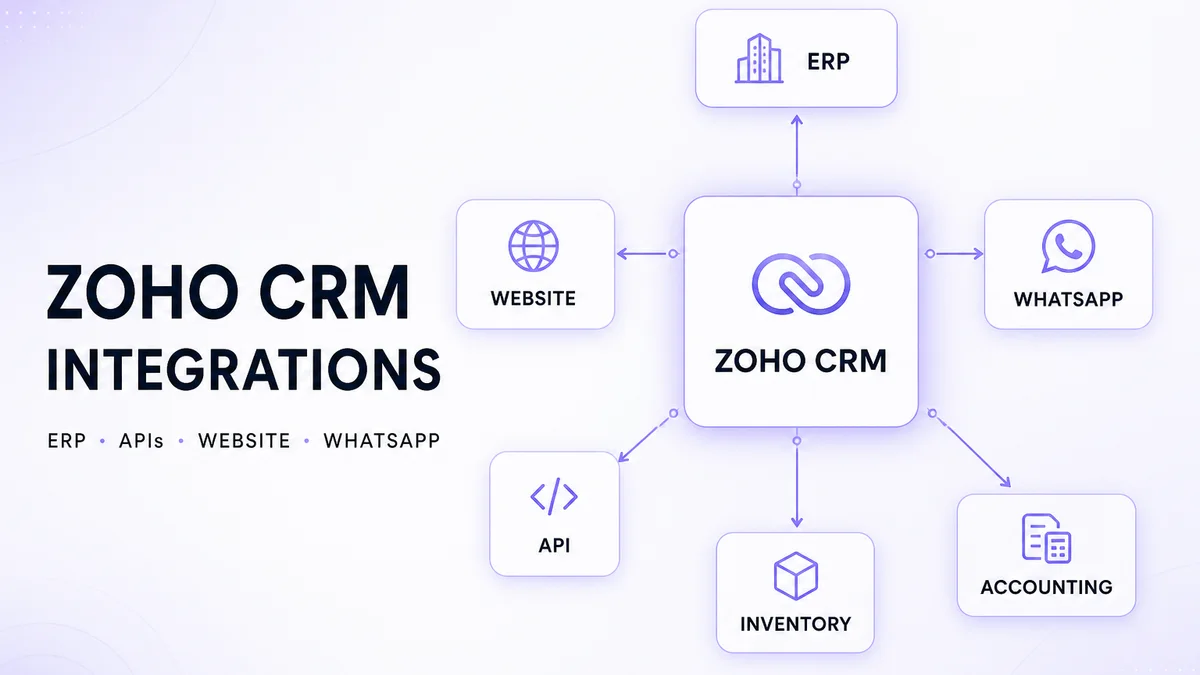
A CRM becomes much more useful when sales teams do not have to manually copy information between websites, accounting systems, ERP software, WhatsApp conversations and other business applications. Connecting systems is not only a technical exercise: businesses first need to decide which application owns each type of data and when information should move.
This guide covers Zoho CRM integration architecture across ERP, WhatsApp, websites, accounting, ecommerce, inventory, support, email and custom APIs — including native connectors, Zoho Flow, Deluge, REST APIs, webhooks and middleware. For configuration inside the CRM itself, see the Zoho CRM customization guide. For discovery-to-launch delivery, see the Zoho CRM implementation guide. Deciding between packaged and purpose-built CRM? Read Zoho CRM vs custom CRM.
What can Zoho CRM integrate with?
Depending on available connectors, Zoho products, APIs and business architecture, Zoho CRM can exchange information with websites and forms, accounting and inventory systems, ERP platforms, customer support tools, marketing apps, communication channels such as email and WhatsApp (where officially supported), ecommerce stores and custom software. Integrations may use native product integrations, Zoho Flow, REST APIs, webhooks, custom middleware or custom functions (often Deluge). Exact options, limits and edition requirements change over time — verify against current Zoho documentation for your plan before designing around a connector.
Zoho CRM integration architecture
Most business stacks look like a hub with controlled spokes — not every app writing freely into every other app:
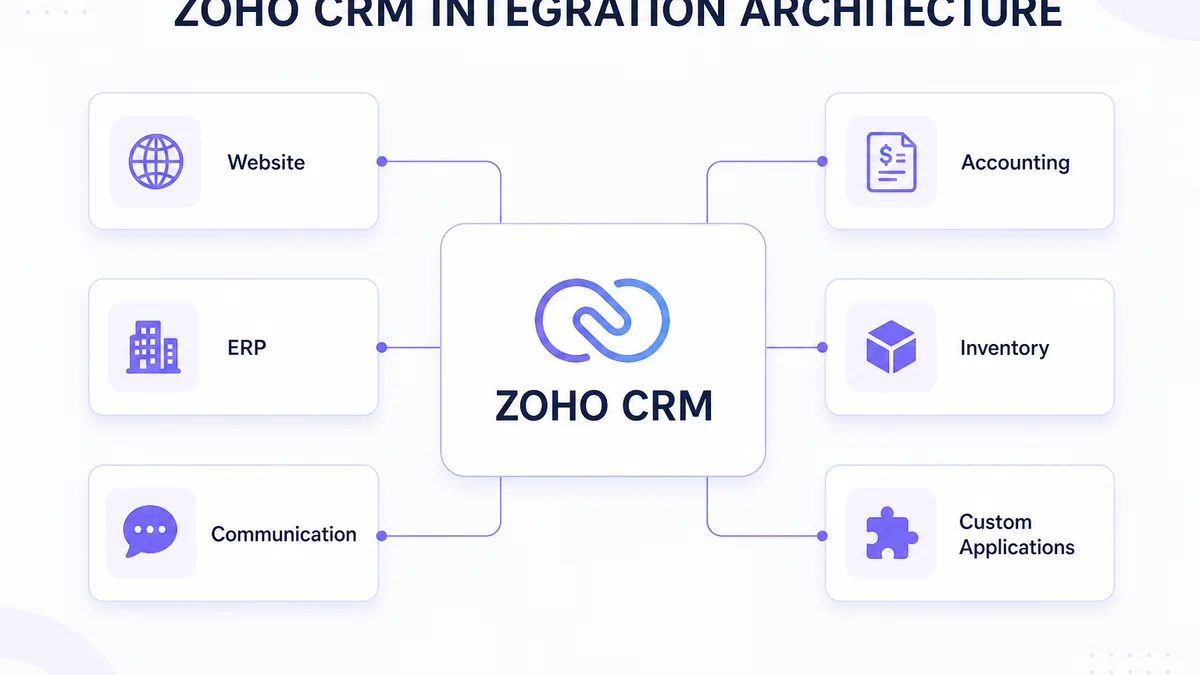
Website leads often feed CRM. CRM may hand won deals to ERP or accounting. Inventory and fulfilment systems may send status back to CRM for sales visibility. Custom applications usually connect through an API or middleware layer. The goal is controlled data movement — not “connect everything.”
Before integrating anything, decide which system owns the data
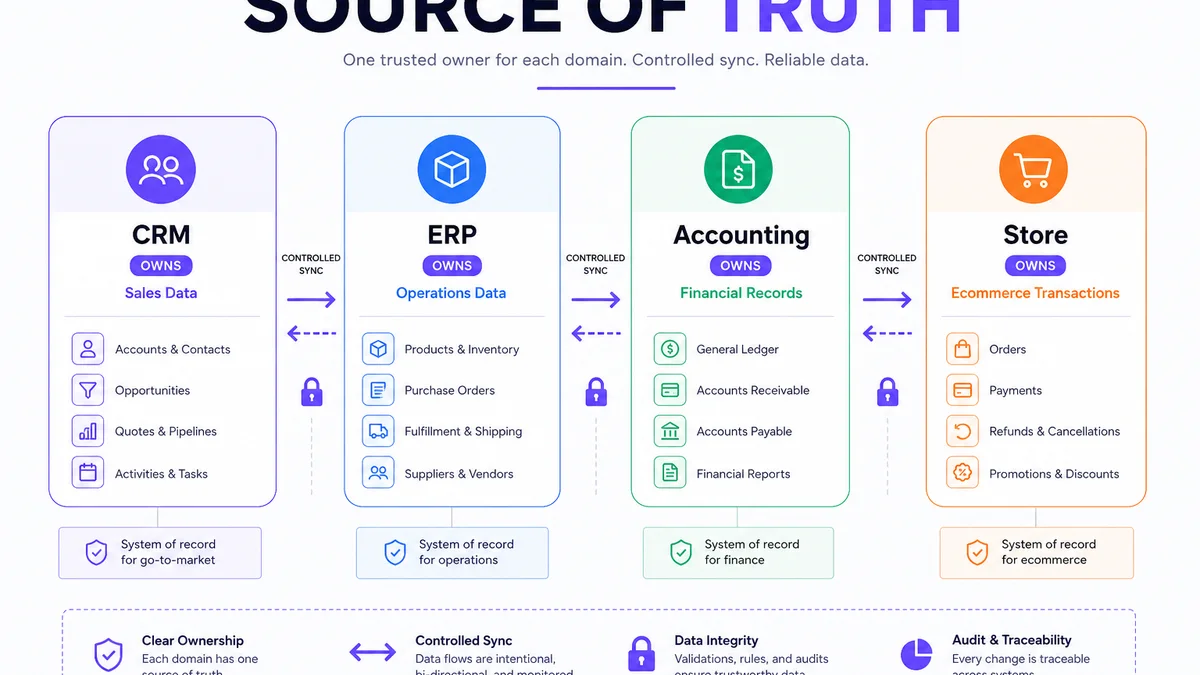
Not every connected application should become the master source for the same information. Define a system of record (source of truth) for each entity before you sync a single field.
Illustrative ownership (not universal):
- CRM — leads, contacts/opportunities, sales activity
- ERP — inventory, orders, operations, procurement
- Accounting — invoices, payments, financial records
- Ecommerce — online orders and storefront transactions
| Data | Possible primary system | CRM needs |
|---|---|---|
| Leads | CRM | Full |
| Contacts | CRM / ERP (depends) | Full |
| Opportunities | CRM | Full |
| Products | ERP / CRM (depends) | Reference |
| Inventory | ERP / Inventory | Visibility |
| Orders | ERP / Ecommerce | Status / reference |
| Invoices | Accounting / ERP | Visibility |
| Payments | Accounting | Status |
| Support tickets | Helpdesk | Customer context |
5 ways to integrate Zoho CRM with other systems
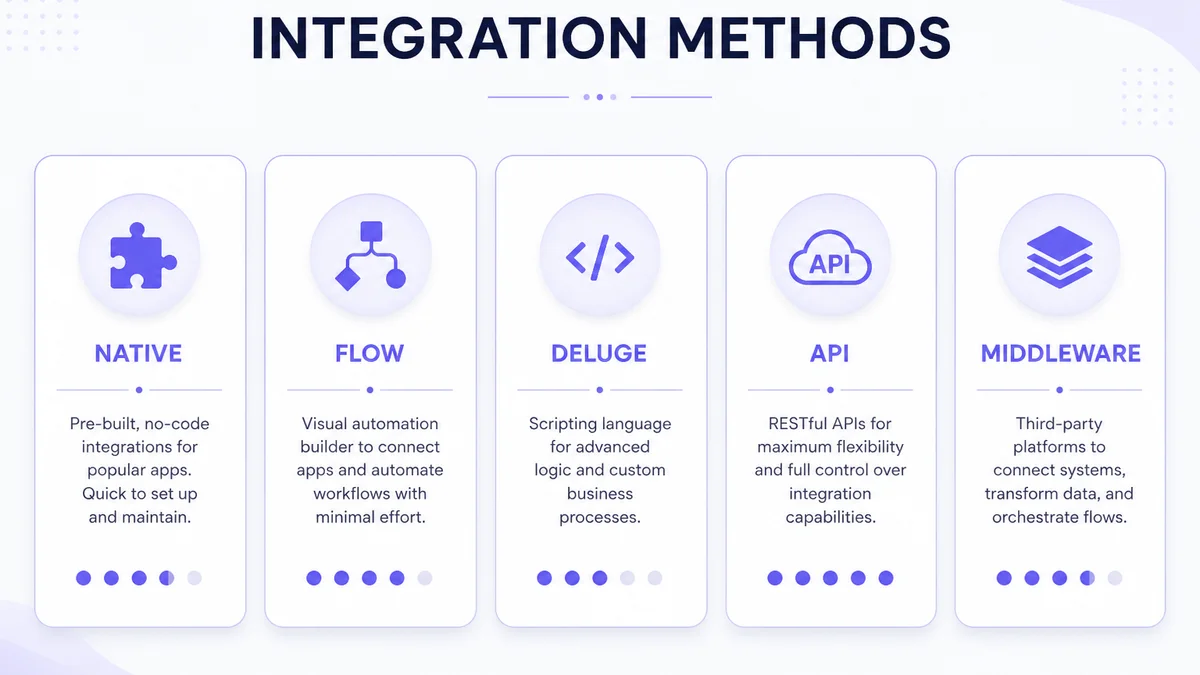
1. Native integration
Use a built-in connector when it correctly meets the requirement. Benefits often include less custom code, simpler maintenance and faster setup. Native integrations still have limits — they may not encode every commercial rule, conflict policy or transformation your business needs.
2. What is Zoho Flow and when should you use it?
Zoho Flow is Zoho’s integration and workflow automation platform for connecting apps with triggers and actions. Typical patterns: App A → Zoho Flow → Zoho CRM, or Zoho CRM → Zoho Flow → App B. Flow is useful for multi-app orchestration when a native connector is insufficient but a full custom middleware service is not yet justified. Confirm current connectors and plan limits in Zoho Flow documentation.
3. Custom functions / Deluge
Deluge-based custom functions can transform data, call external APIs, update related records and apply business logic inside CRM automation. They are powerful for targeted logic — not a default choice for every integration. Prefer configuration and Flow first when they fit; use Deluge when rules need scripted behaviour. See also customizing Zoho CRM for when Deluge belongs inside CRM architecture.
4. How does Zoho CRM API integration work?
Zoho CRM exposes REST APIs for reading and writing CRM data. Conceptually: external system → authentication → Zoho CRM API → CRM record (and the reverse). Design for OAuth-based authentication, field mapping, pagination, rate/API limits, and error responses. This is an architecture overview — not a developer reference. Always use current Zoho CRM API documentation for endpoints and quotas.
5. Middleware / integration service
A dedicated integration layer sits between systems: Zoho CRM ↔ integration service ↔ ERP (or other apps). Middleware helps with transformation, logging, retries, decoupling and monitoring for complex or proprietary stacks. It is not required for simple form-to-CRM or standard Zoho suite connections.
APIs vs webhooks: what's the difference?
An API is typically request/response: one system asks for data or performs an action. A webhook is event notification: something happened, so notify another system. Zoho CRM supports webhook actions that can send data to an external URL when automation events fire (for example record create/update), with failure logging available in current API tooling — confirm edition and setup details in Zoho’s webhook documentation.
| Feature | API | Webhook |
|---|---|---|
| Pattern | Request / response | Event notification |
| Trigger | Application request | Event |
| Best for | Read / write operations | Event-driven updates |
| Example | Fetch customer | Notify ERP when a deal changes |
Illustrative: Deal won → webhook / event → ERP creates or updates an order process based on validated business logic.
How does Zoho CRM integrate with ERP software?
CRM and ERP solve different problems. CRM focuses on leads, contacts, accounts, opportunities and sales activity. ERP focuses on inventory, procurement, orders, production, finance and operations. Connecting them reduces duplicate entry when ownership is clear. For ERP-side design, see ERP development and integration.
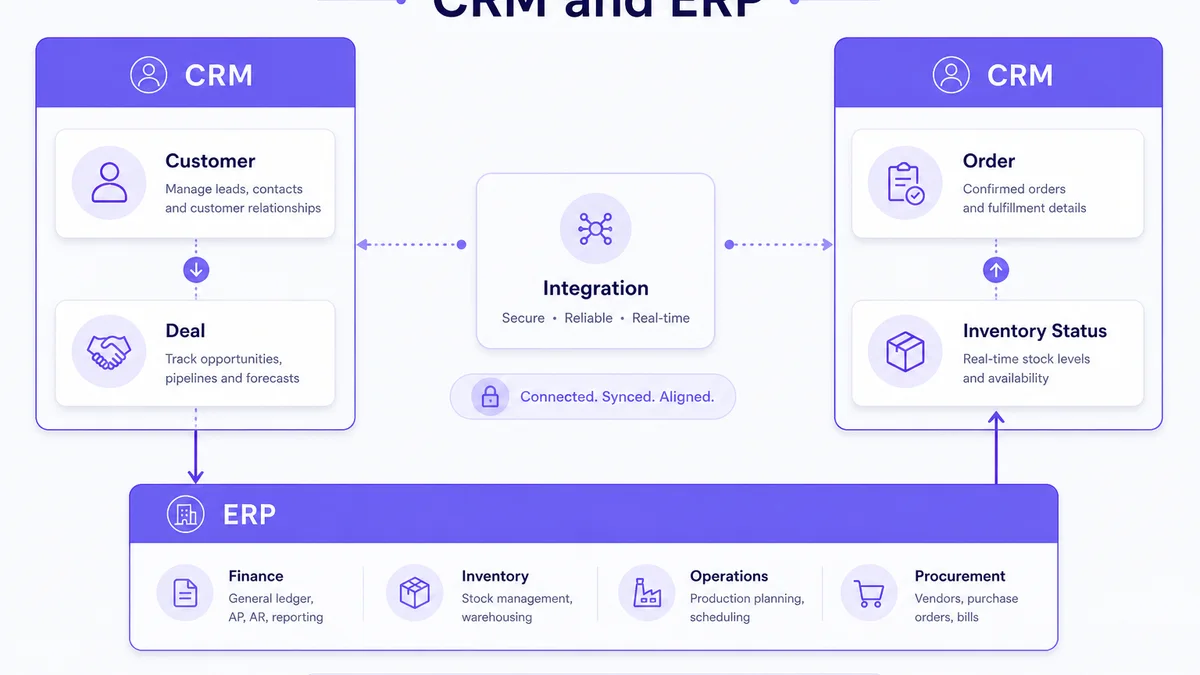
CRM → ERP flow (illustrative)
Lead → Opportunity → Quote → Deal won → ERP customer / order process.
ERP → CRM flow (illustrative)
ERP may push order status, relevant customer commercial status, or product/inventory visibility into CRM — only what sales users actually need.
Two-way ERP sync risks
Two-way synchronization can create conflicts, duplicate updates, loops and unclear ownership. Before building it, define which system owns each field, what happens when both change, conflict resolution, sync frequency and error behaviour.
| Data | CRM → ERP | ERP → CRM |
|---|---|---|
| New customer | Possible | Possible |
| Opportunity | Often CRM-owned | Usually unnecessary |
| Products | Depends | Common |
| Inventory | Usually unnecessary | Common |
| Orders | Depends | Common |
| Invoice status | Usually unnecessary | Useful |
| Payment status | Usually unnecessary | Useful |
Table is illustrative. Actual mapping depends on your ERP and commercial process.
Can Zoho CRM integrate with WhatsApp?
Yes — through legitimate WhatsApp Business Platform channels, not unofficial automation. Zoho provides WhatsApp / business messaging capabilities that connect via Meta’s official WhatsApp Business infrastructure (availability and features depend on Zoho edition, product channel and Meta account setup). Third-party Meta Business Solution Providers may also connect WhatsApp to Zoho CRM via supported APIs or Flow. Confirm current Zoho help documentation and Meta requirements for your account before promising a specific inbox or automation feature.
WhatsApp Business rules (high level)
WhatsApp Business messaging has platform policies: customer consent, approved business accounts, and template requirements for certain outbound message types outside an open customer-service window. Native Zoho CRM WhatsApp / business messaging channels are typically available on higher editions (commonly cited as Enterprise, Ultimate or Zoho One — confirm on Zoho’s current plans). Lower editions may use an approved Meta Business Solution Provider connected via marketplace extension, Zoho Flow or API. Do not use WhatsApp Web scraping, browser automation, session hacks, unofficial APIs or unsolicited bulk messaging — those approaches violate platform rules and create account risk.
Illustrative workflow (implementation varies)
Website lead → Zoho CRM → sales assignment → WhatsApp communication on an approved channel → CRM activity / follow-up logged against the record.
How do you integrate a website with Zoho CRM?
Common flow: website → form → validation → Zoho CRM → lead assignment → follow-up. Capture name, email, phone, company, product/service interest, source, landing page, UTM parameters and consent fields where appropriate — not unnecessary personal data.
Lead attribution
Useful acquisition context can travel with the lead (for example utm_source, utm_medium, utm_campaign). Illustrative path: paid/search traffic → landing page → form → CRM lead. Attribution helps marketing and sales judge source quality; it is rarely perfect across every channel.
Simple forms vs custom portals
Simple lead forms may use Zoho web forms, embedded forms or a lightweight API post. Complex customer portals, dealer logins or multi-step applications usually need custom API integration with authentication, validation and duplicate handling. Website builds may sit under ecommerce website development or broader web delivery depending on the stack.
Can Zoho CRM integrate with an ecommerce website?
Yes. Potential synced information includes customers, order events, product interest, sales activity and segments. CRM should not automatically become a full replica of the ecommerce database or the order-management system of record.
Shopify / store concepts
Conceptually: store → integration → Zoho CRM. Use cases include customer sync for sales visibility, B2B follow-up and high-value retention workflows. Exact Shopify or marketplace connectors change — verify current options before committing. B2B catalogue and account workflows may relate to B2B ecommerce development.
How does Zoho CRM integrate with accounting systems?
CRM manages sales and customer relationships. Accounting software manages financial records. CRM should not replace accounting. Illustrative handoff: CRM deal → customer / transaction handoff → accounting system → invoice / payment status → relevant visibility back in CRM.
Zoho CRM and Zoho Books integration
Zoho documents a native Books ↔ CRM integration that can sync modules such as customers/contacts and related finance objects, with sync direction options depending on organisation setup (including two-way sync in common single-org setups). Quotes, invoices and related finance modules may be accessible from CRM when transaction sync is enabled. Configure module mapping carefully and treat Books as the financial system of record. This is not accounting or tax advice. Jurisdiction-specific tax workflows belong in accounting software — not as CRM logic.
Zoho CRM and inventory integration
Sales teams often need visibility into products, stock availability and order status without CRM owning inventory. Keep inventory quantities and fulfilment in ERP or inventory software; sync reference and status fields that change sales behaviour.
Zoho Inventory
Zoho documents a native Inventory ↔ CRM integration with module sync (customers, vendors, items and, when enabled, transaction modules such as sales orders/invoices accessible from CRM). Multi-org setups may be limited to one-way patterns — confirm current Zoho Inventory help docs for your architecture.
Integrating CRM with customer support
Sales needs customer history; support needs customer context. Typical architecture: CRM customer ↔ support system ↔ tickets. Avoid duplicating full ticket databases inside CRM.
Zoho Desk
Zoho CRM and Zoho Desk can share customer context so agents see CRM information and sales can see relevant ticket signals (including native Signals for Desk events when the integration is active). Confirm edition and setup requirements in current Zoho documentation.
Email and Zoho CRM integration
Email integration typically associates conversations and activity with contacts and deals so sales history lives on the record. Capabilities depend on edition, mailbox configuration and provider setup — verify supported options in Zoho’s current email integration docs rather than assuming every mailbox provider works identically.
Marketing (brief)
CRM and marketing tools often follow: lead → segment → campaign → engagement → sales follow-up. Zoho Campaigns and related Zoho apps may connect where licensed; treat marketing systems as engagement layers, not a second CRM of record.
Can Zoho CRM integrate with custom software?
Yes, when appropriate APIs or integration mechanisms are available. Examples: internal portals, legacy ERP, custom ecommerce, dealer portals, mobile apps, SaaS products and proprietary business software.
Architecture: custom app ↔ API / integration layer ↔ Zoho CRM. Plan authentication, mapping, business rules, logging, retries and monitoring. When Zoho’s configurable surface is no longer the right product boundary, compare with custom CRM development.
One-way vs two-way Zoho CRM integration
Three common models: System A → CRM (inbound), CRM → System B (outbound), and CRM ↔ System C (two-way). Two-way is not automatically better.
| Model | Complexity | Example |
|---|---|---|
| One-way inbound | Lower | Website → CRM |
| One-way outbound | Lower–Medium | CRM → ERP event |
| Two-way | Higher | CRM ↔ ERP |
Real-time vs scheduled data synchronization
Near real-time fits when immediate action matters — for example a new website lead that should reach a sales queue quickly. Scheduled / batch fits when delay is acceptable — for example overnight product catalogue refresh or reporting syncs. Choose based on business urgency, API limits and failure recovery design — not fashion.
Why field mapping matters
Systems rarely use identical field names. CRM “Company Name” may map to ERP “Customer Name”; CRM “Email” to ERP “Primary Email”. Mapping must define field, type, format, ownership, required status and any transformation.
Data transformation
An integration layer may reshape values — for example an ERP region code such as IN-GJ becoming a readable CRM picklist value such as Gujarat. Transformations belong in the integration contract so both systems stay consistent.
Stable identifiers
Prefer matching records with durable identifiers (CRM record IDs, ERP customer codes, or an agreed external ID) rather than name alone. Names change, collide and get mistyped. Zoho CRM APIs support working with record IDs and external references where configured — confirm the current external-ID / upsert patterns in Zoho’s API docs before hard-coding a matching strategy.
Duplicate risk
Website creates a contact. ERP creates the same customer. CRM receives both. Without matching rules and a clear create-vs-update policy, duplicates appear, forecasts split and automation fires twice. Decide matching keys and merge/ownership rules before go-live.
What happens when an integration fails?
Failures are normal: API timeouts, authentication failures, invalid fields, missing required data, rate limits, downtime and mapping errors. Design for them explicitly.
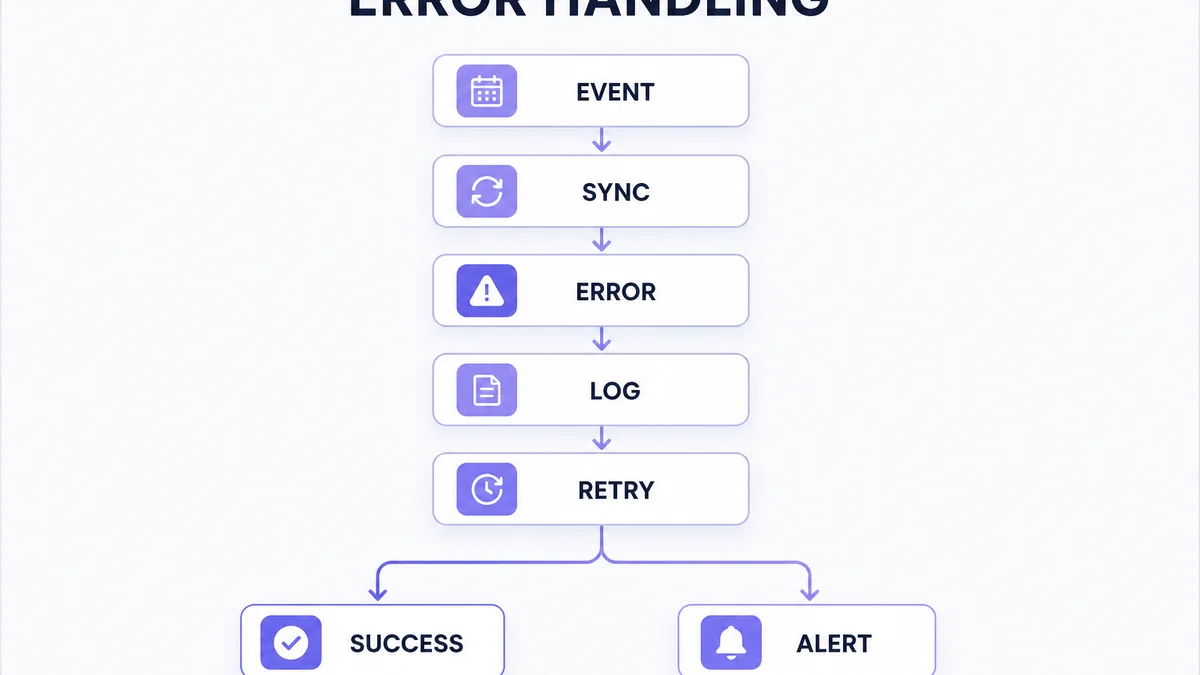
Retry strategy (conceptual)
Request → fail → log → retry → success; or repeated failure → alert. Exact retry intervals and backoff belong to your architecture — the principle is: do not silently drop business-critical events.
How should Zoho CRM integrations be monitored?
Track failed syncs, authentication errors, unexpected payloads, API errors, duplicate spikes, delayed jobs and overall integration health. “No user complaint” is not a health check. Logging should show what happened, when, which record, which system and whether a retry succeeded.
Security considerations for CRM integrations
Apply least privilege, secure credential storage, access control, token rotation, data minimization and auditability. Never hard-code secrets into public frontend code — keep credentials in server-side or environment secret management. Sync only data required for the process; avoid copying sensitive fields into multiple systems without need. This is operational guidance, not legal compliance advice.
Choosing an integration method
| Requirement | Native | Zoho Flow | Deluge | Custom API / middleware |
|---|---|---|---|---|
| Simple supported connection | Strong | Strong | Usually unnecessary | Usually unnecessary |
| Multi-app workflow | Depends | Strong | Possible | Possible |
| Custom business logic | Limited | Depends | Strong | Strong |
| Proprietary ERP | Usually limited | Depends | Possible | Strong |
| Complex transformations | Limited | Depends | Possible | Strong |
| Advanced monitoring | Limited / depends | Depends | Depends | Strong |
Qualified guidance only — validate against your connectors and volume.
When should you use a native integration instead of custom development?
Prefer simpler architecture when it meets requirements: less code, lower maintenance, a vendor-supported path and faster deployment. Verify functional fit first — native connectors that almost match your rules often create more exceptions than they save.
When custom API development makes sense
Custom APIs or middleware become appropriate for proprietary ERP, complex mapping across many objects, multi-system orchestration, specialised authentication, high reliability requirements, complex synchronization or monitoring that connectors cannot provide. That work often sits alongside professional Zoho CRM development rather than replacing CRM configuration.
When should you NOT integrate a system with Zoho CRM?
- No actual business use case
- Data is never used by CRM users
- Integration duplicates an existing system
- Sync would expose unnecessary sensitive data
- Manual process is rare and simpler
- Architecture creates more complexity than value
Avoid turning Zoho CRM into every business system
CRM should focus on customer and sales relationship workflows. If CRM begins managing complex inventory, manufacturing, procurement, full accounting or warehouse operations, the architecture likely needs ERP or another specialised system — not endless CRM fields. Pair CRM programmes with intentional custom ERP development when operations depth exceeds CRM’s job.
Don’t turn CRM into a data warehouse
Not every historical field from every system needs to be copied into CRM. Sync what users and processes need.
Industry integration examples (illustrative)
Manufacturing
Website / sales → Zoho CRM → deal won → ERP → production / order → status → CRM. Sales sees relevant order status without operating ERP.
B2B distribution
Dealer / customer → CRM → quote → ERP → inventory / order → CRM status.
Real estate
Lead source → website → CRM → sales rep → approved WhatsApp / communication channel → site visit → follow-up.
Ecommerce
Online store → customer / order event → integration → CRM → sales / retention workflow. CRM is not necessarily the order-management system.
12 common Zoho CRM integration mistakes
- Integrating before defining the business requirement
- No source-of-truth decision
- Syncing every field
- Unnecessary two-way sync
- Matching records by unreliable identifiers
- No duplicate strategy
- No error handling
- No retry strategy
- No logging
- No monitoring
- Hard-coded or poorly handled credentials
- No ownership after launch
What does a good Zoho CRM integration process look like?
- Define business objective
- Identify systems
- Decide source of truth
- Define records / fields
- Select integration method
- Design authentication
- Map data
- Define sync direction
- Define frequency
- Handle errors / retries
- Build
- Test
- Launch
- Monitor
Integration requirements mini-template
- SYSTEM A:
- SYSTEM B:
- BUSINESS OBJECTIVE:
- TRIGGER:
- RECORD TYPE:
- FIELDS:
- SOURCE OF TRUTH:
- SYNC DIRECTION:
- SYNC FREQUENCY:
- TRANSFORMATION:
- MATCHING KEY:
- ERROR HANDLING:
- RETRY:
- MONITORING:
- OWNER:
How should a Zoho CRM integration be tested?
Test successful create/update paths, duplicates, missing fields, invalid values, authentication failure, API failure, downtime behaviour, retries, permissions, transformations and high-volume scenarios where relevant. Technical success is not enough: users should confirm the right data arrives at the right time in the right system with the right business behaviour (UAT).
What should you document for a Zoho CRM integration?
Document systems, connectors or endpoints, data objects, field mapping, source of truth, sync direction, frequency, authentication ownership, error handling, retry behaviour, monitoring and the business owner. Documentation should explain why the integration exists — not only how it is wired.
What affects the cost of Zoho CRM integration?
Cost depends on number of systems, native vs custom approach, API complexity, objects and fields, sync direction and frequency, transformations, authentication, volume, error handling, monitoring, testing, documentation and ongoing maintenance — not a single fixed market price. This article does not publish Web6 rates.
| Integration | Relative complexity (illustrative) |
|---|---|
| Website form → CRM | Lower |
| Standard supported app connection | Lower |
| Multi-step Zoho Flow | Lower–Medium |
| CRM ↔ accounting | Medium |
| CRM ↔ ecommerce | Medium |
| CRM ↔ ERP | Medium–High |
| Proprietary API | Medium–High |
| Multi-system two-way sync | High |
How long does a Zoho CRM integration take?
There is no universal timeline. Duration depends on API readiness, documentation quality, authentication, mapping, number of systems, business rules, testing depth, external vendor access, data quality and stakeholder approval. Ask for phased estimates after systems and ownership are clear.
Do Zoho CRM integrations require maintenance?
Often yes. APIs change, credentials expire, processes and fields evolve, external systems update, volume grows and errors appear. Document systems, connectors/endpoints, objects, field mapping, source of truth, sync direction, frequency, authentication ownership, error handling, retries, monitoring and the business owner.
Need Zoho CRM to connect with your existing business systems?
The right approach depends on which system owns the data, how frequently information must move, and whether a native connector, Zoho Flow or custom API architecture is appropriate. Explore Zoho CRM development services for integration and customization scoped to that architecture — or Zoho CRM integration services for UAE teams when delivery is for the United Arab Emirates — or ERP development when operations depth belongs outside CRM.