
Zoho CRM Implementation
Greenfield setup or reconfiguration aligned to how your UAE sales team qualifies, assigns and closes — with sandbox testing before go-live.
- Process mapping
- CRM architecture
- Modules & pipelines
- Permissions
- Launch & handover
Zoho CRM Development — UAE
Help UAE businesses configure, customize and integrate Zoho CRM around their actual sales and operational workflows — pipelines, automation, Blueprint, Deluge and stack connections delivered remotely by Web6.
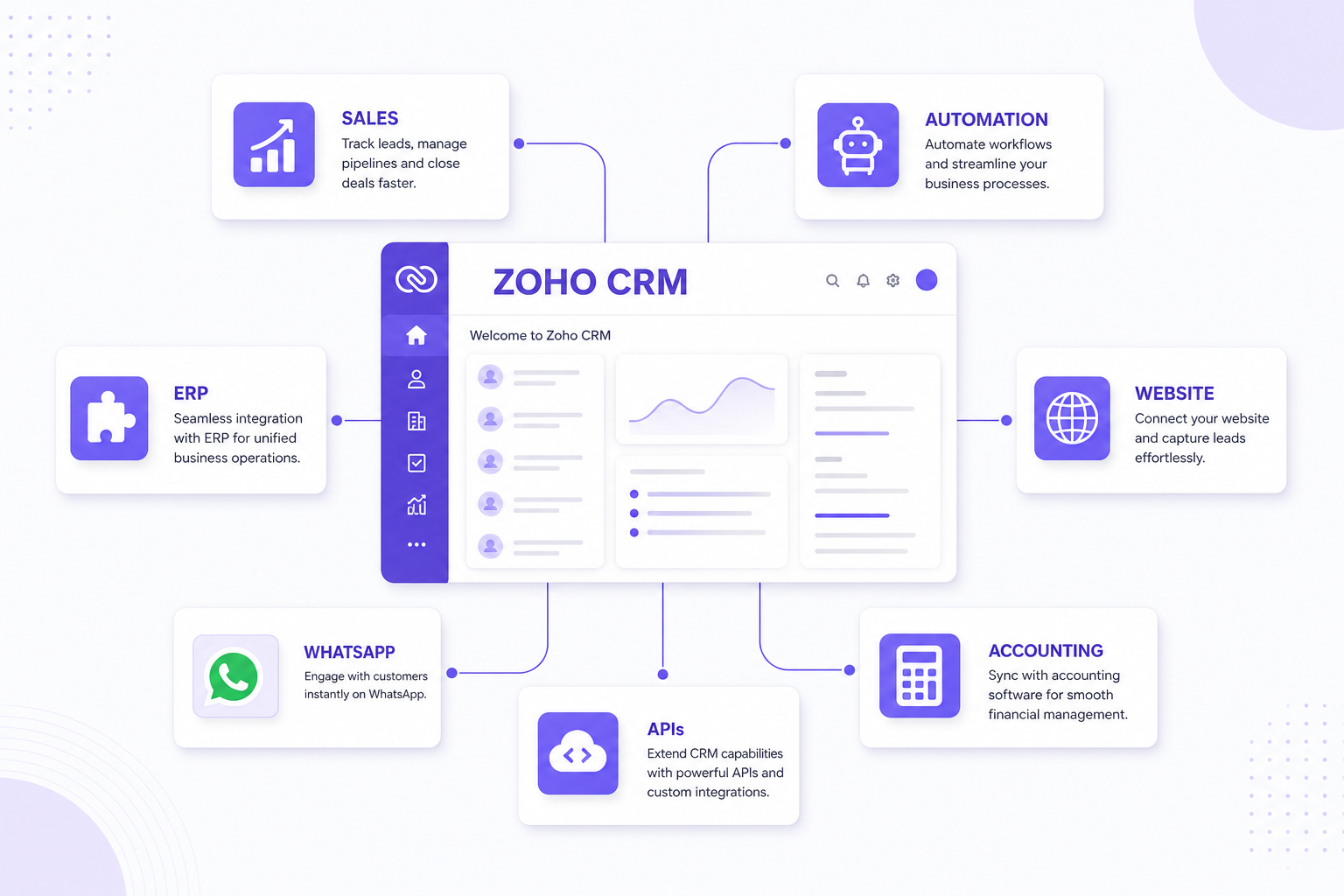
Web6 helps companies in the UAE adapt Zoho CRM around how they actually sell and operate — not a generic demo org. That includes lead and pipeline design, custom modules and layouts, workflow automation, Blueprint for structured approvals, Deluge where configuration alone is not enough, integrations with websites, ERP, accounting and messaging tools, data migration from spreadsheets or legacy CRMs, and reporting dashboards managers can trust.
Delivery is remote from our Surat, India engineering team. We do not claim a physical office in Dubai or Abu Dhabi — we work with UAE businesses that need experienced Zoho CRM developers, clear architecture, and honest guidance when custom CRM development is the better long-term fit.
Services
Implementation through ongoing support — scoped to your modules, integrations and adoption goals.
Greenfield setup or reconfiguration aligned to how your UAE sales team qualifies, assigns and closes — with sandbox testing before go-live.
Fields, page layouts and modules that reflect your products, territories and approval paths — see our Zoho CRM customization guide for what configuration can cover.
Automations that fire on defined events — new enquiry, stage change, inactivity — so reps spend time selling, not chasing admin.
Blueprint enforces a sales or operations path inside CRM when workflow rules alone cannot guarantee the right sequence of actions.
Deluge scripts for calculations, validations and integrations that exceed native workflow capabilities — scoped and documented for maintainability.
Connect CRM to operational systems with clear source-of-truth rules — patterns covered in the Zoho CRM integration guide.
Move from Excel, CSV exports or another CRM with deduplication, owner assignment and rollback planning — not a blind bulk upload.
Dashboards built on fields your team actually populate — lead source, stage aging, rep activity and conversion where data quality supports it.
Retained support after launch for new modules, automation tweaks and integration maintenance as your UAE operation evolves.
Effective CRM work starts with how enquiries become revenue — not with turning on every Zoho module on day one. We map your stages, owners and handoffs before configuring pipelines.
A trading distributor, a real-estate brokerage and a professional-services firm rarely share the same stages. Web6 configures Zoho CRM to match your process — then adds automation, Blueprint and integrations where they reduce manual work without breaking adoption.
UAE companies often run multi-channel sales — inbound website enquiries, partner referrals, exhibitions, WhatsApp conversations and repeat account management. CRM architecture needs to capture where leads originate, who owns follow-up, and how handoffs work between inside sales, field teams and operations.
B2B trading and distribution firms may need account hierarchies, quote stages and ERP order context beside deals. Real-estate teams track project interest, site visits and broker assignment. Professional-services firms emphasize proposals, scope changes and long nurture cycles. Ecommerce and retail brands connect marketing campaigns to customer records. Manufacturing and hospitality operators may span multiple locations with regional reporting needs.
We design territories, teams, assignment rules and dashboards for those patterns — without inventing regulatory claims or pretending every emirate business runs identically. When finance or inventory lives outside Zoho, we plan integration boundaries so CRM remains the sales system of record, not a duplicate ledger.
Businesses serving Dubai, Abu Dhabi, Sharjah and other emirates often need CRM structures that reflect location without duplicating customer records. Zoho CRM supports concepts such as territories, roles, assignment rules and reporting filters that can align to emirate, branch or team ownership — configured to match how your organization actually divides responsibility.
Territory and assignment design depends on your org chart and licensing — we validate against your Zoho edition during discovery.
Localized context for major emirates — dedicated city pages will be added only when they carry unique, useful content.
Dubai teams in B2B services, real estate, ecommerce, trading and professional services often need fast lead routing, multi-user pipelines and integrations with websites or partner portals. We configure CRM for high enquiry volume and clear ownership — without claiming a Web6 office in Dubai.
Abu Dhabi-oriented sales cycles may emphasize institutional clients, longer qualification and structured approvals. Blueprint, role-based layouts and management reporting help leadership see pipeline health across teams serving the capital and adjacent markets.
Sharjah-based trading, logistics and business-services firms benefit from CRM tied to repeat accounts, quote follow-up and operational handoffs. Integration with inventory or ERP systems is common when orders and stock sit outside CRM.
Smaller teams across the northern emirates still need disciplined lead tracking and regional visibility inside one CRM org. We keep configurations maintainable — shared pipelines with territory filters often beat separate siloed spreadsheets per branch.
Track project interest, visits and broker ownership with custom modules or deal fields — illustrative stages, configured to your inventory model.
Illustrative flow
LEAD → PROPERTY / PROJECT INTEREST → SALES ASSIGNMENT → SITE VISIT → FOLLOW-UP → BOOKING
Connect enquiry-to-quote CRM stages with ERP development or Zoho Inventory when stock and orders live outside deals.
Illustrative flow
ACCOUNT → INQUIRY → QUOTE → NEGOTIATION → ORDER → ERP
Longer cycles with proposal versioning, activity discipline and management dashboards on pipeline aging.
Illustrative flow
ENQUIRY → DISCOVERY → PROPOSAL → SCOPE REVIEW → ENGAGEMENT → DELIVERY
Attribute website and campaign leads; integrate forms and ecommerce platforms where order history should appear beside the account.
Illustrative flow
CAMPAIGN → VISIT → LEAD → NURTURE → ORDER CONTEXT → SUPPORT
Enquiry stages with technical attributes; optional ERP sync for fulfillment status visible to sales.
Illustrative flow
ENQUIRY → SPEC REVIEW → QUOTE → SAMPLE → PO → PRODUCTION HANDOFF
Account-based selling with multiple contacts per company, team selling and renewal tracking.
Illustrative flow
COMPANY → CONTACT → OPPORTUNITY → PROPOSAL → FOLLOW-UP → CUSTOMER
Group sales and event pipelines with follow-up tasks and activity history for relationship teams.
Illustrative flow
ENQUIRY → EVENT / BOOKING → PROPOSAL → CONFIRMATION → DELIVERY → FEEDBACK
Field and desk teams sharing one timeline — assignments, reminders and accounting handoff where Zoho Books is in stack.
Illustrative flow
LEAD → QUALIFY → QUOTE → SCHEDULE → SERVICE → INVOICE HANDOFF
Customization spans custom modules, fields, page layouts, pipelines, roles, permissions, validation rules, workflow automation and Blueprint — applied only where standard modules cannot represent your process cleanly. Web6 prefers configuration before custom code, and Deluge or APIs when rules cross systems or need scripted logic. For a full capability breakdown, read the Zoho CRM customization guide.
NEW LEAD → ASSIGNMENT → FOLLOW-UP TASK → NOTIFICATION → SALES ACTIVITY
Automation should mirror a defined process — not fire blindly on every field change. Typical patterns include assigning leads by territory or product line, creating tasks when deals stall, notifying managers on high-value stage changes, and logging activities when integrations receive website or WhatsApp events. We map exceptions before go-live so automations remain trustworthy.
Blueprint adds stage-level control — mandatory fields, approved transitions and checklists — inside CRM. It suits negotiations, compliance-sensitive approvals or multi-step qualifications where workflow rules alone allow shortcuts. We use Blueprint when the business needs enforceable sequence, not for every pipeline.
Deluge is Zoho’s scripting language for custom functions, related-record updates and external API calls from CRM automation. It helps when you need business-specific calculations, cross-module logic or integrations that native connectors cannot express. We document Deluge functions and avoid unnecessary code when Zoho Flow or configuration suffices.
Website, ERP, WhatsApp, accounting and custom APIs — with explicit source-of-truth design.
CRM holds leads, accounts, opportunities and sales activity; ERP holds orders, inventory, production and finance operations. Integration typically exchanges customer and product master data, pushes won deals or orders into ERP, and surfaces fulfillment or stock status back to sales — without duplicating transactional truth in both systems. See ERP development when operational depth exceeds native Zoho apps.
Zoho supports WhatsApp Business integration through official channels and approved partners — enabling business-initiated messaging workflows tied to CRM records where your plan and provider support it. We do not implement unofficial WhatsApp automation or bulk spam flows. Legitimate use cases include logging conversations beside deals, template-based follow-ups within policy, and routing enquiries captured through approved WhatsApp entry points.
Website forms, landing pages and campaign URLs feed CRM with lead source, campaign and service-interest fields when UTM parameters and form mapping are planned. Architecture: Google / social / direct traffic → website → form → Zoho CRM → assigned sales owner — with duplicate detection and consent captured at submission.
When Zoho Books is in stack, native Zoho integration can sync customers, invoices and payment context beside CRM accounts. For other accounting platforms, API or middleware integration defines which system owns revenue recognition and how invoice status appears on sales records. We do not provide UAE tax or VAT advice — accounting integration is scoped to data handoff and workflow.
Proprietary ERP, customer portals, mobile apps, legacy databases and ecommerce platforms often need REST or webhook integration with field mapping, authentication, idempotency, error logging and retry policies. That work sits alongside CRM configuration — documented so your team can monitor sync health.
Typical delivery phases — adjusted after discovery on your modules, data and integrations.
Stakeholders, pain points, systems in scope and success criteria.
Stages, owners, handoffs and exception paths documented.
Modules, relationships, territories and integration boundaries.
Sandbox build of pipelines, fields and baseline permissions.
Layouts, modules, validation and role-specific views.
Workflows, Blueprint and Deluge where justified.
Website, ERP, accounting, WhatsApp or custom APIs.
Extract, clean, map, test import and validate ownership.
Scenario tests across roles, devices and integration paths.
Role-based guides and admin documentation.
Cutover plan, hypercare window and rollback criteria.
Adoption review, report tuning and backlog prioritization.
For a deeper walkthrough, read the complete Zoho CRM implementation guide.
AUDIT → CLEAN → MAP → TEST → MIGRATE → VALIDATE
Migration sources include spreadsheets, CSV exports, legacy CRM databases and parallel tools sales still uses. We audit field quality, deduplicate accounts and contacts, map owners and territories, run test imports in sandbox, then migrate in controlled batches with validation checkpoints — so go-live does not surprise the floor with missing history.
Useful reports depend on consistent data entry — we design dashboards around fields reps will actually maintain. Common views include lead source performance, pipeline by stage, deal aging, activity volume by rep, conversion between stages and team comparisons. Zoho Analytics extends cross-app reporting when Books, Inventory or Desk are connected.
Beyond CRM, Zoho offers adjacent apps that share data when integration is planned — not activated blindly on day one.
Neither choice wins every time — fit depends on process complexity, integration depth and ownership goals.
| Requirement | Zoho CRM | Custom CRM |
|---|---|---|
| Faster initial deployment | Often strong — configured SaaS foundation | Usually longer — built from requirements |
| Built-in CRM features | Strong out of the box | Must be designed and developed |
| Configuration flexibility | Strong within Zoho model | Fully controlled — you own the stack |
| Unique / complex workflows | Depends — Blueprint, Deluge, Creator extend limits | Strong when process exceeds platform fit |
| Full UI / product ownership | Limited to Zoho experience | Strong — bespoke product surface |
| Platform independence | No — tied to Zoho roadmap and licensing | Yes — choose your architecture |
Web6 recommends Zoho when the process fits the platform economically; we recommend custom CRM development when ownership, unique UX or deep operational logic justify build cost. We will say which applies after discovery — not before.
Factual strengths — no “#1 UAE Zoho partner” claims.
We map sales and handoffs before configuring modules — CRM adoption depends on operability, not feature count.
From layouts and Blueprint to Deluge functions and API integrations — scoped documentation included.
Same team can connect CRM to ERP development, websites and ecommerce when operations span systems.
We will redirect to custom CRM when Zoho limits or licence economics no longer fit — no shelfware push.
Web6 is headquartered in Surat, Gujarat, India. We deliver Zoho CRM projects remotely for UAE clients using structured discovery calls, shared sandboxes, documented architecture and async progress updates. We do not list a UAE street address, local phone number or Dubai office — transparency matters more than fake proximity signals. Your Web6 contact channel remains the same as for all international work: contact Web6 or WhatsApp consultation.
We do not publish fixed AED price lists — scope varies too much. Typical cost drivers include:
After discovery, Web6 provides a written scope with phases, assumptions and optional line items — so UAE stakeholders can compare against internal build or alternate vendors fairly.
Insights
Implementation, customization and integration depth for Zoho CRM programmes.
Architecture for connecting Zoho CRM with ERP, WhatsApp, websites, accounting, ecommerce and custom APIs.
Zoho CRM integration guideModules, fields, layouts, pipelines, workflows, Blueprint, Deluge, APIs and when custom CRM is a better fit.
Zoho CRM customization guideProcess mapping, automation, migration, integrations, cost drivers and timeline framework for Zoho CRM programmes.
Zoho CRM implementation guideTwelve checks for implementation, customization, Blueprint, automation, integrations, migration and support.
how to choose a Zoho CRM development companyFAQ
Customization, integrations, migration, cost factors and remote delivery with Web6.
A Zoho CRM development company implements and configures Zoho CRM for your sales process — modules, pipelines, permissions, automation, Blueprint, Deluge, integrations, migration, reporting and post-launch support. Web6 delivers that work remotely for UAE businesses from our India engineering team.
Yes. Custom fields, layouts, modules, pipelines, territories, automation and Blueprint can reflect UAE sales structures — multi-team, multi-location and integration-heavy operations included. Customization should follow process mapping, not cosmetic relabelling.
Yes. CRM commonly integrates with ERP for customer master data, quotes or orders, and fulfillment status — using Zoho native apps, Zoho Flow, Deluge or custom APIs depending on the ERP. Web6 also builds custom ERP when operational logic exceeds off-the-shelf connectors.
Zoho supports WhatsApp Business integration through official channels and approved partners on eligible plans. Legitimate workflows include logging business messaging beside CRM records and template-based follow-ups within provider policy — not unofficial bulk automation.
Yes. Website forms, landing pages and marketing tools can create or update CRM leads with source and campaign attribution when forms, UTMs and duplicate rules are configured.
Yes. Zoho Books integrates natively with Zoho CRM. Other accounting platforms can connect via API or middleware with clear rules on which system owns invoices and customer financial data.
Yes. Spreadsheets, CSV exports and many legacy CRMs can migrate with audit, deduplication, field mapping, sandbox test imports and validated cutover — scope depends on data quality and object complexity.
Yes. Roles, profiles, territories, assignment rules and dashboards can separate teams while sharing a common account model — configured to match your org structure across emirates or business units.
Cost depends on user count, customization depth, Blueprint/Deluge work, migration volume, integrations and support duration. Web6 quotes after discovery — we do not publish fixed AED packages without understanding your scope.
Simple CRM configuration may take a few weeks; programmes with migration, Blueprint, Deluge and multiple integrations often run several weeks to a few months. Timeline follows documented scope, UAT availability and data readiness — not arbitrary deadlines.
Tell us about your sales process, current systems and the workflows you want to automate or integrate. We will respond with an honest view of Zoho fit, integration approach and phased delivery — or point you to custom CRM when that is the better answer.
Book a free consultation with our Surat-based team. Clear advice on websites, Shopify, custom software, SEO, and growth — no theater.