
Shopify
WooCommerce to Shopify Migration in India: A Step-by-Step Guide
Written by Web6 Editorial Team · Published 4 November 2026 · 10 min read
Indian brands usually move from WooCommerce to Shopify for the same reasons: hosting that slows down during sales, plugin updates that break checkout, and a developer who is the only person who understands the setup. Shopify fixes most of that. The migration itself is where things go wrong, and almost always in the same places: URLs, variants, customer accounts, and the India-specific setup that WooCommerce plugins were quietly handling.
This guide covers what moves, what does not, a step-by-step plan, realistic costs and timelines, and the checks to run on launch day.
The short answer
To migrate WooCommerce to Shopify in India, audit and crawl your current store, map every URL, import products and customers with Shopify's Store Migration app or a tool such as Matrixify, rebuild your theme, set up your gateway, COD rules, GST and shipping on Shopify, test orders end to end, then switch DNS and confirm every old URL redirects. A mid-size store takes about five to six weeks. Budgets run from under ₹1,00,000 for small app-led moves to ₹2,00,000 to ₹10,00,000 and more for agency-led migrations.
- Product URLs change from
/product/name/to/products/name. Every old URL needs a 301 redirect. - Shopify products can have at most three options. WooCommerce products with four or more variation attributes need restructuring.
- Customer passwords, coupons, orders, reviews, and WordPress pages and posts do not come across in the basic CSV export.
- Keep the WooCommerce site online until imports finish, because Shopify downloads product images from your old image URLs.
In this guide
What moves, and what does not
| Data | Shopify Store Migration app (CSV) | Paid migration app (for example Matrixify) | Notes |
|---|---|---|---|
| Products and variants | Yes | Yes | Max three options per product; four or more attributes import without variants |
| Product images | Yes | Yes | Pulled from old URLs, so keep WooCommerce online |
| Customers | Yes, with an export plugin for full addresses | Yes | Passwords never migrate |
| Historical orders | No | Yes | Or keep them in your accounts and a WooCommerce backup |
| Coupons | No | Yes | Or recreate as Shopify discounts |
| Reviews | No | Via your reviews app | Export from the WordPress review plugin, import into the Shopify reviews app |
| Pages and blog posts | No | Yes | Rewrite internal links to new URLs |
| SEO titles and descriptions | Partly | Yes | Yoast or Rank Math fields need mapping |
| Redirects | No | Yes | Or import a redirect CSV in Shopify admin |
Plugins are the other half. Make a list of every active WooCommerce plugin and decide for each one: replace with a Shopify app, build into the theme, or drop. This is also where you discover which "small" plugin was doing something important, like GST invoices or pincode checks.
Migration timeline
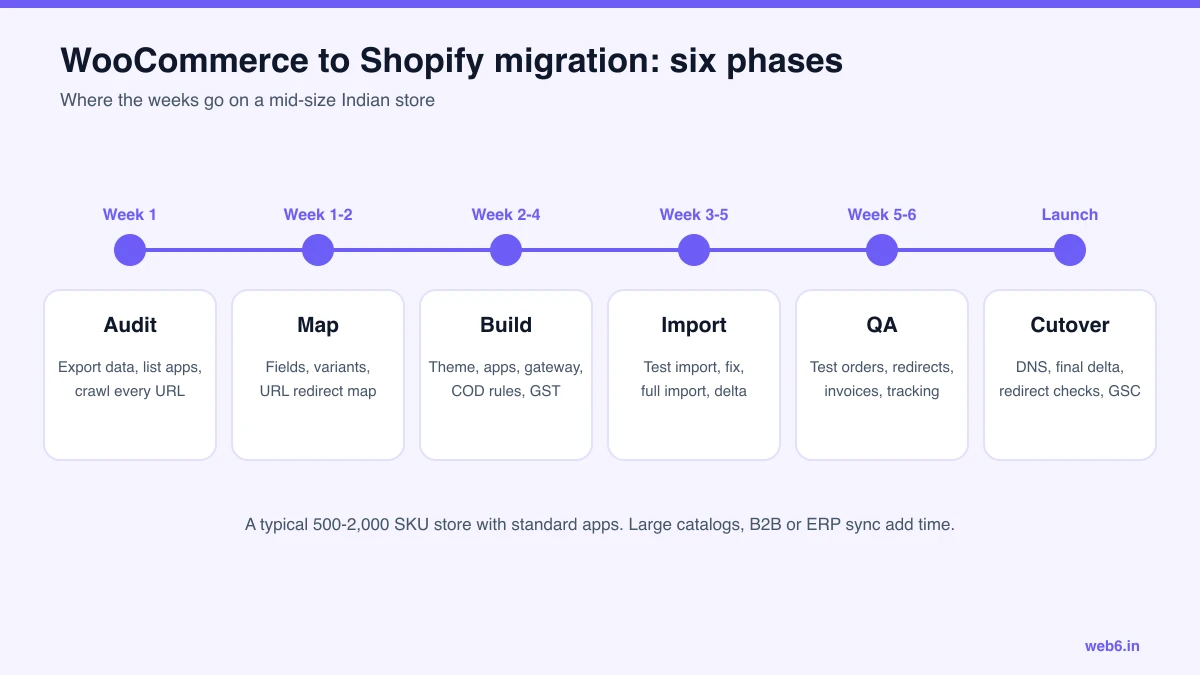
The weeks overlap: theme work starts while data is being mapped, and the first test import happens while the theme is still being built. Most delays come from late decisions about variants and from discovering plugins nobody had listed.
Nine-step migration plan
- Back up and freeze. Take a full WordPress and database backup. Agree a content freeze date after which product edits happen only on Shopify.
- Crawl the old site. Use a crawler such as Screaming Frog to list every URL, title, meta description, canonical and status code. Export top landing pages from Google Search Console and GA4, so you know which URLs matter most.
- Audit plugins and integrations. Payment gateway, COD rules, shipping, GST invoices, reviews, wishlists, filters, subscriptions, ERP or Tally sync, WhatsApp, email marketing.
- Map data. Decide how WooCommerce attributes become Shopify options, metafields or separate products. Map categories to collections and tags. Map SEO fields.
- Set up the Shopify store. Choose the plan, connect the gateway in test mode, set up COD, GST, shipping zones and policies. Our Shopify store launch checklist for India lists every setting.
- Build or adapt the theme. Work on an unpublished theme. Rebuild the key templates: home, collection, product, cart, and any landing pages that rank or convert.
- Test import, then full import. Import a sample of 50 to 100 products across your trickiest types first. Fix the mapping, then run the full import. Spot-check variants, prices, compare-at prices, stock and images.
- Build and import redirects. Create the redirect map from your crawl (see below) and import it into Shopify before launch.
- QA and cutover. Run test orders, check invoices and tracking, then switch DNS, run a final delta import of new orders and customers, and verify redirects on the live domain.
URL mapping and redirects
Shopify uses fixed URL prefixes, so almost every WooCommerce URL changes. A redirect map is the single most important SEO task in the migration.
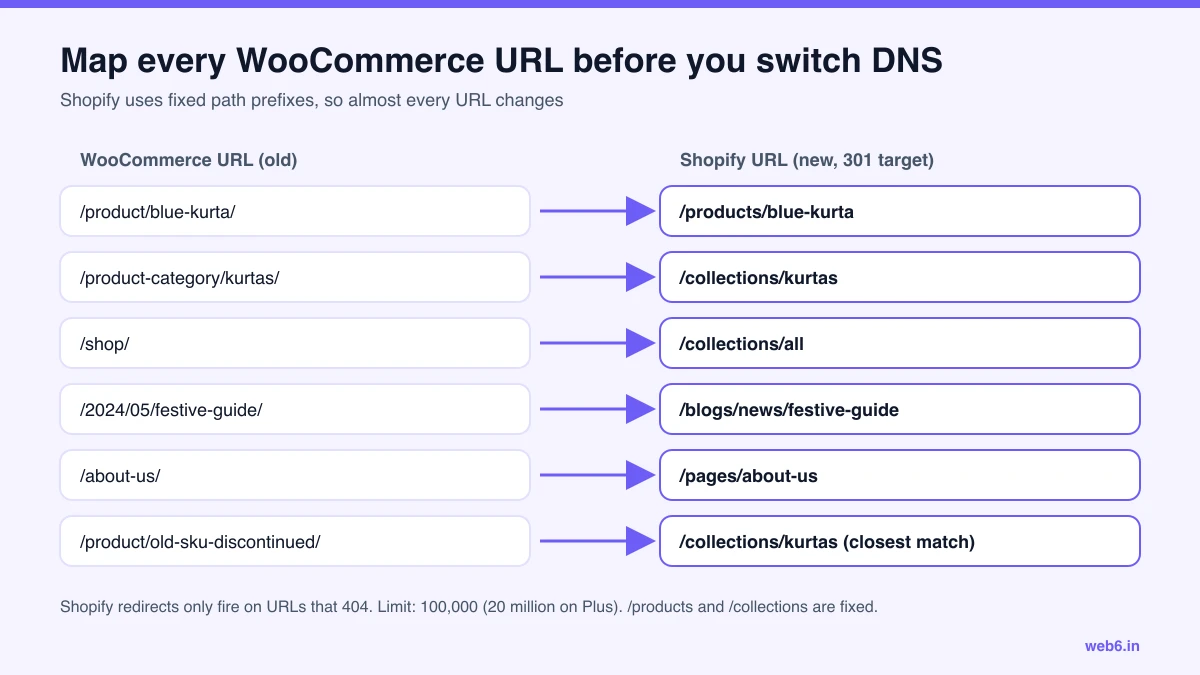
- Redirect every URL that had traffic or links to its closest equivalent. Do not send everything to the home page.
- Discontinued products go to the most relevant collection, not to a 404.
- Filtered and paginated URLs (such as
?orderby=or/page/2/) generally do not need individual redirects. - Know the limits. Shopify allows 100,000 redirects (20 million on Plus). A redirect only works if the old URL no longer loads a page. You also cannot redirect from Shopify's fixed paths themselves (
/products,/collections,/collections/all) or from paths starting with reserved prefixes such as/cart,/ordersor/apps. - Update internal links in product descriptions, pages and blog posts so they point straight to the new URLs.
- Keep titles and descriptions from Yoast or Rank Math where they were working.
India-specific setup
On WooCommerce, these were often handled by plugins you set up years ago. On Shopify, each needs a deliberate decision.
Payment gateway
Shopify Payments is not available in India. Install your gateway's Shopify app (Razorpay, PayU, Cashfree or similar) and connect it. Your provider may want to review the new site before enabling live payments, so start this in week one. Remember Shopify's own fee on prepaid gateway orders: 2% on Basic, 1% on Grow, 0.6% on Advanced, 0.2% on Plus. On WooCommerce you never paid this, so include it in your cost comparison. COD orders carry no Shopify fee.
COD and RTO
Add COD as a manual payment method, then rebuild any rules your old plugin enforced: pincode blocks, order value limits, COD fees and confirmation messages. Our guide to reducing COD RTO on Shopify covers the options.
GST and invoices
Set CGST and SGST for your home state and IGST for other states in Shopify's tax settings, with overrides for products on a different rate. Store HSN codes in the HS code field (six digits or more) or in a metafield. Shopify does not issue GST invoices, so pick an invoicing app or connect your accounting software. If you have not reviewed rates since September 2025, check them with your accountant: most goods moved to the 5% or 18% slab when the 12% and 28% slabs were removed.
Shipping
Reconnect Shiprocket, Delhivery or your courier through their Shopify app. Re-create shipping zones and rates, and test label creation and tracking before launch.
Customer accounts
Passwords do not migrate. On Shopify's current customer accounts, customers sign in with email and a one-time code, which avoids the "reset your password" email blast. Tell customers about the change in an email after launch anyway.
Cost of migration in India
| Migration type | What is included | Indicative cost | Timeline |
|---|---|---|---|
| DIY with apps | Store Migration app or a paid importer, existing theme, manual clean-up | App fees, plus your team's time | 2 to 4 weeks |
| Small assisted migration | Up to a few hundred products, theme setup, redirects, basic India setup | Under ₹1,00,000 to ₹2,00,000 | 2 to 3 weeks |
| Agency-led migration | Full audit, data mapping, theme customisation or rebuild, redirects, orders, gateway, COD, GST, QA | ₹2,00,000 to ₹10,00,000+ | 4 to 10 weeks |
| Complex migration | Large catalogs, B2B pricing, ERP or Tally sync, multiple stores | ₹10,00,000+ | 10 weeks or more |
Ongoing costs change too. You stop paying for hosting and some plugins, and start paying for a Shopify plan, apps and Shopify's fee on prepaid orders. Our Shopify website development cost in India guide has the full breakdown, and Shopify vs WooCommerce vs custom compares total cost of ownership.
Launch-day checks
- Lower the DNS TTL a day before, then point the domain to Shopify and set it as primary.
- Run a final delta import of orders and customers created since the last import.
- Place real orders with UPI, card and COD, then refund one. Check the GST invoice.
- Test 20 to 30 of your highest-traffic old URLs and confirm each returns a single 301 to the right page.
- Submit the Shopify sitemap in Google Search Console.
- Check GA4, Meta pixel and any other tracking fire on purchase.
- Keep the WooCommerce site and database backed up, and offline from the public domain.
The first 30 days
- Watch Search Console for 404s every few days and add redirects for anything you missed.
- Compare organic landing page traffic with the same weeks before launch.
- Review COD confirmation and RTO rates against your old store.
- Start conversion work once data is clean. Our Shopify conversion rate optimization guide lists what to check first.
Web6 runs migrations from WooCommerce, Magento and custom platforms. Our fashion migration case study shows a Magento 2 move with more than 99% redirect coverage. If you would like help planning yours, see Shopify development company in India.
Frequently asked questions
How much does WooCommerce to Shopify migration cost in India?
A small store migrated with an app and some manual clean-up can cost under ₹1,00,000 including app fees. An agency-led migration with a theme rebuild, full URL mapping, order history and India payment setup usually costs ₹2,00,000 to ₹10,00,000 or more, depending on catalog size, integrations and design scope.
How long does a WooCommerce to Shopify migration take?
A mid-size store with 500 to 2,000 products and standard plugins usually takes five to six weeks from audit to launch. Small stores on an existing theme can move in two to three weeks. Large catalogs, B2B pricing or ERP sync add time.
Will I lose SEO rankings when moving from WooCommerce to Shopify?
Some short-term movement is normal, but you can protect most rankings by redirecting every old URL with a 301 to its closest new page, keeping titles, descriptions and content, preserving image alt text, and submitting the new sitemap in Google Search Console on launch day.
Can customer passwords be migrated from WooCommerce to Shopify?
No. Passwords cannot be migrated. With Shopify customer accounts, imported customers sign in with their email and a one-time code, so they do not need a password. On legacy accounts, you invite customers to set a new password.
Can I migrate order history from WooCommerce to Shopify?
Not by CSV. Shopify's product and customer CSV imports do not cover orders. Use a migration app such as Matrixify or a WooCommerce importer app, or keep historical orders in your accounting system and WooCommerce backup.
Do I need a new payment gateway account when moving to Shopify?
Usually you keep the same gateway provider, such as Razorpay, PayU or Cashfree, but you install its Shopify app and connect it to the new store. The provider may ask you to update your website details or complete a review before going live. Allow a few days for this.
What happens to WooCommerce URLs after moving to Shopify?
They change. Shopify uses fixed prefixes such as /products/, /collections/, /pages/ and /blogs/. Every old product, category, page and post URL needs a 301 redirect. Shopify allows 100,000 redirects on standard plans and 20 million on Plus, and redirects only work for URLs that no longer load a page.