
Growth
Shopify Conversion Rate Optimization: 15 Ways to Increase Sales
Written by Web6 Editorial Team · Published 8 August 2026 · 24 min read
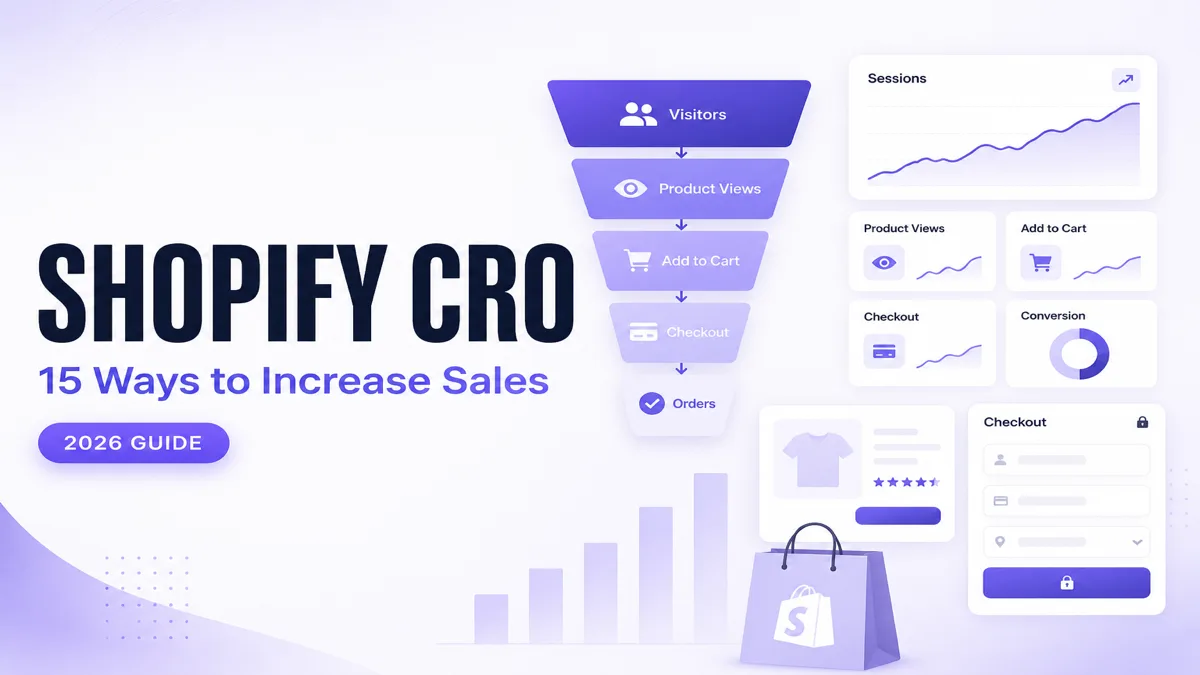
A Shopify store can attract healthy traffic and still produce weak sales when shoppers hit friction between product discovery and checkout. More visitors will not fix a broken funnel — they will only amplify the same drop-offs.
This guide shows how to diagnose where buyers leave, which storefront and checkout levers actually move purchase completion, and how to improve conversion with measurement instead of random redesigns. It is written for merchants who already have demand and need clearer answers about product pages, mobile UX, speed, carts, payments, and analytics.
Quick answer
Improving Shopify conversion rate starts with finding where shoppers leave the buying journey. Measure product views, add-to-cart activity, cart abandonment, and checkout completion, then improve the highest-friction stage first. Common opportunities include mobile UX, product information, page speed, site search, trust signals, shipping clarity, cart design, and checkout friction. Treat conversion work as diagnosis → fix → test — not a one-time theme refresh.
Key takeaways
- Judge the store by funnel stages, not only final purchase conversion.
- Fix the largest drop-off before redesigning everything at once.
- Mobile UX, product clarity, speed, shipping communication, and trust usually matter before vanity design changes.
- Use analytics to compare traffic sources, devices, and product behavior instead of guessing.
- Run controlled experiments so you know which change improved results.
Table of contents
- What Shopify conversion rate means
- Why Shopify stores get traffic but not sales
- CRO diagnostic table
- Understand the Shopify conversion funnel
- Improve mobile shopping UX
- Improve Shopify store speed
- Optimize product pages
- Strengthen trust signals
- Improve product discovery and navigation
- Improve Shopify site search
- Optimize Add to Cart UX
- Analyze products with the most Add to Cart activity
- Reduce cart abandonment
- Improve checkout clarity
- Show shipping and delivery information earlier
- Improve the payment experience
- Use analytics instead of guessing
- Run controlled CRO experiments
- Shopify CRO checklist
- Conclusion
- Frequently asked questions
What is Shopify conversion rate optimization?
Shopify conversion rate optimization (CRO) is the practice of improving how many store sessions turn into completed purchases — and, equally important, improving the micro-steps that lead there. It is not a bag of “growth hacks.” It is a process of measuring shopper behavior, locating friction, changing one meaningful part of the experience, and verifying the result.
How Shopify conversion rate is calculated
In Shopify Analytics, online store conversion rate is generally understood as the share of sessions that result in a purchase. Conceptually:
Conversion rate = (sessions that completed checkout ÷ total sessions) × 100
Merchants often paraphrase this as orders ÷ sessions. That is close enough for day-to-day discussion, but Shopify’s reported conversion rate is session-based: one session that places multiple orders still counts as one converting session. Compare like with like when you look at device, channel, or campaign segments.
Do not judge the store by purchase rate alone
Final purchase conversion is a lagging outcome. Diagnose with micro-conversions such as:
- product views
- internal search usage
- add to cart
- cart reached
- checkout started
- checkout completed
A store with strong product views and weak add-to-cart behavior has a different problem than a store with strong carts and weak checkout completion. Treating both as “we need a new theme” wastes time.
What is a “good” Shopify conversion rate?
There is no single good number that fits every store. Conversion varies by industry, traffic source, device mix, geography, price point, and new versus returning visitors. Paid social traffic often converts differently from branded search. Mobile conversion is frequently lower than desktop even when mobile traffic is larger. Use your own baselines by channel and device, then improve relative to those baselines — do not chase a generic industry average as a guarantee of success.
Why Shopify stores get traffic but not sales
Traffic without sales usually means demand arrived, but the buying journey did not hold. Common causes include:
- Wrong traffic intent: ads or SEO bring browsers who were never close to buying that product.
- Weak product-market fit: the offer, pricing, or assortment does not match what the landing audience expected.
- Slow mobile experience: pages feel heavy, sticky elements fight thumbs, or checkout feels fragile on phones.
- Poor product information: missing size, fit, material, compatibility, or usage detail creates hesitation.
- Weak imagery: low-detail photos, missing lifestyle context, or no zoom for quality-sensitive categories.
- Confusing variants: unclear size charts, broken selectors, or out-of-stock options that still look available.
- Unexpected shipping costs: shoppers discover fees late and abandon.
- Low trust: thin policies, weak contact options, or no credible reviews.
- Poor site search and navigation: customers cannot find the product they already want.
- Checkout friction: long forms, unclear errors, limited payment methods, or forced account creation where guest checkout would convert better.
- Aggressive popups and discount confusion: interruptions and unclear coupon rules reduce focus.
- Cart abandonment patterns: carts fill, then stall because of cost, trust, delivery, or payment uncertainty.
Use these as diagnostic hypotheses. Confirm with funnel data before rebuilding the storefront.
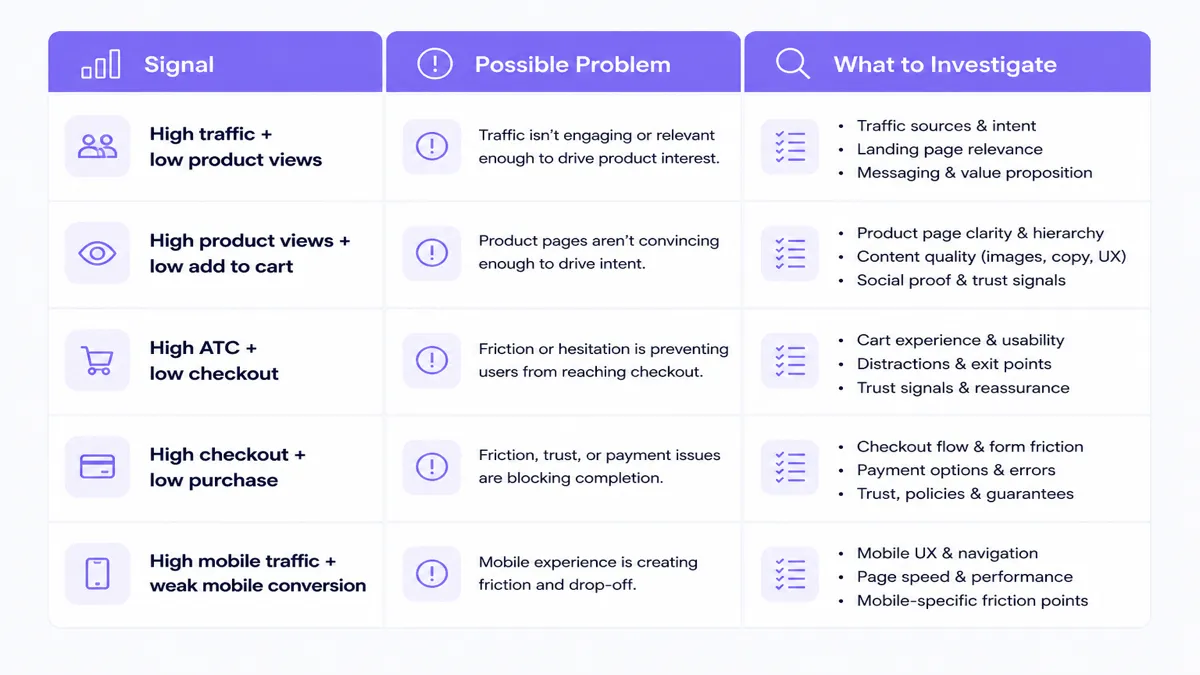
CRO diagnostic table
Match the signal you see to the friction you should investigate first.
| Signal | Possible problem | What to investigate |
|---|---|---|
| High traffic + low product views | Landing relevance or navigation | Landing page match to ad/SEO intent, menu clarity, collection structure |
| High product views + low add to cart | Offer or product-page friction | Price clarity, imagery, variants, trust, delivery info, CTA visibility |
| High add to cart + low checkout starts | Cart or shipping/trust issue | Cart totals, shipping estimates, coupon hunting, policy clarity |
| High checkout starts + low purchases | Checkout, payment, or delivery issue | Form errors, payment methods, COD/prepaid messaging, address friction |
| High mobile traffic + weak mobile conversion | Mobile UX or performance | Thumb targets, sticky ATC, popups, LCP/INP, checkout on real devices |
| High internal search + many zero results | Catalog or search merchandising | Synonyms, titles, missing SKUs, filters, spelling variants |
Understand the Shopify conversion funnel
Start with the path most buyers travel:
Sessions → Product views → Add to cart → Checkout → Purchase
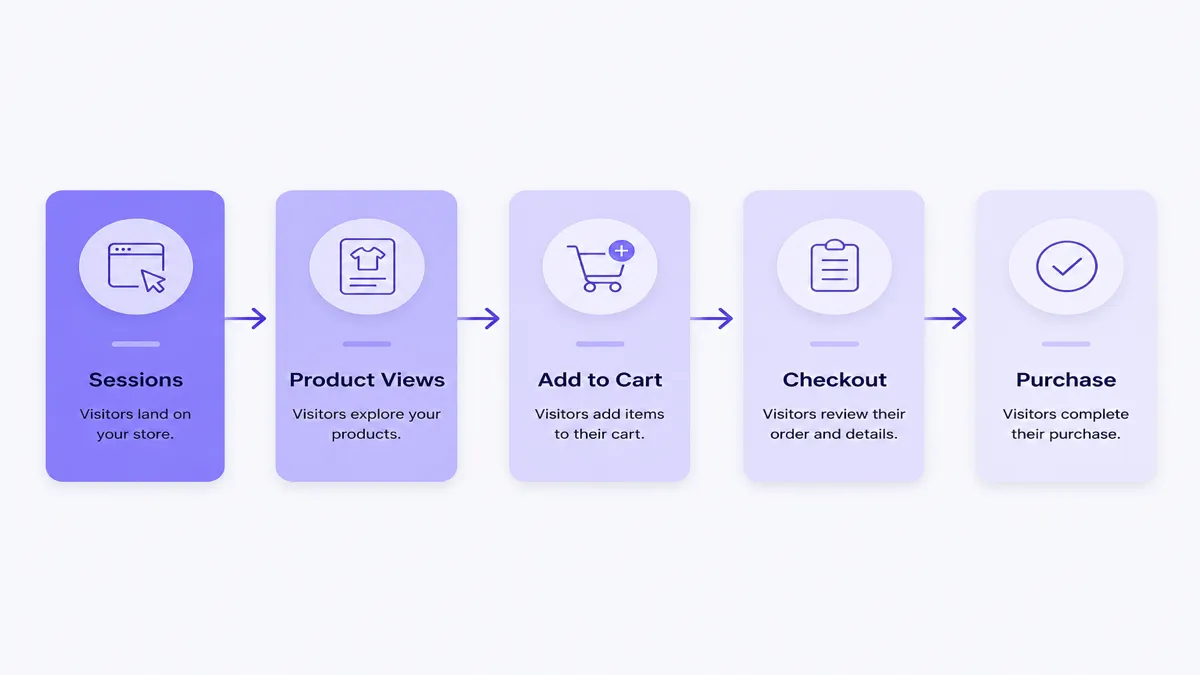
Problem: Teams redesign the homepage while the real leak is variant selection or shipping sticker shock.
Why it matters: Funnel-stage diagnosis prevents random work. If add-to-cart rate is healthy but checkout completion is weak, product photography is not the first lever.
Inspect: Shopify Analytics behavior and conversion reports for sessions with cart additions, sessions that reached checkout, and sessions that completed checkout. Segment by device and traffic source.
Action: Pick the stage with the sharpest drop-off relative to your baseline. Write one hypothesis for that stage before touching theme settings.
Measure: Stage conversion rates over a stable date range, not day-to-day noise after a sale ends.
Improve mobile shopping UX
Most Shopify stores receive a large share of sessions on phones. If mobile conversion lags desktop badly, mobile UX is often where money is lost.
Problem: Controls are hard to tap, variant pickers are cramped, sticky bars collide with chat widgets, and product images do not communicate detail on small screens.
Why it matters: A shopper who cannot confidently select size or reach Add to Cart with one thumb will leave even when intent is high.
Inspect:
- thumb-friendly hit areas for ATC, variants, and quantity
- readable typography and contrast
- sticky add-to-cart behavior that does not hide critical information
- navigation depth and filter usability
- modal or popup timing on first visit
- mobile image zoom and gallery swipe
- full checkout journey on a real device, not only desktop preview
Action: Fix interaction friction before cosmetic mobile “polish.” Remove or delay non-essential overlays. Make primary CTAs persistent and clear without covering trust or shipping text.
Measure: Mobile conversion rate, mobile add-to-cart rate, and mobile checkout completion versus desktop for the same traffic source.
Improve Shopify store speed
Speed does not replace a weak offer, but slow pages make every other CRO improvement harder.
Problem: Heavy images, unused JavaScript, too many apps, render-blocking fonts, and layout shifts degrade Core Web Vitals such as LCP (Largest Contentful Paint), INP (Interaction to Next Paint), and CLS (Cumulative Layout Shift).
Why it matters: Shoppers abandon pages that feel unresponsive. Performance issues also make product discovery and checkout feel unreliable.
Inspect: lab and field data for key templates (home, collection, product, cart). Review theme code quality, app script load, image weight, lazy-loading behavior, and font strategy.
Action: Compress and correctly size images, defer non-critical scripts, remove unused apps, and keep third-party tags under governance. If you need deeper storefront performance work, pair CRO changes with Shopify development services that treat speed as an acceptance criterion.
Measure: Template-level vitals and conversion on the same URLs before and after changes. Do not claim a specific speed score guarantees a conversion lift — validate with your funnel metrics.
Optimize product pages
Product pages are where intent turns into commitment. Weak PDPs create high views with weak add-to-cart rates.
Problem: Titles are generic, descriptions list features without benefits, pricing is unclear with discounts, variants fail silently, stock status is ambiguous, and delivery or returns appear too late.
Why it matters: Shoppers need enough information to reduce purchase risk without leaving the page.
Inspect and improve:
- product title that matches how buyers search and speak
- benefit-oriented description plus clear specifications
- transparent pricing, taxes/duties cues where relevant, and sale clarity
- variant selection that surfaces errors and unavailable options honestly
- stock visibility that prevents false availability
- size, fit, material, or compatibility guidance
- delivery and returns summary near the buy box
- high-quality images and short video where product quality is hard to judge from stills
- CTA visibility above the fold on mobile and desktop
Action: Rewrite one high-traffic, low-ATC product template first. Use that pattern across the catalog.
Measure: Product-page conversion, add-to-cart rate, and bounce/engagement for the treated SKUs.
Strengthen trust signals
Trust is not decoration. It is purchase risk reduction.
Problem: Contact details are buried, shipping and refund policies are vague, reviews look incomplete or unverifiable, and business identity feels anonymous.
Why it matters: Especially for first-time buyers and higher-ticket carts, missing trust cues stop checkout even after add to cart.
Inspect: contact paths, shipping policy, returns/refunds, secure checkout expectations, real customer reviews, business identity, support response channels, and delivery timeline honesty.
Action: Put truthful trust content where hesitation happens — near ATC and in cart — not only in footer policy pages. Use real reviews. Do not invent scarcity timers or fabricated social proof.
Measure: Checkout start rate and purchase completion among first-time visitors after trust placements change.
Improve product discovery and navigation
If shoppers cannot find the right product quickly, conversion work on PDPs never gets a chance.
Problem: Collections overlap, filters hide inventory, menus bury bestsellers, breadcrumbs are missing, and related products feel random.
Why it matters: Discovery friction shows up as high bounce from landing pages and low product views relative to sessions.
Inspect: collection architecture, filter usefulness, menu hierarchy, breadcrumbs, related/upsell logic, and whether popular paths require too many taps.
Action: Organize collections around buyer language. Prioritize high-intent paths. Keep filters accurate. Connect related products that solve the same job.
Measure: Product views per session, collection-to-product click-through, and search-assisted conversion.
Stores that need structural merchandising and template work often benefit from conversion-focused ecommerce website development rather than endless homepage experiments.
Improve Shopify site search
Internal search is a high-intent signal. People who search usually know what they want.
Problem: Common queries return zero results, synonyms fail, product titles use internal jargon, and search demand is never reviewed.
Why it matters: Zero-result searches are direct evidence of missed demand or naming mismatch.
Inspect: top search terms, zero-result queries, search-to-product click-through, and whether spelling variants and category language are covered.
Action: Align product titles and tags with customer language. Add synonyms where your search app supports them. Create or feature collections for repeated unmet queries. Fix out-of-stock handling so “no results” is not confused with “unavailable.”
Measure: Zero-result rate, search-assisted orders, and conversion for search users versus non-search users.
Optimize Add to Cart UX
Add to Cart is the first hard commitment in many funnels.
Problem: CTA copy is vague, required variants are not selected before submit, out-of-stock states look clickable, quantity steppers break on mobile, and the page gives weak feedback after a successful add.
Why it matters: Every failed ATC attempt trains shoppers to leave.
Inspect: CTA clarity, variant error messaging, sold-out handling, sticky ATC where it helps, quantity selection, mobile tap targets, and post-click feedback (cart drawer, confirmation, or redirect).
Action: Make the required choices obvious. Disable or clearly mark unavailable options. Confirm success instantly. Avoid surprising redirects that erase context.
Measure: Add-to-cart rate by device and by top products.
Analyze products receiving the most Add to Cart activity
Not all products deserve equal CRO attention. Add-to-cart activity reveals where shoppers already signal interest.
Problem: Merchants optimize random bestsellers by revenue while ignoring products with strong ATC but weak purchase completion — or high views with almost no ATC.
Why it matters: These patterns tell you whether the issue is offer clarity, cart friction, or checkout.
Inspect:
- most-added-to-cart products
- products with high views but weak ATC
- products with strong ATC but poor purchase completion
- cart value distribution around those products
- abandonment patterns tied to those SKUs
Action: Build a weekly product shortlist from behavior, not only from units sold. Fix PDP objections for high-view/low-ATC items. For high-ATC/low-purchase items, inspect cart messaging, shipping thresholds, and payment friction.
From the Shopify stores and apps we work on, order reports alone rarely explain live hesitation. Native analytics are useful for funnel totals, while cart-centric tools help teams see active journeys. Web6’s Shopify cart analytics app, CartPulse, is built to surface live cart activity, product views, add-to-cart behavior, traffic sources, and top cart products so merchants can prioritize the SKUs already attracting intent.
Measure: ATC-to-purchase completion by product, and whether fixes on the shortlist move stage rates without a traffic increase.
Reduce cart abandonment
Cart abandonment is often a clarity problem, not a “need more discounts” problem.
Problem: Unexpected costs, shipping uncertainty, coupon hunting, forced account creation, cart line errors, thin trust, limited payments, and vague delivery promises stall otherwise interested buyers.
Why it matters: These shoppers already chose a product. Losing them is usually more expensive than improving discovery.
Inspect: cart page totals, shipping estimator timing, discount field behavior, login walls, inventory errors, payment method visibility, and policy links near the checkout CTA.
Action: Show total cost of ownership earlier. Clarify free-shipping thresholds. Allow guest checkout where appropriate. Reduce deceptive urgency. Keep coupon fields available without making the cart look incomplete without a code.
Measure: Cart-to-checkout rate and cart abandonment rate by device and campaign.
Improve checkout clarity
Checkout is where remaining uncertainty becomes a yes or no.
Problem: Form errors are unclear, required fields surprise shoppers, express payment placement is confusing, and merchants try to “fully redesign checkout” without understanding plan limits.
Why it matters: Late friction converts high-intent carts into lost orders.
What merchants can realistically control: Shopify checkout customization depends on plan and extension type. Broad checkout UI extensions and checkout branding are primarily available to Shopify Plus. Shopify Functions and many non-UI customizations are available more broadly (with plan exceptions such as Starter). Thank you and order status extensions have wider availability than mid-checkout UI customization. Always confirm current Shopify plan capabilities before promising a custom checkout layout.
Action: Test the default checkout thoroughly first: address autofill, error recovery, shipping method labels, payment method order, and Shop Pay/express options. Use apps or custom development only for rules you truly need — for example payment availability logic — rather than decorative experiments.
Measure: Checkout completion rate and drop-off between information, shipping, and payment steps where your analytics provide that granularity.
Show shipping and delivery information earlier
Shoppers should not discover major delivery realities only after investing time in checkout.
Problem: Shipping cost, estimated delivery, COD versus prepaid availability, and return windows appear too late.
Why it matters: Late surprises create abandonment that looks like “checkout is broken” when the real issue is expectation mismatch.
Inspect: PDP shipping snippets, cart estimators, collection-level delivery promises, and whether COD/prepaid rules are explained before payment selection.
Action: Surface cost ranges or thresholds on PDPs. State typical delivery windows honestly. For Indian stores, clarify COD availability and any fees before the final step. If COD refusal risk is hurting realized revenue, pair conversion work with operational controls from guides like reducing COD RTO in Shopify rather than treating every unpaid COD attempt as a storefront win.
Measure: Cart-to-checkout rate after shipping messaging changes, plus support tickets about delivery surprise.
Improve the payment experience
Payment choice is part of conversion, especially in markets where preferred methods differ by audience.
Problem: Missing preferred methods, unclear COD conditions, weak prepaid incentives, or checkout errors on specific wallets/cards reduce completion.
Why it matters: A shopper who trusts the product can still leave if payment feels inconvenient or risky.
Inspect (India context where relevant): UPI availability through your payment provider, cards, supported wallets, COD rules, and prepaid incentives. Verify methods on mobile browsers your customers actually use. Do not assume every gateway supports every method on every plan.
Action: Enable methods your audience expects, communicate COD fees transparently, and test prepaid incentives that are fair rather than coercive. Keep failure messages actionable.
Measure: Payment-method mix, failed payment retries, and checkout completion by method.
Use analytics instead of guessing
CRO without measurement becomes opinion theater.
Problem: Teams change themes after a bad week without checking whether traffic quality, device mix, or a single campaign shifted.
Why it matters: Wrong diagnosis creates thrash and hides real wins.
Inspect regularly:
- traffic source quality
- device and browser split
- location patterns that affect shipping or COD
- product views and cart activity
- search activity and zero results
- abandonment timing
Action: Build a simple weekly review: funnel snapshot, top drop-off, top ATC products, top zero-result searches, and one experiment status. Use Shopify Analytics for session and conversion reporting, and complement it with cart-level journey visibility when you need to see live product and cart behavior — the same CartPulse use case described earlier.
Measure: Whether decisions reference a metric and a date range, not a vibe.
Run controlled CRO experiments
Improvement sticks when you can explain what caused it.
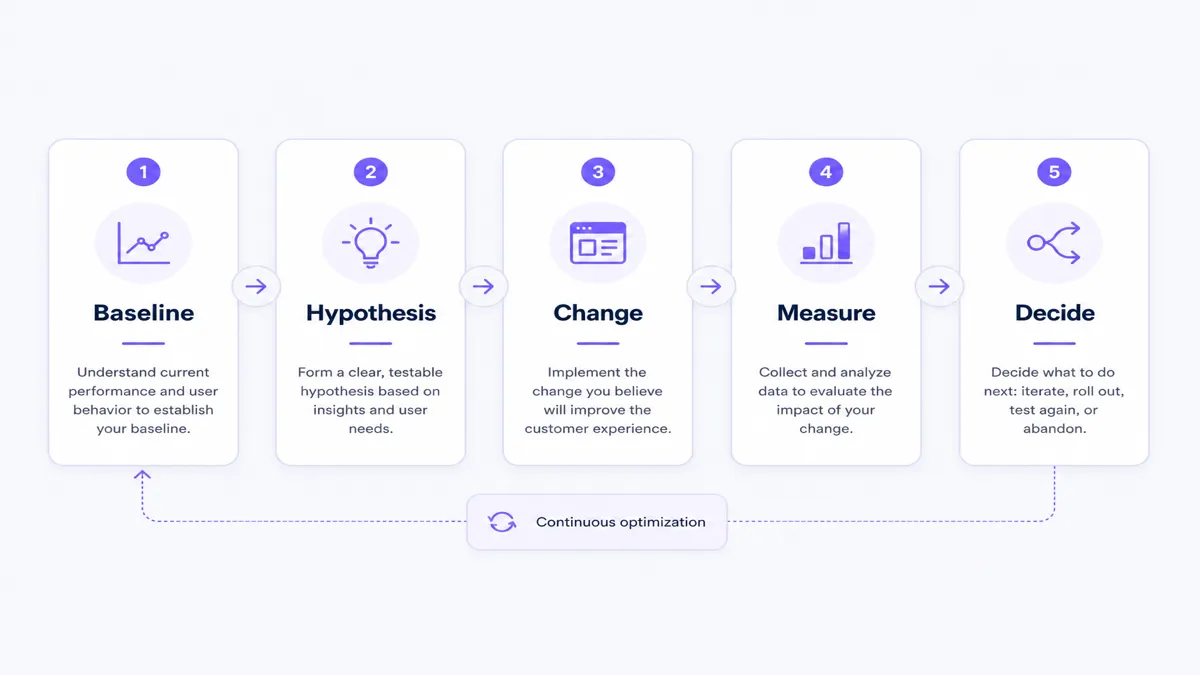
Problem: Merchants change theme, pricing, popups, CTA copy, product descriptions, and checkout messaging in the same week, then credit whichever change they liked most.
Why it matters: Uncontrolled changes make learning impossible and can quietly damage conversion.
Process:
- Record a baseline for the chosen KPI and segment.
- Write one hypothesis tied to a funnel stage.
- Change one meaningful variable.
- Collect enough data for your traffic level before judging.
- Compare against baseline and document the result.
- Keep, iterate, or revert.
Action: Maintain a simple experiment log: date, hypothesis, change, audience, primary metric, result, decision. Protect sale periods from noisy tests when possible.
Measure: Primary KPI plus one guardrail metric (for example, AOV or refund rate) so “wins” are not accidental margin losses.
Shopify CRO checklist
- Mobile product pages tested on real devices
- Core Web Vitals reviewed on home, collection, product, and cart templates
- Product descriptions answer purchase objections
- Variant selectors work clearly, including sold-out states
- Shipping information visible before late checkout surprises
- Returns policy easy to find near buying decisions
- Add to Cart interaction tested on mobile and desktop
- Cart abandonment monitored by device and source
- Checkout tested on mobile with your real payment methods
- Payment methods verified for your primary markets
- Internal search terms reviewed
- Zero-result searches reviewed and actioned
- Top Add to Cart products identified
- Traffic sources compared for conversion quality
- Device-level conversion reviewed
- CRO experiments documented with keep/revert decisions
Conclusion
Shopify CRO is a cycle: measure the funnel, diagnose the highest-friction stage, improve that stage, then test whether the change held. More traffic does not repair unclear product pages, slow mobile UX, late shipping surprises, or checkout friction — it multiplies them.
If your store needs storefront performance, UX, or template work to remove friction, talk with Web6 about custom Shopify development. If you need clearer visibility into live cart activity and product interest while those improvements run, evaluate CartPulse – Track Live Cart on the Shopify App Store.
Frequently asked questions
What is Shopify conversion rate optimization?
Shopify CRO is the practice of improving how store sessions move through product discovery, add to cart, cart, checkout, and purchase. It combines measurement, UX and offer improvements, and controlled testing rather than one-off redesigns.
What is a good Shopify conversion rate?
There is no universal good rate. Results vary by industry, traffic source, device, geography, price point, and new versus returning visitors. Use your own segmented baselines and improve against them instead of chasing a single benchmark.
How can I increase sales on Shopify without increasing traffic?
Raise conversion on existing sessions by fixing the largest funnel leak first — often mobile UX, product information, shipping clarity, trust, cart design, or checkout friction. Improving stage conversion can grow revenue without buying more clicks.
Why are customers adding products to cart but not buying?
Common causes include unexpected shipping costs, weak trust, coupon hunting, limited payment methods, delivery uncertainty, forced account creation, and checkout errors. Inspect cart-to-checkout and checkout completion metrics before changing product photography.
Does Shopify store speed affect conversions?
Yes, slow or unstable pages increase friction and abandonment, especially on mobile. Improve LCP, INP, and CLS on key templates, then confirm whether funnel metrics moved. Speed helps conversion readiness; it does not replace a weak offer.
How can I reduce Shopify cart abandonment?
Show shipping and totals earlier, clarify policies, simplify cart errors, keep guest checkout available where appropriate, and review payment options. Then measure cart-to-checkout rate after each change instead of stacking discounts immediately.
How can I track which products customers add to cart?
Use Shopify Analytics behavior and product reports for store-level trends, and complement them with cart analytics when you need live add-to-cart and cart-product visibility. CartPulse is one option for live cart and top cart product monitoring.
How often should I run CRO tests on my Shopify store?
Run a steady cadence your traffic can support — often one meaningful test at a time on a primary template or funnel stage. Avoid stacking theme, pricing, popup, and checkout changes together if you need to know what worked.