
SEO
Why Your Website Is Not Ranking on Google: 15 Technical & Content Problems
Written by Web6 Editorial Team · Published 17 August 2026 · 28 min read
A website can fail to rank for very different reasons. Google may not be able to crawl the page, the page may be excluded from indexing, the content may target the wrong search intent, stronger competing pages may exist, or the site may lack enough internal and external signals to establish relevance and trust.
Before rewriting content or buying backlinks, determine whether the problem is crawling, indexing, relevance, quality, authority or competition. If pages rank but enquiries stay flat, the issue may be conversion — see why your website is not generating leads.
Why is my website not ranking on Google?
A website may not rank because Google cannot crawl or index important pages, the content does not satisfy the search intent, pages compete with each other, internal linking is weak, technical signals are inconsistent, or competing websites provide stronger and more authoritative results. Start by checking Google Search Console to confirm that the page is indexed, then review crawlability, canonical tags, content quality, search intent, internal links, performance and competition. An indexed page is not automatically entitled to rank for its target keyword.
Key takeaways
- Check indexing before changing content.
- Confirm Google can crawl the important URL.
- Make sure canonical and noindex directives are correct.
- Match the page to the actual search intent.
- Improve weak or redundant content.
- Strengthen internal linking.
- Investigate competition and authority.
- Measure search performance with Search Console.
First, determine whether the page is not indexed or simply not ranking
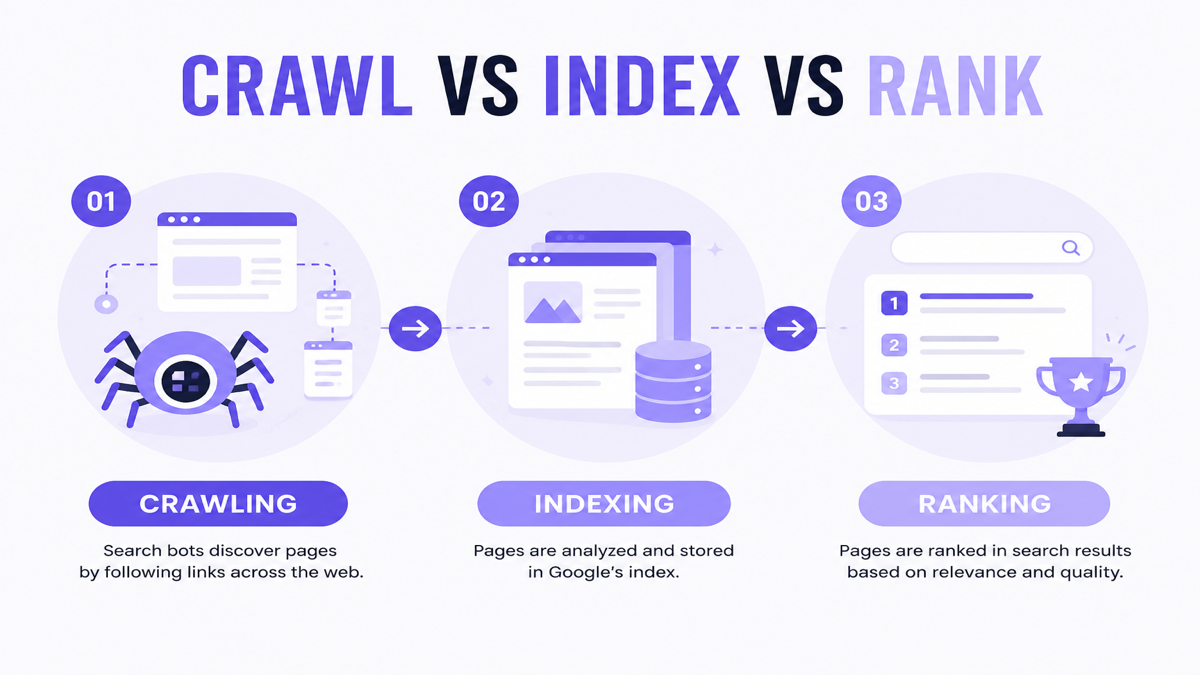
Not indexed: Google does not have the URL in its searchable index.
Indexed but not ranking: Google knows about the URL but does not consider it competitive or relevant enough for the searched query or position.
| Problem | Meaning | First place to check |
|---|---|---|
| Not crawled | Google may not have discovered or fetched it | Search Console + internal links/sitemap |
| Crawled but not indexed | Google fetched it but may not have indexed it | URL Inspection / indexing information |
| Indexed but not ranking | Page is eligible but not competitive for the query | Performance + content/competition analysis |
| Ranking dropped | Previously visible, now lower | Search Console date comparison + recent changes |
15 problems at a glance
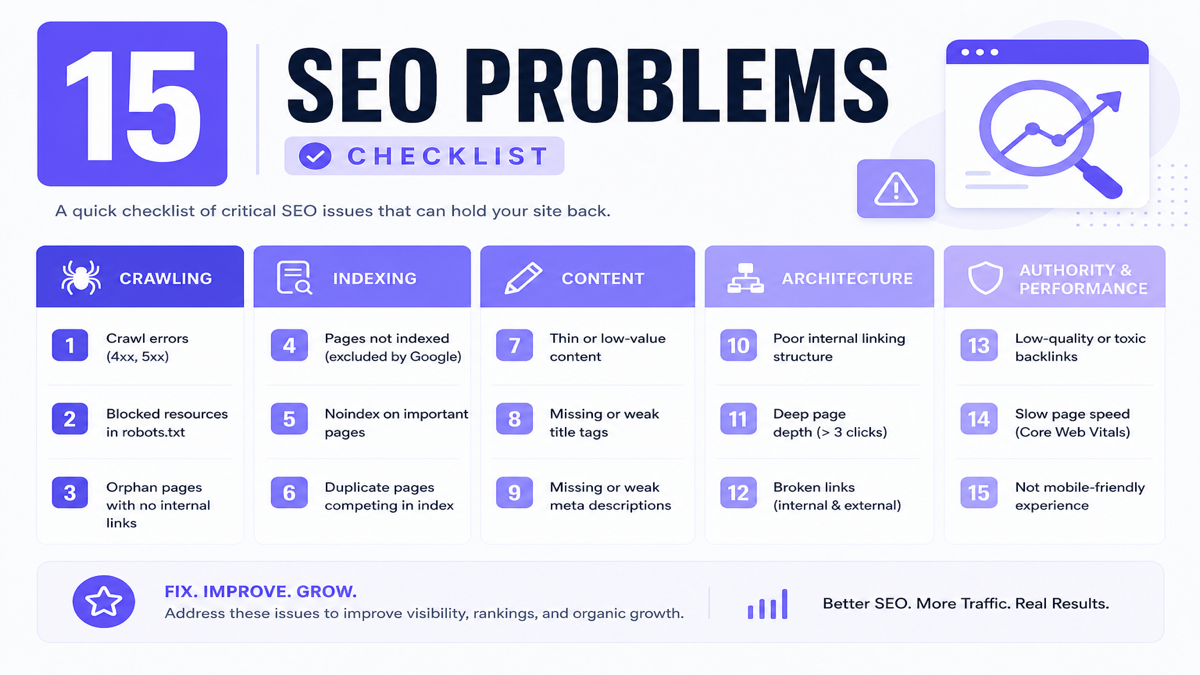
| Problem | Category | How to check | Priority |
|---|---|---|---|
| 1. Crawl blocked | Crawling | robots, server, navigation | Critical |
| 2. Accidental noindex | Indexing | meta/HTTP robots | Critical |
| 3. Wrong canonical | Technical | canonical URL inspection | Critical |
| 4. Weak discovery | Architecture | orphan/deep pages | Important |
| 5. Wrong intent | Content | SERP comparison | Important |
| 6. Thin/unhelpful content | Content | query satisfaction | Important |
| 7. Near-duplicate pages | Content | URL/content overlap | Important |
| 8. Cannibalization | Architecture | query/page overlap | Important |
| 9. Weak on-page clarity | Content | title/H1/structure | Important |
| 10. Poor internal links | Architecture | link graph/navigation | Important |
| 11. Stronger competitors | Authority | SERP authority review | Improvement |
| 12. Generic/low-evidence content | Content | examples/sources/experience | Important |
| 13. Performance/UX issues | Performance | CWV / mobile usability | Improvement |
| 14. Bad structured data | Technical | schema validation | Improvement |
| 15. Wrong expectations/metrics | Measurement | Search Console outcomes | Important |
1. Google cannot properly crawl your important pages
What it is: Googlebot cannot reliably fetch or discover the URL because of robots restrictions, authentication, server errors, inaccessible navigation, broken links or JavaScript-related discoverability issues.
Why it matters: Crawling is the step where Google fetches a page. Indexing is the later decision about whether that page belongs in the searchable index. If crawl fails, ranking diagnosis starts in the wrong place.
How to identify: Use Search Console URL Inspection, check robots configuration, HTTP status codes, internal navigation and sitemap inclusion. Draft robots carefully with a robots.txt generator, then validate against the live site — never block pages where Google still needs to read noindex or canonical tags.
How to fix: Allow crawl of important URLs, fix server/4xx/5xx issues, restore discoverable navigation and link to key pages from crawlable HTML where possible. For a 30-point implementation checklist covering status codes, robots, canonicals, sitemaps and architecture, use the technical SEO audit checklist.
When to get help: Complex authentication, rendering or server configurations may need developer support.
Important: robots.txt manages crawl access. Google documents that it is not the proper tool for keeping a page out of Search. To keep a page out of results, use noindex or password protection. A robots-blocked URL can still appear in results without a description if discovered via links.
2. An important page is accidentally set to noindex
What it is: A meta robots noindex tag or X-Robots-Tag HTTP header tells Google not to show the page in search results.
<meta name="robots" content="noindex">Why it matters: An otherwise excellent page will not rank while noindex remains.
How to identify: View page source/headers, use URL Inspection and look for staging settings copied to production, CMS/theme settings or template mistakes.
How to fix: Remove accidental noindex from pages that should be public. Keep noindex on pages that should stay out of Search (thank-you pages, private areas, thin filter URLs where intentional).
When to get help: Template-level robots directives across thousands of URLs often need developer changes.
3. Your canonical tags point Google to another URL
What it is: A canonical preference tells Google which URL should represent a set of duplicate or very similar pages. If Page A points canonical to Page B, Google may treat B as preferred.
Why it matters: Wrong canonicals can consolidate signals to the wrong URL or leave preferred pages under-emphasized.
How to identify: Inspect rel="canonical" in HTML/headers, check for staging URLs, homepage canonicals copied across templates, HTTP/HTTPS mismatches, parameter URLs and trailing-slash inconsistency.
How to fix: Point similar pages to the correct preferred URL, use self-referential canonicals on preferred pages, keep signals consistent (internal links, sitemap, redirects). Google treats canonical annotations as strong signals, not absolute commands.
When to get help: Large ecommerce parameter systems and CMS template bugs often need engineering.
4. Important pages are difficult to discover internally
What it is: Orphan pages, deeply buried pages, weak navigation or JavaScript-only discovery make important URLs hard for users and crawlers to find.
Why it matters: Internal links help discovery, context and site navigation. A great page with no paths to it is easy to overlook.
How to identify: Find pages with few or no internal links, check whether key URLs appear only in sitemaps, and review navigation depth.
How to fix: Add contextual links from related pages, improve navigation and include important URLs in a clear hierarchy.
When to get help: Large information-architecture redesigns may need UX and development support.
5. Your page targets the wrong search intent
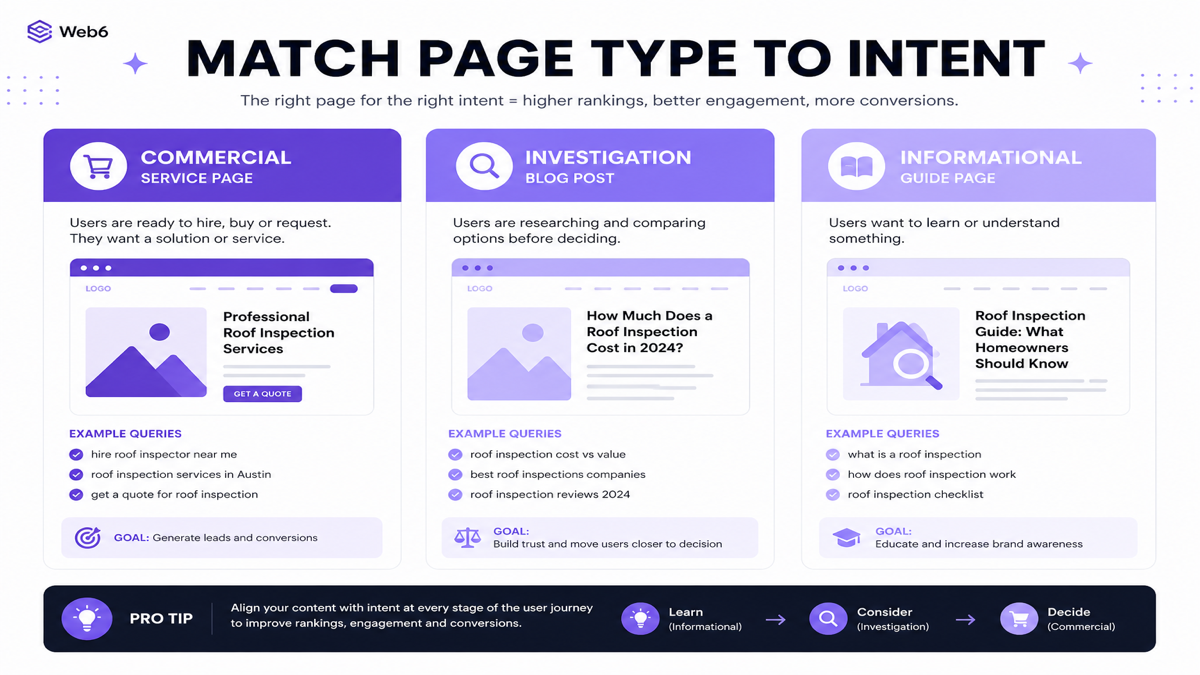
What it is: A technically fine page can fail if it is the wrong type of result for the query.
| Query | Likely intent | Better page type |
|---|---|---|
| SEO company in Surat | Commercial | Service landing page |
| how to choose an SEO company in Surat | Commercial investigation | Guide / blog |
| what is local SEO | Informational | Educational article |
How to identify: Search the query and compare the dominant result types before deciding your page format.
How to fix: Change the page type, rewrite the page to match intent, or create a different page for the query instead of forcing one URL to serve every intent.
This is why Web6 separates commercial SEO services in Surat from guides such as choosing an SEO company in Surat.
6. The page does not provide enough useful information
What it is: Content fails to answer the query with useful detail, examples, clarity and appropriate completeness.
Why it matters: Ranking depends on usefulness, not word-count quotas. A focused 700-word page can outperform a padded 3,000-word page.
How to identify: Compare your page with top results: what questions they answer, what evidence they provide and what users still need after reading yours.
How to fix: Add missing answers, examples, steps, limitations and next actions. Remove fluff.
When to get help: Subject-matter interviews and original research often need the business team, not only writers.
7. Multiple pages say essentially the same thing
What it is: Near-duplicate URLs such as /seo-surat/, /seo-company-surat/ and /seo-services-surat/ with nearly identical copy.
Why it matters: Unclear targeting and weak unique value make it harder for users and search systems to choose a preferred page. Duplicate content is not automatically a “penalty,” but it can dilute clarity and quality.
How to fix: Consolidate into one strong page, redirect where appropriate, use canonicals carefully for true duplicates and differentiate pages only when intent truly differs.
8. Several pages compete for the same search intent
What it is: Keyword cannibalization happens when multiple pages try to satisfy the same intent — not merely when they mention the same word.
Different intents can coexist. Example: a commercial SEO service page, a local SEO checklist and an SEO-company selection guide can all live on one site because they answer different jobs.
How to identify: In Search Console, see multiple URLs appearing for the same query family with unstable winners.
How to fix: Assign one primary page per intent, merge overlaps, differentiate remaining pages and update internal links accordingly.
9. The page does not clearly communicate its topic
What it is: Weak titles, H1s, headings, introductions and page structure make the topic unclear.
Bad conceptual title: Best SEO Company Surat SEO Services Surat #1 SEO Agency Gujarat
Better: SEO Services in Surat | Technical, Local & Ecommerce SEO
How to fix: Write a clear title and H1, organize headings around user questions and keep the opening paragraph specific. Clarity beats repetition. Rewriting a title alone does not guarantee ranking improvement. A meta tag generator can help draft cleaner metadata after the page purpose is clear.
10. Your internal linking does not support important pages
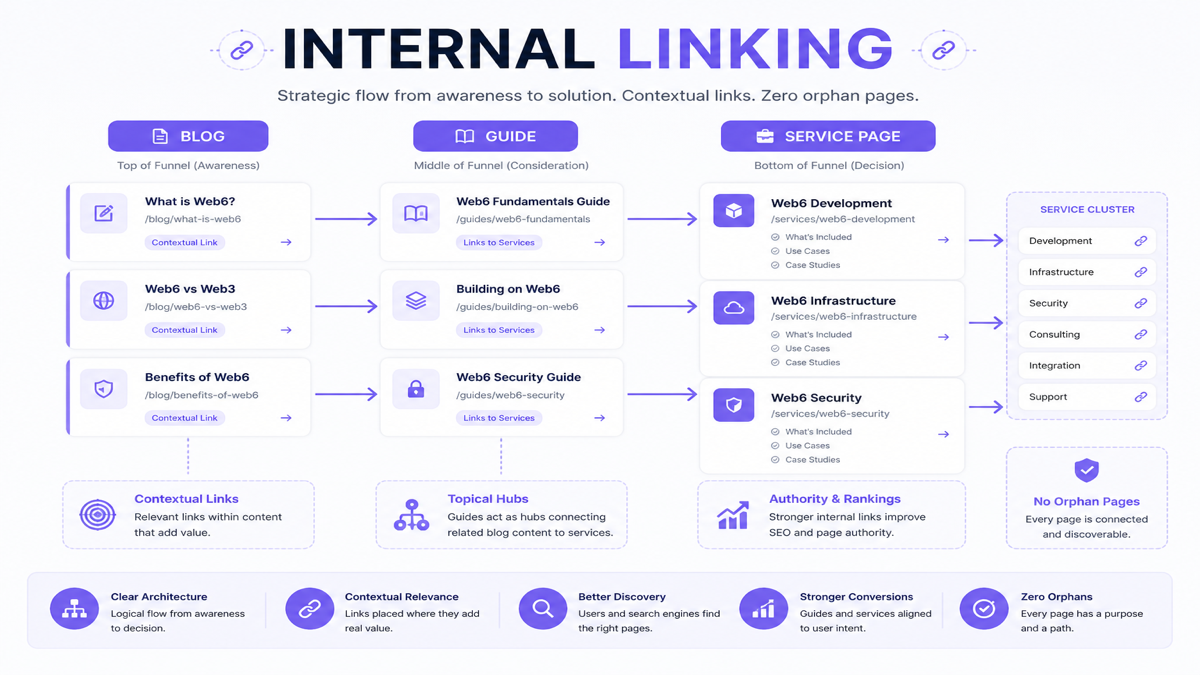
What it is: Orphan pages, generic anchors, important pages only in footers, missing blog→service connections, unrelated spammy link blocks or broken links.
Why it matters: Internal links help users move through a topic and help search systems understand relationships between pages. They are not a substitute for useful content, but they make important pages easier to discover and contextualize.
Good pattern: relevant blog → related guide → service page.
How to fix: Add contextual links, use descriptive anchors, fix broken links and stop linking every page to every other page without purpose. Prefer links that help a reader finish a task.
11. Competing pages have stronger authority and evidence
What it is: Established brands, specialist publishers or sites with deeper coverage and stronger mentions may outrank a newer or thinner site.
How to improve legitimately: Original resources, case studies, partnerships, industry citations, useful tools, digital PR and expert content. Do not reduce this to “buy more backlinks.”
Ten relevant editorial mentions can matter more than thousands of low-quality automated links. Avoid link farms, automated packages, irrelevant directories, PBN-style schemes and spam comments — practices covered by Google’s link-spam policies.
12. Your content looks generic because it lacks evidence or experience
What it is: Pages that restate common advice without screenshots, examples, diagrams, first-party data, case studies, author context or clear sources.
How to fix: Add real process explanations, verified examples, limitations and original visuals. Do not invent experience or fake case studies.
About AI-assisted content
The issue is not simply whether AI helped write. The problem is publishing large amounts of low-value, inaccurate, repetitive or search-engine-first content. Focus on helpfulness, accuracy and unique value.
13. Your website has serious performance or usability problems
What it is: Poor LCP, INP, CLS, mobile usability, excessive JavaScript, large images or weak interaction design.
Why it matters: Core Web Vitals relate to page experience and can influence Search systems, but they are not “the main ranking factor.” Performance also affects conversion.
How to fix: Compress media (for example with an image compressor), reduce unnecessary scripts, improve mobile layout stability and prioritize critical content.
Shopify / ecommerce note
Do not assume “more apps = slower site.” Investigate what actually loads: JavaScript, third-party requests, widgets, tracking, images and theme code. For deeper ecommerce architecture issues, see the ecommerce SEO guide and Shopify development when theme/app work is required.
14. Your structured data or entity information is incorrect
What it is: Invalid structured data, markup that does not match visible content, conflicting business details, fake reviews in schema, incorrect URLs or wrong organization information.
Why it matters: Structured data can help search engines understand eligible content and may support search features. It does not guarantee rankings or rich results.
How to fix: Validate markup, match visible facts and remove fabricated AggregateRating/Review data. Draft carefully with a structured data generator.
15. You are measuring SEO incorrectly or expecting instant results
What it is: Judging SEO only by one keyword position, or expecting immediate page-one results after launch.
Why timelines vary: discovery, indexing, competition, site history, implementation speed, content quality, authority and search demand all differ by page.
Measure: impressions, clicks, qualified traffic, conversions, leads and revenue where applicable — not only one ranking screenshot.
Why is a new website not ranking yet?
Discovery may be recent, historical authority may be limited, content coverage may still be thin, competition may be strong or technical issues may exist. “Google Sandbox” is an SEO-industry concept, not a confirmed Google ranking system — do not treat it as official documentation.
What if your website used to rank and suddenly dropped?
- Check Search Console
- Compare date ranges
- Check indexing
- Check Manual Actions and Security Issues
- Review recent site changes
- Check URL migrations
- Check redirects/canonicals
- Check content changes
- Look at affected query/page patterns
- Review competitive/search changes
Do not automatically blame an algorithm update. Distinguish algorithmic ranking changes from manual actions. Most drops are not penalties.
Did rankings drop after a redesign?
Check changed URLs, missing redirects, removed content, missing metadata, accidental noindex, robots, canonicals, internal links, structured data and deleted pages. Migrations often need coordinated development and SEO work via technical website development or ecommerce website development.
Why might a Shopify store struggle to rank?
- Weak collection pages
- Duplicate/near-duplicate content
- Poor internal linking
- Theme performance
- App-loaded storefront resources
- Thin product descriptions
- Weak category architecture
- Redirect issues
- Search intent mismatch
Do not blame Shopify itself — diagnose implementation and content quality.
Why might a local business not appear for local searches?
Incomplete/incorrect Google Business Profile, weak website location relevance, inconsistent business information, weak reviews/trust and competition can all matter. Google describes local results mainly through relevance, distance and popularity/prominence.
For a full checklist, use the local SEO checklist.
Diagnostic flow when a page is not ranking
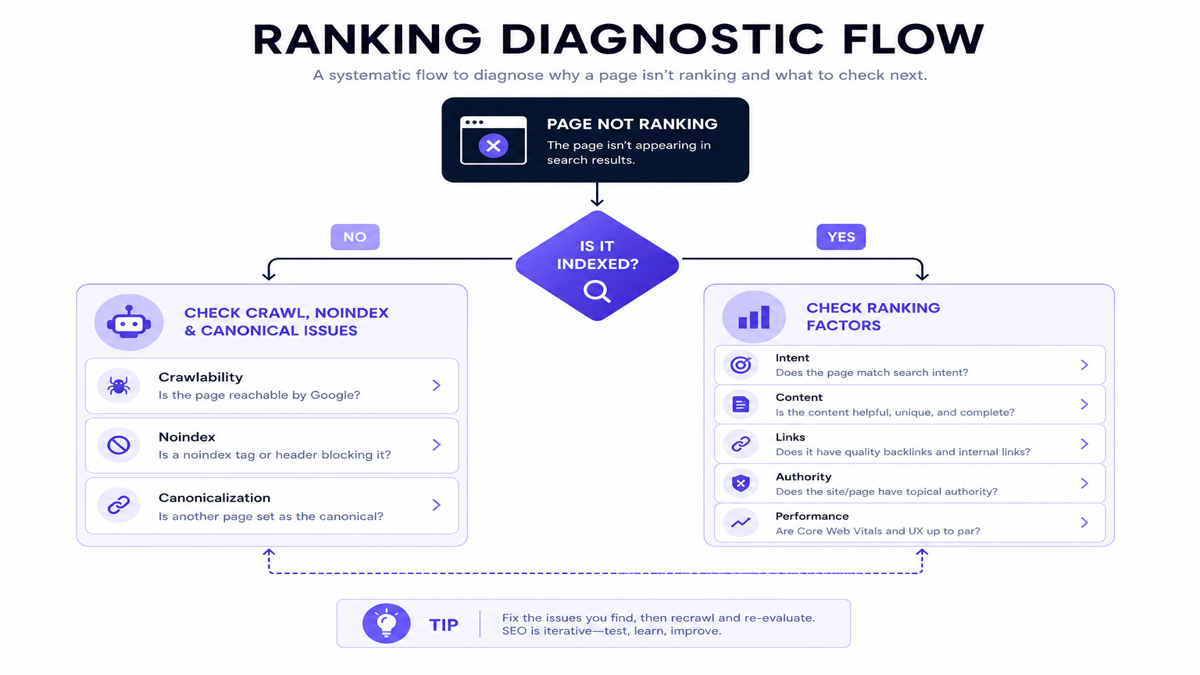
Page not ranking → Is it indexed?
- No: check crawl / noindex / canonical / discovery
- Yes: does it match search intent?
If intent matches, check content competitiveness, evidence, internal links, authority, performance — then measure and iterate.
Which SEO problems should you fix first?
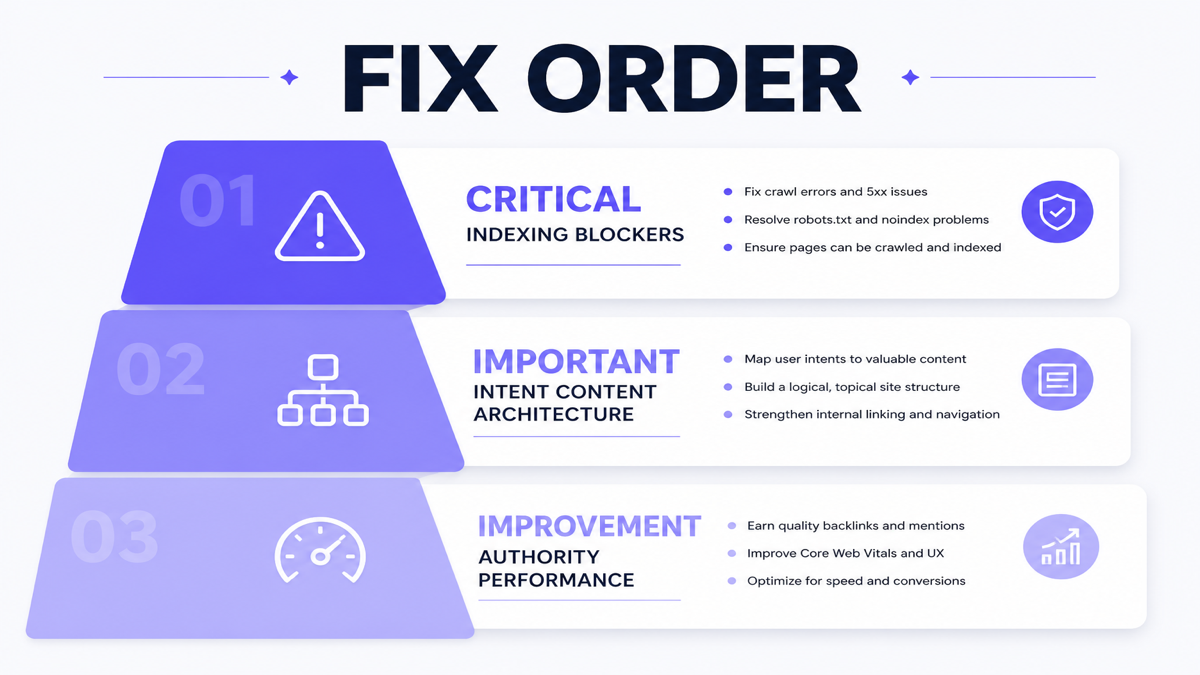
- Critical — indexing/crawling blockers: noindex, bad canonical, server errors, blocked critical pages
- Important — intent/content/architecture: wrong page type, duplicate targeting, thin content, poor internal links
- Improvement — competitiveness: authority building, content enhancement, performance improvement
What to check in Google Search Console
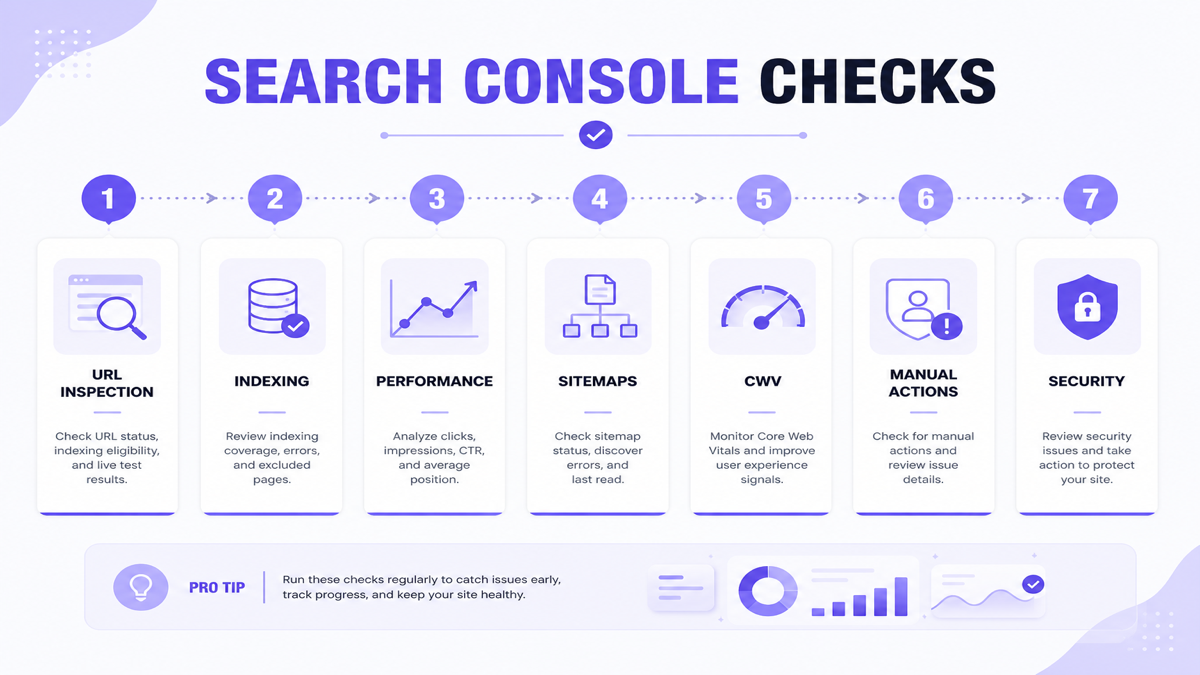
- URL Inspection
- Page indexing / indexing reports
- Performance
- Sitemaps
- Core Web Vitals
- Manual Actions
- Security Issues
- Links where useful
Submitting a sitemap does not guarantee indexing.
A 15-minute check when a page is not ranking
This is diagnosis only — not a promise that every issue can be fixed in 15 minutes.
- [ ] Search Console URL inspection
- [ ] Confirm indexability
- [ ] Check canonical
- [ ] Check robots/noindex
- [ ] Check HTTP status
- [ ] Search primary query
- [ ] Compare page type with top results
- [ ] Review title/H1
- [ ] Check internal links
- [ ] Compare content usefulness
- [ ] Check recent site changes
- [ ] Check performance
- [ ] Check competing internal URLs
- [ ] Review impressions/clicks
- [ ] Document next action
Symptom → likely area → first check
| Symptom | Likely area | First check |
|---|---|---|
| Page not in Google | Indexing | URL Inspection |
| Only homepage ranks | Architecture/content | Internal links + page indexability |
| Impressions but few clicks | SERP relevance | Query/title/snippet/page fit |
| Clicks declining | Ranking/demand/competition | Search Console comparison |
| One page replaced by another | Intent/cannibalization | Query/page analysis |
| Traffic but no leads | Conversion/intent | Landing-page UX |
| Local visibility weak | Local SEO | GBP + local page |
Still not sure what is stopping your website from ranking?
If the problem spans indexing, site architecture, technical SEO, content and search intent, a structured audit can help identify what should be fixed first. Explore SEO services in Surat or broader digital marketing support when organic and paid channels need to work together. No ranking guarantees — diagnosis first.
Frequently asked questions
Why is my website not ranking on Google?
Common causes include crawl/index blockers, wrong search intent, weak content, cannibalization, poor internal links, stronger competitors or incorrect measurement. Start with Search Console indexing checks.
Why is my website not showing in Google Search?
The URL may not be indexed, may be noindexed, may be hard to discover, or may have been removed/blocked. Confirm with URL Inspection before rewriting content.
How can I check whether Google has indexed my page?
Use Google Search Console URL Inspection for the exact URL and review indexing status and any blocking reasons reported there.
Can a page be indexed but still not rank?
Yes. Indexing means the page is eligible to appear. Ranking depends on relevance, quality, competition and other signals for each query.
How long does it take a new website to rank?
There is no fixed timeline. Discovery, content coverage, competition and technical health all affect speed. Avoid treating “sandbox” claims as official Google policy.
Can robots.txt stop my website from ranking?
robots.txt can block crawling of content. It is not the recommended way to remove a page from Search. Google may still list a blocked URL without a description if discovered via links. Use noindex or access control to keep pages out of results.
Does duplicate content prevent rankings?
Near-duplicates can create unclear targeting and weaker pages. That is not the same as an automatic penalty for every duplicate URL. Consolidate or differentiate based on intent.
Does website speed affect SEO?
Performance and Core Web Vitals relate to page experience and can influence Search systems. They also affect users and conversions. Speed alone does not guarantee rankings.
Why did my rankings suddenly drop?
Check indexing, manual actions/security issues, recent site changes, redirects, content edits and competitive shifts before assuming a single algorithm update caused everything.
How important are backlinks for rankings?
Relevant mentions and links can support authority, but quality and relevance matter more than raw volume. Spammy link schemes create risk.
Can AI-generated content rank on Google?
Content can rank when it is helpful, accurate and valuable. Low-quality scaled content created mainly to manipulate search is the problem — not the mere use of AI assistance.
Should I hire an SEO company if my website is not ranking?
Not automatically. If you can verify and fix clear blockers (noindex, wrong canonical, broken pages), start there. Hire help when issues span technical systems, content strategy and architecture, or when diagnosis remains unclear after Search Console checks. Use the questions to ask before hiring if you evaluate agencies.
Diagnose before you optimize
Most “my website is not ranking” problems are solvable once you separate crawl, index and rank — then match intent, improve usefulness and fix architecture. Start with critical blockers, then improve content and competitiveness with evidence, not shortcuts.