
SEO
Technical SEO Audit Checklist: 30 Things to Fix Before Publishing More Content
Written by Web6 Editorial Team · Published 25 August 2026 · 28 min read
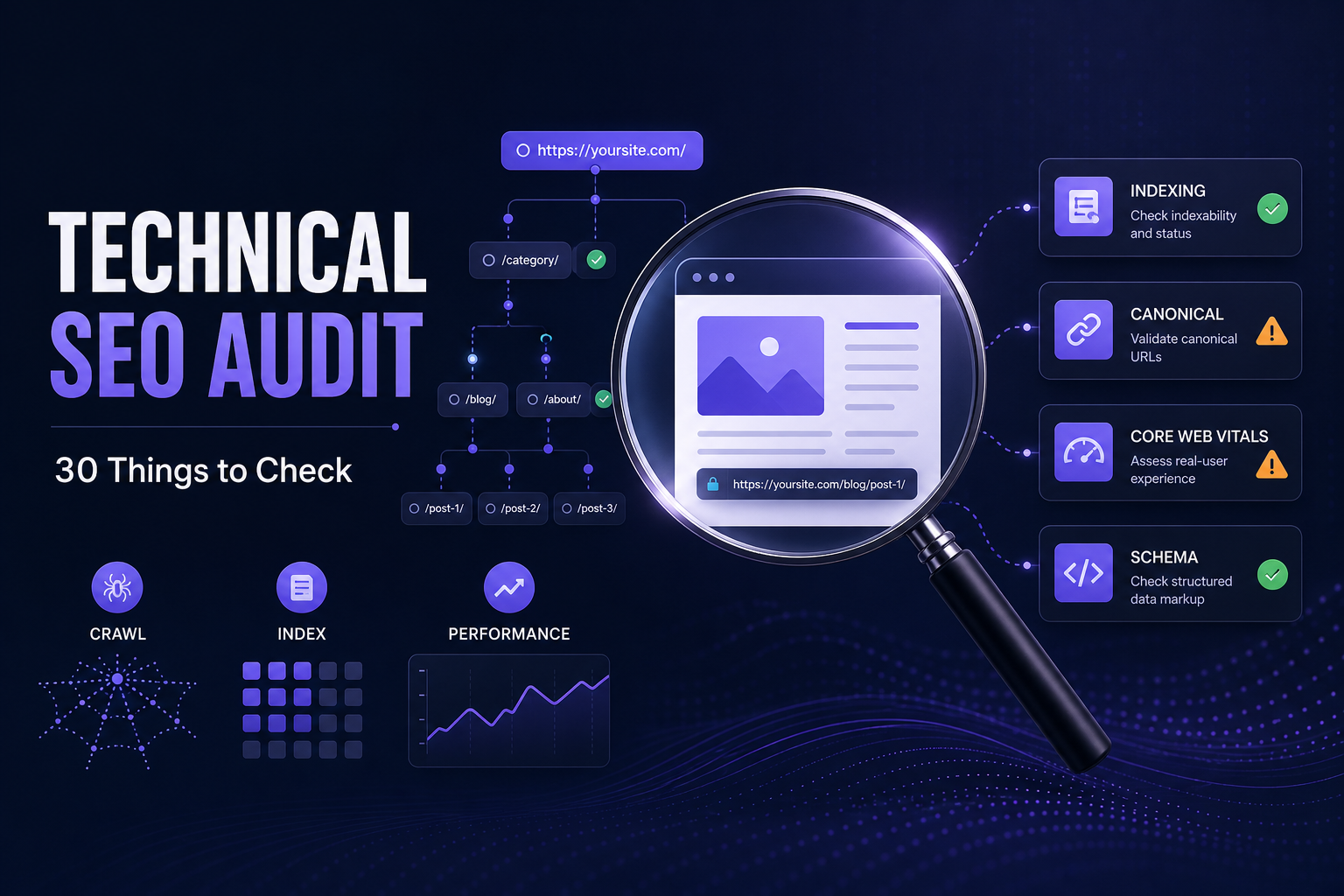
Publishing more blog posts will not fix a website that Google struggles to crawl, index or understand. A technically unhealthy site can waste strong content through incorrect canonicals, accidental noindex directives, broken internal links, duplicate URLs, redirect problems, poor architecture or performance issues.
Before increasing content production, check whether the existing website has a strong technical foundation: crawling, indexing, canonicalization, site architecture, internal links, performance, structured data, security, mobile usability and JavaScript rendering. This checklist helps you answer: is the site technically ready for more SEO content? For pre-launch developer checks before go-live, see SEO-friendly website development checklist.
What should a technical SEO audit include?
A technical SEO audit should verify that important pages can be discovered, crawled, rendered and indexed correctly. Start by checking HTTP status codes, robots.txt, noindex directives, canonical tags and XML sitemaps. Then review redirects, duplicate URLs, internal links, orphan pages, site architecture, JavaScript rendering, mobile usability, Core Web Vitals, HTTPS and structured data. Use Google Search Console to confirm how Google sees important URLs. Fix crawl and indexing blockers before spending heavily on additional content.
Technical SEO audit priorities
- Critical: crawling and indexing blockers
- High: canonicalization, redirects and architecture
- Medium: internal linking, performance and structured data
- Ongoing: monitoring and maintenance
30-point technical SEO audit summary
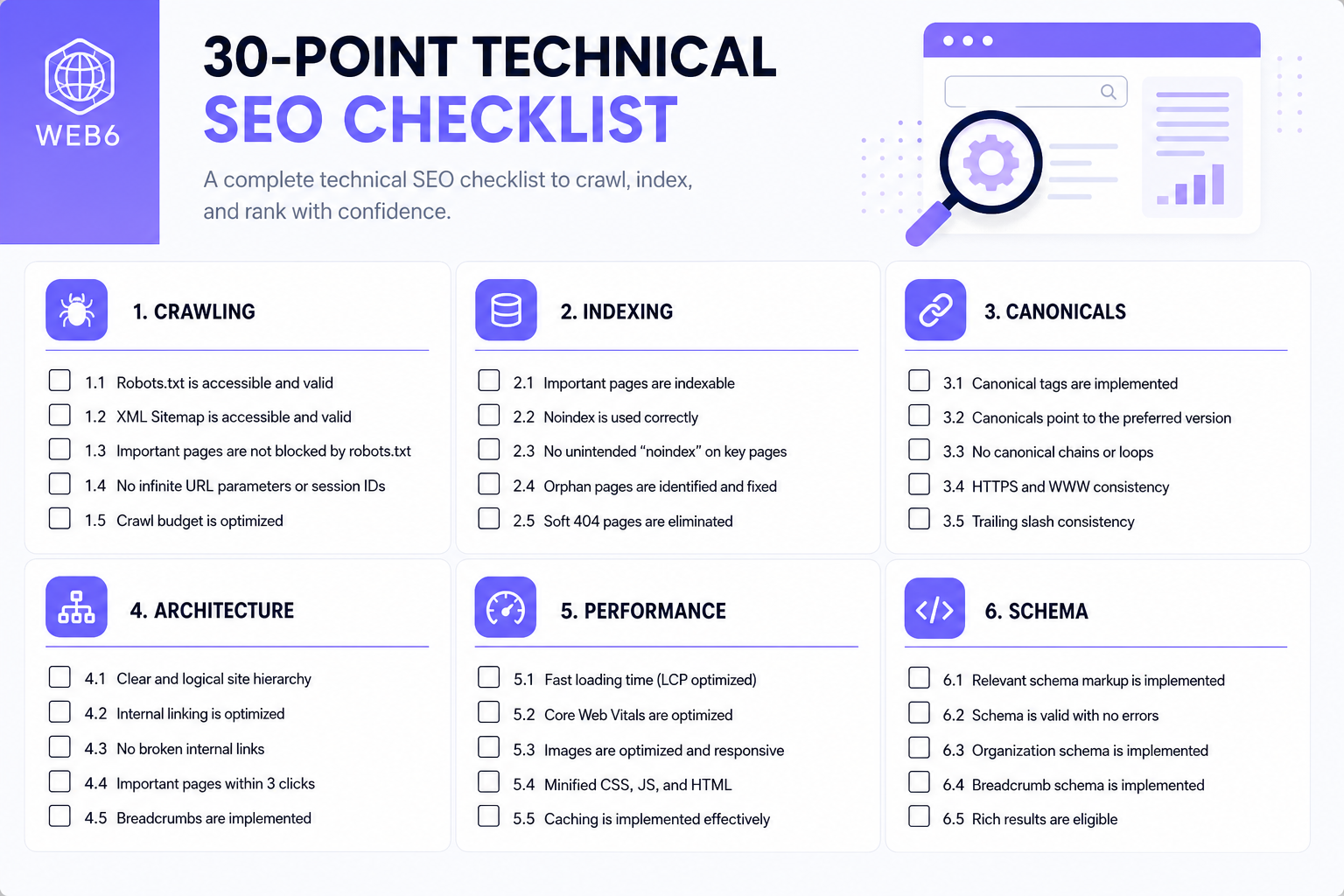
| # | Technical SEO check | Category | Priority | Primary tool |
|---|---|---|---|---|
| 1 | HTTP status codes | Crawling | Critical | Crawler / DevTools |
| 2 | robots.txt | Crawling | Critical | Live /robots.txt |
| 3 | Accidental noindex | Indexing | Critical | URL Inspection |
| 4 | Indexability of key URLs | Indexing | Critical | Search Console |
| 5 | Page indexing patterns | Indexing | High | GSC Pages report |
| 6 | Canonical tags | Canonicalization | Critical | HTML / headers |
| 7 | Conflicting canonical signals | Canonicalization | High | Crawl + sitemap |
| 8 | XML sitemap quality | Discovery | High | Sitemap + crawler |
| 9 | Sitemap processing | Discovery | High | Search Console |
| 10 | Redirect policy | Redirects | High | Crawler / headers |
| 11 | Redirect chains and loops | Redirects | High | Crawler |
| 12 | Broken internal links | Architecture | High | Crawler |
| 13 | Orphan pages | Architecture | High | Crawl vs sitemap |
| 14 | Crawl depth / discoverability | Architecture | Medium | Crawler |
| 15 | Internal linking to money pages | Architecture | High | Crawler |
| 16 | URL consistency | URLs | Medium | Crawler |
| 17 | Duplicate URL versions | URLs | High | Crawler |
| 18 | Near-duplicate pages | Content/URLs | High | Crawl + intent map |
| 19 | Site architecture | Architecture | High | IA review |
| 20 | JavaScript rendering | Rendering | High | URL Inspection / view-source |
| 21 | Mobile experience | Mobile | High | Device testing / PSI |
| 22 | Core Web Vitals | Performance | Medium | GSC / PSI / CrUX |
| 23 | Slow-page causes | Performance | Medium | PSI / DevTools |
| 24 | Image performance and alt text | Performance | Medium | Crawler / PSI |
| 25 | HTTPS and security | Security | High | Browser / GSC |
| 26 | Structured data validity | Structured data | Medium | Rich Results Test |
| 27 | Schema vs visible content | Structured data | Medium | Manual + validator |
| 28 | Titles, H1s, meta descriptions | On-page technical | Medium | Crawler |
| 29 | Hreflang (if international) | International | High if used | Crawler / GSC |
| 30 | Search Console health | Monitoring | Ongoing | Search Console |
1. Check HTTP status codes on important URLs
Why it matters: Google’s crawlers treat status codes as processing instructions. A 200 response may be considered for indexing; 3xx redirects are followed (Googlebot generally up to 10 hops); most 4xx responses mean the URL is not used for indexing; 5xx and 429 can slow crawl rate and eventually drop persistently failing URLs from the index.
How to check: Crawl important URLs and sample templates. Confirm homepage, main service/category pages, key blogs/products and XML sitemap URLs.
Problem signs: money pages returning 404/410; pages that should be 200 stuck in redirects; widespread 5xx; 200 pages that show empty or “not found” content (soft 404).
Fix: Restore or redirect with a relevant replacement. Fix server errors before scaling content. Not every 404 is bad — genuine missing URLs should 404/410 rather than fake a 200.
Priority: Critical
2. Make sure robots.txt is not blocking important content
Why it matters: robots.txt controls crawling, not a reliable way to remove an already indexed page. Google documents that a disallowed URL can still appear in results without a snippet if discovered via links. Blocking CSS/JS needed for rendering can also hurt how Google understands the page.
How to check: Open /robots.txt. Look for Disallow rules on services, products, collections, blogs or assets required to render.
Problem signs: Disallow on /blog, /products, /collections, /services, or theme/asset paths. Staging Disallow copied to production.
Fix: Allow crawl of URLs you want indexed. To keep a page out of Search, use noindex (and allow crawl so Google can read it) or password protection. Draft carefully with a robots.txt generator, then validate against Google’s robots documentation.
Priority: Critical
3. Find accidental noindex directives
Why it matters: Meta robots or X-Robots-Tag noindex tells Google not to show the page in results. Accidental noindex on production is a common post-launch failure.
<meta name="robots" content="noindex">How to check: View source and response headers; use Search Console URL Inspection. Look at CMS/theme defaults, copied staging templates and plugin settings.
Problem signs: Commercial pages “Excluded by ‘noindex’ tag”; whole blog templates noindexed; X-Robots-Tag on PDFs you wanted indexed.
Fix: Remove noindex from pages that should compete. Keep noindex where it is intentional (thank-you pages, internal search, thin parameter URLs you do not want indexed).
Priority: Critical
4. Verify that your important pages are actually indexable
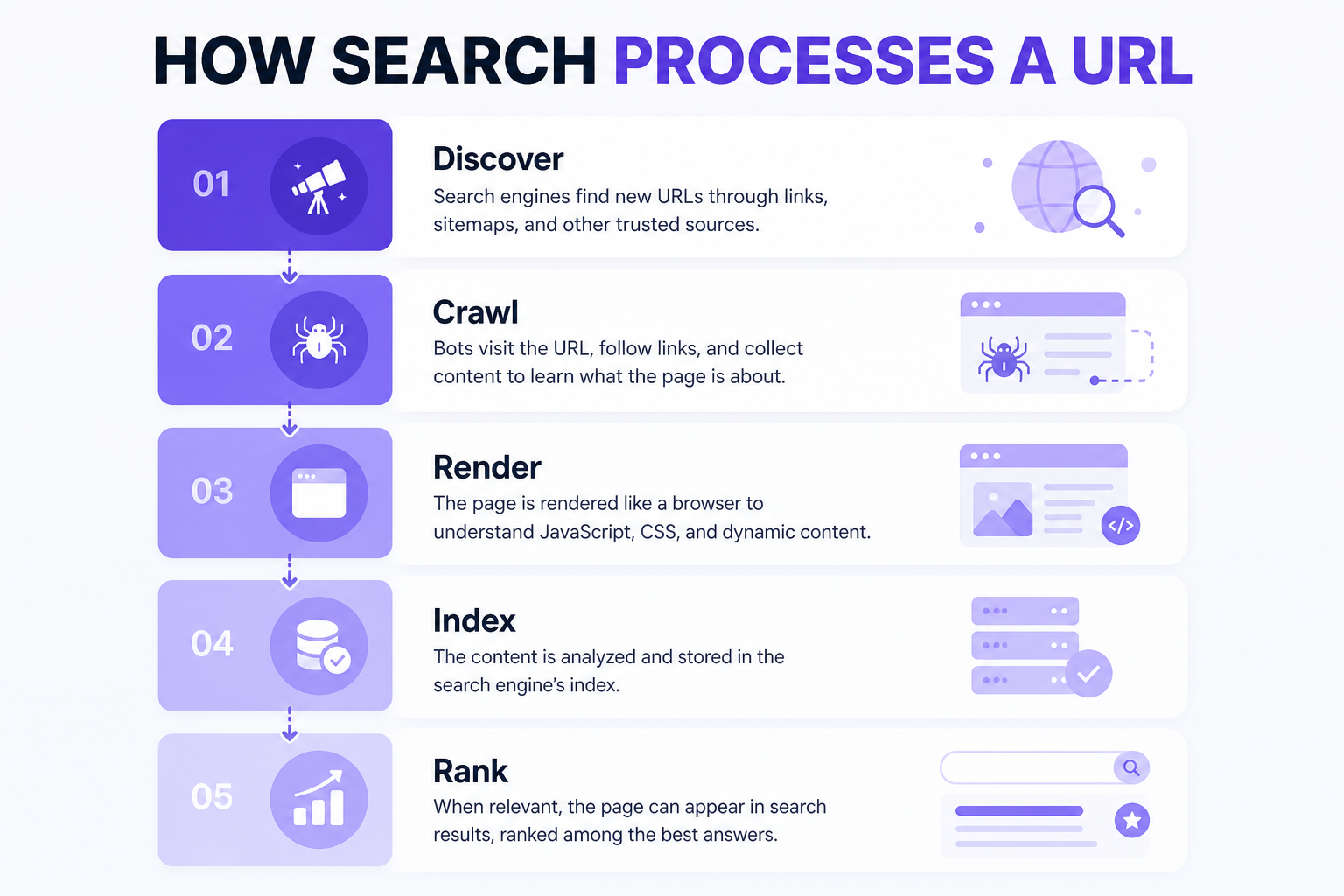
Why it matters: Crawlable ≠ indexable ≠ indexed ≠ ranking. A page can be fetched and still excluded, or indexed and still not rank.
How to check: Search Console URL Inspection on homepage, one service/category URL and one blog/product URL. Confirm “URL is on Google” (or why not) and that Google-selected canonical matches your intent.
Problem signs: “URL is not on Google”; Google chose a different canonical; page blocked, redirected or noindexed unintentionally.
Fix: Remove blockers, align canonicals, ensure internal links and sitemap include the preferred URL. If indexing fails for unclear reasons after technical health is good, review content quality and duplication — see website ranking problems.
Priority: Critical
5. Review indexing patterns in Google Search Console
Why it matters: The Page Indexing report (Indexing → Pages) shows why URLs are not indexed. Not every exclusion is a problem.
How to check: Review current reasons such as: Excluded by noindex; Blocked by robots.txt; Not found (404); Server error (5xx); Page with redirect; Alternate page with proper canonical; Duplicate, Google chose different canonical; Soft 404; Crawled – currently not indexed; Discovered – currently not indexed. Labels can evolve — use the live report names.
Problem signs: Unexpected noindex/robots blocks on money URLs; many soft 404s; large “Discovered – currently not indexed” on a small site; Google choosing unexpected canonicals.
Fix: Fix website-source issues first. “Crawled – currently not indexed” is often a quality/value decision, not a missing meta tag. Do not chase 100% indexing.
Priority: High
6. Audit canonical tags
Why it matters: rel="canonical" is a strong signal for the preferred URL among duplicates — not an absolute command. Google also uses redirects (strong) and sitemap inclusion (weaker). Self-referential canonicals on preferred pages are recommended.
How to check: HTML <link rel="canonical"> and any Link HTTP header. Check HTTP/HTTPS, www, trailing slash, parameters, pagination templates and staging domains.
Problem signs: All pages canonical to homepage; staging host in production; parameter URLs self-canonical when they should consolidate; relative canonicals pointing at the wrong host.
Fix: Use absolute HTTPS canonicals to the preferred URL. Link internally to that URL. Do not use robots.txt for canonicalization.
Priority: Critical
7. Look for conflicting canonical signals
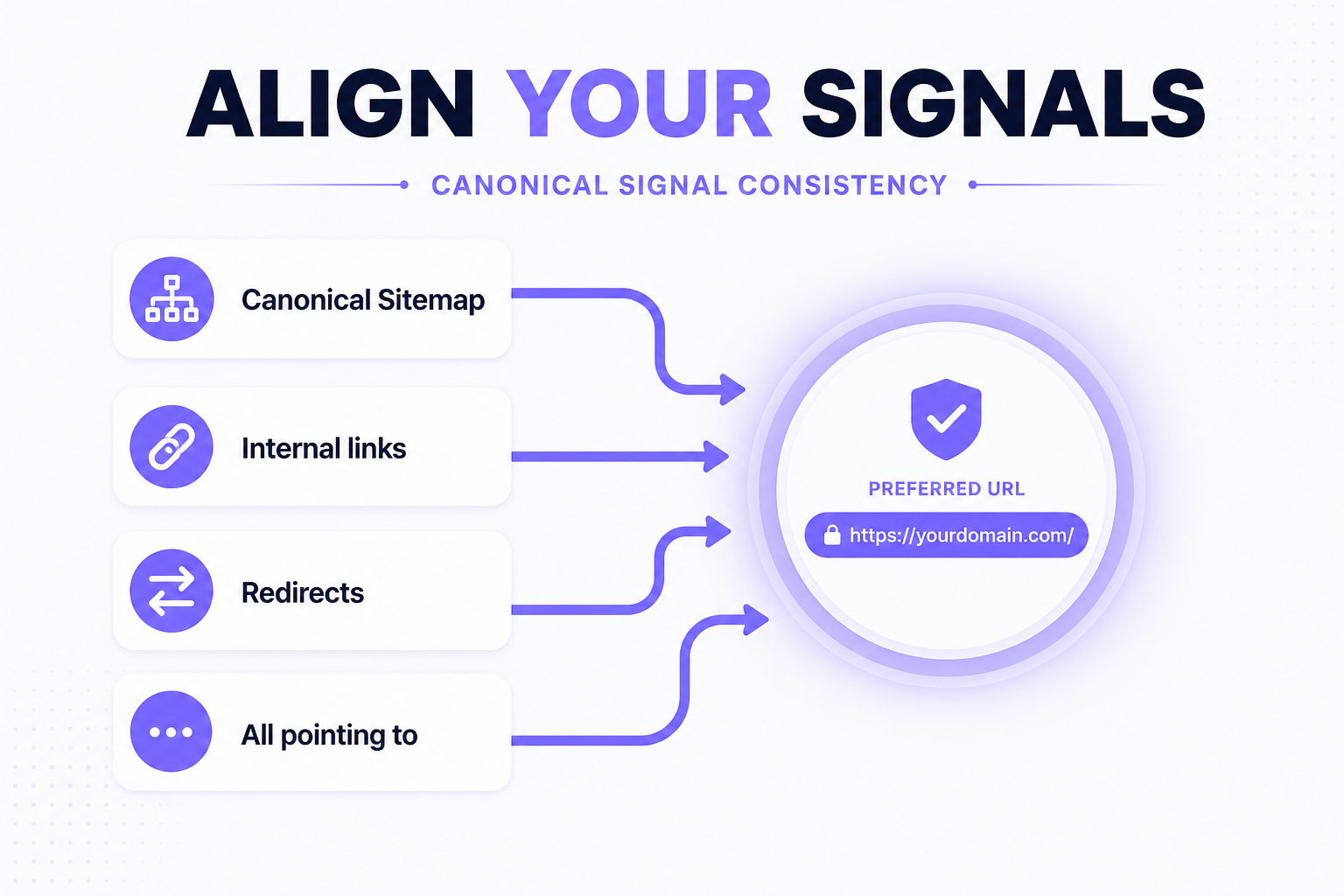
Why it matters: If canonical points to A, sitemap lists B, internal links go to C and a redirect sends D, Google has weaker confidence in your preference.
How to check: Compare canonical, sitemap, internal link target and redirect target for the same content.
Problem signs: Sitemap includes non-canonical URLs; nav links to HTTP or trailing-slash variants; redirect target differs from canonical.
Fix: Make all signals agree on one preferred URL. Google notes methods stack and become more effective when combined.
Priority: High
8. Audit your XML sitemap
Why it matters: A sitemap helps discovery and is a weak canonical hint. It does not guarantee indexing.
How to check: Open the sitemap (and sitemap index). Confirm it lists canonical, indexable, 200 URLs you actually want discovered.
Problem signs: 404s, redirects, noindex URLs, obvious duplicates, staging URLs or thousands of filter URLs.
Fix: Include only preferred indexable URLs. Keep lastmod honest if you use it. Recreate after migrations.
Priority: High
9. Verify sitemap processing in Search Console
Why it matters: A sitemap that is blocked, malformed or pointing at the wrong host will not help discovery.
How to check: Search Console → Sitemaps. Confirm successful processing, accessibility and that discovered URL counts roughly match intent. Do not resubmit daily.
Problem signs: Couldn’t fetch; errors; discovered count far above real indexable pages.
Fix: Fix robots/HTTP access, XML validity and URL list quality. Submit the correct sitemap URL once it is healthy.
Priority: High
10. Audit redirects
Why it matters: Permanent redirects (301/308) are a strong signal that the target should be processed. Temporary redirects (302/307) are weaker. Use them for HTTP→HTTPS, www policy, migrated URLs, deleted products with a relevant replacement and changed service paths.
How to check: Crawl old URLs, marketing links and sitemap history. Confirm final status is 200 on the intended URL.
Problem signs: HTTP still 200; mixed www; missing migration redirects; every deleted URL sent to homepage.
Fix: Implement server-side permanent redirects to the closest relevant URL. Homepage dumps are usually worse than a clean 404/410.
Priority: High
11. Remove unnecessary redirect chains and loops
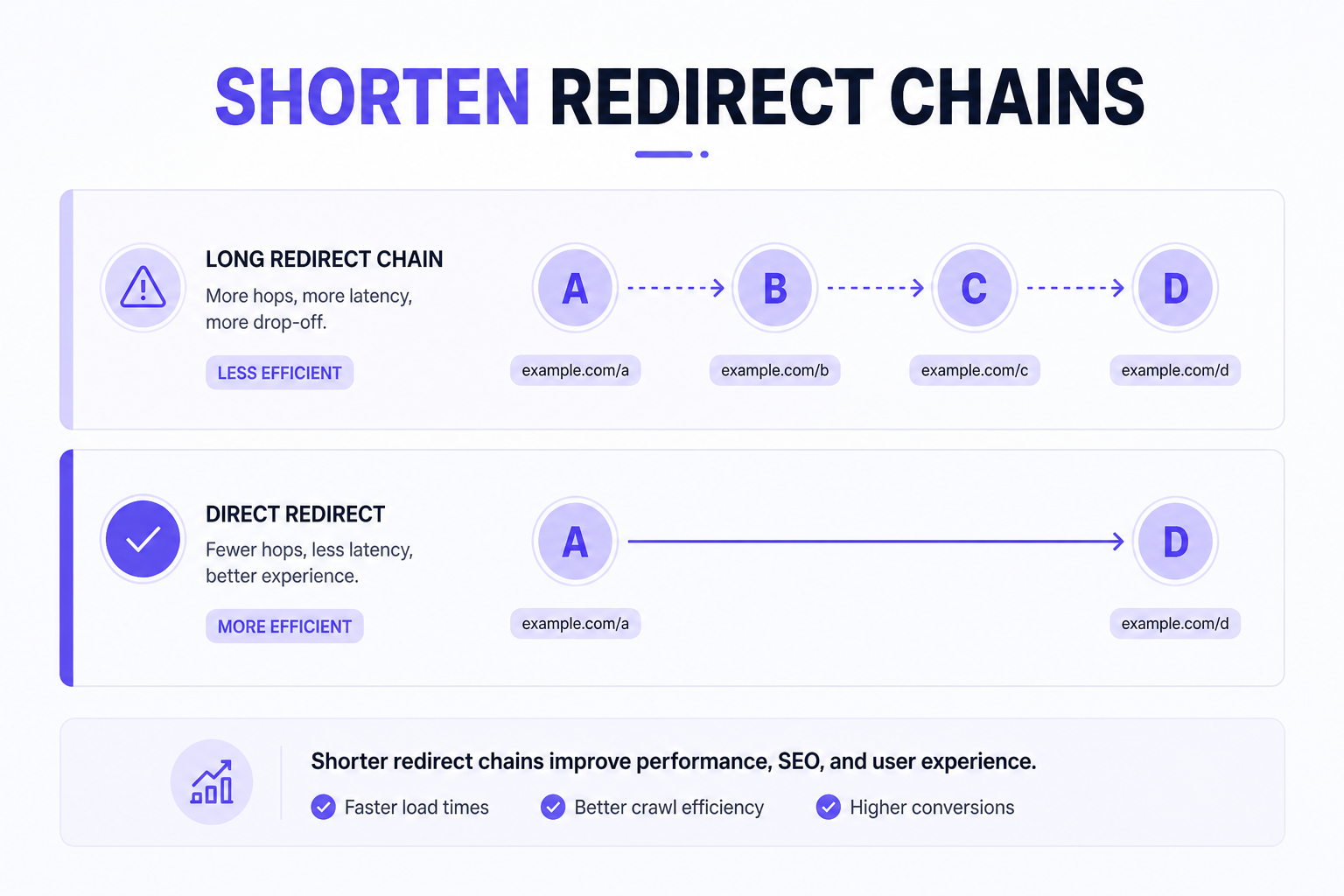
Why it matters: Googlebot generally follows up to 10 hops, but chains add latency and complicate crawling. Loops fail entirely. A two-hop redirect is not automatically a ranking disaster — unnecessary length still wastes crawl and UX.
How to check: Follow Location headers until a non-3xx response. Flag A→B→C→D patterns and cycles.
Fix: Point A directly to the final URL. Update internal links so they do not rely on redirects.
Priority: High
12. Find broken internal links
Why it matters: Links to 404, 410, 5xx or invalid URLs hurt users, waste crawls and weaken architecture.
How to check: Site crawl of internal hrefs. Prioritize links from navigation, footer and high-traffic pages.
Fix: Update the link to a live relevant URL. Do not rely on redirects forever for links you control.
Priority: High
13. Find important orphan pages
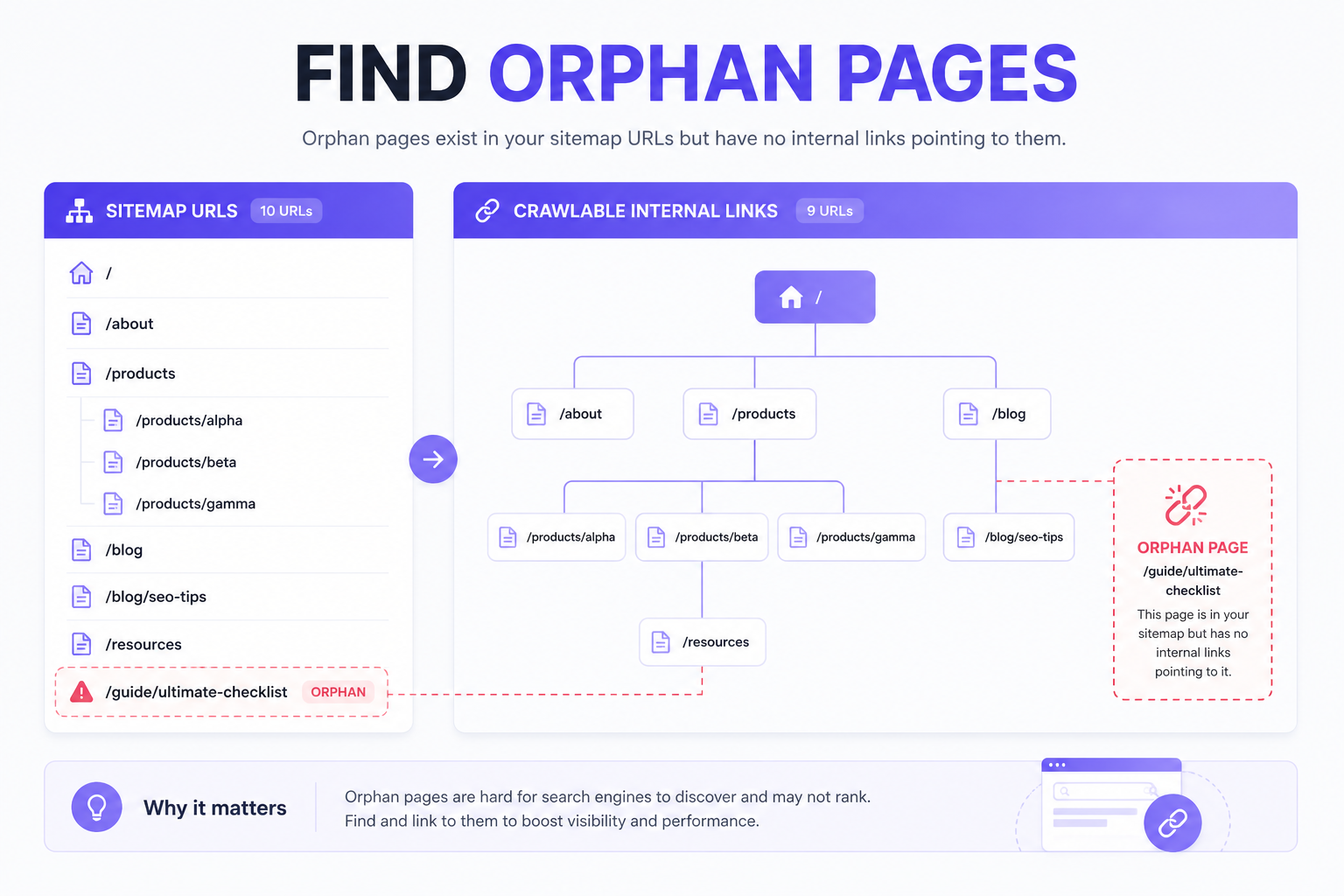
Why it matters: An orphan page has no meaningful crawlable internal link from normal architecture. Sitemap-only discovery is weaker than linked discovery.
How to check: Compare sitemap URLs with crawl-discovered URLs. Flag important service, product, category or guide URLs missing from the crawl.
Fix: Add contextual or navigational links from related live pages.
Priority: High
14. Review how deep important pages are in the site architecture
Why it matters: Important pages should be reasonably easy for users and crawlers to discover. There is no universal Google rule that every page must be within exactly three clicks.
How to check: Measure click depth from the homepage to commercial URLs. Watch for Home → A → B → C → D → money page patterns with no shortcuts.
Fix: Surface important URLs closer via navigation, hub pages or contextual links — without stuffing every page into the header.
Priority: Medium
15. Audit internal linking to important pages
Why it matters: Internal links support discovery, navigation, context and architecture.
How to check: Confirm commercial pages receive relevant links; supporting blogs link contextually; anchors describe destinations; links are in crawlable HTML; unrelated mass linking is avoided.
Fix: Connect related guides, services and case studies with descriptive anchors. Implementation help: technical SEO services.
Priority: High
16. Check URL consistency
Why it matters: Readable, consistent URLs reduce duplicate variants. Changing established URLs just to shorten them introduces migration risk.
How to check: Review lowercase policy, trailing-slash consistency, unnecessary parameters and outdated IDs on new or migrated paths.
Fix: Pick a policy and apply it to new URLs. Redirect only when a change is necessary.
Priority: Medium
17. Look for duplicate URL versions
Why it matters: HTTP/HTTPS, www/non-www, trailing slash, parameters, case and printer/filter versions can multiply the same content.
How to check: Request each variant. Confirm one preferred version returns 200 and others redirect or canonicalize consistently.
Fix: Align redirects, canonicals, internal links and sitemap to one preferred URL. Google generally prefers HTTPS over equivalent HTTP when signals are not conflicting.
Priority: High
18. Identify duplicate and near-duplicate pages
Why it matters: Duplication is not an automatic “penalty.” It can waste crawl, split signals and confuse targeting.
How to check: Find identical-intent service pages, duplicate product URLs, parameter versions and thin tag/filter pages.
Fix: Keep, differentiate, canonicalize, redirect or noindex depending on purpose. Do not delete indiscriminately.
Priority: High
19. Review site architecture before adding more content
Why it matters: Hundreds of new URLs without a logical place increase orphans, cannibalization and thin coverage.
How to check: Map Homepage → main service → specialized service → supporting guide → related case study/tool. For ecommerce: Homepage → collection → subcollection (if useful) → product.
Fix: Give each new URL a parent hub and internal links before publishing at scale.
Priority: High
20. Make sure important content is accessible when JavaScript is involved
Why it matters: Google can process JavaScript when it is not blocked, but JS SEO is more complex. Critical text, headings, links, metadata, canonical and structured data should be available appropriately — ideally in initial HTML when possible.
How to check: Compare view-source vs rendered DOM; URL Inspection crawled HTML; test with JS disabled for critical content. Relevant for React, Next.js, Vue, Angular and custom SPAs.
Problem signs: Empty source HTML; links only in click handlers; canonical injected inconsistently; schema missing until hydration.
Fix: Prefer SSR/SSG/hybrid rendering for important SEO pages. Follow JavaScript SEO best practices. JavaScript sites can rank — poor rendering is the issue. Custom stacks may need custom website development.
Priority: High
21. Audit the mobile version of important pages
Why it matters: Google Search indexes with a smartphone Googlebot. Content parity, usable tap targets, readable text, non-intrusive overlays and mobile performance matter.
How to check: Real device or responsive testing on key templates; PageSpeed Insights mobile; Search Console experience reports where available. Do not rely on retired “mobile-friendly test” workflows.
Fix: Match primary content between desktop and mobile; fix overlay and tap issues; optimize mobile LCP/INP/CLS.
Priority: High
22. Check Core Web Vitals
Why it matters: Current Core Web Vitals are LCP (loading), INP (interaction responsiveness; replaced FID in March 2024) and CLS (visual stability). They relate to page experience and can influence Search systems. Passing CWV does not guarantee rankings.
How to check: Search Console Core Web Vitals (field/CrUX where available) and PageSpeed Insights for lab + field data. Typical “good” thresholds: LCP ≤ 2.5s, INP ≤ 200ms, CLS ≤ 0.1 — confirm current web.dev/Search documentation if thresholds change.
Fix: Improve the actual cause (see check 23). Prioritize templates that get real traffic.
Priority: Medium
23. Find the actual causes of slow pages
Why it matters: A low PSI score is a symptom. Causes include oversized images, unnecessary JavaScript, third-party scripts, fonts, render-blocking resources, widgets, tracking, large DOM and server latency.
How to check: PSI diagnostics + Chrome DevTools coverage/network. On Shopify, inspect what storefront resources actually load — do not assume “too many apps always slow Shopify.”
Fix: Remove or defer unused JS; compress images; reduce third parties; improve TTFB. Theme/app work may need Shopify development.
Priority: Medium
24. Optimize images without destroying quality
Why it matters: Images often dominate LCP. Alt text supports accessibility and context — do not keyword-stuff every alt.
How to check: Dimensions vs display size; format (WebP/AVIF where appropriate); compression; responsive srcset; lazy-load below-the-fold (not the LCP hero); width/height to reduce CLS.
Fix: Resize, convert and compress. Use Web6’s image compressor and image converter for asset prep — they do not replace a full audit.
Priority: Medium
25. Verify HTTPS and basic site security signals
Why it matters: HTTPS is expected. Mixed content, invalid certificates or HTTPS→HTTP redirects can undermine trust and canonical preference. HTTPS alone does not produce strong rankings.
How to check: Certificate validity; HTTP→HTTPS redirect; internal links and canonicals on HTTPS; mixed content; Search Console Security Issues.
Fix: Valid TLS, HSTS where appropriate, HTTPS-only internal links, no mixed active content.
Priority: High
26. Validate structured data
Why it matters: Structured data can help search engines understand eligible content and enable certain search features. It does not guarantee higher rankings or AI Overview inclusion.
How to check: Rich Results Test / schema validators on types you actually use: Organization, WebSite, WebPage, BreadcrumbList, Article, Product, SoftwareApplication, LocalBusiness, Service — only where relevant. Check validity, URLs and required properties.
Fix: Mark up visible content only. Draft with the schema generator or FAQ schema generator, then keep JSON-LD in sync with the page.
Priority: Medium
27. Check whether structured data conflicts with visible information
Why it matters: Wrong address, old business name, fake ratings, wrong price/availability, incorrect author or a different canonical in schema creates trust and eligibility risk.
How to check: Compare schema fields to visible page and centralized business data. Never add fake review markup.
Fix: Align schema with reality or remove the invalid type.
Priority: Medium
28. Audit titles, H1s and meta descriptions
Why it matters: Missing, duplicated or generic titles/H1s make pages harder to understand. Title and H1 do not have to be identical; they should accurately communicate topic.
How to check: Crawl for missing/duplicate/empty titles, multiple conflicting H1s, missing H1s and duplicated meta descriptions at scale.
Fix: Unique, accurate titles per intent. Use a meta tag generator for drafting — then edit for the real page.
Priority: Medium
29. Audit hreflang if the website targets multiple languages or regions
Skip this check if the site does not use international or language targeting. Ordinary India-only sites usually do not need hreflang.
If applicable: Check valid language/region codes, reciprocal references, canonical interaction, correct URLs and x-default where appropriate.
Priority: High if used; otherwise skip
30. Finish the audit in Google Search Console
Why it matters: Search Console is not a full technical crawler, but it shows how Google interacts with the site.
How to check: URL Inspection, Pages indexing, Sitemaps, Performance, Core Web Vitals, Manual actions, Security issues, and Links where useful.
Fix: Treat GSC as verification after crawler findings. Request indexing only after blockers are removed — not as a daily ritual.
Priority: Ongoing
Should deleted pages return 404 or 410?
Google treats most 4xx codes similarly for indexing: the URL is not used, and previously indexed 4xx URLs are removed over time. 404 means not found; 410 means gone. In practice, use 404 or 410 for genuinely removed content with no good replacement. Use a relevant redirect when a replacement exists. Do not redirect every deleted URL to the homepage.
What is a soft 404?
A URL may return HTTP 200 while showing “product unavailable,” “page not found” or empty content. Search Console may flag this as a soft 404. Serve a real 404/410 for missing resources, or return useful unique content on 200 if the URL should remain a real page (for example a recategorized collection with genuine products).
Technical SEO checks for ecommerce websites
Ecommerce adds category architecture, product URLs, filters, faceted navigation, out-of-stock handling, duplicate product paths, pagination, product schema, canonicals, internal search pages and sitemap hygiene. For strategy beyond this audit, use the ecommerce SEO guide and ecommerce website development when platform work is required.
What should Shopify merchants check?
Review collection structure, product discovery, theme performance, app scripts, canonical behavior, structured data, redirects for deleted products, internal linking, sitemap contents and duplicate routes (for example extra filter or page variants). Shopify is not “bad for SEO”; misconfigured themes, apps and URL patterns are. Storefront implementation: Shopify development.
Faceted navigation
Color, size, price, brand, sorting and filter combinations can explode URL count. Google documents overcrawling risk on faceted spaces. There is no universal rule to noindex all filters or canonical all filters. Decide per demand, crawl value and index value: allow crawl/index for useful combinations; prevent crawling of useless combinations; do not serve 200 “no results” pages for nonsense filters.
Pagination
Google does not use rel="next" / rel="prev" for indexing. Keep paginated series discoverable with crawlable links and consistent URLs. Self-canonical each paginated URL unless you have a deliberate consolidation strategy you can defend. Infinite scroll should still expose crawlable paginated or equivalent URLs if those products/articles need discovery.
Do you need to worry about crawl budget?
Most small websites should not obsess over crawl budget. Google’s crawl-budget guidance is aimed at very large or frequently updated sites (for example 1M+ URLs with weekly changes, or 10k+ with daily change) and sites with large “Discovered – currently not indexed” volumes. Smaller sites should focus on crawlability, architecture, duplicate URLs and server health. Log-file analysis is an advanced check for large sites — not mandatory for every small business.
Tools you can use for a technical SEO audit
- Google Search Console
- PageSpeed Insights
- Chrome DevTools
- Rich Results Test
- A professional crawler (for example Screaming Frog or equivalent)
- Web6 helpers: robots.txt, schema, meta tags, image compressor — useful for drafting, not a substitute for a full crawl
Is your website technically ready for more content?
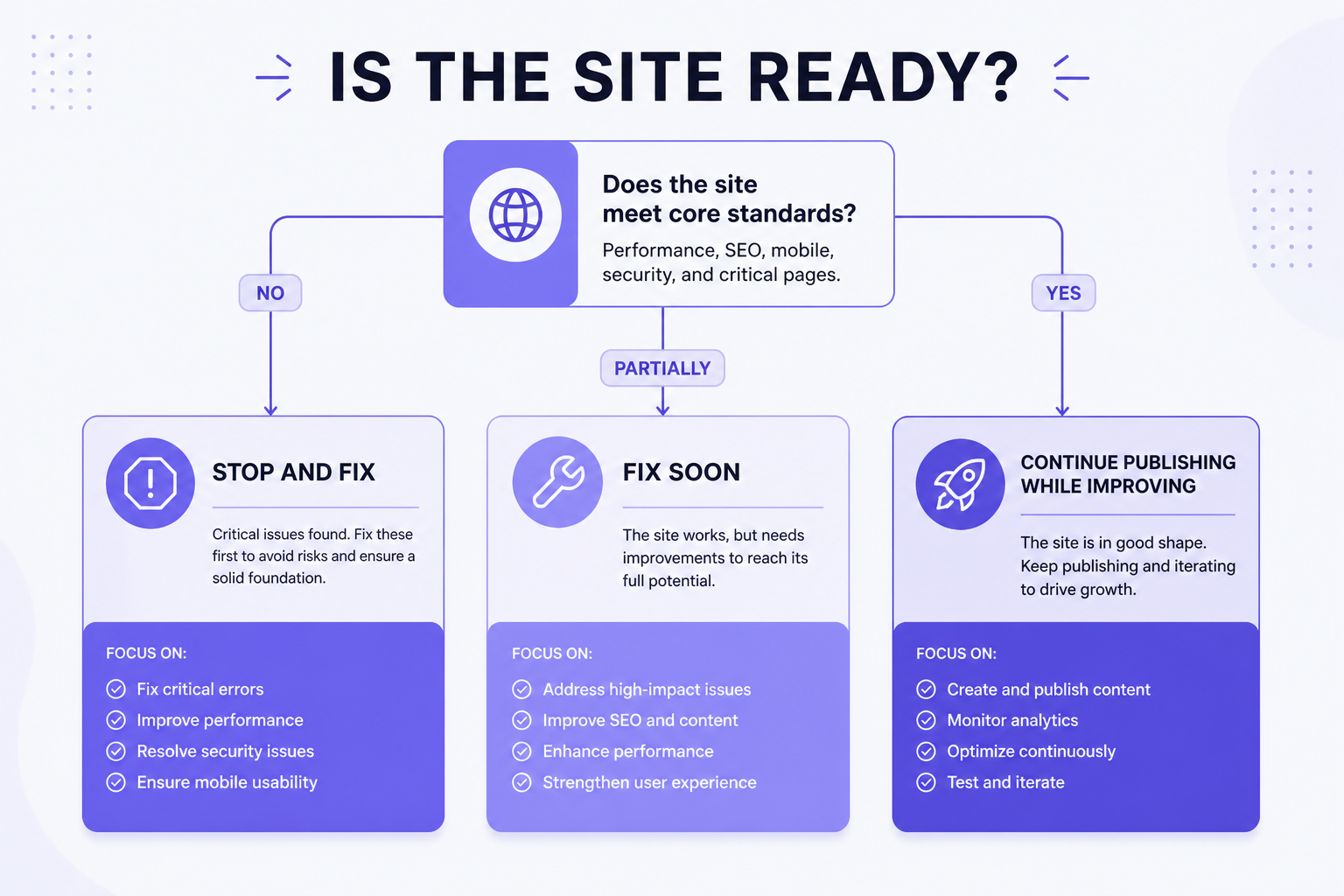
Stop and fix first
If important pages are blocked, accidental noindex exists, canonicals are seriously incorrect, server errors affect key URLs, migration redirects are broken or large-scale duplicate URL issues exist.
Fix soon
If internal linking is weak, orphan pages exist, architecture is confusing, performance is poor or structured data is invalid.
Continue publishing while improving
If important pages are crawlable and indexable, canonicalization is stable, architecture is logical and no critical errors exist. Minor warnings should not freeze useful publishing.
Technical SEO priority matrix
| Issue | Impact | Urgency | Fix before more content? |
|---|---|---|---|
| Accidental noindex | Critical | Immediate | Yes |
| Robots blocking money URLs | Critical | Immediate | Yes |
| Incorrect canonical on key pages | High / critical | Immediate | Yes |
| Widespread 5xx | Critical | Immediate | Yes |
| Broken migration redirects | High | Immediate | Yes |
| Orphan commercial pages | High | Soon | Usually yes for those URLs |
| Broken internal link | Medium | Soon | Depends on page importance |
| Poor image compression | Medium | Improve | Usually no |
| Minor schema warning | Low / medium | Review | Usually no |
A 15-minute technical SEO health check
This is a quick health check, not a replacement for a full crawl.
- Open robots.txt
- Inspect homepage in Search Console
- Inspect one service/category page
- Inspect one blog/product page
- Confirm indexability
- Check canonical
- Check sitemap
- Test broken key links
- Review mobile page
- Check PageSpeed Insights
- Validate structured data
- Check HTTPS
- Review Search Console indexing patterns
- Review Core Web Vitals
- Check manual actions / security
Technical SEO audit workflow
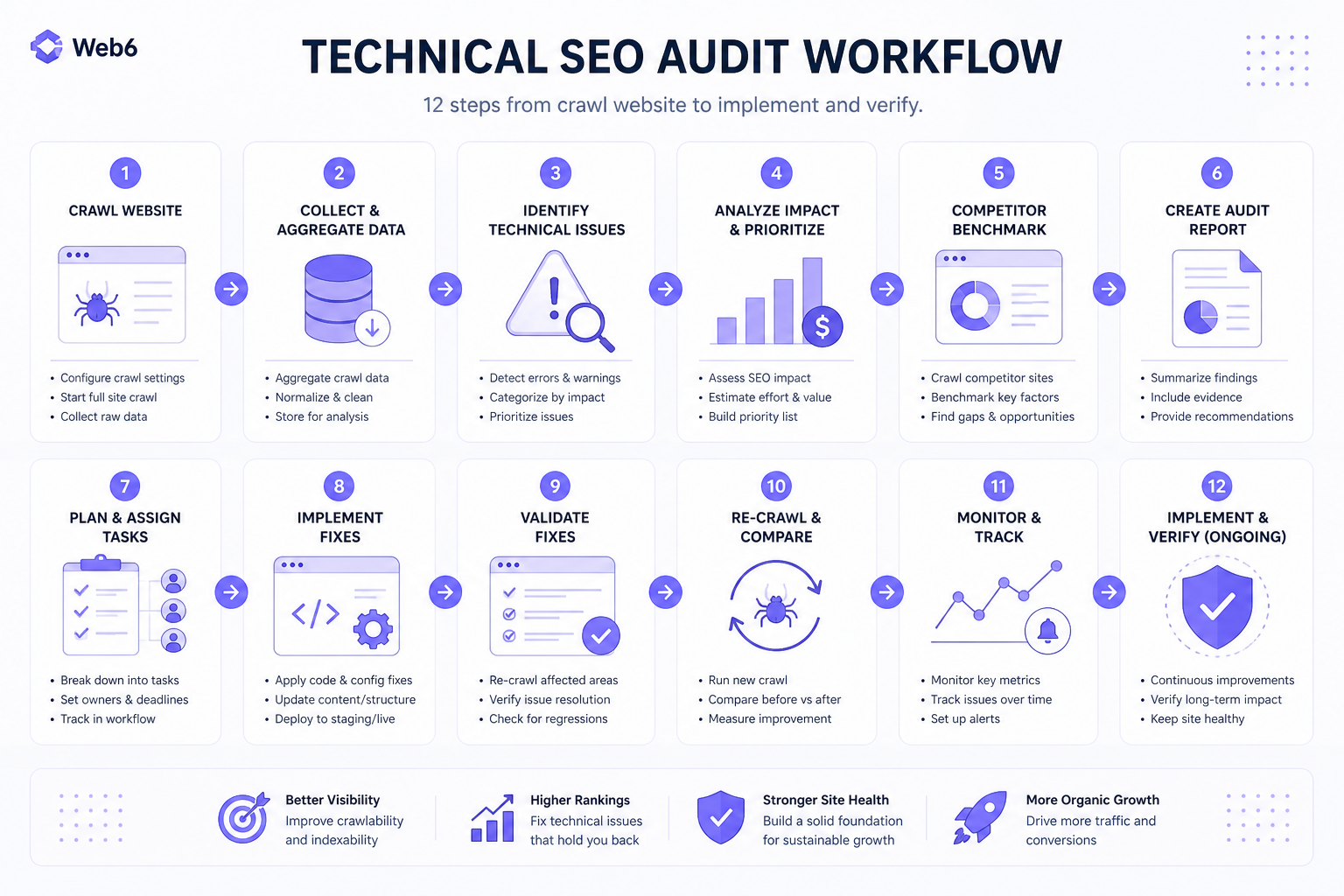
- Crawl the website
- Compare crawl with sitemap
- Review Search Console
- Check indexability
- Audit canonicals
- Review status codes
- Audit architecture and internal links
- Check rendering and mobile
- Measure performance
- Validate structured data
- Prioritize issues
- Implement and verify
After fixes: recrawl, inspect affected URLs, test redirects and canonicals, validate schema, check the sitemap and monitor Search Console. Verification is part of the audit.
Why a 100/100 SEO audit score is not the goal
Automated tools identify patterns. They may not understand business intent, page value, legitimate noindex, search demand or conversion goals. Do not optimize merely to remove every warning.
Does technical SEO matter for AI search?
For search experiences that rely on discoverable, indexed web content — including Google AI Overviews and AI Mode — technical accessibility remains foundational. AI-friendly formatting cannot compensate for blocked pages, noindex, inaccessible content or serious canonical problems. Inclusion is not guaranteed. See AI search optimization for content and entity guidance after the technical foundation is sound.
Common technical SEO myths
- Myth: Every 404 hurts SEO. Reality: Normal 404s are expected; broken important links and incorrect removals deserve attention.
- Myth: Submitting a sitemap guarantees indexing. Reality: It assists discovery only.
- Myth: Schema automatically improves rankings. Reality: No ranking guarantee.
- Myth: Every page must be three clicks from the homepage. Reality: Keep important content reasonably discoverable; there is no universal three-click ranking rule.
- Myth: A perfect Lighthouse score means perfect SEO. Reality: Technical SEO covers much more.
- Myth: Publishing more content fixes technical problems. Reality: It can increase the number of URLs affected by those problems.
30-point technical SEO audit checklist (copyable)
- HTTP status codes on important URLs
- robots.txt not blocking important content
- Accidental noindex directives
- Important pages are indexable
- Search Console page indexing patterns
- Canonical tags
- Conflicting canonical signals
- XML sitemap quality
- Sitemap processing in Search Console
- Redirect policy (HTTP/HTTPS, www, migrations)
- Redirect chains and loops
- Broken internal links
- Important orphan pages
- Discoverability / crawl depth of money pages
- Internal linking to important pages
- URL consistency
- Duplicate URL versions
- Duplicate / near-duplicate pages
- Site architecture before more content
- JavaScript rendering of critical content
- Mobile experience
- Core Web Vitals (LCP, INP, CLS)
- Actual causes of slow pages
- Image performance and alt text
- HTTPS and security issues
- Structured data validity
- Schema vs visible content
- Titles, H1s and meta descriptions
- Hreflang (only if international)
- Search Console health (inspection, indexing, CWV, manual actions, security)
Primary sources
Frequently asked questions
What is a technical SEO audit?
A technical SEO audit checks whether search engines can discover, crawl, render and index important URLs correctly — covering status codes, robots, noindex, canonicals, sitemaps, redirects, architecture, rendering, mobile, performance, HTTPS and structured data.
How often should you perform a technical SEO audit?
After launches or migrations, then periodically (for example quarterly) and whenever indexing, traffic or releases change. Large ecommerce catalogs may need more frequent crawl hygiene.
What should be checked first in a technical SEO audit?
Crawling and indexing blockers: status codes, robots.txt, noindex, canonical disasters and server errors on important URLs.
How do I know if Google can crawl my website?
Check robots.txt, HTTP status codes, internal links and Search Console URL Inspection / crawl stats. Confirm Googlebot can fetch important URLs.
How do I check whether Google indexed a page?
Use Search Console URL Inspection for that exact URL. Site: search is a weak proxy and can mislead.
Does robots.txt prevent a page from being indexed?
Not reliably. robots.txt blocks crawling. Google may still list a discovered URL without a snippet. Use noindex (and allow crawl so it can be read) or password protection to keep content out of results.
Should every page have a canonical tag?
Preferred pages should usually include a self-referential canonical. Duplicates should point to the preferred URL. Canonicals are strong signals, not absolute commands.
Does an XML sitemap guarantee indexing?
No. It helps discovery and can weakly suggest canonicals. Indexing still depends on quality, duplicates and technical eligibility.
Are 404 pages bad for SEO?
Genuine 404s for missing URLs are normal. Problems arise when important live pages 404, internal links break or deletions should have been redirected to a relevant replacement.
Do Core Web Vitals affect SEO?
They are page-experience metrics (LCP, INP, CLS) that Search systems may use. They also affect users. They are not “the most important ranking factor.”
Does structured data improve rankings?
No ranking guarantee. Valid markup that matches visible content can enable eligible rich results and clearer understanding.
Should I fix technical SEO before publishing more content?
Fix critical crawl/index/canonical/server blockers first. Minor performance or schema warnings can often be improved alongside continued publishing.
Need help identifying technical SEO problems?
A technical audit is most useful when findings are prioritized by their effect on crawling, indexing, user experience and business-critical pages rather than by the number of warnings an audit tool produces. Explore SEO services if you want a discovery-led technical review.
Foundation first, then content scale
Priority order: technical foundation → crawlability → indexability → canonicalization → architecture → internal linking → performance → content expansion. Fix critical blockers before scaling content. Do not pause useful publishing for minor tool warnings. The goal is not a perfect audit score — it is a website where important content can be efficiently discovered, crawled, understood, indexed and used by visitors.