
Shopify Apps
Shopify Webhooks Explained: How Custom Apps Sync Orders, Products & Inventory
Written by Web6 Editorial Team · Published 14 August 2026 · 24 min read
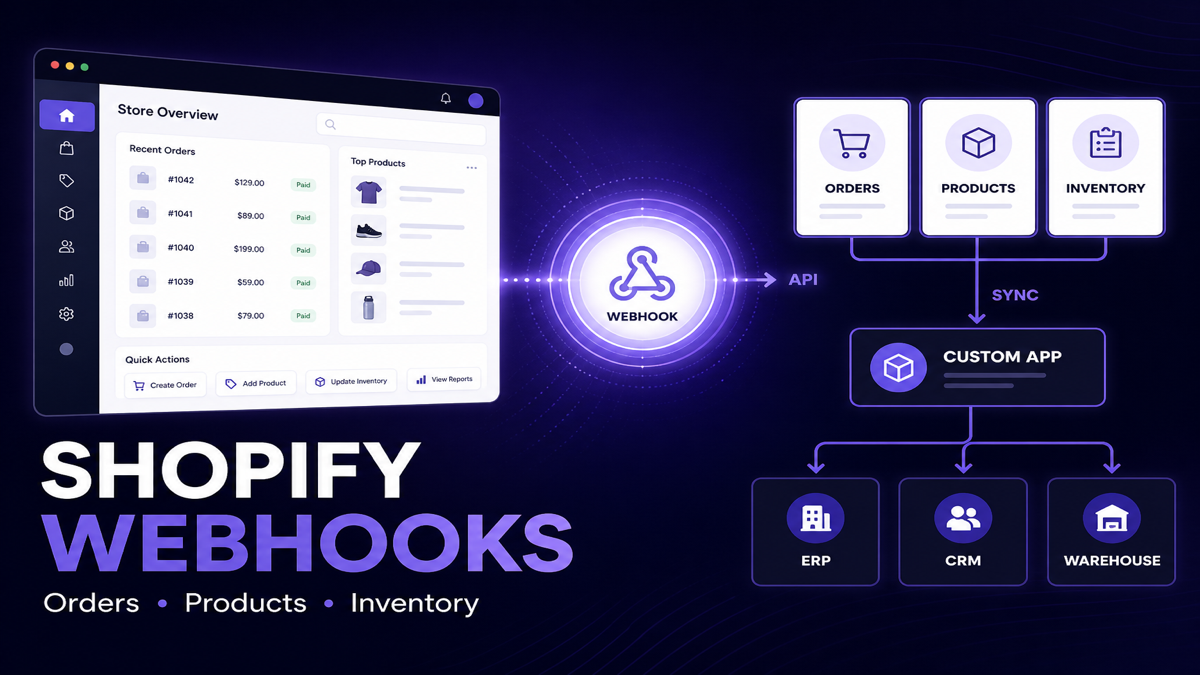
A custom Shopify app should not repeatedly ask Shopify every few seconds whether an order, product or inventory level has changed. Shopify webhooks provide an event-driven alternative: when a relevant event occurs, Shopify sends a notification so the app can react.
That pattern is commonly used for order processing, ERP synchronization, inventory updates, product sync, fulfillment workflows, CRM updates, analytics pipelines and operational automation — without turning every sync into a polling loop.
What is a Shopify webhook?
A Shopify webhook is an event notification Shopify sends to an app or configured destination when something changes in a store. Instead of repeatedly polling Shopify for updates, an app can subscribe to relevant topics and react when Shopify delivers an event. For example, an order event can trigger ERP synchronization, while product or inventory events can update another system. Reliable webhook integrations should verify requests, prevent duplicate processing, handle failures and periodically reconcile data.
Key takeaways
- Webhooks notify apps when store events happen.
- APIs are then often used to read or update additional authoritative data.
- Webhooks reduce unnecessary polling.
- Deliveries should be treated as potentially duplicated, delayed or missed.
- Processing should be idempotent.
- Important integrations should include reconciliation jobs.
How Shopify webhooks work
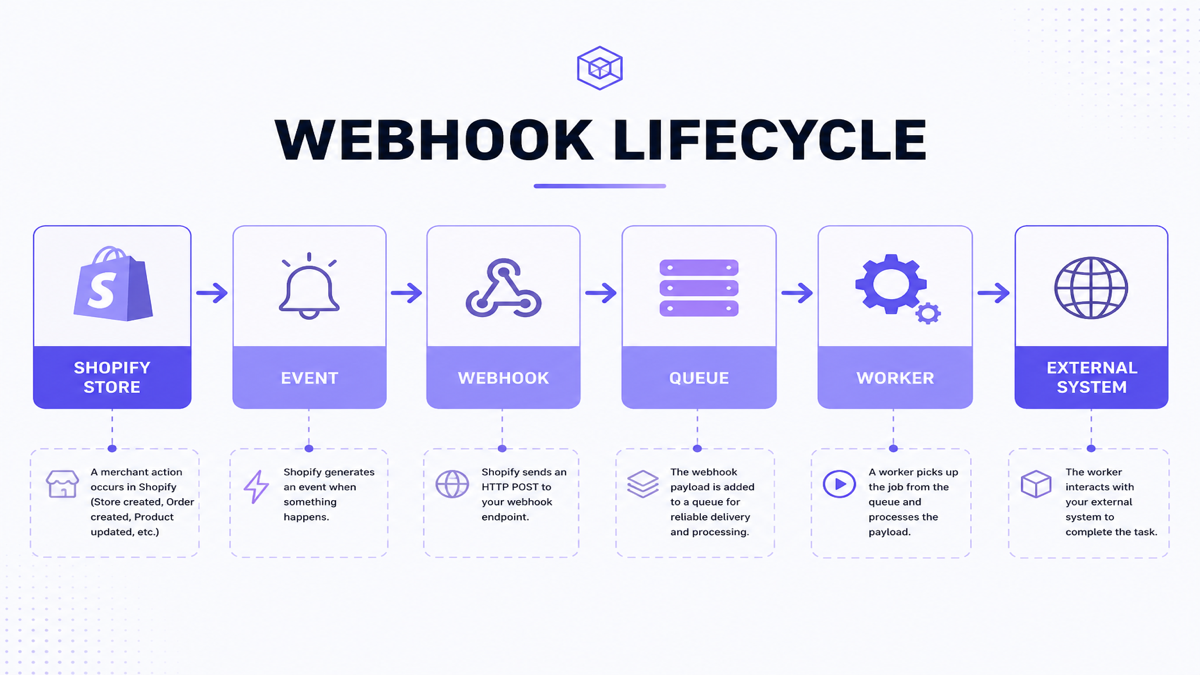
- The app subscribes to a webhook topic (for example, order create or product update).
- Something happens in Shopify.
- Shopify generates an event for that topic.
- Shopify delivers the webhook to the configured destination.
- The app receives the request (or message).
- The app verifies authenticity where required.
- The app acknowledges receipt quickly.
- The app processes the event — usually asynchronously.
- The app updates ERP, CRM, WMS, analytics or an internal database if needed.
Conceptual flow:
Shopify store → event → webhook → custom app → processing → ERP / CRM / WMS / database
Illustrative order flow (architecture example)
This is an illustrative architecture, not a client case study.
- Customer completes checkout on Shopify.
- An order is created.
- Shopify delivers an order webhook to the custom app.
- The app verifies, queues and processes the event.
- The app creates or updates the order in ERP.
- Warehouse picks and packs from ERP/WMS.
- The integration writes fulfillment status back to Shopify using the Admin API.
Webhooks start the reaction. APIs complete reads, writes and corrections.
Shopify webhooks vs APIs: what is the difference?
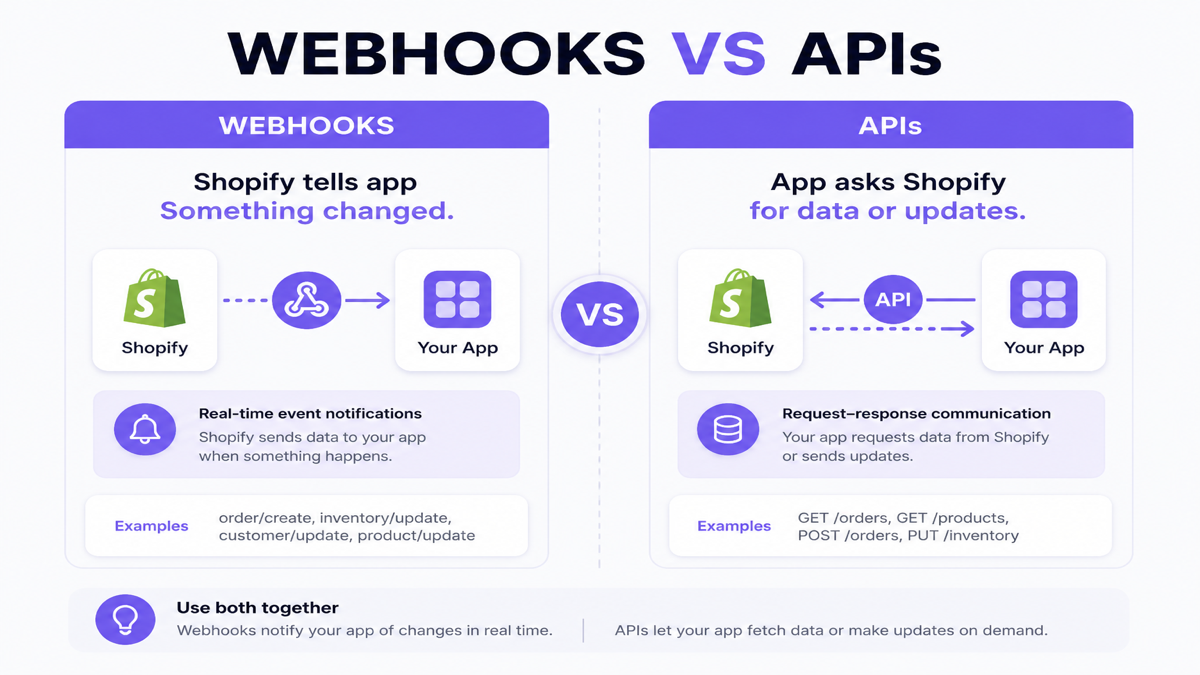
| Factor | Webhooks | APIs |
|---|---|---|
| Purpose | Notify that something changed | Read or write resources on demand |
| Direction | Shopify → your app/destination | Your app ↔ Shopify |
| Trigger | Store/resource event | Your code initiates the request |
| Polling | Avoids continuous “any updates?” loops | Can be used for polling or targeted fetches |
| Typical use | Near-real-time reaction to changes | Lookups, updates, backfills, reconciliation |
| Response | Acknowledge delivery quickly | Return/request resource data |
| Reliability considerations | Duplicates, delays, missed events possible | Rate limits, retries, pagination, versioning |
Webhook: Shopify tells your app, “Something changed.”
API: Your app asks Shopify, “Give me this data,” or “Update this resource.”
In production, webhooks and APIs usually work together.
The webhook + API pattern
A common architecture:
Webhook → event/resource reference → queue → worker → Shopify GraphQL Admin API (when needed) → business logic → external system
The webhook payload is useful, but it should not automatically be treated as the complete architecture for every workflow. Apps often re-fetch authoritative Shopify data before applying irreversible ERP/CRM actions — especially when payloads can be stale after retries, or when the worker needs fields that were not included in the delivery.
Webhooks vs polling
Polling repeatedly asks: “Any new orders? Any new orders?” Webhooks invert that: Shopify notifies when a qualifying event occurs.
| Factor | Polling | Webhooks |
|---|---|---|
| API requests | Continuous or frequent | Event-driven; fewer idle requests |
| Latency | Depends on poll interval | Usually nearer to the event time |
| Complexity | Simpler conceptually | Needs verification, queues, idempotency |
| Failure recovery | Next poll can catch up | Needs retries + reconciliation |
| Best use | Reports, backfills, catch-up jobs | Near-real-time operational reactions |
Polling is not always wrong. Scheduled polling or reconciliation often complements webhooks by correcting missed or mishandled events.
How custom apps use Shopify order webhooks
Order-related topics such as orders/create and orders/updated are commonly used to drive:
- ERP order creation and updates
- Warehouse / fulfillment handoff
- Accounting and invoicing signals
- CRM activity updates
- Internal analytics and ops dashboards
- Notifications and review queues
- COD or fraud-review workflows
Exact topic names and required scopes should always be checked against Shopify’s current webhook reference before implementation.
Order synchronization architecture
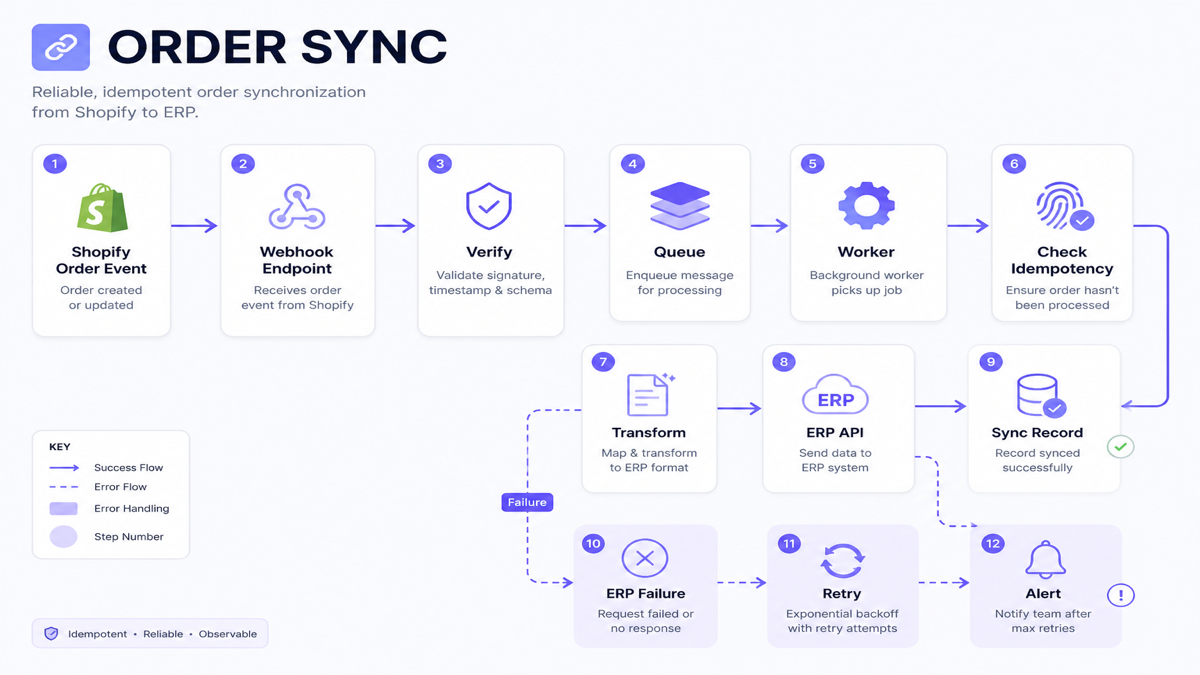
- Shopify delivers an order event.
- Webhook endpoint verifies the request.
- Event is persisted and enqueued.
- Endpoint returns a successful acknowledgement.
- Worker checks whether the order/event was already processed.
- Worker transforms data and calls the ERP API.
- Worker stores the ERP reference and marks success.
If ERP fails after acknowledgement, that is your app’s downstream retry problem — not a reason to block the webhook response for minutes.
How Shopify product webhooks work
Product topics such as products/create, products/update and products/delete support:
- PIM or ERP product synchronization
- Search indexing
- Marketplace or feed updates
- Internal catalog systems
- Analytics enrichment
Do not use product title as the synchronization identifier. Titles change. Stable Shopify product/variant IDs (and your external master IDs) should drive mapping.
How Shopify inventory webhooks work
Inventory is not just “SKU → quantity.” Shopify models inventory across related concepts such as inventory items, inventory levels and locations. Apps may subscribe to inventory-related topics (for example inventory item and inventory level changes) depending on the workflow and access scopes.
Common use cases:
- ERP-owned stock publishing to Shopify
- Warehouse adjustments
- Multi-location availability
- Marketplace inventory mirrors
- Safety-stock and reservation logic
Inventory sync architecture
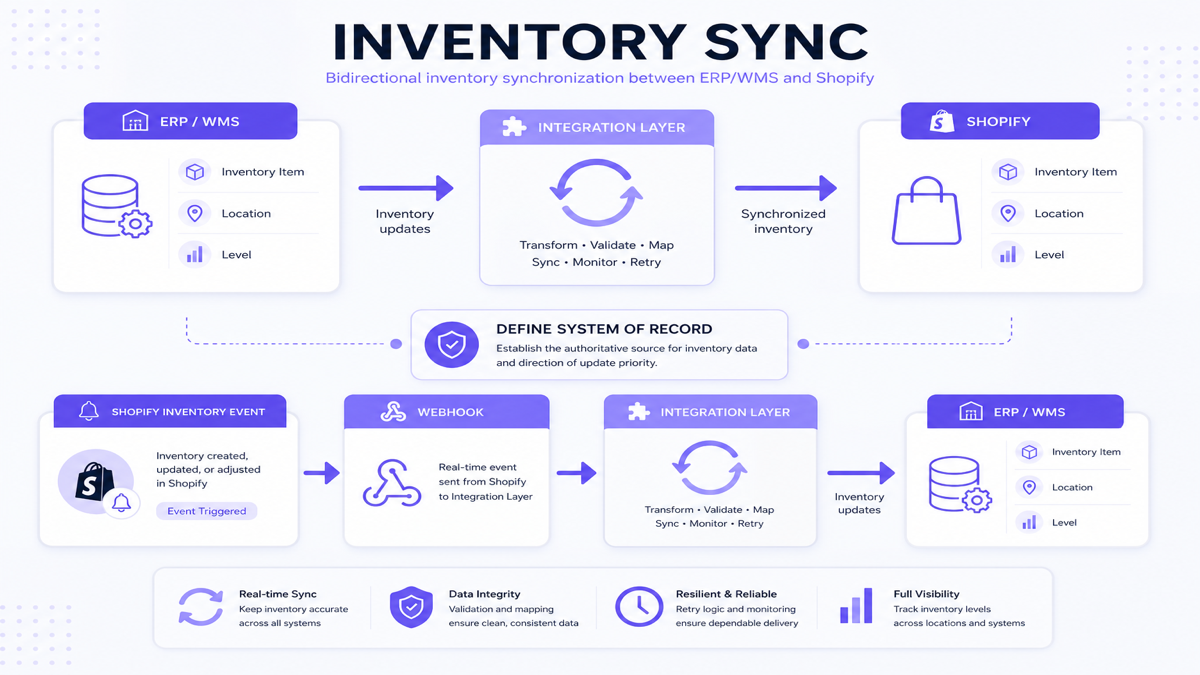
Two directions often appear:
- ERP/WMS → integration → Shopify when the warehouse owns stock.
- Shopify inventory event → webhook → integration → ERP/WMS when Shopify-side changes must be reflected elsewhere.
Before building two-way sync, define which system owns inventory. Webhooks will not resolve ownership conflicts by themselves. For broader system design, see Shopify ERP and CRM integration.
Webhooks do not solve data ownership
Webhooks tell systems that something changed. They do not decide:
- which system owns price
- which system owns inventory
- which system owns product master data
- which system owns customer records
Example: ERP may own inventory and account pricing, Shopify may own storefront content, and CRM may own sales-activity notes. Architecture must define ownership separately from event delivery.
What is a webhook endpoint?
A webhook endpoint is typically an HTTPS URL that receives Shopify event deliveries — for example a conceptual path like /webhooks/orders. Subscriptions can also deliver to Google Cloud Pub/Sub or Amazon EventBridge instead of a direct HTTPS handler.
Apps declare subscriptions in app configuration (such as shopify.app.toml) and/or via the GraphQL Admin API, depending on whether subscriptions are app-specific or shop-specific. Always follow Shopify’s current subscription guidance for your distribution model.
How Shopify apps verify webhook requests
Do not trust a webhook merely because it reached your endpoint. For HTTPS deliveries, Shopify includes an HMAC signature (commonly in the X-Shopify-Hmac-SHA256 header) computed from the raw request body and your app client secret. Verify that signature before processing.
HMAC verification applies to HTTPS deliveries. Cloud bus deliveries (Pub/Sub or EventBridge) follow their own trust model and do not use the same HMAC header check.
High-level pattern:
receiveWebhook()
verifyHmac(rawBody, header, clientSecret)
if invalid → reject
else → continue
Never hardcode secrets in source control. Official verification details are in Shopify’s webhook documentation.
Acknowledge quickly, process asynchronously
For HTTPS delivery, Shopify expects a successful acknowledgement promptly. Shopify documents a short connection timeout and a short overall request timeout for webhook delivery. Long ERP calls, multi-step transforms or report jobs should generally happen after you have verified, persisted/queued and returned a 2xx response.
Pattern:
Receive → verify → persist/queue → return success → process asynchronously
Why production webhook handlers often use queues
Webhook → queue → worker → business logic
Queues help with:
- retries for downstream failures
- traffic spikes after flash sales
- slower external APIs
- failure isolation
- observability (depth, latency, error rates)
Technology can be Redis-backed workers, a cloud queue or a managed messaging service. Choose based on volume and operational maturity — not fashion.
Can Shopify send the same webhook more than once?
Yes. Shopify minimizes duplicates, but apps can still receive the same webhook more than once (for example after timeouts or retries). Robust systems must tolerate duplicate deliveries.
Shopify provides identifiers such as X-Shopify-Webhook-Id for delivery deduplication. If multiple subscriptions exist for the same topic, deliveries can share an event identity while having different webhook IDs. Design idempotency around business effects, not only around “I already saw this HTTP request.”
How to prevent duplicate webhook processing
Idempotency means processing the same event more than once should not create duplicate business effects.
Bad: webhook arrives twice → ERP order created twice.
Good: webhook arrives twice → system recognizes prior processing → one ERP order remains.
Practical approach:
- Extract delivery/event identifiers from headers.
- Check a persistent store for prior processing.
- If already processed, return success and skip side effects.
- If new, process and store the processing record with Shopify ↔ external mapping IDs.
Do Shopify webhooks guarantee event order?
No. Shopify does not guarantee ordering within a topic or across topics for the same resource. A product update can arrive before a product create. Use timestamps such as X-Shopify-Triggered-At or payload updated_at values, and prefer current authoritative state when applying updates.
What happens when webhook processing fails?
Separate two failure types:
- Delivery failure: Shopify could not get a successful acknowledgement from your endpoint (timeouts, non-2xx responses, downtime). Shopify retries failed deliveries.
- Business processing failure: Shopify delivered successfully and your app acknowledged, but ERP/CRM later failed. Your queue/retry layer must handle that.
Acknowledging a webhook does not mean the business sync succeeded.
Retry architecture for downstream failures
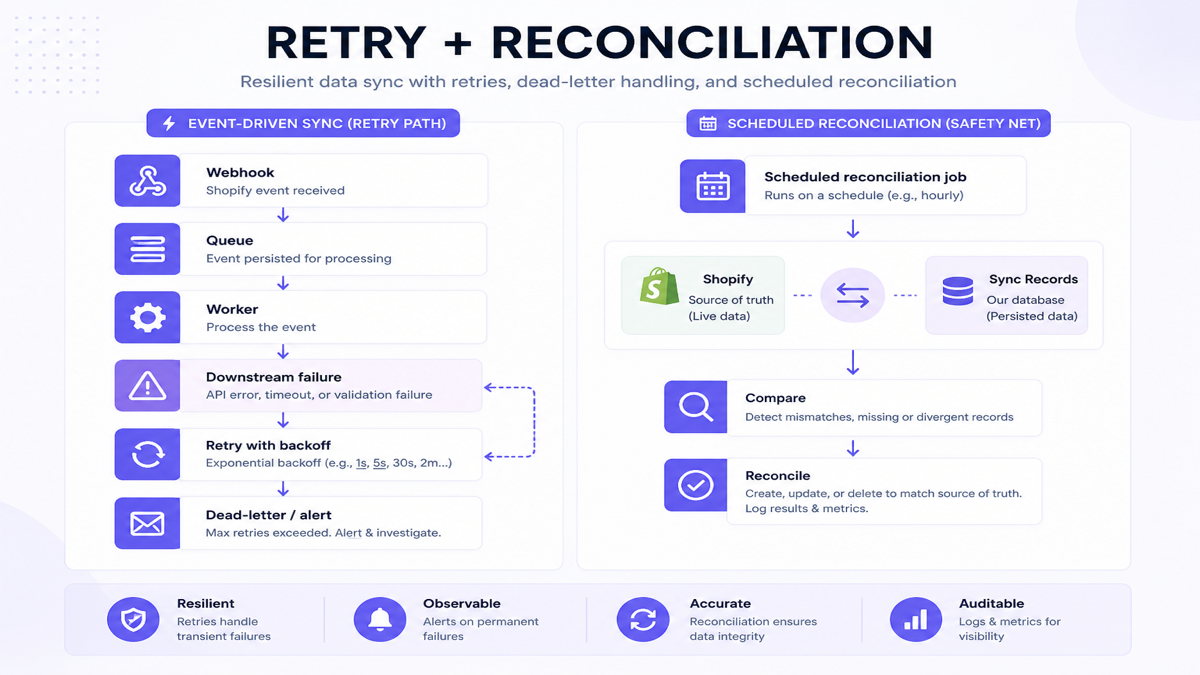
Webhook → queue → worker → ERP request fails → retry with backoff → still fails → alert / manual review
For Shopify’s own delivery retries, current documentation describes retrying failed deliveries multiple times over several hours with exponential backoff, reusing the original payload. Do not invent custom “Shopify retry intervals” in your runbooks — follow current official retry guidance and design your own worker retries separately.
Failed-job / dead-letter handling
After repeated failures, events should not disappear. Store them for inspection, controlled retry, debugging and support. Teams often call this a failed-job queue or dead-letter queue. The business goal is simple: nothing important vanishes silently.
Why webhooks should be backed by reconciliation
Shopify’s own guidance is clear: apps should not rely on webhooks alone. Delivery is not always guaranteed, and handlers can fail. Reconciliation jobs periodically fetch Shopify data (often filtered by updated_at) and compare it with your sync records to find:
- missing orders
- failed syncs
- stale inventory
- incomplete product updates
There is no universal reconciliation frequency. Choose an interval that matches operational risk and volume.
Webhooks are not a database
Do not use webhook deliveries as the only permanent record of Shopify state. Persist processing state, mapping IDs, sync status, timestamps and errors. Retrieve authoritative Shopify data through the Admin API when the workflow requires it.
Data mapping between Shopify and external systems
- Shopify Order ID ↔ ERP Order ID
- Shopify Product/Variant ID ↔ ERP Product ID
- Shopify Inventory Item / location level ↔ ERP SKU / warehouse stock record
Mapping tables prevent “mystery duplicates,” make retries safe and give support teams a clear audit trail.
Shopify webhook security checklist
- [ ] Verify incoming HTTPS webhook signatures
- [ ] Use HTTPS endpoints
- [ ] Keep secrets outside source code
- [ ] Limit application access scopes
- [ ] Validate payloads before side effects
- [ ] Avoid logging unnecessary personal data
- [ ] Protect internal admin/tooling endpoints
- [ ] Monitor repeated failures
- [ ] Rotate credentials where appropriate
- [ ] Keep dependencies updated
Webhook handler performance
Do not perform expensive work directly in the synchronous request handler if it can be queued safely. Avoid slow ERP calls, long sequential API chains, image processing, large reports or campaign sends inside the webhook acknowledgement path.
High-volume store considerations
As volume grows, plan for queues, concurrency limits, Shopify API rate/cost management, backpressure, batching where appropriate, and monitoring. Not every store needs enterprise infrastructure on day one — but every production sync needs a failure plan.
Webhooks can still create API load
One thousand events can become one thousand follow-up GraphQL operations if every worker eagerly re-fetches data. Design for Shopify’s current Admin API rate/cost model, cache carefully where safe, and batch or prioritize work when bursts occur. Do not hardcode stale numeric limits into architecture docs.
How apps subscribe to webhook topics
Conceptually, a subscription declares:
- which topic(s) to watch
- where to deliver events (HTTPS URL, Pub/Sub URI or EventBridge ARN)
- which API version serializes payloads
Current Shopify guidance commonly uses app configuration for app-specific subscriptions and GraphQL Admin API mutations for shop-specific subscriptions. Required access scopes must match each topic. For App Store distribution, mandatory compliance topics also apply.
Shopify is also developing a next-generation Events subscription model (developer preview for a subset of topics). For production breadth today, webhooks remain the widely supported mechanism; Events can coexist where supported.
App installation and shop lifecycle
Design webhook setup around install/auth flows, subscription registration, uninstall cleanup, revoked access and shop-specific data deletion. Compliance/uninstall-related webhooks are especially important for App Store apps that store customer or shop data.
Privacy / compliance webhooks
Apps distributed through the Shopify App Store must subscribe to mandatory compliance topics such as customer data request, customer redact and shop redact. These are operational and legal requirements — not optional extras. Verify and respond according to Shopify’s current privacy compliance documentation (including acknowledgement behavior and redaction timelines).
Webhook architecture for ERP sync
Shopify → webhook endpoint → queue → worker → (optional Shopify API) → transform → ERP API → sync record
Error path: ERP failure → retry → alert → reconciliation.
Keep this article focused on event mechanics; for broader ERP/CRM patterns, use the ERP, CRM and custom API integration guide.
Webhook architecture for CRM sync
Customer or order events can update CRM profiles, order history and sales workflows. Not every ecommerce event belongs in CRM — push signals that help sales/support, not noise.
Related services: custom CRM development and ERP development.
Webhooks for analytics — and what they are not
Backend webhooks can feed operational analytics databases and dashboards. They are not the same as storefront behavioral tracking.
| Shopify webhooks | Storefront event tracking |
|---|---|
| Backend/store resource events (orders, products, inventory, customers) | Customer behavior on the storefront |
| Admin/resource lifecycle | Product views, search, cart interactions |
| Useful for ops sync and system analytics | Useful for conversion diagnosis and UX insight |
A product view is not a Shopify Admin webhook. For cart/product activity analytics on the storefront, a purpose-built app such as CartPulse – Track Live Cart addresses a different layer than backend webhook sync.
How to test a Shopify webhook integration
- [ ] Valid event processing
- [ ] Invalid signature rejection
- [ ] Duplicate delivery handling
- [ ] Delayed / out-of-order events
- [ ] External API unavailable
- [ ] API timeout
- [ ] Rate limiting behavior
- [ ] Missing mapping records
- [ ] Deleted or changed resource
- [ ] High event volume
- [ ] Retry succeeds
- [ ] Retry exhausts into failed-job handling
- [ ] Reconciliation detects a missing record
Use development stores and Shopify’s webhook trigger tooling. Do not depend on production shops for first-pass testing.
Monitor webhook integrations after launch
- Events received
- Events processed
- Failures and retries
- Processing latency
- Queue depth
- Downstream API failures
- Records awaiting manual review
Common Shopify webhook mistakes
- Doing all work inside the webhook handler — blocks acknowledgement and increases delivery failures.
- Not verifying requests — trusts unauthenticated payloads.
- Assuming each event arrives only once — causes duplicate side effects.
- No idempotency — retries become dangerous.
- No retry strategy for downstream systems — acknowledged events still fail silently later.
- No reconciliation — missed events never surface.
- Treating webhooks as complete database state — no durable sync records.
- Using names instead of IDs — titles/SKUs change; mappings break.
- Ignoring API version changes — payload shapes drift.
- No monitoring — failures are discovered by customers first.
- Assuming event ordering — update-before-create races.
- Confusing storefront analytics with backend webhooks — wrong tool for the job.
When not to use webhooks
Webhooks are not always the answer. Prefer API queries, bulk operations or scheduled jobs for:
- periodic reporting
- large historical exports
- full catalog backfills
- reconciliation catch-up
- some batch analytics jobs
Recommended hybrid pattern
- Webhooks → fast event reaction
- Scheduled reconciliation → correctness
- Bulk/API operations → large data jobs
That combination is the practical reliability model for custom Shopify apps.
Concise processing example (pseudocode)
// HTTPS handler
receiveWebhook(request):
  body = rawBody(request)
  if not verifyHmac(body, request.headers, CLIENT_SECRET):
    return 401
  saveDelivery(headers, body)
  enqueue(headers.webhookId, headers.topic, body)
  return 200

// Worker
processJob(job):
  if alreadyProcessed(job.webhookId) or alreadySynced(job.resourceId):
    return
  data = fetchFromShopifyIfNeeded(job)
  result = syncExternalSystem(data)
  storeMapping(job.resourceId, result.externalId)
  markProcessed(job.webhookId)
When a custom app is needed for webhook workflows
A custom Shopify app becomes appropriate when events must trigger proprietary ERP workflows, CRM synchronization, custom inventory logic, internal approvals, B2B processes, warehouse integrations or custom dashboards that public connectors cannot model cleanly.
See custom Shopify app development, when a Shopify store needs a custom app, and public vs custom Shopify apps. For a related build example, review the custom Shopify app development case study.
Official Shopify documentation
For current technical details, consult Shopify’s guides on webhooks, delivery verification, subscriptions, and privacy compliance webhooks.
Frequently asked questions
What is a Shopify webhook?
A Shopify webhook is an event notification Shopify sends to your app or configured destination when a subscribed store event occurs, such as an order being created or a product being updated.
How do Shopify webhooks work?
Your app subscribes to topics. When a matching event happens, Shopify delivers a payload to your HTTPS endpoint, Pub/Sub topic or EventBridge bus. Your app verifies (for HTTPS), acknowledges quickly and processes the work — ideally via a queue.
What is the difference between a Shopify webhook and API?
A webhook pushes a change notification from Shopify to your app. An API lets your app pull data from Shopify or write updates back. Reliable integrations usually combine both.
How do Shopify apps receive new orders?
Apps commonly subscribe to order topics such as orders/create and orders/updated, then queue the event, optionally re-fetch order details via the Admin API, and sync to ERP, WMS or internal systems.
Can Shopify webhooks sync inventory?
Yes. Inventory-related webhook topics can notify apps about inventory item or inventory level changes. Successful sync still requires clear ownership, location mapping and reconciliation.
Can Shopify send the same webhook more than once?
Yes. Design for duplicates using delivery identifiers and idempotent business logic so retries do not create duplicate ERP orders or stock adjustments.
What happens if my webhook endpoint fails?
If Shopify cannot get a successful acknowledgement, it retries delivery over time. Separately, if your app acknowledges but a downstream ERP call fails, your own retry/dead-letter process must handle it.
How do I verify that a Shopify webhook is genuine?
For HTTPS deliveries, verify the HMAC signature Shopify sends with the raw body and your app client secret before processing. Reject mismatches.
Should Shopify webhooks be processed asynchronously?
Usually yes for production systems. Acknowledge quickly after verification and queueing, then run ERP/CRM work in a worker so slow dependencies do not cause delivery timeouts.
Do Shopify webhooks guarantee event order?
No. Ordering is not guaranteed within or across topics. Use timestamps and current resource state when applying updates.
Do webhooks replace scheduled API synchronization?
No. Webhooks are excellent for event reaction, but reconciliation and backfills still need scheduled or on-demand API jobs.
When does a Shopify webhook integration need a custom app?
When events must drive proprietary workflows, multi-system mapping, custom approvals, or reliability controls that existing connectors cannot provide without painful workarounds.
Build for events — and for correctness
Shopify webhooks give custom apps a practical way to sync orders, products and inventory without constant polling. The durable pattern is simple: verify deliveries, process asynchronously, make side effects idempotent, retry downstream failures, and reconcile against Shopify on a schedule.
Related reading: Shopify ERP/CRM API integration, custom app use cases, public vs custom Shopify apps, and B2B ecommerce workflows.