Skip to content
Web6 home

Shopify App by Web6 · Surat · Free

Shopify COD & Cash on Delivery Rules with Fees, Pincodes, and Risk Controls

COD Risk Guard – Pincode Rules helps Shopify merchants add a Cash on Delivery fee, restrict COD by cart value, products, collections, discounts, and pincodes, and hide COD for risky checkouts — built with Shopify Functions payment and delivery customizations.

Free to install Built by Web6, Surat Shopify Functions payment customizations Shopify Functions delivery customizations Works with Checkout, Payments, and Shipping English Launched May 7, 2026
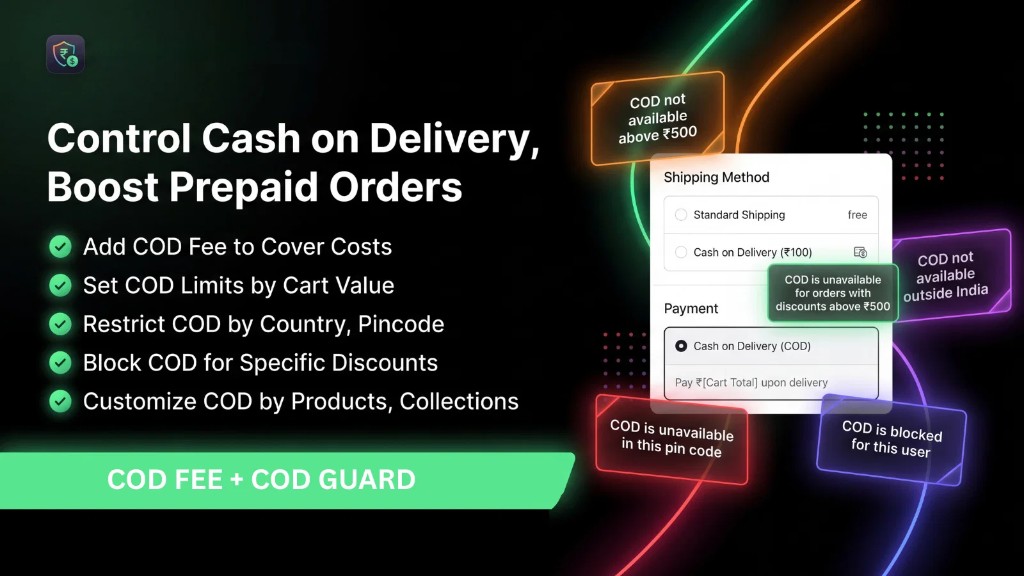
COD Risk Guard Shopify COD fee and pincode rules marketing banner showing Cash on Delivery controls
Marketing overview of COD Risk Guard – Pincode Rules: COD fees, pincode restrictions, cart limits, product rules, and discount blocks.

Quick answers

Short definitions first — then expand into the full guide below.

What is COD Risk Guard – Pincode Rules?

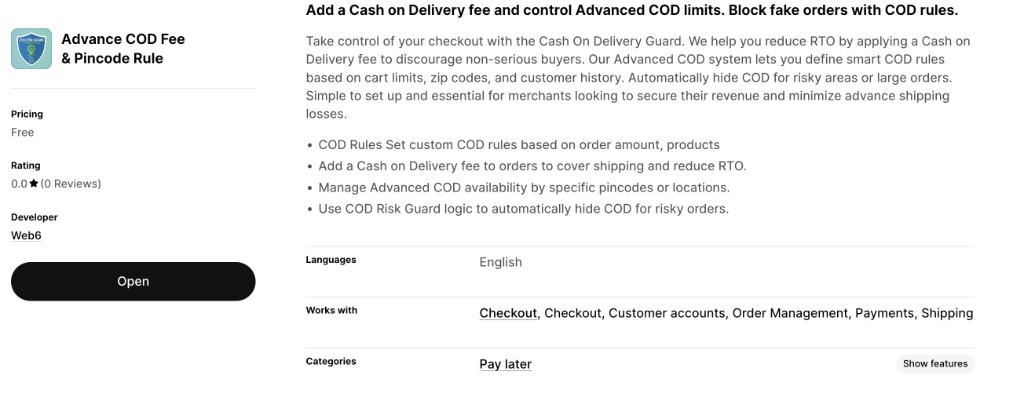
COD Risk Guard – Pincode Rules is a free Shopify app by Web6 that helps merchants control Cash on Delivery at checkout. You can add a COD fee, set rules by order amount and products, manage COD availability by pincode or location, customize COD by collections, block COD for specific discounts, and hide COD for risky orders. On the Shopify App Store the listing title is “Advance COD Fee & Pincode Rule”; Web6 markets the product as COD Risk Guard – Pincode Rules.

Is this Shopify COD app free?

Yes. The App Store listing price is Free. Install from https://apps.shopify.com/cod-risk-guard-pincode-rules, configure rules in the app admin, and test COD behavior on a draft or development checkout before going live.

Can I add a Cash on Delivery fee on Shopify?

Yes. COD Risk Guard supports adding a Cash on Delivery fee so you can cover shipping or handling costs and discourage casual COD selection. Confirm how the fee appears on your checkout and order totals after install, because fee presentation can vary with your payment and shipping setup.

Can I restrict Shopify COD by pincode or ZIP?

Yes. You can manage advanced COD availability by specific pincodes or locations so COD only appears where you are willing to fulfill and recover. Merchants typically maintain allow or deny lists of ZIP/pincode values in the app; confirm the exact list UI after install.

Does COD Risk Guard use Shopify Functions?

Yes. The listing scopes include Products and collections, and the app uses Shopify Functions for payment customizations and delivery customizations. That is the modern Shopify path for changing which payment methods appear and how delivery-related logic behaves at checkout — not a Theme App Extension storefront widget.

Can I hide COD for risky orders?

Yes. Hide COD / hide payment type is a listed COD management capability. You define conditions (for example cart limits, products, discounts, or pincode rules) so Cash on Delivery is not offered when an order matches your risk criteria.

Can I set COD rules by product and collection?

Yes. Confirmed capabilities include COD rules based on products and customizing COD by products and collections. Typical use cases: force prepaid for fragile SKUs, allow COD only on selected collections, or combine product rules with cart-value limits.

Can I block COD when a discount code is applied?

Yes. Marketing materials describe blocking COD for specific discounts. That helps when deep coupons attract low-commitment COD orders. Pair discount blocks with a COD fee or pincode allowlist if your abuse pattern is multi-dimensional.

Who built COD Risk Guard?

Web6 (https://web6.in), a Surat Shopify studio, builds and maintains the app. For custom Shopify Functions beyond the public feature set, see /services/shopify-app-development/ or /contact/.

Does the app claim ratings or RTO reduction percentages?

COD Risk Guard focuses on rule-based controls — fees, pincodes, cart value, products, collections, discounts, and hide COD — rather than star ratings or promised RTO percentages. Outcomes still depend on your catalog, carriers, and ops follow-through. For broader RTO operations reading, see [Reduce COD RTO on Shopify](/blog/reduce-cod-rto-shopify-india/). Check the live App Store listing for current reviews.

What is Cash on Delivery (COD) on Shopify?

Cash on Delivery (COD) is a payment method where the customer pays when the order is delivered (or sometimes collected) instead of paying online at checkout. On Shopify, COD is typically configured as a manual payment method or through payment apps that expose a pay-later / COD option at checkout.

In markets where trust in online payments is still forming — or where customers simply prefer to inspect goods before paying — COD remains a major checkout path. It can raise conversion for first-time buyers and for categories where “see then pay” feels safer. The tradeoff is operational: you ship inventory before you collect money, so refused deliveries, fake addresses, and serial non-payers become a cost center rather than a rare edge case.

Shopify’s native tools let you enable a Cash on Delivery (COD) manual payment method and write a short checkout instruction. That is enough for low-volume stores with simple policies. It is not enough when you need different COD behavior by pincode, cart value, product type, collection, or discount. Native settings do not give you a structured rule engine for “allow COD only in these postal codes when cart is above X and no deep coupon is applied.” That gap is why merchants look for a Shopify COD app.

COD Risk Guard – Pincode Rules is Web6’s free App Store product aimed at that gap. Categories on the listing include Pay later and COD management features such as custom fees, hide payment type, and fraud prevention framing. It works with Checkout, Customer accounts, Order Management, Payments, and Shipping. Technically it leans on Shopify Functions payment customizations and delivery customizations, plus access related to products and collections — so rules can evaluate cart contents and payment visibility rather than injecting a Liquid snippet into the theme.

It is useful to separate four layers merchants often confuse. Native Shopify is what you configure in Admin without apps. Shopify Plus adds enterprise checkout and Functions capacity for large brands, but COD rule needs exist on all plans that support the relevant Functions APIs your app uses — always verify plan requirements in Shopify’s docs for your shop. Shopify Functions are the server-side customization model (payment, delivery, discounts, and more) that run at checkout without theme code. Third-party apps like COD Risk Guard package Functions-backed logic into a merchant UI so you do not write Rust/Wasm yourself.

Cash on Delivery is not inherently “bad.” Uncontrolled COD is. A fee can signal seriousness. A pincode allowlist can match courier coverage. Product and collection rules can keep high-RTO SKUs on prepaid. Discount blocks can stop coupon hunters from stacking risk. Hide-COD logic can remove the method when conditions look wrong. None of those levers replace warehouse discipline, address checks, or carrier SLAs — they stop Shopify from offering COD where you have already decided it is unacceptable.

Install COD Risk Guard free

Official Shopify App Store listing · Free

COD problems Shopify merchants actually face

Most COD pain is not a single bug. It is a stack of incentives: shoppers can order with zero money down, fake or incomplete addresses still create fulfillable orders, and ops teams discover the loss only after shipping. The problems below are the ones a rules-based Shopify COD app is designed to address.

Casual COD and low-commitment carts

When COD is free and always available, some shoppers treat checkout like a wishlist. They place orders they never intend to receive. A Cash on Delivery fee raises the cost of casual selection without removing COD for buyers who genuinely need it. Pairing a fee with a minimum cart value for COD further filters window-shopping orders.

Pincode and serviceability mismatch

Your courier may not cover every postal code, or recovery rates may be poor in certain areas. Native Shopify COD does not give you a first-class pincode allow/deny list. Without pincode rules, you either disable COD storewide or accept orders you cannot reliably deliver. Managing COD by specific pincodes or locations keeps the method available where operations work.

High-risk SKUs and fragile products

Electronics kits, made-to-order goods, and high-theft categories often suffer when COD is unrestricted. Product-level and collection-level COD rules let you force prepaid on those lines while keeping COD on safer catalog segments. That is more precise than a storewide COD off switch.

Discount-driven COD abuse

Deep coupons plus COD is a common abuse pattern: the shopper gets a large discount and still pays nothing until delivery, then refuses the package. Blocking COD for specific discounts reduces that combination. You can still allow COD on full-price orders or milder promotions.

No structured “hide payment type” path

Merchants often want COD to disappear under risk conditions rather than show with a stern note. Hide COD / hide payment type for risky orders is the checkout-native way to do that. The customer simply does not see Cash on Delivery when your rules match — reducing argument at the door and support tickets about “why was COD taken away after I ordered.”

Ops tools without checkout enforcement

Address validation scripts, call centers, and WhatsApp confirmation are valuable — but if checkout still offers COD freely, you create volume that ops must scrub after the fact. Rules at payment customization time prevent bad combinations from becoming orders. Ops strategies and app rules should reinforce each other; neither replaces the other. See also reduce COD RTO on Shopify.

What are Shopify COD rules?

Shopify COD rules are conditions that decide whether Cash on Delivery is available, hidden, limited, or surcharged for a given cart — typically evaluated from cart value, line items (products/collections), shipping address fields such as postal code, and sometimes discount state.

Think of a COD rule as a policy statement you can automate: “If the shipping postal code is not in our allowlist, do not offer COD.” Or: “If cart subtotal is below ₹1,499, do not offer COD.” Or: “If collection X is in the cart, hide COD.” Or: “If discount code SUMMER40 is applied, block COD.” Or: “If COD is selected, add a fee of Y.” COD Risk Guard packages several of these dimensions into a merchant-facing app rather than leaving you to maintain custom checkout scripts.

Under the hood on modern Shopify checkouts, payment method visibility is often implemented with Shopify Functions payment customizations. Delivery-related customizations can accompany payment logic when shipping options and payment availability need to stay consistent. The App Store listing for this product notes Shopify Functions — Delivery customizations and payment customizations — along with products and collections scopes. That means rule evaluation can look at catalog membership, not only a static store setting.

Rules are not the same as fraud-score dashboards. A rule is deterministic: match condition → allow, hide, or fee. A risk-scoring dashboard would assign probabilistic scores and auto-hold orders in admin; that is outside COD Risk Guard’s built-in feature set. If you need scoring, auto-hold, or RTO analytics reports, treat those as separate ops systems or custom Shopify app developmentcontact Web6 to scope the work.

Good rule design starts from operations data you already trust: postal codes with high refusal, SKUs with high return rates, coupon campaigns that attracted bad COD, and cart thresholds where prepaid conversion is acceptable. Write policies in plain language first, then map each policy to a supported dimension (pincode, order amount, product, collection, discount, fee, hide COD). If a policy depends on vendor metafields, customer tags, or shipping method titles as first-class rule types, check whether you can approximate it with products/collections/pincodes — or discuss custom Functions with Web6, because those are not listed first-class rule types in the current App Store feature set.

Document your COD policy on the storefront (shipping page, FAQ, checkout instructions) so customers understand why COD might not appear. Surprising hides create support load; published policy feels fair.

How COD Risk Guard works

At a high level the merchant configures policies in the app; Shopify Functions evaluate the cart and shipping context at checkout; payment customization logic can hide or adjust COD; fee and availability rules change what the shopper can select. The steps below describe the intended merchant and checkout flows — confirm exact admin labels after install.

Merchant setup

  1. Install from the Shopify App Store

    Open https://apps.shopify.com/cod-risk-guard-pincode-rules, install COD Risk Guard – Pincode Rules on your store, and approve the requested access. Confirm that Cash on Delivery is already enabled as a payment method in Shopify Admin so the app has a method to customize.

  2. Define your COD policy on paper

    List where COD should be allowed, where it should be hidden, when a fee applies, and which products/collections/discounts are exceptions. This prevents toggling random rules without an ops rationale.

  3. Configure fees and cart limits

    Set a Cash on Delivery fee if you want to cover shipping or discourage casual COD. Set cart-value limits so COD only appears above (or within) your chosen order amounts. Test with sample carts.

  4. Add pincode / location availability

    Manage advanced COD availability by specific pincodes or locations aligned to courier coverage. Start with a small allowlist of known-good postal codes if you are tightening policy, or a denylist of known-bad codes if you are opening carefully.

  5. Attach product, collection, and discount rules

    Restrict or allow COD for selected products and collections. Block COD for specific discounts that historically attract refusal risk. Combine with hide-COD behavior so risky carts never see the method.

  6. QA on real checkout paths

    Place test orders across allow and deny scenarios: good pincode vs bad, with and without discounts, mixed carts with restricted products, below and above cart limits. Verify order totals when a COD fee applies. Only then announce the policy to customers.

Checkout flow

  1. Shopper builds a cart

    Products and collections in the cart become inputs to rule evaluation. A cart that includes a prepaid-only collection should not expose COD if your product/collection rules say so.

  2. Shopper enters shipping address

    Postal code / ZIP and broader location context feed pincode and location rules. If the address is outside your COD service area, payment customization can hide Cash on Delivery.

  3. Discounts and cart value are known

    Order amount limits and discount blocks can run once the cart total and applied discounts are available. Deep coupons that you marked as COD-blocked remove the method even if the pincode is otherwise fine.

  4. Payment methods are presented

    Shopify Functions payment customizations influence which payment types appear. Hide payment type / hide COD for risky orders means the shopper may only see prepaid options. When COD remains available and a fee is configured, the fee should surface according to your fee setup — verify on a live test checkout.

  5. Order lands in admin

    Orders that pass your rules still need normal fulfillment discipline. The app’s job is checkout gatekeeping, not a dedicated risk-scoring dashboard or auto-hold workflow. Pair with your existing order management process under Shopify’s Order Management surfaces.

COD Risk Guard features

Items below map to confirmed App Store and marketing capabilities. Vendor, customer-tag, and shipping-method rules are called out separately where they are wishlist patterns rather than listed first-class product features.

Cash on Delivery fee (custom fees)

Add a Cash on Delivery fee to orders so COD is not a zero-friction default. Fees can help cover shipping or handling and discourage casual COD selection that often correlates with refusal risk.

Business benefit: Shoppers who truly need COD can still choose it; window-shoppers face a clearer cost signal before placing a zero-down payment order.

Example: A merchant adds a flat COD fee on eligible orders so small impulse COD carts become less attractive while prepaid remains free of that surcharge.

Pincode / ZIP COD availability

Manage advanced COD availability by specific pincodes so Cash on Delivery only appears for postal codes you support. Merchants can manage pincode lists in the app; confirm the exact list UI after install rather than assuming a bulk CSV importer exists.

Business benefit: Aligns payment options with courier coverage and recovery reality instead of offering COD nationwide by default.

Example: Allow COD only for a defined set of serviceable pincodes around your warehouse hubs; hide COD elsewhere so prepaid is the path.

Country / location oriented COD control

Marketing materials describe restricting COD by country / pincode and managing availability by locations. Be clear about granularity: postal-code lists are the precise lever; “city/state” control is only as good as the address data and location dimensions exposed in your configured rules. Verify city-name matching after install if that matters for your markets.

Business benefit: Lets multi-market stores keep COD in countries or regions where cash collection works, while forcing prepaid elsewhere.

Example: Enable COD for domestic pincodes you serve; hide COD for international checkouts where cash collection is impractical.

Order amount / cart value COD limits

Set COD rules based on order amount and cart-value limits. Typical patterns: minimum cart for COD, or COD only inside a band where loss risk is acceptable.

Business benefit: Stops tiny COD orders that are not worth shipping risk, or caps COD where high-value refusal would hurt most — depending on how you configure limits.

Example: Hide COD below a minimum cart subtotal so only serious carts can choose Cash on Delivery; combine with a fee above that threshold.

Product-based COD rules

Apply COD rules based on products — allow, restrict, or hide COD when certain SKUs are in the cart. Listing scopes include products, which supports catalog-aware payment customization.

Business benefit: Protects high-risk or high-value SKUs without turning off COD for the entire catalog.

Example: A store forces prepaid when a limited-edition electronics SKU is present, even if the pincode is otherwise COD-eligible.

Collection-based COD rules

Customize COD by collections so entire catalog segments share a policy. Useful when merchandising already groups fragile, made-to-order, or prepaid-only goods.

Business benefit: Scales product policy without tagging every SKU individually when collections already mirror risk.

Example: “Bridal made-to-order” collection hides COD; “ready-to-ship basics” collection allows COD with a fee.

Block COD for specific discounts

Restrict COD related to discounts — including blocking COD for specific discounts called out in marketing. Prevents stacking deep coupons with unpaid delivery risk.

Business benefit: Protects margin and recovery on promotional traffic that historically refuses COD parcels.

Example: A 40% sitewide code disables COD; a 10% newsletter code still allows COD with the standard fee.

Hide COD / hide payment type for risky orders

Fraud-prevention oriented COD management: hide the Cash on Delivery payment type when your risk conditions match. This is checkout enforcement, not a post-order auto-cancel dashboard.

Business benefit: Shoppers never select a method you would reject anyway, reducing cancellation theater and support debates.

Example: Cart fails pincode allowlist + contains restricted collection → COD hidden; UPI/card/netbanking remain.

Rule combinations

Real stores rarely need a single dimension. Combining pincode allowlists, cart limits, product/collection restrictions, discount blocks, fees, and hide-COD logic creates a policy that matches how you actually fulfill. Configure combinations carefully and QA overlapping rules so you understand which condition wins in edge carts.

Business benefit: Mirrors multi-factor ops policy instead of forcing one blunt storewide switch.

Example: COD allowed only if pincode is allowlisted AND cart ≥ minimum AND no blocked discount AND no prepaid-only collection — else hide COD; if allowed, apply fee.

Vendor-based COD (custom / approximate with collections)

Marketplace-style Shopify stores often want COD per vendor. That merchant problem is real: Vendor A may accept COD while Vendor B ships only prepaid. Vendor rules are not a listed first-class rule type in the current App Store feature set for COD Risk Guard. Closest supported approximations: put each vendor’s catalog into collections or constrain by products, then apply collection/product COD rules. For true vendor-metafield Functions logic, discuss custom Shopify Functions with Web6 through [contact](/contact/) or [Shopify app development](/services/shopify-app-development/).

Business benefit: Clarifies expectations so merchants do not install expecting a vendor dropdown that is not advertised.

Example: Practical path: map Vendor B SKUs into a “Prepaid only — Vendor B” collection and hide COD when that collection is in cart.

Customer tag COD rules (custom development path)

Merchants sometimes want “COD only for tagged wholesale customers” or “hide COD for tagged serial refusers.” Customer-tag rules are not listed as a first-class product feature in the current App Store feature set. Address- and cart-based dimensions (pincode, products, collections, discounts, cart value, hide COD) remain the supported levers. Custom Functions that read customer tags may be possible as bespoke work — [contact Web6](/contact/) or explore [Shopify app development](/services/shopify-app-development/).

Business benefit: Keeps expectations clear by separating wishlist features from shipped capabilities.

Example: Ops alternative today: maintain a denylist of problem pincodes and SKUs while your support team uses customer notes outside checkout.

Shipping-method COD rules (confirm or customize)

Some merchants want “COD only for standard shipping, not express.” Shipping-method rules are not listed as a first-class rule type in the current App Store feature set. The app does work with Shipping as a Shopify surface and uses delivery customizations at the Functions layer, but binding COD visibility to a named shipping rate should be confirmed after install. See the shipping guide section for practical options and custom-dev paths.

Business benefit: Prevents misconfiguration expectations around rate-name matching.

Example: If express must be prepaid-only, consider operational policy plus custom Functions after scoping with Web6, rather than relying on an unlisted shipping-method rule builder.

How to add a Cash on Delivery fee on Shopify with COD Risk Guard

A COD fee is an extra charge applied when the customer chooses Cash on Delivery, used to offset shipping/handling or to discourage low-commitment COD orders.

Native Shopify does not give every merchant a polished “COD surcharge” rule engine tied to pincodes and catalog conditions. Some stores approximate fees with shipping rates named “COD charges,” but that approach breaks down when fee logic must depend on products, discounts, or postal codes. COD Risk Guard’s custom fees capability is aimed at attaching a Cash on Delivery fee in the COD payment context rather than hacking shipping titles forever.

Before you set an amount, decide the job of the fee. Is it cost recovery (courier COD handling)? Is it a behavioral nudge (make prepaid relatively attractive)? Or both? Write that down so customer support can explain the line item. Publish the fee on your shipping/payments FAQ so checkout is not the first time shoppers learn about it.

After install, configure the fee in the app and run test checkouts with COD selected and unselected. Confirm tax treatment, refund behavior, and how the fee appears on order invoices. Because stores differ in tax and payment apps, verification on your shop matters more than generic screenshots.

Combine fees with other rules thoughtfully. Start milder, measure refusal and prepaid mix with your own analytics, then tighten. Your admin reports and carrier data are the source of truth for conversion and refusal outcomes.

  1. Step 1: Enable COD as a payment method

    In Shopify Admin, ensure Cash on Delivery (or your COD manual payment method) is available. The app customizes an existing method; it does not replace the need to offer COD at the platform level.

  2. Step 2: Install COD Risk Guard

    Install from https://apps.shopify.com/cod-risk-guard-pincode-rules and open the app admin.

  3. Step 3: Set the COD fee amount and conditions

    Configure the Cash on Delivery fee according to the app UI. Decide whether the fee applies whenever COD is available or only under certain cart conditions if the UI offers conditionality — confirm after install.

  4. Step 4: Test checkout totals

    Use a test order path: prepaid cart (no fee) vs COD cart (fee present). Check thank-you page, order admin, and customer notifications.

  5. Step 5: Document the fee for customers

    Update FAQ and shipping policy pages. Train support so they can explain the fee in one sentence.

If you only need a flat nationwide COD surcharge, a shipping-rate workaround may suffice — but if you already need pincode, product, collection, or discount rules, keep the fee inside the same COD Risk Guard policy.

How to restrict Shopify COD by pincode or ZIP

Pincode (postal/ZIP) rules are the backbone of serviceable Cash on Delivery. This guide covers confirmed capability: manage advanced COD availability by specific pincodes or locations. Manage lists in the app and confirm UI details — including any bulk import options — after install.

  1. Step 1: Export serviceable postal codes from your courier reality

    Ask your logistics partner which pincodes they cover for COD collection, or build a list from your own delivery history. Separate “we can ship prepaid” from “we can collect COD.”

  2. Step 2: Choose allowlist vs denylist strategy

    Allowlist (COD only in listed pincodes) is safer when coverage is sparse. Denylist (COD everywhere except listed bad pincodes) fits when coverage is broad and only a few areas are problematic. Pick one primary strategy to avoid contradictory lists.

  3. Step 3: Enter pincodes in COD Risk Guard

    Install the app if needed, then manage your pincode lists in the app admin. Confirm formatting (leading zeros, PIN vs ZIP length) against real checkout addresses on your market.

  4. Step 4: QA with known good and bad addresses

    At checkout, enter an allowlisted postal code and confirm COD appears (subject to other rules). Enter a blocked postal code and confirm COD is hidden. Repeat on mobile checkout.

  5. Step 5: Operationalize list updates

    When couriers change coverage, update the list. Assign an owner on your team. Do not let pincode lists rot for months.

Pincode rules work best with honest shipping pages: tell customers which areas support COD. Surprise hides create abandoned checkouts that look like “payment bugs” in analytics.

How to set product-level Shopify COD rules

Product rules let you treat SKUs differently. Confirmed capability: COD rules based on products, and customize COD by products. Use this when risk or margin varies by item.

  1. Step 1: Flag SKUs that should not offer COD

    From returns and refusal data, mark fragile, high-theft, made-to-order, or ultra-high-AOV products that should be prepaid-only.

  2. Step 2: Configure product rules in the app

    In COD Risk Guard, attach those products to a hide-COD or restrict-COD rule. Confirm whether mixed carts (restricted + unrestricted products) hide COD for the whole cart — test that edge case explicitly.

  3. Step 3: Align PDP messaging

    On product pages for prepaid-only SKUs, mention that Cash on Delivery is not available. That reduces checkout shock.

  4. Step 4: Test single-SKU and mixed carts

    Verify COD hidden for restricted-only carts and document behavior for mixed carts so support knows the policy.

If dozens of SKUs share the same policy, prefer collection rules so merchandising updates keep COD policy in sync automatically.

How to set collection-level Shopify COD rules

Collections are how Shopify merchandisers already segment catalogs. Confirmed capability: customize COD by collections. Ideal when an entire category shares COD risk.

  1. Step 1: Create or reuse collections that match risk

    Examples: “Made to order,” “Digital + physical bundles,” “High value electronics.” Automated collections can keep membership fresh if you use tags or metafields carefully.

  2. Step 2: Attach COD allow/hide rules to those collections

    In COD Risk Guard, configure collection-based COD behavior. Prefer clear naming so future staff understand why a collection exists.

  3. Step 3: Avoid conflicting collections

    If a product sits in both “COD allowed” and “COD hidden” collections, define which rule wins by testing. Simplify membership when conflicts appear.

  4. Step 4: QA category landing → PDP → checkout

    Walk the path a shopper takes from a collection page into checkout and confirm payment methods match policy.

Collection rules scale better than one-off product rules for seasonal catalogs — update the collection, keep the COD rule.

How to set COD limits by cart value / order amount

Cart limits are a classic COD control. Confirmed capability: COD rules based on order amount and setting COD limits by cart value. Use minima to filter tiny orders, or other thresholds your ops team defines from your own order data.

  1. Step 1: Pull your own order distribution

    From Shopify analytics or exports, see where COD orders group by subtotal and where refusals hurt. Your thresholds should come from your data, not a blog template.

  2. Step 2: Pick a minimum and/or band

    Common pattern: hide COD below a minimum cart value. Some merchants also avoid COD above a maximum where loss would be severe — only configure maxima if the app UI supports them; verify after install.

  3. Step 3: Configure order amount rules

    Set the cart-value conditions in COD Risk Guard and combine with fees if you still want COD above the minimum but not free of surcharge.

  4. Step 4: Test boundary carts

    Build carts just below and just above the threshold. Confirm COD visibility flips as expected with taxes and discounts applied — discounts can change whether you are evaluating pre- or post-discount totals; verify which total the rule uses.

Announce minimum COD order value in FAQ. Shoppers add a low-cost add-on more willingly when they understand the rule.

COD and shipping methods — what is supported vs custom

Merchants often ask for “COD only on standard shipping.” Here is the honest mapping.

COD Risk Guard works with Shipping as a Shopify surface area and lists Shopify Functions delivery customizations alongside payment customizations. That means delivery-related Functions are part of the technical story — useful when payment availability and delivery context need to stay consistent at checkout.

However, shipping-method rules (binding COD visibility to a named shipping rate such as “Express”) are not a listed first-class rule type in the current App Store feature set. Confirm whether a shipping-rate dropdown exists in the COD rule builder after install.

Practical approaches today: (1) use pincode, cart value, product, collection, discount, fee, and hide-COD levers that are confirmed; (2) keep express SKUs or zones on prepaid via those levers; (3) if you truly need rate-title or delivery-option conditioned COD, discuss custom Shopify Functions with Web6 through contact or Shopify app development.

Also remember Shopify Plus vs non-Plus differences for some checkout extensibility — always check current Shopify documentation for Functions availability on your plan before promising stakeholders a custom delivery customization timeline.

If express shipping is prepaid-only for ops reasons, publish that policy and enforce with confirmed rule dimensions where possible; escalate to custom Functions only when those dimensions cannot express the policy.

Reducing fake COD orders and RTO risk (ops + app)

Fake or low-intent COD orders are placements with little intention to accept delivery — including wrong numbers, incomplete addresses, or serial refusers. RTO (return to origin) is the logistics outcome when delivery fails and goods come back.

No Shopify app can honestly guarantee an RTO percentage drop. What you can do is remove COD where your data says risk is high, add friction (fees) where COD remains, and run human confirmation processes for borderline orders. COD Risk Guard contributes the checkout rules layer: fees, pincodes, products, collections, discounts, cart limits, and hide COD.

OTP verification is a common ops or carrier strategy in some markets. It is not claimed as a built-in feature of COD Risk Guard. If you need OTP before confirming COD orders, implement it through your call center, WhatsApp workflows, courier partner, or custom development — not by assuming an OTP module inside this app.

COD Risk Guard focuses on rule-based checkout controls — fees, pincodes, products, collections, discounts, cart limits, and hide COD — rather than a dedicated risk-scoring dashboard, auto-hold/cancel workflow, or built-in RTO analytics reports. Use Shopify’s order list, your courier panel, and spreadsheets/BI for measurement. For custom admin tooling, talk to Web6 about Shopify app development.

Theme App Extensions are also not the architecture story for this product. COD Risk Guard is framed around Shopify Functions payment and delivery customizations. That is the right mental model for payment method visibility — not a floating storefront widget.

Checkout rules with COD Risk Guard

Hide COD outside serviceable pincodes, restrict risky products/collections, block COD on abusive discounts, set cart limits, and add a COD fee. This prevents many bad combinations from becoming orders.

Human confirmation for edge orders

Call or WhatsApp-confirm large COD orders. This is an ops process, not an app toggle. Pair with clear SLAs so stock is not reserved forever.

OTP or ID checks via carriers / custom flows

Where market practice uses OTP at confirmation or delivery, implement through carrier features or custom apps. Do not expect OTP as a COD Risk Guard feature.

Address quality standards

Require complete addresses, landmarks, and reachable phones in your shipping policy. Incomplete addresses are an ops filter even when COD is allowed.

Measure with your own data

Track refusal reasons in your courier panel. Feed learnings back into pincode lists and product rules monthly. Skip vanity benchmarks you cannot verify.

Read deeper RTO operations guidance

For India-focused operational reading on COD and RTO, see reduce COD RTO on Shopify. Combine that playbook with the rule levers in this app.

How to install and set up COD Risk Guard

Setup is intentionally boring: install, enable COD, configure rules, test, then communicate policy. Language on the listing is English. Works with Checkout, Customer accounts, Order Management, Payments, and Shipping.

  1. Step 1: Open the App Store listing

    Go to https://apps.shopify.com/cod-risk-guard-pincode-rules. Confirm you are installing on the correct store.

  2. Step 2: Install the free app

    Click install and approve permissions. The listing price is Free. Scopes relate to products and collections and Functions-based payment/delivery customizations.

  3. Step 3: Confirm COD payment method in Admin

    Settings → Payments: ensure Cash on Delivery (or equivalent manual payment) is enabled with clear customer instructions.

  4. Step 4: Configure core rules

    Set COD fee (if any), cart-value limits, pincode/location availability, product and collection rules, discount blocks, and hide-COD behavior per your written policy.

  5. Step 5: Run a QA matrix

    Test at least: allowlisted pincode + eligible cart; blocked pincode; restricted product; blocked discount; below minimum cart; COD fee present when expected. Include a customer-account checkout path if you use customer accounts.

  6. Step 6: Train support and publish policy

    Update FAQ/shipping pages. Give support a one-page cheat sheet of when COD appears.

Launched May 7, 2026 per listing — if you are an early merchant, send precise edge-case feedback to Web6 through [contact](/contact/) so rules UX can improve from real checkout scenarios.

Performance, checkout architecture, and what not to fear

Checkout payment customizations via Shopify Functions run in Shopify’s Functions runtime as part of checkout computation — they are not heavyweight theme JavaScript widgets competing with LCP on your homepage.

Merchants sometimes worry that “another COD app” will slow the storefront. COD Risk Guard’s relevant architecture is Shopify Functions payment and delivery customizations, not a Theme App Extension injecting scripts on every PDP. Storefront theme performance (LCP, CLS) is mostly orthogonal to whether COD is hidden at the payment step.

That said, misconfigured rules can create business friction that feels like “broken checkout”: shoppers who expected COD bounce when the method is hidden. That is a policy and communication issue, not Core Web Vitals. Measure conversion by payment method mix and refused-delivery costs together — not page-speed scores alone.

Functions-based customizations should be kept logically clear. Overlapping contradictory rules make QA hard and support harder. Prefer a small set of well-named policies. When you outgrow the public feature set, custom Functions work from custom Shopify app development is cleaner than stacking unrelated apps that fight over payment customization priority.

Always verify behavior on Shopify’s current checkout for your plan. Shopify evolves checkout extensibility; Plus and non-Plus capabilities differ for some features. Use Shopify Help Center articles on payments, checkout, and shipping (linked in external resources) as the platform source of truth, and treat this page as product education for Web6’s app.

Comparisons: native Shopify, custom code, and simple vs advanced COD control

Fair comparisons help you choose the lightest tool that enforces your real policy — without marketing fiction.

Native Shopify COD vs COD Risk Guard

Capability Native Shopify COD COD Risk Guard
Enable Cash on Delivery Yes — manual payment method Requires COD enabled; then customizes availability/fees
COD fee tied to rules Workarounds only (e.g. shipping rate hacks) Custom fees capability for COD
Pincode allow/deny Not a first-class native COD rule engine Manage COD by specific pincodes/locations
Product / collection COD rules Not native Confirmed product & collection COD customization
Block COD for specific discounts Not native Supported per marketing/feature set
Hide COD for risky carts Manual process after order or storewide off Hide payment type / hide COD logic
Price Included in Shopify Free app listing

Custom Shopify Functions / code vs COD Risk Guard

Factor Custom Functions / dev build COD Risk Guard
Time to first policy Discovery, build, review, deploy Install and configure
Vendor / customer-tag / shipping-method first-class rules Can be built deliberately Not listed first-class; discuss custom via Web6
OTP, risk scores, auto-hold Possible as bespoke systems Not claimed built-in features
Maintenance Your team owns Functions upgrades Web6 maintains the public app
Best when Policy needs unique data models Policy fits fee, pincode, cart, product, collection, discount, hide COD
Engagement path /services/shopify-app-development/ or /contact/ App Store install URL

Simple COD on vs advanced COD policy

Situation Simple COD on Advanced rules (app)
Low volume, single city, trusted buyers Often enough Optional
Multi-city courier gaps Painful refusals Pincode/location availability
Mixed catalog risk One blunt COD switch Product & collection rules
Heavy coupon calendar Discount + COD abuse Block COD for specific discounts
Need behavioral nudge No fee control Cash on Delivery fee
Need method hidden, not argued Support cancels later Hide COD at checkout

Start with native COD only if your policy is truly storewide and simple. Move to COD Risk Guard when pincodes, fees, catalog rules, or discount blocks matter. Commission custom Shopify Functions when you need vendor, customer-tag, shipping-method, OTP, or scoring systems that are outside this listing’s first-class feature set.

Who should use COD Risk Guard

Patterns below are realistic merchant situations — not fake case-study metrics.

D2C brands expanding beyond one metro

You started COD-friendly in a home city. National shipping introduced postal codes you cannot collect reliably. Pincode allowlists plus a COD fee keep expansion sane.

Catalogs with fragile or made-to-order lines

Most of the store can offer COD, but a few collections cannot absorb refusal. Collection and product rules isolate prepaid-only segments.

Promotion-heavy calendars

Festival coupons spike COD volume and refusals. Blocking COD on the deepest discounts while allowing COD on milder offers protects the campaign.

Stores replacing shipping-rate COD hacks

You named a shipping method “COD charges” and it keeps breaking reporting. Moving to a proper COD fee and payment customization cleans analytics and checkout UX.

Teams documenting a formal COD policy

Leadership wants written rules: minimum cart, serviceable pins, no COD on SKU set X. The app becomes the enforcement layer for that document.

Why choose COD Risk Guard by Web6

Reasons grounded in listing facts and studio context — transparent about what the public app covers.

Free App Store product

Price is Free, which makes it rational to test against your real checkout before paying for a heavier COD suite you may not need.

Built around Shopify Functions

Payment and delivery customizations are the modern way to influence COD at checkout — preferable to brittle theme hacks.

Practical COD management feature set

Custom fees, hide payment type, pincode/location availability, cart limits, products, collections, and discount blocks cover the policies most COD-heavy stores write down first.

Surat Shopify studio behind the listing

Web6 (Web6) builds Shopify store and app work — useful when you outgrow public rules and need a scoped custom Functions engagement. More on the studio: Shopify app development guide.

Honest boundaries

Ratings, install counts, and RTO percentages are left to the live App Store listing and your own ops data. When a capability is educational-only — including OTP, risk dashboards, and non-listed rule types — this guide says so clearly.

Related Web6 pages

Continue with services, apps, blog posts, and contact paths that sit in the same workflow space.

Resources

Explore complementary services, other published apps, relevant case studies, and practical guides for your store setup.

Official Shopify Help resources

FAQ

COD Risk Guard FAQ — Shopify COD rules

Fees, pincodes, cart limits, products, collections, discounts, hide COD, and setup.

What is COD Risk Guard – Pincode Rules?

It is a free Shopify app by Web6 that helps you control Cash on Delivery using fees, pincode/location availability, cart-value limits, product and collection rules, discount blocks, and hide-COD logic via Shopify Functions payment and delivery customizations.

What is the Shopify App Store listing title?

The App Store listing title is “Advance COD Fee & Pincode Rule.” Web6 markets the same product as COD Risk Guard – Pincode Rules. The install URL is https://apps.shopify.com/cod-risk-guard-pincode-rules.

Is COD Risk Guard free?

Yes. The listing price is Free. Install, configure, and test on your store. For bespoke rules beyond the public feature set, Web6 can scope custom work separately.

Who is Web6?

Web6 (https://web6.in) is a Surat Shopify studio that builds stores, apps, and custom Shopify Functions engagements. See /services/shopify-development/ and /services/shopify-app-development/.

When did the app launch?

The listing indicates a launch date of May 7, 2026.

How many reviews does it have?

Check the live App Store page for the current review count and ratings as merchants start rating the app.

What languages does the app support?

English, per the App Store listing.

What does the app work with?

Checkout, Customer accounts, Order Management, Payments, and Shipping.

Which categories describe the app?

Pay later positioning with COD management features including custom fees, hide payment type, and fraud prevention framing on the listing.

Does it use Shopify Functions?

Yes — payment customizations and delivery customizations, with products and collections among the listed scopes/tech notes.

Is this a Theme App Extension?

No. Do not think of it as a storefront theme widget. Architecture is Shopify Functions payment/delivery customizations affecting checkout payment behavior.

Can I add a COD fee?

Yes. Adding a Cash on Delivery fee (custom fees) is a confirmed capability. Verify how the fee appears on your checkout and orders after install.

Can I restrict COD by pincode?

Yes. Manage advanced COD availability by specific pincodes or locations. Maintain lists in the app; confirm UI details after install.

Can I restrict COD by ZIP code?

Yes — ZIP/pincode style postal codes are the practical unit for availability rules. Format them to match how addresses appear at checkout in your market.

Can I control COD by city or state?

Marketing mentions locations/country alongside pincodes. Be precise: postal-code lists are the reliable granular lever. City/state control only works to the extent your configured location dimensions and address data support it — verify after install rather than assuming fuzzy city matching.

Can I set COD rules by order amount?

Yes. COD rules based on order amount and cart-value limits are confirmed. Test whether thresholds use pre- or post-discount totals on your shop.

Can I set product-based COD rules?

Yes. Products are a supported dimension for COD rules and customization.

Can I set collection-based COD rules?

Yes. Customize COD by collections so category-level policies stay aligned with merchandising.

Can I block COD for specific discounts?

Yes. Blocking COD for specific discounts is part of the confirmed marketing/feature set.

Can I hide COD for risky orders?

Yes. Hide COD / hide payment type is a listed capability so risky carts may not see Cash on Delivery at all.

Does the app include OTP verification?

OTP is not claimed as a built-in app feature. Use carrier tools, call/WhatsApp confirmation, or custom development if you need OTP flows.

Does it include a risk-scoring dashboard?

No dedicated risk-scoring dashboard is claimed. Rules are deterministic conditions you configure, not a probabilistic score UI.

Can it auto-hold or auto-cancel COD orders in admin?

Auto-hold/cancel in admin is not a claimed built-in feature. The app focuses on checkout-time availability, fees, and hide-COD behavior.

Does it provide RTO analytics reports?

RTO analytics reports are not claimed as a built-in feature. Use courier panels and your own BI. For custom admin reporting, contact Web6.

Can I bulk CSV import pincodes?

Confirm CSV import/export after install if you need bulk list management. You can manage pincode lists in the app; verify the exact UI on your store.

Are vendor COD rules supported as a first-class feature?

Vendor rules are not a listed first-class rule type in the current App Store feature set. Approximate with products/collections, or discuss custom Shopify Functions through [contact](/contact/) or [Shopify app development](/services/shopify-app-development/).

Are customer-tag COD rules supported as a first-class feature?

Customer-tag rules are not listed as first-class. Use pincode, cart, product, collection, discount, fee, and hide-COD levers — or scope custom Functions with Web6.

Are shipping-method COD rules supported as a first-class feature?

Shipping-method rules are not listed as a first-class merchant rule type. The app works with Shipping and uses delivery customizations technically, but binding COD to a named rate should be confirmed or built as custom work.

Will this reduce my RTO by a guaranteed percentage?

No guaranteed RTO percentage is promised here. Rules change which carts can choose COD; outcomes depend on your couriers, catalog, and confirmation process. See [Reduce COD RTO on Shopify](/blog/reduce-cod-rto-shopify-india/) for ops context.

Do I need Shopify Plus?

COD needs exist on many plans, but Functions availability can differ by plan and Shopify’s current platform rules. Verify Functions requirements for your shop in Shopify’s documentation before committing to a rollout timeline.

How is this different from enabling native COD only?

Native COD turns the method on with instructions. COD Risk Guard adds structured fees, pincode/location availability, catalog rules, discount blocks, cart limits, and hide-COD behavior through Functions-based customization.

Can Web6 build custom COD logic beyond the app?

Yes. If you need capabilities outside the public feature set, use /services/shopify-app-development/ or /contact/. Related reading: /case-studies/custom-shopify-app-development/ and /blog/shopify-app-development-surat-2026/.

Where is the site page for this app?

https://web6.in path: /shopify-apps/cod-risk-guard/. Apps index: /shopify-apps/.

Does hide COD affect prepaid methods?

Hide payment type targets Cash on Delivery under your risk conditions. Prepaid methods should remain available subject to your other payment settings — always QA the full payment list on a test checkout.

What should I test after install?

Allowlisted vs blocked pincodes, below/above cart limits, restricted products/collections, blocked discounts, COD fee line items, mobile checkout, and customer-account checkout if you use accounts.

Can I use COD Risk Guard with customer accounts?

The listing notes it works with Customer accounts. Still test logged-in checkout paths because address defaults and markets can change which pincode is applied.

Is unlimited rules a promised feature?

“Unlimited rules” is not something this page claims. Configure the policies you need, QA them, and contact Web6 if you require a large custom rules engine.

How do I get support from Web6?

Use /contact/ for studio help, or the App Store listing support channel for install issues. For broader store work, see /services/shopify-development/ and /services/ecommerce-website-development/.

Does the app replace my courier’s COD process?

No. It gates whether Shopify offers COD and can apply fees/rules. Couriers still collect cash, update RTO, and settle remittances under your logistics contracts.

What is the fastest sensible rollout?

Install free → enable native COD → add pincode allowlist for known coverage → add fee and minimum cart → add product/collection/discount exceptions → QA matrix → publish FAQ → iterate monthly from refusal data.
Ready to grow with Web6?

Book a free consultation with our Surat-based team. Clear advice on websites, Shopify, custom software, SEO, and growth — no theater.