Skip to content
Web6 home

Shopify App by Web6 · Surat

Shopify WhatsApp Chat Button for Instant Customer Support

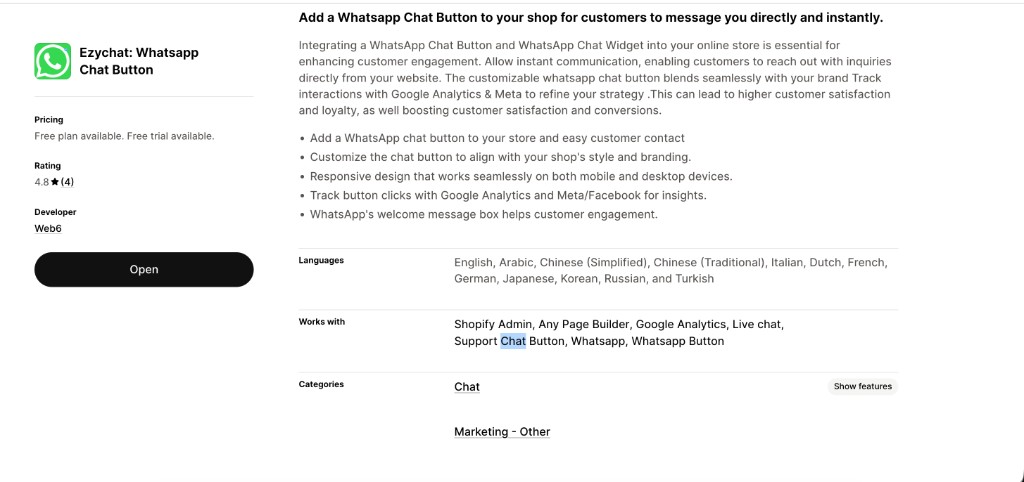
Ezychat: Whatsapp Chat Button adds a branded floating WhatsApp widget to your Shopify storefront so shoppers can message your business in one tap — with a free plan, optional Pro analytics, and a Multiple Agents upgrade when your team grows.

Free plan available 7-day free trial on paid plans 4.8★ from 4 App Store reviews Built by Web6, Surat No theme coding for standard setup
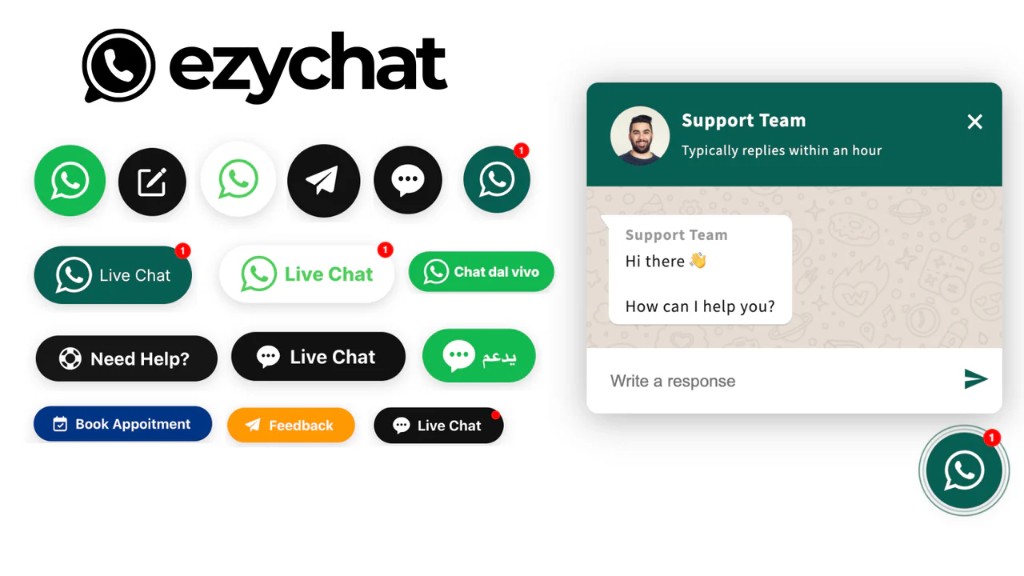
Ezychat Shopify WhatsApp chat button and greeting chat widget customization preview
Customize appearance, position, colors, and the WhatsApp chat widget greeting for your Shopify storefront.

Quick answers

Short definitions first — then expand into the full guide below.

What is Ezychat: Whatsapp Chat Button?

Ezychat: Whatsapp Chat Button is a Shopify app by Web6 that adds a floating WhatsApp chat button and optional greeting chat widget to your store so customers can start a WhatsApp conversation in one tap. The App Store handle is ezy-support-chat-button.

Is there a free Shopify WhatsApp chat button?

Yes. Ezychat includes a Free plan with basic features, appearance types, position and color styling, and mobile/desktop visibility. Pro is $0.99/month and Multiple Agents is $2.49/month, each billed in USD every 30 days with a 7-day free trial.

Do I need to edit Liquid theme code?

No for the standard install. Install from the Shopify App Store, configure your WhatsApp number and design in the app admin, then enable the widget. Theme code edits are optional for developers who want custom placement.

Does Ezychat work on mobile and desktop?

Yes. Visibility settings let you show or hide the WhatsApp button on mobile, desktop, or both so the floating contact widget matches how your customers actually browse.

Can I track WhatsApp button clicks?

On Pro and Multiple Agents plans, Ezychat integrates with Google Analytics and Meta Pixel so you can measure clicks on your Shopify WhatsApp widget and improve support and sales follow-up.

What is the Multiple Agents plan for?

Multiple Agents ($2.49/month, 7-day free trial) includes everything in Pro plus multiple agents — useful when more than one teammate handles WhatsApp support Shopify enquiries.

Will a WhatsApp widget slow my Shopify store?

Ezychat is designed to load asynchronously and minimize storefront impact so your theme stays responsive. You can also limit visibility by device when you only need the button on high-intent templates.

Who built Ezychat?

Web6 (https://web6.in), a Surat Shopify development and app studio, builds and maintains Ezychat: Whatsapp Chat Button alongside other published Shopify apps.

What is a Shopify WhatsApp Chat Button?

A Shopify WhatsApp Chat Button is a storefront widget that opens a WhatsApp chat with your business number when a shopper taps it — typically as a floating contact widget on product, cart, or sitewide pages.

Ezychat: Whatsapp Chat Button is Web6’s App Store product for merchants who want that path without rebuilding the theme. Shoppers already use WhatsApp for size questions, COD clarification, delivery windows, and order status. Putting a WhatsApp Button Shopify merchants can trust on the storefront turns those private questions into conversations you can answer before the cart is abandoned.

Unlike a generic contact form, a WhatsApp Chat App Shopify install opens the customer’s preferred messaging app with your number prefilled. That lowers friction compared with waiting for an email reply. Ezychat focuses on a branded support chat button and optional greeting chat widget — not a full multi-channel launcher. If you need WhatsApp plus Messenger, Instagram, and more in one UI, see Ezy All in One Chat Widgets at Shopify multi chat widget.

From an operations view, a Shopify Live Chat WhatsApp pattern is often “click to WhatsApp” rather than an inbox inside Shopify admin. Messages land in WhatsApp Business (or WhatsApp on your phone/desktop). Your team replies where they already work. Ezychat’s job is to make the entry point clear, on-brand, and controllable: appearance types, position, color, styling, and device visibility on Free; greeting widget, animation, notification badge, dynamic variables, and Analytics/Meta tracking on Pro; multiple agents on the highest plan.

Merchants searching for WhatsApp Widget Shopify options usually need three things: fast install, brand match, and honest pricing. Ezychat ships a Free plan for basic WhatsApp Floating Button needs, then Pro at $0.99/month when you want measurement and greeting UX, then Multiple Agents at $2.49/month when routing across teammates matters. Charges are billed in USD every 30 days. Paid plans include a 7-day free trial.

Web6 builds this app as a Shopify development & app studio in Surat. The same team ships custom theme and app work through Shopify development and Shopify app development. That matters for merchants who may start with a public WhatsApp Support Shopify widget and later need private routing, metafield-driven greetings, or deeper CRM sync — contact Web6 when you outgrow the public listing.

Install Ezychat on Shopify

Official Shopify App Store listing · Free plan available

Why Shopify stores use WhatsApp for support and sales

WhatsApp remains one of the highest-intent channels for ecommerce questions. A Shopify WhatsApp Widget turns that habit into a measurable storefront action instead of hoping shoppers find your number in the footer.

Shopper expectations

Many buyers expect a fast human reply before they commit — especially for sizing, authenticity, gift wrapping, and COD. A WhatsApp Chat Button Shopify merchants place on the storefront meets that expectation without forcing a new chat account. Customers open a thread they already trust. That reduces the “I will email later” drop-off that never converts into a ticket.

Support that feels personal

Ticket systems are excellent for queues and SLAs. WhatsApp Support Shopify workflows excel at short, photo-heavy, back-and-forth help: send a size chart screenshot, confirm a pincode, share a tracking update. A floating support chat button makes that path obvious on mobile, where most browsing happens, without burying contact options three menus deep.

Sales assistance on the PDP

High-consideration categories — jewellery, furniture, electronics kits, B2B samples — often need a human nudge. A WhatsApp Button Shopify teams staff during business hours can capture “is this in stock in gold?” style questions while intent is hot. Pair the button with a Pro greeting message so the first line of the chat already includes context you configure with dynamic variables.

Pre-purchase and post-purchase continuity

The same WhatsApp number can answer pre-sale questions and later handle “where is my order?” without the customer switching channels. A consistent Shopify Chat Button builds recognition: the green floating widget becomes the known path for Customer Communication. Visibility settings help you show the button where it helps most and hide it where it distracts.

Abandoned carts and hesitant checkouts

A clickable WhatsApp Floating Button will not replace a dedicated recovery sequence app, but it gives hesitant shoppers a last human option before they close the tab. Merchants who also need automated abandoned-order messaging can explore Web6’s related apps on /shopify-apps/, while Ezychat stays focused on the always-on contact entry point.

Ezychat features for a Shopify WhatsApp Widget

Features below map to the App Store listing for Ezychat: Whatsapp Chat Button. Free covers the core floating button and styling. Pro adds greeting UX and click measurement. Multiple Agents adds team routing on top of Pro.

Floating WhatsApp chat button

Place a persistent WhatsApp Floating Button on your storefront so shoppers can start a chat from almost any page. The button acts as a Contact Button and Floating Contact Widget without requiring a new account for the customer — it opens WhatsApp with your business number.

Business benefit: Reduces friction between “I have a question” and “I am talking to the brand,” which is critical on mobile PDP and cart templates.

Example: A fashion shopper on a product page taps the button, WhatsApp opens with your number, and they ask for size advice with a screenshot of the garment.

Flexible placements and appearance types

Choose appearance types and change position so the Widget for Ecommerce matches your layout. Corner placement keeps the button discoverable without covering primary CTAs when configured thoughtfully.

Business benefit: Lets design-conscious brands keep a clean theme while still offering Shopify Live Chat WhatsApp access where shoppers look for help.

Example: Move the button to the opposite corner on a theme with a sticky add-to-cart bar so the two controls do not collide on small phones.

Mobile and desktop visibility controls

Visibility settings for mobile and desktop let you show the WhatsApp Chat App Shopify widget only where it helps. Some stores keep WhatsApp on mobile-only; others keep both.

Business benefit: Prevents unnecessary chrome on desktop if your desktop support path is email or phone, while keeping mobile WhatsApp Support Shopify coverage strong.

Example: Enable mobile visibility for a D2C brand whose buyers mostly chat on phones; keep desktop off during a redesign if the button overlaps a new mega-menu.

Colors, styling, and brand match

Change position, color, and custom styling so the Support Chat Button feels native. WhatsApp’s familiar green (#25D366) is a common accent, but you can align the widget with your brand palette when that reads cleaner.

Business benefit: A styled Shopify WhatsApp Chat Button looks intentional instead of like a third-party sticker dropped on the theme.

Example: A jewellery brand matches button chrome to its charcoal and gold UI while keeping the WhatsApp icon recognizable.

Custom icon and label presentation

Appearance options help the floating widget read as help, chat, or WhatsApp — depending on how you present the control. Keep labels short so they remain legible on narrow screens.

Business benefit: Clear labeling improves tap rates for Customer Chat without confusing the primary purchase CTA.

Example: Use a compact WhatsApp icon on catalog grids and a slightly more explicit label on the contact page if your theme supports that presentation style.

Greeting message chat widget (Pro+)

On Pro and Multiple Agents, enable a greeting message with a chat widget so shoppers see a short welcome before opening WhatsApp. Dynamic variables help personalize that greeting with context you configure.

Business benefit: Raises engagement by explaining what to ask (“Ask about sizing or COD”) instead of presenting a silent icon.

Example: Greeting: “Hi from {{shop}} — ask us about shipping to your city” before the shopper continues into WhatsApp.

Animation and notification badge (Pro+)

Animation settings and a notification badge (Pro+) draw polite attention to the floating widget without rebuilding the theme. Use these to highlight support availability during campaigns, not to spam every pixel.

Business benefit: Improves discoverability of the WhatsApp Widget Shopify control on busy product pages.

Example: Enable a subtle badge during a festive sale when support volume rises and you want the Contact Button noticed sooner.

Google Analytics and Meta Pixel click tracking (Pro+)

Pro and Multiple Agents integrate with Google Analytics and Meta Pixel so WhatsApp button interactions can be measured alongside other storefront events. This supports better decisions about placement and creative.

Business benefit: Turns the Shopify WhatsApp Widget from a guess into a measurable Customer Communication channel.

Example: Compare click rates before and after moving the button or enabling the greeting widget, then keep the variant that earns more qualified chats.

Multiple agents (Multiple Agents plan)

The Multiple Agents plan ($2.49/month) includes all Pro features plus multiple agents for teams that share WhatsApp support load. Use it when a single inbox owner is no longer enough.

Business benefit: Supports growth from founder-led chat to a small support or sales pod without abandoning the same storefront button.

Example: A wholesale brand routes daytime chats across two sales coordinators while keeping one public WhatsApp entry point on the site.

Theme-friendly install without coding

Standard setup is one-click install from the Shopify App Store with configuration in Shopify Admin. No Liquid edits are required for the default floating widget path. Works with Shopify Admin and common page builders listed on the App Store.

Business benefit: Merchants get a Shopify Chat Button live faster and with less risk than pasting unverified snippets into theme files.

Example: Install, enter the WhatsApp number with country code, pick colors, enable on storefront, preview on a phone — done in a short admin session.

Designed for fast, async storefront loading

Ezychat is designed to load asynchronously and minimize storefront impact so Core Web Vitals remain a theme concern rather than a chat-widget casualty. Pair with device visibility rules to keep the Floating Widget only where needed.

Business benefit: Lets you offer WhatsApp Chat Button Shopify access without treating the widget as an excuse to ignore performance.

Example: Keep the button sitewide on mobile but disable it on a heavyweight homepage video template if your theme already pushes LCP limits.

Display and visibility rules (not a separate “business hours” engine)

The listing emphasizes visibility settings for mobile and desktop rather than a dedicated business-hours scheduler. Use device visibility — and common sense staffing — so shoppers are not encouraged to chat when nobody will reply.

Business benefit: Honest expectations: control where the button appears; manage reply hours with your team process.

Example: If evenings are unstaffed, keep the greeting text clear about response windows and staff WhatsApp Business notifications accordingly.

How Ezychat works on Shopify

Ezychat connects a storefront WhatsApp Button Shopify shoppers can tap with the WhatsApp conversation on your business number. Merchants configure; customers tap; your team replies in WhatsApp.

Merchant setup

  1. Install and open the app

    Find Ezychat: Whatsapp Chat Button on the Shopify App Store (handle ezy-support-chat-button), install it, and open the embedded app from Shopify Admin.

  2. Connect your WhatsApp number

    Enter the business phone number with country code that should receive customer chats. This is the destination every tap should open.

  3. Design the floating widget

    Pick appearance type, position, colors, and styling. On Pro+, configure greeting chat widget copy, dynamic variables, animation, and notification badge.

  4. Set visibility and measurement

    Choose mobile and desktop visibility. On Pro+, connect Google Analytics and Meta Pixel so clicks on the Shopify WhatsApp Chat Button can be reviewed with your other events.

  5. Enable and staff replies

    Publish the widget, preview on real devices, and make sure someone monitors WhatsApp Business. Multiple Agents plan helps when more than one teammate owns replies.

Customer journey

  1. Browse the store

    The shopper views products, collections, or cart as usual. The Floating Contact Widget stays available according to your visibility settings.

  2. Notice the greeting (Pro+)

    If enabled, a greeting chat widget can introduce the brand and suggest what to ask before WhatsApp opens.

  3. Tap the WhatsApp button

    One tap opens WhatsApp (app or web, depending on device) with your business number ready for Customer Chat.

  4. Send the first message

    The shopper asks about size, shipping, COD, wholesale MOQ, or order status. Your team answers in WhatsApp with photos, voice notes, or short text.

How to install and configure Ezychat

Follow these steps for a no-code Shopify WhatsApp Chat Button using Ezychat. Shopify’s help center at https://help.shopify.com/ covers general app install and permissions if you need platform-level guidance.

  1. Step 1: Install from the Shopify App Store

    Open https://apps.shopify.com/ezy-support-chat-button or search for “Ezychat: Whatsapp Chat Button.” Click Install and approve the requested access for your store. You will return to Shopify Admin with the app available under Apps.

  2. Step 2: Enable the app and open settings

    Launch Ezychat from Apps. Confirm the widget is ready to configure. Stay inside admin for the standard path — you do not need the theme code editor for a normal floating button.

  3. Step 3: Configure WhatsApp number and Free-plan design

    Add your WhatsApp business number with country code. Choose appearance type, position, color, and custom styling. Set mobile and desktop visibility so the WhatsApp Floating Button appears where you want Customer Support Shopify coverage.

  4. Step 4: Upgrade and configure Pro features (optional)

    Start a 7-day free trial on Pro ($0.99/month) or Multiple Agents ($2.49/month) if you need greeting message chat widget, dynamic variables, animation, notification badge, and Google Analytics & Meta Pixel integration. Multiple Agents adds multiple agents on top of Pro.

  5. Step 5: Test on mobile and desktop

    Open the storefront in a private window on a phone and a desktop browser. Tap the button, confirm WhatsApp opens to the correct number, and verify greeting/animation behavior if enabled. Check that the widget does not cover primary CTAs on your most important templates.

  6. Step 6: Train the team and monitor early clicks

    Tell support/sales who owns first response. On Pro+, use Analytics/Meta events to see whether shoppers find the Shopify WhatsApp Widget. Adjust position, copy, or visibility rather than guessing.

  7. Step 7: Remove or disable cleanly if needed

    To stop showing the button, disable it in the app or uninstall from Shopify Admin → Apps. After uninstall, hard-refresh the storefront and confirm the Floating Widget is gone. Remove any leftover custom Liquid only if you previously added manual embeds (not required for standard install).

Always include the country code in the WhatsApp number, and send yourself a test chat from a second device before announcing the button in marketing campaigns.

Theme compatibility for the WhatsApp Button Shopify widget

Ezychat is built for merchants on modern Shopify themes and is listed to work with Shopify Admin and common page builders. Theme App Extensions-style embeds are the preferred path over fragile copy-paste snippets.

Online Store 2.0 themes generally provide cleaner app integration surfaces than older architectures. That means a WhatsApp Chat Button Shopify install can stay maintainable when you switch sections, update the theme, or run A/B layout tests. Vintage themes can still work, but they may need more careful previewing around sticky headers, slide-out carts, and fixed footers that compete for corner space.

Custom themes from agencies — including work from Web6 under /services/shopify-development/ — should treat the floating widget as a known z-index and safe-area citizen. If your theme already has a sticky ATC bar, chat launcher, or cookie banner, test overlaps early. Ezychat’s position and visibility controls exist partly for these real-world collisions.

If you need the button only inside a page-builder landing page, use visibility and placement thoughtfully rather than forking theme code. For deep custom Chat Integration — for example, launching WhatsApp from a product metafield block instead of a global floater — Web6’s Shopify app development practice at /services/shopify-app-development/ can discuss private extensions beyond the public listing.

Online Store 2.0

Best baseline for app embeds and section-driven layouts. Preview the WhatsApp Widget Shopify control on product, collection, cart, and homepage templates after install.

Vintage themes

Still common on older stores. Expect more manual QA around fixed elements. Prefer app configuration over editing outdated Liquid snippets you did not write.

Custom / heavily modified themes

Compatible in principle, but z-index and sticky UI need a checklist. Document where the Floating Contact Widget should sit relative to your conversion chrome.

Theme app extensions mindset

Keep storefront changes reversible. Avoid hardcoding WhatsApp links in five places when one configured Shopify Chat Button can own the entry point.

Storefront performance and the WhatsApp floating widget

A storefront chat widget should help conversion without becoming a silent tax on load time — Ezychat is designed to load asynchronously and minimize storefront impact rather than dominate the page weight budget.

Exact kilobyte claims are hard to keep true across themes, apps, and tag managers. What you can plan for is architecture: async loading, limited main-thread work, and the option to hide the widget on templates that are already heavy. That is the practical frame for a Shopify WhatsApp Chat Button.

Your overall Core Web Vitals still depend on theme images, third-party pixels, review apps, and page builders. Adding Customer Chat should be one controlled decision among many. Use Pro Analytics/Meta tracking to learn whether the widget earns its place — clicks and assisted conversations — instead of leaving every app enabled forever.

Practical guidance: test on a mid-range Android phone on cellular, not only on a desktop fiber connection. Confirm the Floating Widget does not block add-to-cart. If you stack multiple launchers (WhatsApp, Messenger, Instagram), consider consolidating with Ezy All in One Chat Widgets instead of running overlapping floaters that fight for attention and layout space.

When performance and custom behavior both matter, Web6 can review the full app stack as part of Shopify development work. Start from /shopify-apps/ for our published tools, or /contact/ for a store-specific audit. For broader App Store craft and case studies, see /blog/shopify-app-development-surat-2026/ and /case-studies/custom-shopify-app-development/.

Customization options for brand-fit WhatsApp support

Ezychat’s customization focuses on how the button and greeting present on the storefront — appearance, position, color, styling, device visibility, and Pro+ engagement features — so the WhatsApp Support Shopify path feels native.

Appearance types

Select from available appearance types so the control reads as a WhatsApp Button, chat affordance, or compact icon. Match density to your theme: quieter on minimal luxury sites, clearer on busy marketplaces.

Position and layout safety

Change position to avoid sticky bars, cookie consent, and slide carts. Re-check after theme updates — layout regressions often show up first on mobile PDPs.

Color and custom styling

Align colors with brand guidelines. Many merchants keep WhatsApp green (#25D366) for recognition; others tint chrome to match headers while keeping the glyph familiar.

Greeting chat widget copy (Pro+)

Write short, specific greetings. Tell shoppers what you can help with. Dynamic variables help keep messages consistent across campaigns without rewriting every string by hand.

Motion and badges (Pro+)

Use animation settings and the notification badge to improve discoverability during launches. Prefer subtle motion; aggressive pulsing can feel spammy and hurt trust.

Measurement hooks (Pro+)

Wire Google Analytics and Meta Pixel so Popup / widget interactions enter the same reporting habit as add-to-cart. Review weekly for the first month after install.

Use cases by industry and business model

A Shopify WhatsApp Widget helps whenever a short human conversation unblocks purchase or reduces ticket load. Patterns below are common; your staffing model decides how far WhatsApp should go.

Fashion and apparel

Size, fit, fabric, and return windows drive most pre-sale questions. A WhatsApp Chat Button Shopify fashion brands place on PDPs lets shoppers send mirror selfies or measurement notes. Keep greeting copy focused on fit help. Use mobile visibility aggressively — apparel browsing is phone-heavy. Pro greeting widgets can prompt “Share your usual size and city for shipping advice.” Pair with clear return policy links in the first reply template your team saves in WhatsApp Business.

Jewellery and luxury accessories

High average order value means shoppers want reassurance on making, hallmarking, customization, and secure delivery. A polished Floating Contact Widget supports concierge-style Customer Communication without forcing a phone call. Style colors to match a refined theme; avoid noisy badges unless a bridal sale needs extra attention. Multiple Agents helps when sales consultants share the same public number during peak wedding seasons.

Beauty and personal care

Shade matching, routine advice, and ingredient questions are chat-native. WhatsApp Support Shopify flows work well when customers send photos of their current products. Use the Shopify Live Chat WhatsApp pattern for consultative selling, then move payment back to checkout links. Track Pro clicks around new launches to see whether the button captures campaign traffic from Meta ads.

Electronics and gadgets

Compatibility, warranty, and bundle contents generate repetitive tickets. A Shopify WhatsApp Chat Button gives buyers a fast path to confirm “will this work with…” before they bounce to a marketplace competitor. Staff replies with SKU-aware macros. Desktop visibility can matter for B2C electronics shoppers comparing specs on larger screens.

Furniture and home

Long consideration cycles, room photos, and delivery logistics benefit from WhatsApp Chat App Shopify entry points. Encourage customers to share dimensions. Visibility on collection and PDP templates matters more than on blog pages. Animation can help on image-heavy themes where a static icon disappears into lifestyle photography.

B2B and wholesale

Dealers often prefer WhatsApp for MOQ, price lists, and dispatch ETAs. A WhatsApp Button Shopify wholesalers expose on password or wholesale pages can capture qualified chats. Multiple Agents is a natural fit when sales coordinators split regions. For deeper account-based catalogs and net terms, combine the widget with custom Shopify development rather than expecting a chat button to be a full B2B portal.

Manufacturing and made-to-order

Lead times, material options, and sample requests need human clarification. The Floating Widget becomes a request inbox for RFQs that start on the storefront. Keep greeting text explicit about what information to include (quantity, destination, drawings). Web6’s broader ecommerce and app work can later connect those chats to CRM — see /services/shopify-app-development/ when you outgrow manual copy-paste into spreadsheets.

D2C brands

D2C teams live on social proof and fast replies. A branded Shopify WhatsApp Widget complements Instagram and Meta traffic by giving ad responders a storefront path that is not buried in the footer. Use Pro Meta Pixel integration to relate button clicks to campaigns. Keep Free-plan styling tight if you are validating demand before paying for greeting features.

Wholesale marketplaces and multi-SKU catalogs

Dense catalogs create “is this the right variant?” confusion. Customer Support Shopify via WhatsApp shortens that loop with photos and voice notes. Limit button visibility if you also run a multi-channel launcher; one clear Chat Integration beats three overlapping icons. Explore /shopify-apps/ezy-all-in-one-chat-widgets/ when WhatsApp alone is not enough.

Benefits of adding Ezychat to your Shopify store

Benefits below follow from a clear WhatsApp entry point, transparent pricing tiers, and measurement on paid plans — without promising conversion percentages we cannot verify for every store.

Lower friction than contact forms

Shoppers message in an app they already open daily. That improves the odds of a completed question compared with a form that waits in an unread merchant inbox.

Brand-controlled first impression

Appearance, color, position, and Pro greetings let you own how WhatsApp Support Shopify shows up — instead of a raw wa.me link in the footer.

Device-aware presentation

Mobile and desktop visibility keep the Floating Contact Widget aligned with how your audience shops and how your team staffs replies.

Affordable path from free to team features

Start on Free. Move to Pro at $0.99/month for greeting UX and Analytics/Meta. Step to Multiple Agents at $2.49/month when more than one agent handles chat. Trials last 7 days on paid plans.

Measurable clicks on Pro+

Google Analytics and Meta Pixel integration turn the Shopify WhatsApp Chat Button into a channel you can review beside other storefront events.

Built and maintained by an app studio

Web6 publishes and supports the listing, with a broader Shopify development practice if you later need custom Chat Integration or theme work.

Multilingual listing reach

The App Store listing supports English, Arabic, Chinese (Simplified and Traditional), Italian, Dutch, French, German, Japanese, Korean, Russian, and Turkish — useful for merchants serving multilingual buyers evaluating apps.

Works alongside common store tools

Listed works-with tags include Shopify Admin, Any Page Builder, Google Analytics, Live chat, Support Chat Button, WhatsApp, and WhatsApp Button — signaling fit with typical merchant stacks.

Comparisons: code snippets, channels, and app choice

Choose the lightest honest solution. A public WhatsApp Chat Button Shopify app is often safer than unverified theme snippets, and a single-purpose WhatsApp widget is cleaner than a pile of overlapping floaters.

Custom Liquid / snippet vs Ezychat app

Approach Setup Updates Risk Best when
Paste wa.me snippet in theme Fast for a developer; opaque for most merchants You maintain CSS/JS through theme updates Broken layouts, lost snippets on theme switch, inconsistent mobile behavior One-off experimental stores with in-house Liquid owners
Ezychat: Whatsapp Chat Button Install from App Store; configure in admin App updates and plan features without editing theme files Lower operational risk for standard floating button needs Merchants who want a maintained Shopify WhatsApp Widget with Free/Pro options

WhatsApp vs email vs contact form vs live chat

Channel Shopper effort Strength Limitation
WhatsApp floating button Very low if WhatsApp is installed Fast, personal, media-friendly customer chat on a familiar app Requires staffed replies; not an in-Shopify inbox by itself
Email Medium Async and formal; strong for long issues and attachments Slow for size, COD, or shipping questions during purchase intent
Contact form Medium Keeps enquiries on your domain; easy to route into CRM tickets Feels one-way; shoppers often wait without knowing reply timing
On-site live chat Low while browsing Real-time help without leaving the storefront Needs cover hours, agents, and tooling; different cost model than click-to-WhatsApp

Fair takeaway: use Ezychat when WhatsApp is the primary support path you want to highlight. Use a multi-channel widget when shoppers split across social apps. Use custom development when routing, CRM, or automation must go beyond a storefront button — contact Web6 or explore Shopify app development.

Why choose Ezychat: Whatsapp Chat Button

Pick Ezychat when you want a focused Shopify WhatsApp Chat Button from a studio that also ships themes and custom apps — with transparent Free / Pro / Multiple Agents pricing.

Purpose-built for WhatsApp entry

Not a vague “live chat everything” promise. The product is a branded WhatsApp Button Shopify merchants can configure quickly, with optional greeting chat widget on Pro.

Honest pricing ladder

Free for basics. Pro at $0.99/month for engagement and tracking. Multiple Agents at $2.49/month for team features. USD billing every 30 days. 7-day trials on paid plans.

Visible App Store social proof — without inflation

The listing shows 4.8 stars from 4 reviews. Install counts and awards are not claimed here beyond what the App Store shows. Early reviews still help you evaluate fit; try the Free plan or trial to judge on your theme.

Surat-based Shopify studio behind the listing

Web6 builds Ezychat and can extend into custom Shopify app development when your WhatsApp Support Shopify workflow needs private tooling.

Clear upgrade path inside one product family

Stay on Ezychat for WhatsApp-only. Move to Ezy All in One Chat Widgets when you need more channels. Browse both on /shopify-apps/.

Admin-first configuration

Standard merchants should not need Liquid. Developers who want deeper embeds still have a partner for custom work.

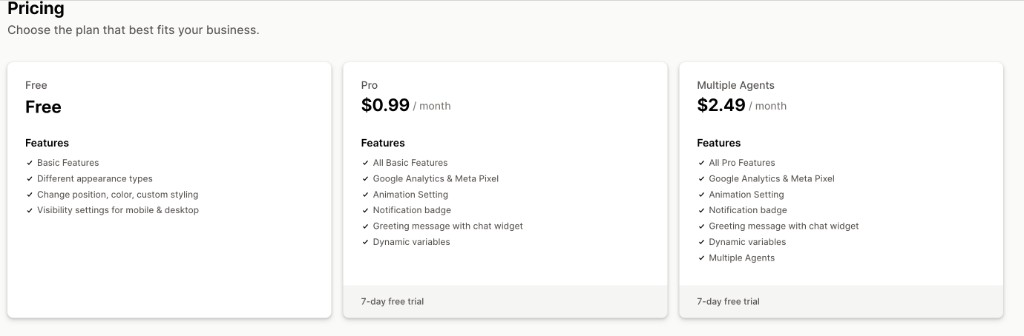
Ezychat pricing

Choose the plan that fits your business. All charges billed in USD every 30 days.

Free

Free

  • Basic features
  • Different appearance types
  • Change position, color, custom styling
  • Visibility settings for mobile & desktop

Pro

$0.99 / month

  • All Free features
  • Google Analytics & Meta Pixel integration
  • Animation settings
  • Notification badge
  • Greeting message with chat widget
  • Dynamic variables

7-day free trial

Multiple Agents

$2.49 / month

  • All Pro features
  • Google Analytics & Meta Pixel integration
  • Animation settings
  • Notification badge
  • Greeting message with chat widget
  • Dynamic variables
  • Multiple agents

7-day free trial

Ezychat pricing plans: Free, Pro at $0.99 per month, and Multiple Agents at $2.49 per month
Free plan available; Pro and Multiple Agents include a 7-day free trial.

Prices and features reflect the Shopify App Store listing for Ezychat: Whatsapp Chat Button. Confirm current plan details on the listing before purchase, as App Store billing displays in your shop’s currency context where applicable.

Related Web6 resources

Explore more Shopify apps and services from the same Surat studio that builds Ezychat.

Resources

Explore complementary services, other published apps, relevant case studies, and practical guides for your store setup.

Helpful external documentation

FAQ

Ezychat FAQ — Shopify WhatsApp chat button

Performance, pricing, themes, customization, removal, and troubleshooting.

What is Ezychat: Whatsapp Chat Button?

Ezychat: Whatsapp Chat Button is a Shopify app developed by Web6 that adds a floating WhatsApp chat button — and on paid plans, a greeting chat widget — to your online store. Shoppers tap the button to open a WhatsApp conversation with your business number. The App Store URL handle is ezy-support-chat-button, but the primary product name in merchant-facing copy is Ezychat: Whatsapp Chat Button.

How do I add a WhatsApp chat button to my Shopify store with Ezychat?

Install Ezychat from the Shopify App Store, open the app in Shopify Admin, enter your WhatsApp business number with country code, customize appearance and visibility, then enable the widget on the storefront. Preview on mobile and desktop. No Liquid edits are required for the standard Shopify WhatsApp Chat Button setup.

Is Ezychat free?

Yes, there is a Free plan with basic features, appearance types, position/color/custom styling, and mobile & desktop visibility settings. If you need greeting widgets, animation, notification badge, dynamic variables, and Google Analytics & Meta Pixel integration, choose Pro at $0.99/month. Multiple Agents is $2.49/month and includes multiple agents. Paid plans include a 7-day free trial and are billed in USD every 30 days.

What is the difference between Pro and Multiple Agents?

Pro ($0.99/month) includes all Free features plus Google Analytics & Meta Pixel integration, animation settings, notification badge, greeting message with chat widget, and dynamic variables. Multiple Agents ($2.49/month) includes all Pro features and adds multiple agents for teams that share WhatsApp support or sales conversations.

Does Ezychat include a 7-day free trial?

Paid plans — Pro and Multiple Agents — include a 7-day free trial according to the App Store listing. The Free plan does not require a trial because it is already free. Confirm trial terms on the listing at install time.

Will a Shopify WhatsApp widget slow down my store?

Ezychat is designed to load asynchronously and minimize storefront impact. Exact performance still depends on your theme, images, and other apps. Use device visibility controls if you only need the Floating Widget on certain experiences, and always test on real mobile devices after install.

Do I need to edit my theme code?

Not for the standard install. Configure everything in the app admin. Only developers who want a fully custom embed or non-standard placement should touch Liquid — and even then, prefer maintainable app extension patterns over fragile copy-paste snippets.

Can I customize colors and position?

Yes. Free plan includes different appearance types and the ability to change position, color, and custom styling so your WhatsApp Button Shopify control matches the brand. Re-check placement after theme updates so sticky bars do not collide with the button.

Can I show the button only on mobile?

Yes. Visibility settings for mobile and desktop let you show or hide the Shopify Chat Button per device class. Many D2C brands emphasize mobile WhatsApp Support Shopify coverage while keeping desktop quieter.

What are greeting messages and dynamic variables?

On Pro and Multiple Agents, you can enable a greeting message with a chat widget so shoppers see a short welcome before opening WhatsApp. Dynamic variables help personalize or standardize that greeting with configured context, reducing repetitive manual edits when campaigns change.

Does Ezychat support Google Analytics and Meta Pixel?

Yes on Pro and Multiple Agents. Integration with Google Analytics and Meta Pixel helps you measure clicks on the WhatsApp Chat App Shopify widget alongside other marketing events. The Free plan focuses on presentation and visibility rather than these tracking integrations.

What does the notification badge do?

On Pro+, a notification badge can draw attention to the floating button — useful during launches or peak support windows. Use it sparingly so it remains a helpful cue rather than visual noise on every page view.

Are animation settings available on Free?

Animation settings are listed under Pro (and therefore Multiple Agents), not under Free. Free covers basic features, appearance types, position/color/styling, and device visibility.

Does Ezychat provide an inbox inside Shopify Admin?

Ezychat’s storefront role is to open WhatsApp for Customer Chat. Conversations happen in WhatsApp Business or WhatsApp clients your team already uses. It is a Support Chat Button / WhatsApp Widget Shopify pattern, not a full helpdesk replacement.

Is this the same as Ezy All in One Chat Widgets?

No. Ezychat: Whatsapp Chat Button focuses on WhatsApp. Ezy All in One Chat Widgets is the multi-channel launcher for brands that also want Messenger, Instagram, and similar entry points in one UI. Compare both on /shopify-apps/ and the dedicated page at /shopify-apps/ezy-all-in-one-chat-widgets/.

Who is Web6?

Web6 is a Shopify development and app studio based in Surat, India (https://web6.in). Besides publishing apps like Ezychat, Web6 offers Shopify development and Shopify app development services for custom storefronts and private tools.

What rating does Ezychat have on the App Store?

The App Store listing shows 4.8 stars from 4 reviews. Check the live listing for the latest review count and install details.

Which languages does the listing support?

The App Store listing languages include English, Arabic, Chinese (Simplified), Chinese (Traditional), Italian, Dutch, French, German, Japanese, Korean, Russian, and Turkish. Storefront shopper language still depends on your theme and markets configuration.

What does Ezychat work with?

Works-with tags on the listing include Shopify Admin, Any Page Builder, Google Analytics, Live chat, Support Chat Button, WhatsApp, and WhatsApp Button. Always verify compatibility on a staging theme if you run a heavily customized stack.

Can I use Ezychat for abandoned cart recovery automation?

Ezychat is the always-on WhatsApp Contact Button / floating widget. Automated abandoned-order messaging is a different product category. Browse related Web6 apps on /shopify-apps/ if you need recovery sequences in addition to a manual chat entry point.

Does Ezychat include scheduled business hours?

The public feature list emphasizes mobile and desktop visibility settings rather than a dedicated business-hours scheduler. Manage expectations with greeting copy and staffing, and use visibility controls to place the button where your team can respond.

How do I remove Ezychat from my store?

Disable the widget in the app or uninstall from Shopify Admin → Apps. Refresh the storefront to confirm the Floating Contact Widget is gone. Remove manual Liquid only if you added custom embeds yourself. Shopify’s help docs at https://help.shopify.com/ explain general app uninstall behavior.

Can agencies install Ezychat for clients?

Yes. Install on the client store with their approval, configure the WhatsApp number they own, and document who monitors replies. Agencies that need custom Chat Integration beyond the public app can [contact Web6](/contact/) or review [Shopify app development](/services/shopify-app-development/).

Is WhatsApp Business API required?

For the common click-to-chat button pattern, shoppers open WhatsApp toward your business number. Advanced WhatsApp Business Platform API messaging (templates at scale, official API webhooks) is a separate integration track documented by Meta at https://developers.facebook.com/docs/whatsapp/. Ezychat’s listing focuses on the storefront button, greeting widget, and related presentation/tracking features — not on replacing a full API inbox product.

Will Ezychat work with my page builder?

The listing includes “Any Page Builder” in works-with tags. Still preview landing pages where builders inject fixed elements. Adjust button position if a builder section overlaps the corner you chose for the WhatsApp Floating Button.

How should I write the first WhatsApp greeting?

Keep it short and specific: who you are, what you can help with, and any response-time expectations. On Pro+, use the greeting chat widget and dynamic variables so the first impression stays consistent across campaigns without stuffing keywords unnaturally.

Can multiple teammates answer chats?

Choose the Multiple Agents plan when you need multiple agents in addition to Pro features. Operationally, also set expectations inside WhatsApp Business labels or your internal rotation so customers are not answered twice with conflicting information.

Where can I read more about Web6’s Shopify app work?

See /shopify-apps/ for published apps, /services/shopify-app-development/ for custom app services, /blog/shopify-app-development-surat-2026/ for studio context, and /case-studies/custom-shopify-app-development/ for related delivery stories. For storefront theme work paired with apps, visit /services/shopify-development/.

Does Ezychat replace my theme’s contact page?

No. Keep formal contact details, email, and policies on dedicated pages for trust and compliance. The Shopify WhatsApp Widget complements those pages by offering a faster Customer Communication path for short questions.

How do I get help from Web6 about Ezychat or custom needs?

For product install questions, start with the app admin and App Store listing. For custom Shopify WhatsApp Support workflows, theme conflicts, or private apps, contact Web6 at /contact/. You can also explore broader Shopify development at /services/shopify-development/ when the storefront and the widget need to ship as one project.
Ready to grow with Web6?

Book a free consultation with our Surat-based team. Clear advice on websites, Shopify, custom software, SEO, and growth — no theater.