Skip to content
Web6 home

Shopify App by Web6 · Surat · Free

Shopify Social Icons, Follow Buttons, and Product Share Icons

Ezy Social Bar adds floating social media icons, social follow buttons, and product page share buttons to your Shopify storefront — with 100+ networks, custom colors, size, position, and animation for desktop and mobile.

  • Floating social icons for desktop and mobile
  • Follow buttons and product page share buttons
  • 100+ social media icons across major networks
  • Customize colors, size, position, and animation
  • Works on product, collection, and blog pages
  • Free to install — no coding for standard setup
Free to install Built by Web6 100+ social icons No coding required English Launched August 5, 2026
Ezy Social Bar Shopify social follow and product share icons with floating social media buttons
Ezy Social Bar – Social Follow & Product Share Icons: floating social bars, follow buttons, and product share icons for Shopify merchants.

Quick answers

Short definitions first — then expand into the full guide below.

What is Ezy Social Bar?

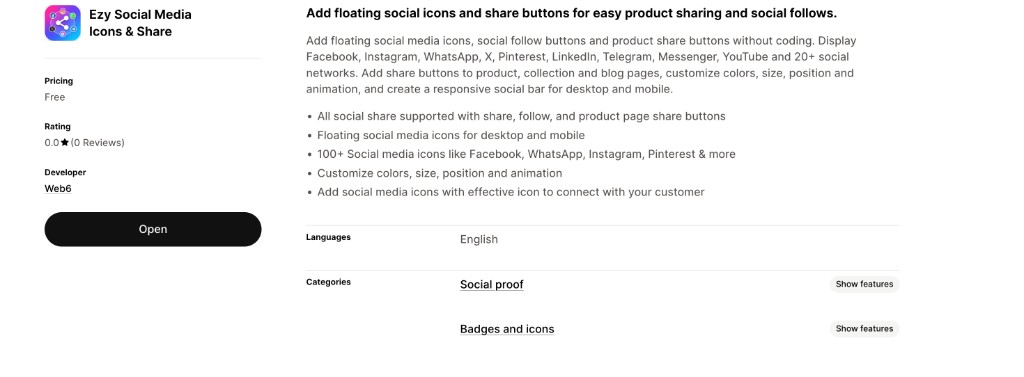
Ezy Social Bar – Social Follow & Product Share Icons is a free Shopify app by Web6 that adds floating social media icons, social follow buttons, and product share buttons to your storefront. On the Shopify App Store the listing title is “Ezy Social Media Icons & Share”; Web6 markets the product as Ezy Social Bar.

Is Ezy Social Bar free?

Yes. The App Store listing price is Free. Install from Ezy Social Bar on the Shopify App Store, configure icons and placement in the app, then enable the bar on your storefront.

How many social media icons are included?

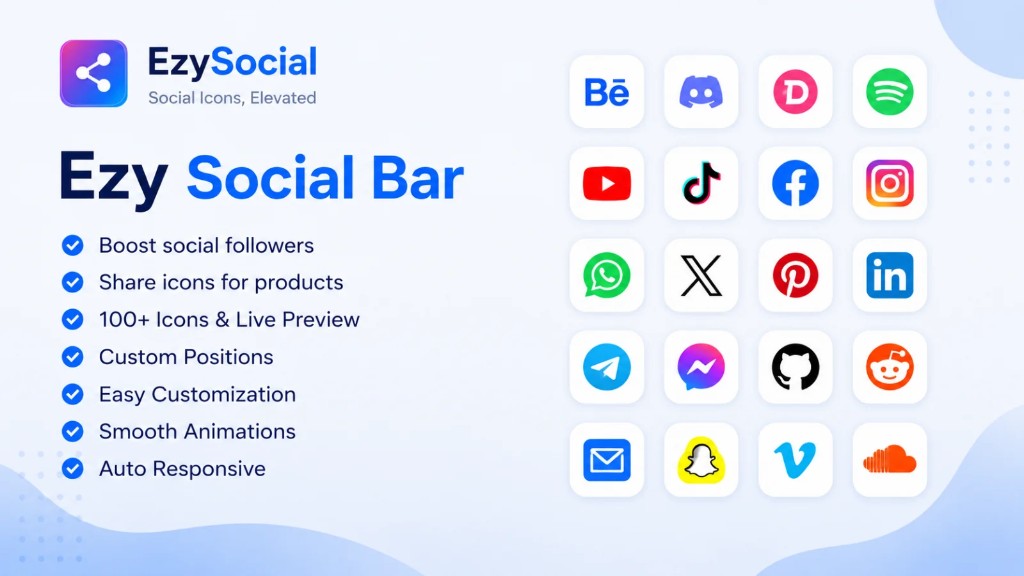
Ezy Social Bar includes 100+ social media icons covering networks such as Facebook, Instagram, WhatsApp, TikTok, YouTube, Telegram, Pinterest, X, LinkedIn, Discord, Reddit, Email, Messenger, Snapchat, GitHub, Behance, Spotify, Vimeo, SoundCloud, and many more.

Can shoppers share product pages?

Yes. Product page share buttons let customers share a product URL to networks they already use — useful on high-consideration PDPs where recommendations from friends and family influence purchase decisions.

Does it work on mobile and desktop?

Yes. The listing emphasizes floating social media icons for desktop and mobile, plus a responsive social bar so follow and share controls remain usable across screen sizes.

Do I need to edit theme code?

No for the standard setup. Install from the App Store, choose follow or share icons, customize style and position, then save and enable the bar. Theme code edits are optional only if you want deeper custom placement later.

Where can I place social icons?

Icon positions in the feature taxonomy include homepage, product, collection, cart, header, footer, and related storefront surfaces. Confirm the exact placement controls in the app admin after install.

Install Ezy Social Bar free

Official Shopify App Store listing · Free to install

Why Shopify stores need social icons, follow buttons, and share links

Shoppers discover brands on social platforms, then buy on your store. Without clear follow and share paths on the storefront, that loop breaks — followers stay on the network, and product enthusiasm never leaves the product page.

Social discovery still ends on your product page

Instagram, TikTok, Pinterest, YouTube, and Facebook send shoppers into Shopify daily. On a product or collection page, many visitors still ask “where else can I follow this brand?” A floating social bar answers without a footer dig. Ezy Social Bar keeps follow destinations visible while they browse so discovery can become an ongoing relationship.

Product recommendations travel through share buttons

Friends, family groups, and workplace chats remain strong purchase channels. Product share buttons let shoppers send a PDP link through WhatsApp, Messenger, Email, Pinterest, or X without copying a URL — lower friction for gifts, group approval, and real customer word of mouth.

Themes often bury social links where nobody looks

Many Shopify themes ship a small footer icon row that is easy to miss on mobile. Merchants who want stronger social proof need configurable size, color, position, animation, and page targeting. An app-based social bar is easier to restyle than hunting Liquid snippets for every brand refresh.

Follow and share are different jobs

Follow buttons grow owned audiences on Instagram, YouTube, TikTok, LinkedIn, and more. Share buttons amplify a specific product, collection, or blog URL. Mixing both into one anonymous row does neither job well. Ezy Social Bar supports follow, share, and product page share so you configure intent deliberately.

Social presence supports trust and social proof

Familiar network icons signal that the brand is active where customers already spend time. Listing categories include Social proof and Badges and icons for that reason. Pair a clean social bar with strong product content and Shopify conversion optimization rather than relying on a sparse footer alone.

No-code control keeps marketing and design aligned

Campaign seasons change icon emphasis — WhatsApp share pushes, Pinterest launches, LinkedIn for B2B drops. Merchants need to adjust position, colors, and networks without waiting on a developer. Ezy Social Bar is free and English-language for that flexibility; you can also explore all Web6 Shopify apps.

Floating social media icons for Shopify storefronts

A floating social bar stays visible as shoppers scroll — typically along an edge of the viewport — so follow and share actions remain one tap away on product, collection, blog, and other pages.

Always-available without burying links in the footer

Footer social rows only appear after a full scroll. Floating icons stay reachable during browsing, when interest is highest — especially on long product pages with rich media, reviews, and size guides.

Desktop and mobile layouts that stay usable

The listing highlights floating icons for desktop and mobile. On phones, keep the bar clear of sticky add-to-cart and chat widgets; on desktop, a side margin often works. Ezy Social Bar presents a responsive social bar rather than one fixed pixel layout.

Position controls for real storefront chrome

Icon positions include homepage, product, collection, cart, header, footer, and related surfaces. Emphasize follow where brand storytelling lives and share where conversion intent lives. Confirm placement toggles after install so the bar does not collide with other floating UI.

Animation that draws attention without shouting

Customization includes animation so icons can gently attract attention during campaigns. Prefer soft entrance or hover cues over constant flashing. Match brand tone — quiet for luxury, a bit livelier for youth-oriented drops.

Works alongside other Web6 storefront tools

If you also use Customer support tools such as Ezychat, place the social bar on the opposite edge. Social icons grow audiences; chat answers questions — different jobs on the same page.

Product share buttons on Shopify product pages

Product share buttons are storefront controls that let a shopper share the current product URL (and often its title or image context) to a social network, messaging app, or email — turning product interest into outbound recommendations.

On Shopify, product pages concentrate consideration: price, variants, media, shipping, and reviews. When someone loves a product but is not ready to buy alone — gifts, group approval, “compare with a friend” — share is the easiest next step. Ezy Social Bar includes product page share buttons so that path is one tap instead of copying the address bar.

Match share destinations to how your audience talks. WhatsApp and Messenger dominate private recommendations in many markets. Pinterest and Instagram matter for visual catalogs. Email still wins for longer threads. X and LinkedIn help launches and B2B catalogs. The listing notes share, follow, and product page share buttons so you can configure product-centric share without forcing every network into a follow-only bar.

When a PDP spreads inside a community chat, the shared link should land on the correct product URL. Dedicated product share controls reduce broken or homepage-only shares from manual copy-paste. Keep share secondary to purchase on minimalist PDPs; give it more presence on lookbook-style templates. Share amplifies a SKU; follow grows the channel for future drops — configure both with intent, and treat listing engagement tracking as a soft operational aid rather than a GA4 or Shopify Analytics replacement.

Common share destinations

  • WhatsApp
  • Facebook
  • Messenger
  • Instagram
  • Pinterest
  • X
  • LinkedIn
  • Telegram
  • Email
  • Reddit
  • TikTok
  • Snapchat

Share benefits

  • Lower friction for gift and group buying conversations
  • Cleaner product URL sharing than manual copy-paste
  • Network-native previews that reinforce product imagery
  • Configurable icon set so only relevant networks appear
  • Works with the same customization system as follow icons

Social follow buttons that grow your owned audiences

Follow buttons point shoppers to your profiles on the networks you actually publish to. The goal is not to display every logo in existence — it is to make the next follow action obvious while brand interest is high.

Instagram

Default follow destination for many D2C brands. Place it prominently when visual catalog and Stories drive repeat visits, and keep profile photography aligned with the storefront.

TikTok

Essential when short-form video is a primary acquisition channel. A TikTok follow icon on homepage and blog helps convert viral traffic into subscribers for the next drop.

YouTube

Strong for tutorials, unboxings, and long-form storytelling — furniture, beauty education, electronics, and hobby brands often convert better when shoppers can subscribe after browsing.

Facebook

Still relevant for community pages, local audiences, and demographics that use Facebook as a primary feed — useful for events and Messenger-adjacent presence.

WhatsApp

Often used as a business follow or chat entry depending on presentation. For dedicated support chat UX, see Customer support tools; WhatsApp can still sit in the social bar as a recognizable icon.

Telegram

Popular for announcement channels, drop alerts, and regional communities — a natural follow icon for channel-based launches.

Pinterest

High intent for visual discovery and planning. Home, fashion, wedding, and DIY catalogs benefit from an easy Pinterest follow tied to inspiration boards.

X

Useful for real-time updates and launch chatter. Keep the icon if you post consistently; hide it if the profile is quiet.

LinkedIn

Best for B2B catalogs, wholesale stories, and professional services — LinkedIn follow signals credibility for buyers who research companies before purchasing.

Discord, Reddit, and creator platforms

Discord and Reddit suit community-led brands. Spotify, SoundCloud, Vimeo, Behance, and GitHub matter for music, film, design, or open-source identity. The 100+ icon set exists so niche brands are not stuck with a generic five-network footer.

Curate follow icons ruthlessly. Five active profiles outperform fifteen quiet ones. Update the bar whenever you retire a network or launch a new channel — the free app workflow is built for that brand hygiene.

100+ social media icons across the networks merchants actually use

The listing highlights 100+ social media icons like Facebook, WhatsApp, Instagram, Pinterest and more — plus broader coverage across messaging, video, creative, and community platforms.

A modern Shopify brand rarely lives on one network. Acquisition may start on TikTok, proof on Instagram, tutorials on YouTube, community on Discord or Reddit, and closing chats on WhatsApp or Messenger. Ezy Social Bar’s icon library fits that multi-network reality so you are not limited to a theme’s built-in five logos.

Start with WhatsApp, Instagram, Facebook, TikTok, YouTube, Telegram, Pinterest, X, LinkedIn, Discord, Reddit, Email, Messenger, and Snapchat for most D2C patterns. Add GitHub, Behance, Spotify, Vimeo, and SoundCloud when your brand story includes code, design portfolios, music, or video hosting outside YouTube.

The listing also references Facebook, Instagram, WhatsApp, X, Pinterest, LinkedIn, Telegram, Messenger, YouTube and 20+ networks — wide coverage, not a ceiling. The 100+ icon library is the fuller set you can draw from when configuring the bar.

Choose icons from content ops, not vanity: show active profiles, hide quiet ones, expand seasonally for launches. Pair the app with ecommerce website development or Shopify conversion optimization when the theme itself needs deeper craft — the social bar handles icons; the storefront still has to present products beautifully.

  • WhatsApp, Instagram, Facebook, TikTok, YouTube
  • Telegram, Pinterest, X, LinkedIn, Discord, Reddit
  • Email, Messenger, Snapchat
  • GitHub, Behance, Spotify, Vimeo, SoundCloud
  • Plus additional networks in the 100+ icon library
Customize colors, size, position, animation, and tooltips

Listing bullets and feature taxonomy emphasize customization: animations, colors, size, tooltips, and flexible icon positions across key storefront templates.

Colors that match the brand system

Default network colors are recognizable, but many brands prefer monochrome icons or brand-accent fills. Color controls make the bar feel designed rather than pasted on — keep contrast strong on light and dark sections.

Size tuned to hierarchy

Icons that compete with Add to cart hurt conversion; microscopic icons never get tapped. Size controls set a secondary-action scale. Recheck after theme updates that change sticky bars or font scales.

Position for template intent

Homepage and blog favor follow groups; product and collection pages often emphasize share; cart can offer a final share moment. Positions include homepage, product, collection, cart, header, footer, and related surfaces.

Animation as a discoverability tool

Subtle animation helps visitors notice the bar during campaigns. Prefer fade, slight slide, or hover emphasis over aggressive looping — motion should support brand voice, not distract from purchase.

Tooltips and labeling clarity

Tooltips and related cues help shoppers tell follow from share. Clear labeling reduces mis-taps when similar logos appear in both groups. Keep tooltip copy short and on-brand.

Page coverage across the catalog story

The description mentions product, collection, and blog pages with a responsive social bar. Collections inspire browsing, products inspire sharing, blogs inspire following editorial voice — configure each surface deliberately.

Responsive social bars for mobile Shopify shoppers

A responsive social bar adapts layout, spacing, and touch targets so floating follow and share icons remain usable on phones and tablets without blocking primary purchase controls.

Most Shopify traffic is mobile. A bar that looks fine on a wide desktop preview can still fail on a phone if it covers sticky add-to-cart, overlaps chat, or uses hard-to-tap targets. Ezy Social Bar emphasizes floating icons for desktop and mobile plus a responsive social bar so you can address that directly.

On mobile, prioritize one-hand networks: WhatsApp, Instagram, Facebook, Messenger, Telegram, and Email are common. Keep secondary networks on desktop when space is scarce — a curated subset usually beats the full desktop set.

Test on real product templates with variant pickers, sticky ATC, announcement bars, and support widgets. If you use Ezychat, keep social icons on the opposite side. Live cart activity tracking solves a different job: cart insight does not replace share paths, and share icons do not replace cart visibility.

After install, tap share destinations on iOS and Android using your highest-traffic PDPs. Confirm shared URLs resolve to the intended product, including variant parameters your theme uses. Keep the icon set lean, avoid stacking floating widgets in one corner, and revisit placement whenever theme sections change.

Designed to load efficiently on the Shopify storefront

Ezy Social Bar is designed to load efficiently and minimize storefront impact so social icons can ship without turning the theme into a heavy widget stack — without claiming zero JavaScript or guaranteed Core Web Vitals scores.

Merchants are right to ask whether another storefront app will slow the site. Social icon bars are typically lighter than video apps or dense personalization suites, but every script deserves scrutiny. Ezy Social Bar is positioned around efficient loading and minimized storefront impact — a design intent, not a promise of zero JS, perfect Lighthouse scores, or locked Core Web Vitals for every theme.

Practical hygiene still matters: enable only icons you need, avoid redundant social rows (theme footer + app bar + popup), keep animations modest, and review placement after installing other floating apps.

If the store already has speed debt, fix the foundation. Web6’s Shopify speed optimization case study shows how performance work is approached on real projects. A social bar should sit on a healthy theme, not compensate for one.

Listing data access covers Theme and Online Store page content on paths controlled by the app — the expected model for a storefront social utility. For custom performance budgets or private icon sets, see Shopify app development services and the custom Shopify app case study.

How to install and set up Ezy Social Bar

Standard setup is designed for merchants — install from the App Store, configure icons and style, then enable the bar. No theme coding is required for the usual path.

  1. Step 1: Install from the Shopify App Store

    Open Ezy Social Bar on the Shopify App Store, review permissions, and install Ezy Social Media Icons & Share (marketed by Web6 as Ezy Social Bar). The app is free; confirm live listing details at install time.

  2. Step 2: Choose follow, share, and product share icons

    Select networks you actively use. Start tight — for example Instagram, TikTok, YouTube, WhatsApp, and Pinterest — then add LinkedIn, Telegram, Discord, or Email if they match your audience.

  3. Step 3: Customize colors, size, position, and animation

    Match brand colors or keep network-native hues. Set size so icons stay secondary to purchase CTAs. Choose positions for homepage, product, collection, cart, header, footer, or other available surfaces.

  4. Step 4: Enable on key templates and preview

    Turn the bar on for product, collection, and blog pages where social intent is strongest. Preview on desktop and mobile so icons do not cover sticky add-to-cart, announcement bars, or support chat.

  5. Step 5: Verify share destinations and follow URLs

    Tap each follow icon and confirm the correct profile. Tap product share on a live PDP and confirm the shared link resolves to the right product before announcing the bar.

  6. Step 6: Iterate with campaigns and seasonal emphasis

    Before a launch, emphasize networks where you will publish most. Afterward, return to your evergreen set. The free, no-code workflow keeps iteration in marketing’s hands.

If you also run COD controls, cart analytics, or WhatsApp support from Web6, give floating UI corners room — see COD rules for Shopify stores, Live cart activity tracking, and Customer support tools.

Ezy Social Bar features at a glance

Features below map to the App Store listing for Ezy Social Media Icons & Share — marketed as Ezy Social Bar – Social Follow & Product Share Icons by Web6.

All social share supported

Share, follow, and product page share buttons cover outbound sharing and inbound following without separate one-off widgets for each job.

Floating social media icons

Desktop and mobile floating icons keep networks visible while shoppers browse, instead of hiding social presence only in the footer.

100+ social media icons

Large icon coverage includes Facebook, WhatsApp, Instagram, Pinterest, and many more — spanning messaging, video, community, and creative platforms.

Customize colors, size, position, and animation

Brand-matched styling and placement controls help the bar feel native to your theme rather than like a default sticker.

Connect with customers through familiar networks

Add social media icons that send shoppers to the channels where you already publish updates, answer comments, and build community.

Product, collection, and blog page coverage

Responsive social bar support across key content and commerce templates so follow and share match the page’s job.

Broad platform coverage

Facebook, Instagram, WhatsApp, X, Pinterest, LinkedIn, Telegram, Messenger, YouTube and 20+ networks appear in the listing narrative, with the fuller library at 100+ icons.

Customization taxonomy depth

Animations, colors, size, tooltips, and related controls give storefront polish without theme coding for the standard setup.

Flexible icon positions

Homepage, product, collection, cart, header, footer, and related placements help align icons with browsing and buying intent.

Engagement tracking (listing taxonomy)

Engagement tracking appears in the listing taxonomy as a soft capability. Treat it as an in-app operational aid — not a full marketing analytics suite.

Theme and Online Store integration

Data access covers Theme and Online Store page content on paths controlled by the app — expected for a storefront social icon utility.

Free, English, built by Web6

Price is Free, language is English, developer is Web6 (https://web6.in), launched August 5, 2026, in Social proof and Badges and icons categories.

Practical use cases for Shopify merchants

Ezy Social Bar fits brands that need clearer follow paths, easier product sharing, and a configurable icon system without hiring a developer for every tweak.

D2C fashion and beauty brands

Instagram, TikTok, Pinterest, and WhatsApp dominate discovery and recommendation. A floating bar on PDPs helps shoppers follow the brand and share outfits or shades into group chats.

Home, DIY, and visual catalogs

Pinterest and YouTube matter for planning and tutorials. Collection and blog pages benefit from follow icons; product share helps customers send a sofa, lamp, or kit for approval.

Electronics and hobby stores

YouTube, Reddit, Discord, and Telegram communities influence buyers. Product share into those communities — plus follow icons for official channels — keeps the store connected to enthusiast talk.

B2B and wholesale-friendly Shopify stores

LinkedIn follow icons and Email share support professional buying committees. Pair with clear catalogs and, when needed, ecommerce website development.

Creator and portfolio-led brands

Behance, Vimeo, Spotify, SoundCloud, and GitHub icons help when brand identity includes design, film, music, or engineering. The 100+ library exists for merchants who outgrew generic social footers.

Launch and campaign teams

Temporarily emphasize networks where launch creative will publish. Use animation sparingly during the campaign window, then return to a calm evergreen set.

Stores combining social with recovery and support

Social icons grow audiences; support chat answers questions; abandoned-order messaging recovers checkouts. Keep jobs separate: Ezy Social Bar for icons, Customer support tools for chat, and WhatsApp marketing when you need abandoned recovery rather than pure social follow growth.

Merchants rebuilding themes

During a theme refresh, an app-based social bar can survive section rewrites better than hard-coded Liquid icon rows. Configure after the new theme ships, then fine-tune against sticky elements.

Why choose Ezy Social Bar by Web6

Web6 builds Shopify apps and storefront solutions from Surat. Ezy Social Bar focuses on a clear job: follow icons, share buttons, and product share — free, customizable, and designed for everyday merchant operations.

Clear marketing name and App Store listing

On the App Store the listing title is Ezy Social Media Icons & Share. Web6 markets it as Ezy Social Bar – Social Follow & Product Share Icons. One product, two labels — same install URL.

Free to start without a coding project

Price is Free. Standard setup does not require Liquid edits. Marketing and design teams can adjust icons, colors, and placements as campaigns change.

Breadth of networks without theme lock-in

100+ icons cover mainstream and niche platforms so you are not stuck with a theme’s limited footer set when your audience moves to Telegram, Discord, or Behance.

Follow and share as first-class intents

Listing bullets cover share, follow, and product page share so you configure intent instead of treating every logo as interchangeable decoration.

Customization depth for real brands

Colors, size, position, animation, tooltips, and template placements match polished themes — including those shaped through Shopify conversion optimization.

Honest positioning on reviews and performance

As of the listing details reflected here, reviews are 0 — check the live App Store page for updates. Performance language stays soft: designed to load efficiently and minimize storefront impact, without guaranteed Core Web Vitals claims.

How Ezy Social Bar compares to common alternatives

These comparisons are capability-oriented. They do not name competing apps or invent third-party metrics.

Theme footer icons vs Ezy Social Bar

Dimension Typical theme footer icons Ezy Social Bar
Visibility while browsing Usually only after scrolling to the footer Floating icons can stay available during scroll
Follow vs share intent Often a single undifferentiated icon row Share, follow, and product page share supported
Icon library depth Often a small fixed set 100+ social media icons
Customization May require Liquid/CSS edits Colors, size, position, animation, tooltips in-app
Template targeting Global footer, limited per-template control Positions across homepage, product, collection, cart, header, footer, and more
Campaign iteration speed Depends on developer availability Merchant-configurable without coding for standard setup
Cost Bundled in theme (dev time still costs) Free App Store listing price

Follow buttons vs product share buttons

Dimension Follow buttons Product share buttons
Primary job Grow audiences on your profiles Amplify a specific product URL
Best templates Homepage, blog, about, brand story Product pages; sometimes collections
Typical networks Instagram, TikTok, YouTube, LinkedIn, Discord WhatsApp, Messenger, Email, Pinterest, X, Facebook
Success signal More profile followers over time More outbound product recommendations
Risk if misused Too many quiet profiles look abandoned Too many share icons can clutter the PDP
How Ezy Social Bar helps Configure follow icons deliberately Enable product page share where intent is high

Most stores benefit from both a calm evergreen follow set and a focused product share set. Use the app to separate those intents, then keep theme footer icons minimal so you do not triple-render the same networks.

Related Web6 pages

Continue with apps, services, and case studies that sit alongside Ezy Social Bar on Web6.

Official and helpful external links

Add Shopify social icons without rebuilding your theme

Ezy Social Bar – Social Follow & Product Share Icons gives Shopify merchants a free, no-code path to floating social icons, follow buttons, and product share controls. Listed on the App Store as Ezy Social Media Icons & Share, it covers 100+ networks, customization for colors, size, position, and animation, and responsive behavior across product, collection, and blog pages.

Configure follow and share as separate intents. Keep mobile layouts clear of colliding widgets. Treat performance claims softly — efficient by design, not magical. When you need adjacent capabilities, Web6 also publishes tools for COD rules for Shopify stores, Live cart activity tracking, and Customer support tools.

Install from the Shopify App Store, curate the networks you actually run, verify share links on your top PDPs, and iterate with campaigns. For custom storefront systems or private app work, talk to the Web6 team or review Shopify app development services.

FAQ

Ezy Social Bar FAQ — Shopify social icons & share

Floating icons, follow vs share, 100+ platforms, customization, mobile, performance, and setup.

What is the difference between the App Store title and Ezy Social Bar?

The Shopify App Store listing title is “Ezy Social Media Icons & Share.” Web6 markets the same product as Ezy Social Bar – Social Follow & Product Share Icons. Install URL: https://apps.shopify.com/social-media-follow-share-icon.

Is Ezy Social Bar free on Shopify?

Yes. The listing price is Free. Confirm current plan details on the live App Store page when you install.

Does Ezy Social Bar require coding?

No for the standard setup. Install, choose icons, customize style and position, then enable the bar. Theme code is optional only for advanced custom placement.

Which platforms are supported?

The icon library includes 100+ networks, commonly including WhatsApp, Instagram, Facebook, TikTok, YouTube, Telegram, Pinterest, X, LinkedIn, Discord, Reddit, Email, Messenger, Snapchat, GitHub, Behance, Spotify, Vimeo, and SoundCloud.

Can I add floating social icons on mobile?

Yes. Floating social media icons for desktop and mobile are a core listing bullet, with a responsive social bar across devices.

Can customers share products to WhatsApp?

Yes. Product page share buttons can include messaging destinations such as WhatsApp so shoppers can send a product link into chats.

Can I customize icon colors and size?

Yes. Customize colors, size, position, and animation — plus taxonomy items such as tooltips — so the bar matches your brand system.

Where can icons appear on my store?

Feature taxonomy includes homepage, product, collection, cart, header, footer, and related positions. Confirm the exact toggles in the app admin after install.

Does it work on collection and blog pages?

Yes. The description mentions product, collection, and blog pages as part of the responsive social bar story.

Will Ezy Social Bar slow down my store?

The app is designed to load efficiently and minimize storefront impact. It does not claim zero JavaScript or guaranteed Core Web Vitals. Keep icon sets lean and avoid stacking redundant social widgets.

Does the app include engagement tracking?

Engagement tracking appears in the listing feature taxonomy as a soft capability. Continue using Shopify Analytics and your existing analytics stack for broader reporting.

What data does the app access?

Listing data access covers Theme and Online Store page content on paths controlled by the app — appropriate for rendering storefront social icons where you enable them.

How many reviews does the app have?

As of the listing details reflected here, reviews are 0. Check the live App Store listing for updates before you decide based on social proof.

When did Ezy Social Bar launch?

August 5, 2026. Language: English. Categories: Social proof; Badges and icons. Developer: Web6.

Can I use this with a WhatsApp chat button?

Yes. Social icons and chat widgets solve different jobs. Place them on opposite corners. See [Customer support tools](/shopify-apps/ezy-support-chat-button/) for Ezychat.

Is this an abandoned cart recovery app?

No. Ezy Social Bar is for social follow and share icons. For abandoned-order WhatsApp messaging, see [WhatsApp marketing](/shopify-apps/ez-whatsapp-abandoned-order/).

Can Web6 customize social integrations beyond the app?

Yes. For bespoke storefront or app work, use [Shopify app development services](/services/shopify-app-development/) or [talk to the Web6 team](/contact/). Related reading: [custom Shopify app case study](/case-studies/custom-shopify-app-development/).

How does this relate to Shopify conversion work?

A clean social bar supports brand trust and sharing, but conversion still depends on theme UX, speed, and merchandising. Pair icons with [Shopify conversion optimization](/services/shopify-development/) when the broader funnel needs work.

Where is the Web6 page for this app?

On web6.in the path is /shopify-apps/ezy-social-bar/. You can also [explore all Web6 Shopify apps](/shopify-apps/).

What should I test after installing?

Follow URL accuracy, product share link correctness on mobile and desktop, overlap with sticky ATC or chat widgets, color contrast, and a curated icon set that matches active profiles only.

Ready to grow with Web6?

Book a free consultation with our Surat-based team. Clear advice on websites, Shopify, custom software, SEO, and growth — no theater.